Getting Started with Local LLM Deployment: Ollama vs. vLLM for Deploying Qwen3

A practical breakdown of local LLM deployment goals and how Ollama vs. vLLM address them.
This article examines what it takes to move local LLM usage from demo scripts to production services. Simple script-based inference is limited to a single machine and can't handle cross-server, multi-source requests. Production deployment requires four things: balancing VRAM and inference performance, factoring hardware costs into tool selection, providing a unified and convenient API, and supporting high concurrency via standard HTTP/HTTPS protocols. Against this backdrop, the article introduces Ollama — optimized for ease of use and quick prototyping — and vLLM, which leverages PagedAttention for high-throughput, high-concurrency production deployments. The two tools are complementary, and the right choice depends on VRAM budget, concurrency needs, and development efficiency.
Getting Started with Local LLM Deployment: Ollama vs. vLLM for Deploying Qwen3
Deploying large language models locally is the critical step between "getting a demo running" and "production-ready." Many developers learning open-source models stop at downloading weights, loading a tokenizer and model with transformers or modelscope, and calling model.generate() to produce text. This approach is essentially just a local demo using the model weights — it's a long way from a real production environment. This article draws on related tutorial content to outline the core goals of local LLM deployment and introduces two mainstream tools: Ollama and vLLM.
Why Demo-Level Calls Can't Support Production
A typical model inference script follows this pattern: download an open-source model → instantiate a tokenizer and model with modelscope or transformers → pass in text and call the generation API. This works fine for verifying model behavior on a single machine, but it has one fatal limitation — it only works on the exact server where the model was downloaded.
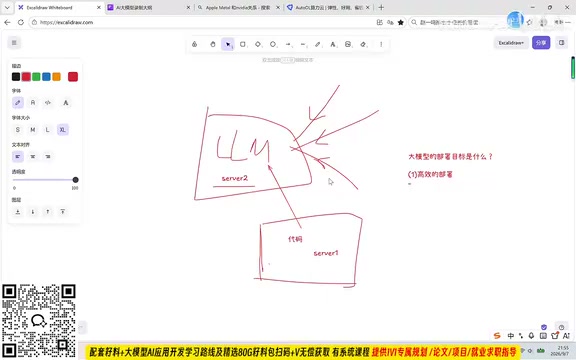
Real production environments are far more complex. An online LLM service needs to accept requests from all kinds of users, potentially originating from multiple different servers. More commonly, the business logic and the model itself aren't even on the same machine: application code might be deployed on server1, while the LLM model lives on server2. A simple script cannot support this kind of cross-server, multi-source request architecture.
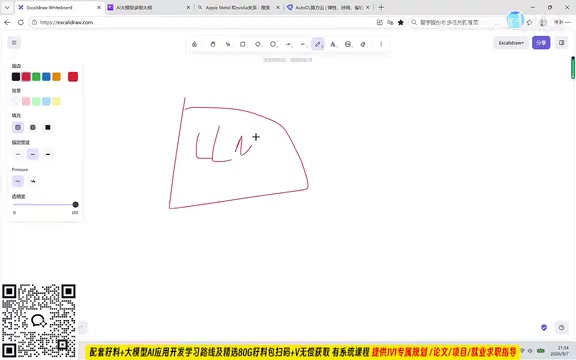
In other words, production-grade deployment is fundamentally about service-ification: making the model available as a stable, callable service — not hardwired to a single script on a single machine.
Four Core Goals of LLM Deployment
To understand the value of deployment tools, it helps to first clarify what deployment actually needs to achieve. Tutorials in this space generally break it down into several key dimensions.
Efficient Deployment: Balancing VRAM and Performance
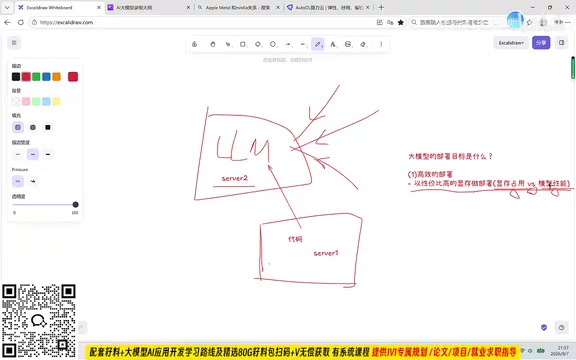
The first dimension of efficient deployment is completing the deployment using the most cost-effective VRAM configuration. The goal isn't to chase extremes — neither cramming the model into the smallest possible VRAM nor throwing the highest-end GPUs at the problem without regard for cost. It's about finding the right balance between VRAM usage, inference speed, and model quality.
Two extreme cases illustrate this clearly: loading full-precision weights entirely into GPU VRAM gives you the best model quality but the highest VRAM cost; pushing everything to CPU eliminates the GPU requirement but results in inference so slow it becomes unusable. The real engineering goal is to deploy the most capable model possible using the least amount of VRAM.
Quantization is one of the most common techniques for achieving efficient deployment. It compresses model weights from high-precision floating point (e.g., FP32, BF16) to lower-bit integers (e.g., INT8, INT4), dramatically reducing VRAM requirements — INT4 quantization, for example, theoretically requires only one-eighth the VRAM of FP32. The trade-off is a slight loss in model precision, which is generally acceptable in most engineering scenarios. Both Ollama and vLLM support loading pre-quantized model weights, and some tools also support dynamic quantization at load time. Understanding the basics of quantization helps you make informed deployment trade-offs when VRAM is limited, rather than being forced to choose between "full-precision with expensive GPUs" and "CPU inference."
Cost Accounting: The Hidden Costs of Deployment Choices
In production-oriented local model deployment, cost accounting is a necessary prerequisite — and the deployment approach itself is a significant variable in that calculation. Different deployment strategies directly affect VRAM requirements and hardware costs, so choosing the right tool is not only a technical decision but also a financial one.
Convenience: A Unified and Stable Deployment API
The second goal is deploying models faster and more conveniently. Ideally, deployment should take one or two commands rather than hundreds of lines of code and repeated debugging. This requires deployment tools to offer a unified, stable API that works across different model types, establishing a standardized deployment workflow.
High Concurrency and Accessibility
Production applications often face large numbers of simultaneous requests — perhaps 50 or 100 users hitting the same model service at once. A deployment solution that handles higher concurrency naturally has a significant advantage.
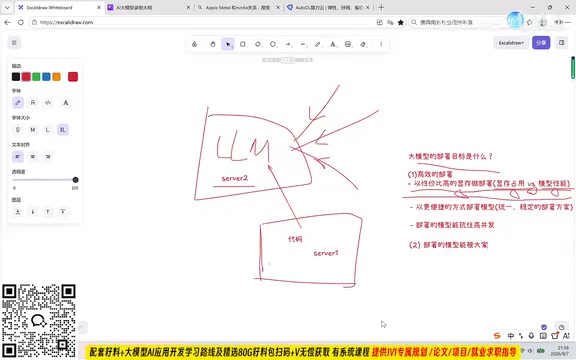
Beyond concurrency, deployed models also need to be broadly accessible. Once a model service starts, it exposes a port (e.g., 8000, 9000), and as long as network connectivity exists, any client — whether a phone, a client server, or another machine — can call it via the standard HTTP/HTTPS protocol. This standards-based accessibility is the essence of service-ified deployment.
Ollama and vLLM: Two Deployment Philosophies
Building on these goals, two mainstream local LLM deployment tools emerge: Ollama and vLLM.
Ollama excels at ease of use and is well-suited for individual developers and rapid prototyping. It wraps the entire workflow — model download, loading, and service startup — into a seamless experience. A few commands are typically all it takes to get a model running and serving an API, dramatically lowering the barrier to entry.
vLLM is more geared toward production environments, with its core strengths being high throughput and high concurrency. Through optimization techniques like PagedAttention, it improves VRAM utilization and inference speed, making it much better suited for handling large numbers of concurrent user requests. Tutorials in this space often demonstrate vLLM by deploying a lightweight model like qwen3-0.6B, using it to walk through the full vLLM deployment workflow.
The two tools are not mutually exclusive: Ollama fits lightweight scenarios where convenience is the priority, while vLLM is better suited for production deployments with real performance and concurrency demands. Understanding where each tool fits helps you make the right choice based on your actual VRAM budget, concurrency requirements, and development velocity.
vLLM's core innovation, PagedAttention, is inspired by the virtual memory paging concept from operating systems. Traditional inference frameworks handle concurrent requests by pre-allocating contiguous KV cache blocks in VRAM for each request, which leads to severe memory fragmentation and low utilization. PagedAttention splits the KV cache into fixed-size non-contiguous pages and allocates or frees them dynamically on demand, allowing different requests to share VRAM space. Benchmarks show this mechanism can push VRAM utilization close to 100% and deliver throughput several times to over ten times higher than HuggingFace Transformers. This is the fundamental reason vLLM has such a pronounced advantage in production: the same hardware can serve far more concurrent user requests.
Summary
The shift from script-based calls to service-ified deployment is fundamentally a leap from "it runs" to "it works in production." The benchmarks for a solid deployment solution come down to a few key points: balancing VRAM against performance, keeping costs manageable, offering a convenient and unified API, handling high concurrency, and being accessible via standard protocols. Ollama and vLLM represent two distinct paths — convenience versus high performance. Understanding their strengths and appropriate use cases is an essential foundation for engineering LLMs into real-world applications.
Related articles

Bilibili's Hit Dify Tutorial: A Practical Guide to Building 20+ AI Apps from Scratch
A distilled guide to Bilibili's top-rated Dify tutorial: Windows + Docker deployment, MySQL connection, five app types, model integration strategy, and publishing.

Agent Skills Beginner's Guide: From Concepts to Multi-Agent Collaboration in Practice
A comprehensive guide to Agent Skills: core concepts, components, the importance of Description, standardization, beginner learning paths, and multi-agent collaboration.

One Neuron Detects Both Cats and Cars? We Reproduced It and Found a New Explanation
The cat-car neuron reinterpreted: researcher Cammarata argues it distinguishes pointy from round, not cats from cars. We reproduced the experiment and found the new explanation holds on most inputs—but cars are the exception. The interpretability debate continues on language models.