Getting Started with n8n Workflow Automation: A Practical Guide to Connecting Apps and Integrating AI

n8n is a low-code platform that automates repetitive business tasks by connecting apps and AI through visual workflows.
n8n is a workflow automation platform that chains together apps like Gmail, Google Sheets, and Slack using visual nodes and APIs to enable seamless cross-platform data flow. Every workflow starts with a trigger and follows a simple event-response logic. What sets n8n apart is its ability to embed large language models into workflows — letting AI handle content analysis and generation while keeping humans in the loop for quality control. Key use cases include form data archiving, intelligent email sorting, invoice extraction, and content creation assistance.
What Exactly Is n8n
n8n is a workflow automation platform whose name comes from "Nodimation" — a blend of Node and Automation. Its core concept is straightforward: connect disparate applications, let information flow between them automatically, and hand off repetitive work to software.
Imagine receiving 100 customer inquiry emails every day. Without automation, you'd need to manually read each one, copy out the details, and reply one by one. With n8n, a single incoming email can trigger a chain of actions: information flows automatically from the email into a spreadsheet, and replies are sent without lifting a finger. This ability to turn chaos into efficiency is exactly where n8n delivers its value.
Workflows and Nodes: The Building Blocks of Automation
In n8n, a workflow is essentially a series of logically connected actions — for example: new email arrives → extract and save information → send a notification. Each step is linked together through nodes, which are n8n's fundamental building blocks.
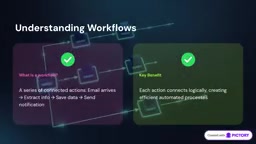
Think of each node as an employee responsible for a specific task: it processes or passes along information. Take an automated customer inquiry archiving workflow as an example — you could build a chain of nodes like this: a Gmail node receives the email, an AI node analyzes the content, a Google Sheets node stores the data, and then a Gmail node sends the reply. Each node handles its own job, and together they complete an entire business cycle.
Triggers: The Starting Gun for Every Workflow
Every workflow begins with a trigger — like the starting gun in a race. When a new email arrives or a form is submitted, n8n knows it's time to act.

Once triggered, n8n begins executing the subsequent actions. The entire logic can be summed up in one sentence: when something happens, perform the corresponding response. Someone fills out a form? Save the data to Google Sheets. This simple "event → response" formula is the underlying logic behind all automation.
Why Businesses Need n8n
Modern businesses rely on a large number of independently operating applications — Gmail, Google Sheets, and Slack often run in silos with little connection between them. n8n acts as a digital bridge, linking these isolated tools into a unified workflow.
For instance, your website collects user data, n8n processes it, and then pushes it into your CRM system. The key technology behind this is the API (Application Programming Interface) — a bridge that enables different pieces of software to communicate. By calling APIs, n8n allows applications that have no direct connection to work together, dramatically expanding the reach of automation.
An API (Application Programming Interface) is essentially a set of rules and protocols that govern how software systems "talk" to each other. Think of it like a waiter at a restaurant: the customer (App A) doesn't need to go into the kitchen directly — they just tell the waiter (the API) what they want, and the kitchen (App B) handles the request and sends back the result. When you configure a Google Sheets node in n8n, n8n is actually sending standardized requests to Google's API in the background, telling it to "insert this data in row three" — no manual login to Google required. Because the vast majority of modern SaaS applications (Slack, Stripe, Notion, HubSpot, etc.) expose APIs, n8n can support 400+ apps as nodes and communicate with virtually any API-enabled service via its HTTP Request node, without waiting for an official integration to be built.
Embedding AI into Your Workflows
n8n isn't just a traditional automation tool — it can also embed AI directly into your workflows. Imagine this scenario: a customer email triggers an AI response, the AI analyzes the request, generates an appropriate reply, and sends it automatically. An efficient AI-assisted workflow is born.
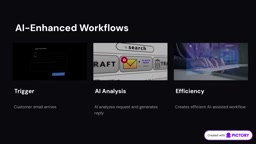
It's worth emphasizing that n8n's approach is human-AI collaboration, not full replacement. For example, AI can draft a reply to a customer inquiry, but a human reviews it before it's actually sent. This model preserves AI's efficiency while maintaining a quality check on the output.
A concrete example: you run an online business and a customer emails asking about payment options for an AI ebook. Your workflow can automatically acknowledge receipt of the message, use AI to generate the required response, and then notify you to step in and handle it personally.
n8n's AI integration works primarily by calling large language model (LLM) APIs — such as OpenAI's GPT series, Anthropic's Claude, or locally deployed open-source models. Within a workflow, an AI node acts as an "intelligent processing layer": it receives text data from upstream nodes (such as the raw email body), follows your pre-configured prompt instructions to understand or generate content, and then passes the result to downstream nodes. This is fundamentally different from traditional rule-based matching (e.g., "if email contains keyword X, trigger Y") — LLMs can handle ambiguous, variable natural language, judging the sentiment, intent, or category of an email rather than relying on hardcoded conditions. The human-in-the-loop model (AI drafts, human reviews) is especially important in real-world deployments, because LLMs carry a "hallucination" risk — they can generate content that sounds plausible but is factually wrong. Adding a human review node effectively controls output quality.
Real-World Use Cases: From Forms to Invoices
n8n's applications span virtually every aspect of day-to-day business operations.
Website Contact Forms
When a visitor submits their name, email, and message on your website, an automated workflow can instantly capture that data, save it, send a follow-up email, and notify you — all at once.
Intelligent Email Sorting
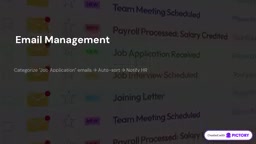
When you're managing a high volume of emails, workflows can automatically categorize them for you. For example, when an email contains the phrase "Job Application," the system can automatically sort it and send the appropriate notification.
Invoice Processing
When a business receives invoices via email, an automated workflow can download the attachments, extract key information, and notify the accounting team — significantly reducing repetitive data entry.
Content Creation
Content creators benefit too. A list of topic ideas can flow through AI to generate a first draft, then be handed off for human review, and finally move into publication. For sites like LearnSuccess, an automated pipeline can start from a content idea, use AI research to produce a draft, pass it to a human editor, and then enter a publishing checklist.
Google Sheets as a Lightweight Database
The n8n and Google Sheets combination is remarkably simple: every time a website form is submitted, it creates a new row in the spreadsheet — essentially a lightweight database for tracking submissions.
Closing Thoughts
The core value of n8n lies in transforming the way businesses operate through automated workflows — connecting applications, integrating AI, letting each node handle its own unique task, and building bridges across different platforms. Whether it's customer inquiries, invoice processing, or content production, n8n hands repetitive labor off to machines and reserves judgment and creativity for people. If you're looking to reclaim the time consumed by repetitive tasks, n8n is well worth exploring.
Related articles

Free Unlimited Claude Code Solution: Agnes AI + CC Switch Setup Guide
No paid subscription needed — pair the free AI platform Agnes AI with the open-source tool CC Switch to provide a backend for Claude Code, enabling unlimited free calls to text, image, and video models. This guide covers the full setup, test results, and usage boundaries.

A Complete Zero-Cost Guide to Getting Started with Claude Code for Beginners in China
A beginner's guide to Claude Code for users in China: two installation methods (command line and IDE plugin), full configuration steps for replacing the official API with the free domestic LongCat model, and a hands-on demo of building a small tool with natural language, plus tips.

When the NSA Gets Involved: The AI Supply Chain Crisis Behind Open-Source CVEs and API Key Hijacking
Multiple open-source projects disclosed severe CVEs in one day, PHP flaws alarmed the FBI, and Railway and OpenCode were breached with API keys stolen. This article breaks down the vulnerability window, AI-accelerated exploitation, and the AI supply chain crisis behind the API key black market, with a developer defense checklist.