Getting Started with WorkBuddy: Let AI Actually Do the Work on Your Computer

WorkBuddy lets AI directly operate your computer — upgrading from Q&A assistant to task-executing digital employee.
This article introduces WorkBuddy, an AI Agent that goes beyond chatting to directly operate your computer — converting PPT files to PDF, drafting reports, and more. Based on a hands-on Bilibili demo, it compares WorkBuddy with Codex across four dimensions: zero-config setup, Chinese office app integrations (like WeCom), lower pricing, and a one-click Chinese skill store. It also raises important considerations around data security, system permissions, and task reliability for real-world use.
From "Q&A AI" to "Management AI"
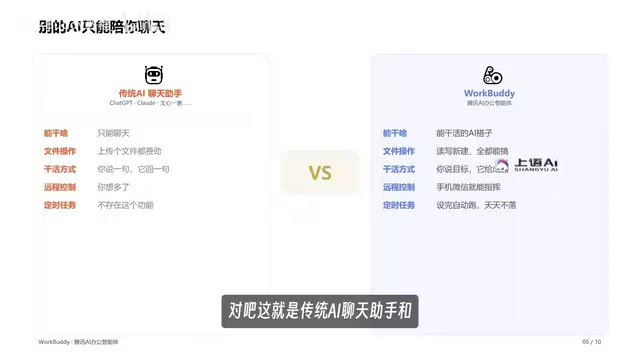
After years of using AI chat assistants like Doubao and ERNIE Bot, many people share the same quiet wish: instead of just giving advice, could AI actually get things done for me? WorkBuddyAd is built exactly for that. It belongs to a category of products that has taken off in the past couple of years — AI Agents — and the core difference is this: traditional chat assistants can only answer your questions, while an Agent can directly operate your computer, like hiring a digital employee.
As demonstrated in a hands-on test by a Bilibili creator, the gap between the two becomes immediately clear. Take one task: convert all PPT files in a "Work Files" folder on the desktop into PDFs and archive them. With Doubao, the AI can only tell you how to do it — it has no access to your local file system, so the task ends in failure. Copy the same prompt into WorkBuddy, however, and it starts executing right away. By the time you've grabbed a coffee and come back, a neatly archived PDF folder has appeared.

This is the fundamental divide between an Agent and a traditional AI. The creator put it perfectly: traditional AI is a "consultant" — it gives advice. WorkBuddy is an "employee" — it delivers results.
The technical difference between an AI Agent and an ordinary chat AI is substantial. A traditional large language model is essentially a "text prediction engine" — it generates text within a conversation window and cannot perceive or interact with the outside world. An Agent adds "tool-calling" capabilities on top of that: it can use file system APIs to read and write local files, control the mouse and keyboard via automation scripts, call third-party software interfaces to send messages, and autonomously decide its next step after completing a subtask — forming a closed loop of Perceive → Plan → Execute → Feedback. This architecture turns AI from a passive responder into an active executor. It also means the AI holds significantly higher system permissions than a chat assistant, which is the technical root of the security concerns discussed later in this article.
Why WorkBuddy Is Worth Starting With
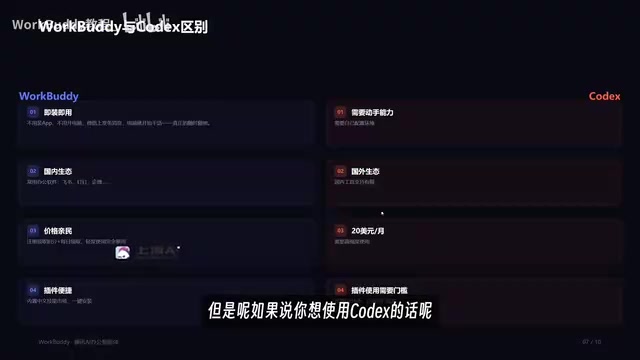
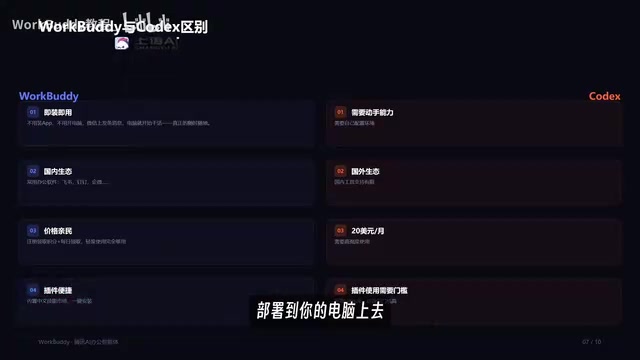
WorkBuddy isn't the only AI Agent on the market. Codex from abroad and several other competitors all play in the same space. So why recommend beginners start with WorkBuddy instead of jumping straight to Codex? The Bilibili creator highlighted four key advantages.
Ready Out of the Box — Zero Configuration Required
First, installation is dead simple. Just search for WorkBuddy in your browser, click download, and it deploys to your computer in one step — no special network setup, no complicated configuration. Codex, by contrast, requires a VPN, a certain level of technical ability, and manual environment setup. It's not beginner-friendly.
A Mature Domestic Office Ecosystem
The second point is what the creator called the "killer feature" — WorkBuddy has deep integration with Chinese software tools. Through its built-in "connectors," you can authorize it to access WeCom (Enterprise WeChat) and other commonly used workplace apps. Once connected, it can reply to messages on your behalf and even automatically compile last week's work and client conversations into a weekly report. Codex, as a foreign product, offers very limited support for domestic Chinese tools.
Affordable Pricing
Third is cost. WorkBuddy reportedly gives you credits upon registration and lets you claim additional credits daily — more than enough for light use. Codex, meanwhile, costs $20/month and only makes financial sense if you're using it heavily. For individual users and small teams, that gap is hard to ignore.
One-Click Plugins and Skills
Fourth is extensibility. WorkBuddy supports one-click plugin deployment through what functions like a "Chinese skill store." This involves two concepts: Experts and Skills. An "Expert" is a pre-configured persona — if you need a Xiaohongshu (Little Red Book) content specialist, you summon one with a single click, no hiring or training required. A "Skill" is a tool, also deployed with one click. Codex is more flexible thanks to its GitHub open-source foundation, but that freedom comes with a higher coding barrier.
The "Expert" and "Skill" concepts correspond to two common extension approaches in the Agent space. An "Expert" is essentially a combination of a pre-configured system prompt plus specific tool permissions, tuning the AI to behave more professionally in a given domain (like Xiaohongshu operations) — similar to giving a new hire role-specific training upfront. A "Skill" is closer to an MCP (Model Context Protocol) plugin or traditional API integration — connecting the Agent to external capabilities like image generation interfaces, databases, or custom scripts. This "skill store" model lowers the bar for ordinary users to expand their AI's capabilities without any coding. However, each plugin also broadens the Agent's access to your system, which is worth keeping in mind.
What Can It Do? Far More Than File Archiving
The PPT-to-PDF archiving demo is just the tip of the iceberg. According to the creator, the range of scenarios this kind of tool can handle is quite broad: writing proposals, building spreadsheets, data analysis, poster creation, coding and development, taking over the browser, and controlling various applications — all with one command, delivering finished output directly.
In other words, it upgrades the relationship between user and AI from "Q&A mode" to "management mode." You're no longer asking AI how to do something — you're giving it orders and letting it get on with the job. That shift has real, tangible implications for workplace productivity.
A Few Things Worth Thinking Critically About
As an introductory overview, the original video leans toward feature demos and product recommendations. A few points are worth your own consideration.
First, an Agent operating directly on your computer requires elevated permissions. When sensitive data like WeCom messages and local files are involved, security and privacy boundaries deserve careful attention. Second, the convenience of "zero-configuration, plug-and-play" doesn't tell the whole story — execution stability and success rates on complex tasks still need to be tested over time in real work environments. Third, the video's comparison between WorkBuddy and Codex focuses mainly on ease of use; Codex's open-source nature is actually a major advantage for developers, and the two products are targeting fundamentally different audiences.
For workplace users with no technical background, starting with a domestically localized, low-barrier Agent like WorkBuddy is genuinely a gentler learning curve. But whether it truly becomes your "digital employee" ultimately depends on how it performs in your specific workflow.
On the topic of data security and permissions: before authorizing an Agent to access WeCom, your local file system, or similar environments, a few things are worth knowing. First, Agents typically run a background process locally that retains the permissions you've granted on an ongoing basis — not just during active conversations. Second, screenshots, file contents, message logs, and other data processed during task execution may be uploaded to the cloud for AI inference; check whether the product's privacy policy clearly explains how data is stored and used. Third, for work involving trade secrets or client data, it's worth testing the Agent with non-sensitive content first to assess its actual behavior boundaries, rather than relying solely on the vendor's documentation.
Related articles

Random Pruning of the DPO Computation Graph: 1.4x Training Speedup and Lower Peak Memory
DPO training too slow and memory-hungry? This paper proposes a random pruning framework for the DPO computation graph, sampling independently across position, sequence, and branch dimensions; branch pruning achieves a 1.426x step-time speedup and cuts training time by about 30%, with in-depth attribution of memory and time gains.

Why Does JEPA Underperform MLM in Longitudinal EHR Representation Learning?
New study compares JEPA and MLM for longitudinal EHR representation learning on MIMIC-IV: three JEPA variants train stably without collapse but underperform MLM; target size, not heterogeneity, drives prediction error.

Transfer Learning + Visible Light Communication: A New Approach to Energy-Efficient Indoor Positioning
A study proposes a transfer learning-based visible light communication indoor positioning method, achieving 47% accuracy improvement on the BOSCH factory dataset, 67.5% model efficiency under high noise, and introducing the ME composite metric for energy-efficient positioning in energy-constrained industrial IoT scenarios.