GitHub Copilot Fully Explained: Features, Usage, and Real-World Limitations

A comprehensive guide to GitHub Copilot's features, real-world usage, and honest limitations.
This article provides a thorough analysis of GitHub Copilot, covering its five-step prediction cycle, three core features (Ghost Text, Inline Chat, and Sidebar Chat), and a practical demonstration building a PDF merge tool in 10 minutes. It also compares Copilot with Cursor AI and honestly addresses critical limitations including code hallucinations, loss of control, and security risks.
The Rise of AI Programming Assistants: The Era of Repetitive Coding Is Ending
The core pain point of modern software development has never been clearer: exploding complexity. Today's developers must simultaneously juggle multiple programming languages, massive frameworks, endless APIs, and complex cloud platforms. Behind all this work that genuinely requires intelligence lies a vast amount of repetitive boilerplate code—writing the same form validation logic for a login page for the thousandth time, repeatedly typing out structurally identical database queries.
This phenomenon has long been established in software engineering theory. Fred Brooks distinguished between "essential complexity" (the inherent difficulty of the problem itself) and "accidental complexity" (the extra burden imposed by tools and processes) in his classic work The Mythical Man-Month. Boilerplate code is a textbook example of accidental complexity—according to GitHub's 2023 survey data, developers spend over 40% of their coding time on average writing repetitive pattern code such as CRUD operations, form validation, error handling templates, and more. While this code is indispensable, it involves virtually no creative thinking and represents the ideal entry point for AI-assisted programming.
It's against this backdrop that GitHub Copilot—jointly created by GitHub, Microsoft, and OpenAI—was born. Its most revolutionary aspect isn't that it "can write code," but that it delivers suggestions directly within your development environment—you don't need to switch windows to ask a chatbot; the AI sits right there with you in the code editor. It offloads the tedious, repetitive burden so developers can focus on real problem-solving.
At its core, Copilot represents the biggest leap in engineering productivity in recent years: it transforms developers from tedious syntax typists into macro-level architects and creative problem solvers.
How GitHub Copilot Works: A Five-Step Cycle in Milliseconds
The intelligence behind Copilot is elegant and ingenious. From a technical standpoint, it was originally based on OpenAI's Codex model—a large language model (LLM) fine-tuned on billions of lines of publicly available source code, capable of understanding the syntax and semantic patterns of over a dozen programming languages. As the technology has evolved, Copilot now supports more advanced models like GPT-4 Turbo and the Claude series. Its core principle is autoregressive prediction based on the Transformer architecture—given a context, the model computes the probability distribution of the next token (code fragment), generating the most likely code continuation.
It operates in a continuous five-step cycle, with the entire process taking only milliseconds:
- You write code or comments—even just describing what you want to accomplish in plain English;
- Context reading—Copilot immediately analyzes the context of the current file;
- Code prediction—the AI infers the most likely next few lines of code;
- Human decision—you decide whether to accept, modify, or reject the suggestion;
- Cycle repeats—iterating continuously.
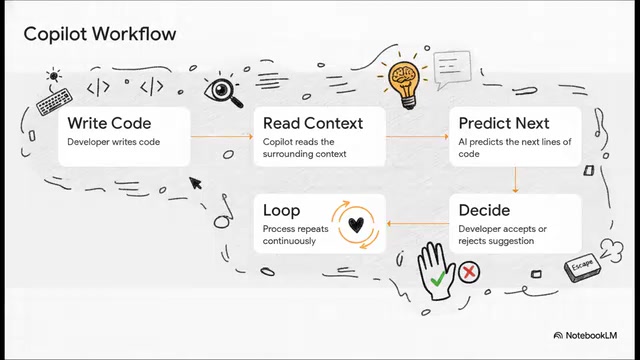
The technical details of step two—"context reading"—deserve deeper understanding. Copilot's capabilities are constrained by the model's "Context Window"—the maximum number of tokens the model can process at once. Early versions had roughly 4K-8K tokens, while newer generation models have expanded to 128K or even longer. Copilot's engineering team has developed intelligent context collection strategies: beyond reading the code around the current cursor, it also analyzes import relationships, function signatures, and type definitions from related files within the same project, constructing the highest information-density "prompt snippets" to send to the model, thereby maximizing suggestion quality within the limited context window.
If the AI gives a completely wrong suggestion, you simply press ESC and it disappears silently, at zero cost. The design philosophy behind this is zero friction. You don't need to change your existing workflow or learn a complex new piece of software. Copilot is already integrated into mainstream editors like Visual Studio Code, JetBrains, and NeoVim; whether you're writing web applications in JavaScript/TypeScript, high-performance backend logic in C++, or doing data science in Python, it handles everything smoothly.
Visual Studio Code (VS Code) is a free, open-source code editor developed by Microsoft that, as of 2024, holds over 73% developer market share. Built on the Electron framework, it supports plugin-based development through a rich extension API. Copilot runs as a VS Code plugin, leveraging the editor's Language Server Protocol (LSP) and IntelliSense interfaces for deep integration, meaning it can perceive the project's type system, autocomplete context, and diagnostic information—far beyond simple text matching.
Copilot's Three Core Features: Ghost Text, Inline Chat, and Sidebar
In daily use, mastering Copilot really comes down to understanding "when to use which feature."
Ghost Text: Seamless Code Completion
This is your passive, invisible assistant. When you create a variable, Copilot immediately anticipates your next step, generating subsequent content as faint gray suggestion text ahead of your cursor—just press Tab to accept. It's ideal for carrying forward obvious, sequential code and is the most basic yet most frequently used feature.
Inline Chat: Precise Local Modifications
Triggered by a keyboard shortcut, Inline Chat is a highly precise, "surgical" tool. It pops up a tiny dialog at the cursor position, perfect for iteratively adjusting a specific code block, complete with real-time diff comparison so you can confirm changes before accepting them.

Sidebar Chat: Deep Conversations and Architecture Discussions
This is the primary "heavy weapon," offering an experience almost like having a senior developer sitting beside you. It's best suited for brainstorming, working through implementation approaches, or asking macro-level architectural questions about an entire project.
Additionally, when you highlight a dense, complex function or encounter one of those cryptic compiler errors, a sparkle icon appears in the editor. Click it, and Copilot steps in to explain the specific error and directly offers a one-click fix—completely eliminating the days of desperately searching forums for error messages.
Practical Demo: From Login Pages to PDF Merge Tools
Copilot demonstrates distinct dual value for developers at different levels.
For beginners and students, it dramatically lowers the barrier to entry, acting like a 24/7 on-call programming tutor that can break down unfamiliar concepts in simple language and help learn new frameworks from scratch.
For experienced developers, it multiplies output—delegating boilerplate code to AI generation, freeing all energy for the complex, unique business logic in their applications.
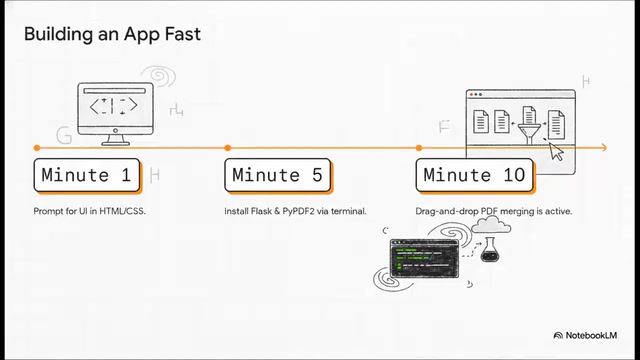
Here's a highly compelling real-world timeline—building a custom "Merge PDF" web tool:
- Minute 1: Prompt Copilot to generate a modern HTML/CSS interface; the page layout comes together effortlessly;
- Minute 5: Handle the backend logic—it suggests installing Flask and PDF processing libraries, and writes the Python code connecting them;
- Minute 10: A fully functional application is born—drag in three PDFs, click merge, and it completes instantly.
The tech stack here deserves additional explanation: Flask is one of the most popular lightweight web frameworks in the Python ecosystem, following the "micro-framework" philosophy—the core provides only routing and request handling, with other features added on-demand through extensions. For PDF processing, Python has a rich library ecosystem: PyPDF2/pypdf for merging, splitting, and text extraction; ReportLab for generating PDFs from scratch; and pdfplumber specializing in table data extraction. Copilot can recommend appropriate library combinations based on task requirements and generate correct installation commands (like pip install flask pypdf2) and connecting code—especially valuable for developers unfamiliar with the Python ecosystem.
Work that previously took hours of reading documentation and debugging dependencies can now be accomplished in ten minutes. In the more cutting-edge Agent Mode, developers typically need to use VS Code Insiders (VS Code's daily build channel containing the latest experimental features), select models like Claude 3.5 or Claude 3.7 Sonnet as the underlying brain, and can even issue voice commands like "add a navigation bar to this app"—the AI then autonomously writes code and updates files in real-time.
Agent Mode represents a fundamental evolution of AI programming assistants from "suggesters" to "executors." Traditional Copilot is reactive—waiting for your input then offering suggestions; in Agent Mode, the AI gains "action capability": it can autonomously read and write the file system, execute terminal commands, run tests, analyze error output, and iteratively fix issues. Behind this is the application of the ReAct (Reasoning + Acting) framework—the model alternates between reasoning (thinking about what to do next) and acting (executing specific operations), forming an autonomous "think-act-observe" loop until the task is complete.
GitHub Copilot vs Cursor AI: How to Choose
One of the hottest discussions in the developer community is the comparison between GitHub Copilot and Cursor AI.
| Dimension | GitHub Copilot | Cursor AI |
|---|---|---|
| Price | ~$10/month | ~$20/month |
| Form Factor | Deep integration with mainstream editors | Standalone editor built for AI |
| Strengths | Strong Microsoft/GitHub backing, continuously improving Agent Mode | Extremely fast and fluid interface, natively indexes entire codebase for massive context |
Cursor AI, developed by Anysphere, is an "AI-first" code editor built from the ground up (actually a deep fork of VS Code). Its core technical differentiator is "Codebase Indexing": Cursor builds a semantic vector index of the entire project, using an Embedding Model to convert code snippets into high-dimensional vectors stored in a local vector database. When you ask a question, the system retrieves the most relevant code snippets as context through vector similarity search (i.e., RAG—Retrieval-Augmented Generation), theoretically providing more comprehensive project-level understanding than standard Copilot. This makes Cursor particularly strong when handling large codebases (tens of thousands of lines and above).
Both are excellent AI programming tools, and the choice fundamentally depends on your workflow, budget, and whether you prefer "deep integration into your existing environment" or "a dedicated AI-first editor."
On a related note, the AI programming ecosystem extends far beyond code writing and editing. Tools like CodeRabbit focus on AI code review—connecting to your code repository, reviewing code like a senior developer, leaving constructive feedback, catching hidden bugs, and even auto-generating Pull Request summaries.
Tools like CodeRabbit represent AI's deep penetration into the "pre-deployment" stage of the Software Development Life Cycle (SDLC). Traditional code review relies on senior developers checking line by line—time-consuming and prone to fatigue-related oversights. AI review tools connect to GitHub/GitLab Pull Request workflows via webhooks, automatically analyzing the semantic intent of code changes, potential bugs, security vulnerabilities, performance issues, and code style consistency. This naturally integrates with CI/CD (Continuous Integration/Continuous Deployment) pipelines, forming a complete AI-assisted development chain from writing (Copilot) → review (CodeRabbit) → testing → deployment. AI now permeates the entire development lifecycle from the first line of code to final deployment review.
Copilot's Limitations: You Are the Pilot
Faced with the "magic" of AI code generation, developers must stay clear-headed. Here are several critical limitations that must never be ignored:
- Hallucinated code: Copilot occasionally generates code that looks correct but contains flawed logic or is entirely fabricated—for example, suggesting a terminal command that simply doesn't exist. Blindly running it will inevitably cause problems.
- Loss of control: If you rely entirely on AI agents to build applications, you may lose understanding and control over your own codebase, making it impossible to fix serious errors when they arise.
- Security risks: Never input sensitive company information, passwords, or real API keys into AI prompts.
AI hallucination in code generation carries unique dangers that deserve further understanding. Unlike natural language hallucinations, code hallucinations can produce "superficially plausible but semantically incorrect" output: calling non-existent API methods, using deprecated library version syntax, generating concurrent code with race conditions, or constructing algorithms that appear correct but contain boundary condition bugs. Research shows that approximately 30-40% of LLM-generated code contains some form of error upon first generation. This underscores the irreplaceability of code review, unit testing, and human verification—AI-generated code must undergo the same or even stricter quality gates as hand-written code.
Human judgment isn't supplementary—it's absolutely necessary. Always remember: you are the pilot; Copilot is just the co-pilot.
As increasingly capable autonomous coding agents continue to enter the arena, this field is evolving at breakneck speed with fierce competition. What's certain is that GitHub Copilot has already redefined how developers work; and how to strike the right balance between "letting AI accelerate" and "maintaining human control" is a question every engineer must continuously grapple with.
Related articles

Random Pruning of the DPO Computation Graph: 1.4x Training Speedup and Lower Peak Memory
DPO training too slow and memory-hungry? This paper proposes a random pruning framework for the DPO computation graph, sampling independently across position, sequence, and branch dimensions; branch pruning achieves a 1.426x step-time speedup and cuts training time by about 30%, with in-depth attribution of memory and time gains.

Why Does JEPA Underperform MLM in Longitudinal EHR Representation Learning?
New study compares JEPA and MLM for longitudinal EHR representation learning on MIMIC-IV: three JEPA variants train stably without collapse but underperform MLM; target size, not heterogeneity, drives prediction error.

Transfer Learning + Visible Light Communication: A New Approach to Energy-Efficient Indoor Positioning
A study proposes a transfer learning-based visible light communication indoor positioning method, achieving 47% accuracy improvement on the BOSCH factory dataset, 67.5% model efficiency under high noise, and introducing the ME composite metric for energy-efficient positioning in energy-constrained industrial IoT scenarios.