GPT-6 Astra Tested: One Prompt Generates a Full 3D Blender Animation

GPT-6 Astra turns a single prompt into an editable Blender 3D previz, then into a photorealistic final cut in 12 minutes.
This article documents a hands-on test of AI-assisted 3D animation: using the Higgsfield AI plugin in Blender with GPT-6 Astra, a single natural-language prompt generates a complete Miami Beach scene — buildings, palm trees, beach, skyline, and keyframed camera shots — in about 12 minutes, all saved as editable native Blender data. The rendered MP4 previz is then fed into Higgsfield AI, where Seedance 2.5's video-to-video capability upgrades the footage to photorealistic quality while preserving the original camera motion, producing a cinematic final cut with ambient sound. The workflow's core value is compressing the traditionally time-intensive previz and environment-building stages to minutes, offering independent creators and small teams a fast path to concept visualization.
From a Single Sentence to a Complete 3D Scene — AI Is Reshaping Animation Production
Traditional 3D animation production often requires hours or even days of manual modeling, scene setup, and character animation. But according to a hands-on demo, the recently released GPT-6 Astra compresses all of that into roughly a dozen minutes — you simply describe the scene you want in natural language, and it builds 3D models, a full environment, previz animation, and even camera-motion cutscenes directly inside Blender.
The goal of this test was straightforward: verify whether GPT-6 Astra could build a complete cinematic cutscene in Blender from scratch using a single prompt. The test scene was a Miami Beach setting inspired by GTA 6, complete with a sandy beach, palm trees, buildings, a full city skyline, moving objects, and multiple cinematic camera shots.
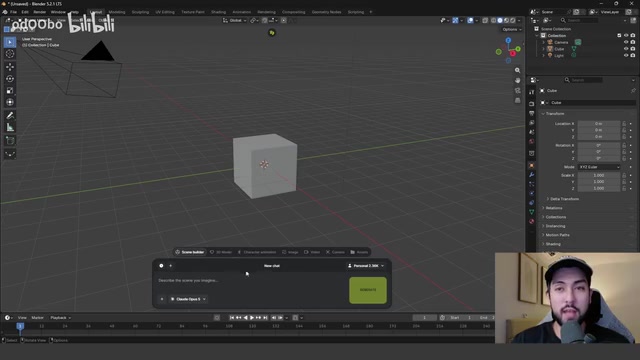
How Astra Builds an Entire City in 12 Minutes
The test environment used Blender 5.2 with the Higgsfield AI plugin. Installation is straightforward: download the plugin from the provided link, enable it under Add-ons in Preferences, and log in to your account. A chat window appears at the bottom of the interface where you describe your scene and select GPT-6 Astra as the generation model.
The prompt described Miami Beach in detail — several different camera cuts, a city backdrop, a plane flying overhead, the duration of each shot, and an overall length of roughly 30 seconds. After clicking Generate, the scene begins building in real time.
What genuinely surprised the tester was the speed of construction:
- ~2 minutes: The ocean, beach, roads, and basic city layout are already modeled
- Shortly after: All buildings are generated and placed automatically — palm trees, beach huts, and pedestrian walkways included
- ~6 minutes: All camera shots described in the prompt are created and keyframed inside Blender
- ~12 minutes: The entire scene is complete
Critically, everything is generated within Blender's native environment, meaning camera angles, object positions, and motion timing can all be adjusted manually at any time — this is not a locked, uneditable black-box output.
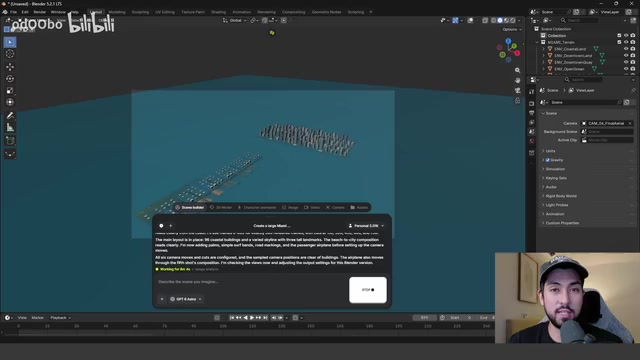
Blender is an open-source professional 3D creation suite that supports the full production pipeline — modeling, sculpting, rigging, animation, simulation, rendering, and compositing — widely used by independent artists and small-to-mid-sized studios for film, games, and advertising. Higgsfield AI is an AI video generation startup whose Blender plugin embeds conversational AI generation capabilities directly into the Blender interface, acting as a "translation layer" that converts natural-language descriptions into Python scripts Blender can execute, creating and manipulating 3D objects natively in the scene. The key architectural advantage here is that the output is not a closed black-box result but standard Blender scene data — artists can modify, refine, and extend it exactly like any manually created asset.
From Previz to Final Cut: Higgsfield AI and Seedance 2.5 in Relay
Once the scene was complete, playing back the timeline revealed the full shot sequence: a wide shot of the city and beach, a close-up of the beach with the city in the background, a push into the city, apartment buildings along a city street, a plane flying past, and a final panoramic pull-out.
This previz was then rendered to MP4. In the render settings, you select output resolution (1080p, 30fps in this test) and a save location, then export the cutscene via View → Render → Play Blast.
The rough rendered footage was then imported into Higgsfield AI's video tab. After uploading, simply add a scene description in the prompt field — for example, "Convert this to a photorealistic beach environment, maintaining the original camera angles" — set the duration (30 seconds) and resolution, select Seedance 2.5 as the video model, and click Generate.
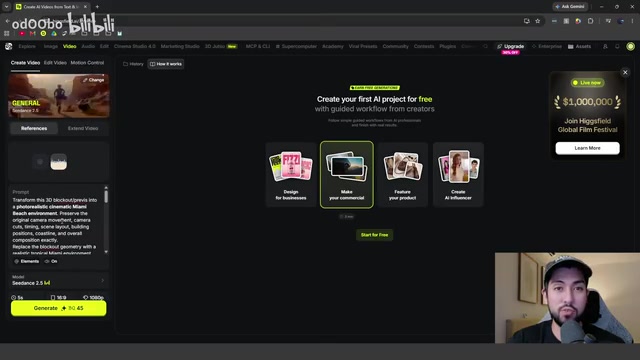
Seedance 2.5 is a video generation model from ByteDance, focused on video-to-video capability — using an existing video as a structural reference to upgrade the visual style to photorealistic quality while preserving the original camera motion, composition, and timing. This is fundamentally different from text-to-video models: the former is constrained by the input video and can reliably maintain camera angles and motion paths; the latter is entirely text-driven and offers far less precise camera control. This workflow leverages exactly that distinction — first using Blender to precisely control the camera language, then using Seedance 2.5 to upgrade image quality without altering the shots, solving "controllability" and "visual realism" as two separate steps.
Final Output Quality and Practical Value
The final rendered video retained all the camera shots defined in Blender: an ocean shot with waves, a beach shot with palm trees and buildings on the left, the city skyline, apartment buildings along a street, a plane flying overhead, and a wide pull-out at the end. Notably, the final output also automatically added ambient sound effects and various environmental details.
The value of this entire workflow lies in establishing a clear production pipeline: use GPT-6 Astra to rapidly block out a 3D environment and previz animation from a single prompt, then use Higgsfield AI with Seedance 2.5 to convert that rough previz into a photorealistic cinematic output — using the exact same camera angles and motion throughout.
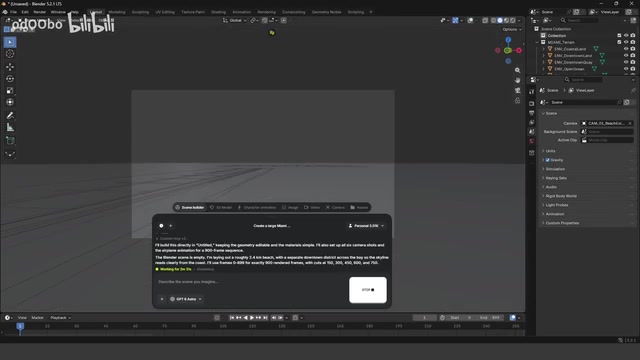
Of course, there is still room for improvement. The tester noted that pedestrians walking on the beach, cars on the road, and other elements could be added — but this depends entirely on the level of detail in the prompt. The more detail you describe, the more you get. It has also been observed that users on Twitter have already used similar approaches to reconstruct a full Oval Office scene, and there are numerous racing demo cases as well.
Who Should Pay Attention to This Workflow
For independent creators, small studios, or teams that need to rapidly prototype concepts, the greatest significance of Astra is not replacing detailed modeling — it's compressing the most time-consuming stages of "environment setup" and "previz" down to minutes. It can serve as:
- A rapid block-out tool for environment construction
- A starting point for generating cutscene previz
- An initial draft generator within a Blender workflow
From a single prompt to a complete 3D scene and previz animation in under 12 minutes, then to a photorealistic final cut — this pipeline demonstrates AI's potential in 3D and film pre-production. That said, a measured perspective is warranted: this article is based on a single tester's demo, and real-world performance, stability, and behavior on complex scenes still require broader independent validation.
In traditional film and game production, "previz" (previsualization) is the stage before principal production where simplified 3D animation is used to validate camera language, narrative pacing, and scene layout — typically carried out by a dedicated previz team over several days. "Block out" refers to the initial draft stage of modeling, using low-resolution geometry to establish spatial relationships and proportions as a reference for detailed modeling later. Both stages have historically been high-barrier steps that small teams and independent creators struggle to handle on their own. AI tools compressing them to the minute scale means creators can iterate through multiple versions in an extremely short time, focusing their energy on narrative decisions and fine-tuning rather than foundational construction.
Related articles

GPT-Next Leak, Gemini 4 Argon Imminent: AI News Roundup
GPT-Next leak suggests extreme efficiency; OpenAI's 28-day shipping pledge boosts speed 50%; Gemini 4 Argon nears release; Anthropic subscription value report sparks debate.

GPT-Next Leaked, Gemini 4 Argon Speeds Up, Fable 5.5 May Launch Today
OpenAI's GPT-Next model leaks, expected to be extremely low-cost and possibly part of the 28-day release plan; Gemini 4 Argon internal testing accelerates, NanoBanana 2.1 is live; Semi Analysis tests show Claude Max's equivalent API value is about 5 times that of ChatGPT Pro; Fable 5.5 may launch today.

Gemini 4 Argon Launches Globally: Key Highlights from the AI Daily Brief
Google opens Gemini 4 Argon globally across Pro and Ultra subscriptions and the API, and demonstrates robot control. This article rounds up open-source models, Agent infrastructure, cost transparency, and safety governance updates.