GPT Astra 6 Deep Test: AI Video Creation's Real Capabilities vs. the Hype

GPT Astra 6 real-world test reveals 3 genuine use cases and debunks the hype through a human vs. AI showdown.
An AI video creator spent weeks testing GPT Astra 6 (Codex) and identified three genuinely useful scenarios: connecting Blender MCP for reusable 3D scenes to solve AI video consistency issues, using it with GPT image 2.5 for thumbnail ideation, and automating match cuts and color grading via DaVinci Resolve MCP. A head-to-head experiment also debunked the "Astra 6 can do everything" claim — the AI-directed short fell short in image quality and coherence compared to the human-made version. The core finding: Astra 6 is a capability enhancer that rewards users with existing tool expertise, not a plug-and-play replacement for creative professionals.
The conversation around GPT Astra 6 (also referred to as Codex/Astra 6 in the video) has been everywhere lately, but genuinely useful information is buried under layers of noise and inflated claims. A creator focused on AI video production spent several weeks doing a deep dive with this tool to separate what's truly practical from what's just marketing fluff. He identified three use cases that hold up to scrutiny — and took a clear-eyed look at debunking the "Astra 6 can do everything" narrative.
Building 3D Scenes in Blender for Shot-Level Consistency
The most impressive capability Astra 6 demonstrated was building reusable 3D scenes by connecting to Blender. The creator used a bar scene as an example — if a film has a lot of scenes set in the same bar, building the entire environment in Blender means you can generate any number of shots within that same space while maintaining perfect consistency in set details and visual identity. This directly addresses one of the hardest problems in pure text-to-video generation.
Taking it further, he had Astra 6 generate an interactive web-based version of the Blender scene. Team members who don't know Blender can orbit around it, even "walk" through it using keyboard controls, sit on the couch to define new camera angles, adjust colors and lighting, and toggle the visibility of specific objects.
The setup process isn't complicated: connect Blender MCP inside ChatGPT (you can let ChatGPT connect and download Blender automatically, or install it manually under Settings > Plugins). The creator also recommends installing Higgs Field MCP (the video's sponsor), noting that its plugin is one of the best for use alongside ChatGPT. Users without ChatGPT can access Astra 6 directly through the Higgs Field supercomputer and connect it to Blender, Adobe, or DaVinci.
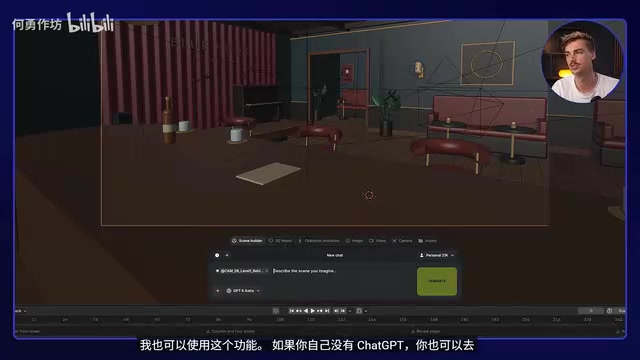
One important myth worth busting: the creator explicitly called out a popular lie circulating online — that you just "install a plugin in ChatGPT and you're done." That's not how it works. He openly admitted he's only been using Blender for a few months, emphasizing that you need to learn the fundamentals of the tool first — knowing how to move a camera, understanding what the AI is actually doing — before you can truly control it rather than treating it like out-of-the-box magic.
The full workflow typically looks like this: use ChatGPT to build the scene in Blender with multiple camera angles set up, then feed those rendered outputs as references into a tool like CDance 2.5 (the AI video model referenced in the video) to generate the final footage. The whole process doesn't even require leaving the ChatGPT interface — combined with Higgs Field MCP, you can drive CDance 2.5 to generate storyboard shots directly from ChatGPT or the supercomputer.

He also tested having Astra 6 recreate his own studio in Blender from just a few photos — the results were surprisingly solid. This capability extends naturally to interior design use cases. Since he's in the middle of moving, he used it to iterate on desk placement and layout options for his new studio apartment, making it a genuinely useful visualization aid for anyone without a design background.
MCP (Model Context Protocol) is an open protocol introduced by Anthropic in late 2024 that allows AI models to connect to external tools, file systems, and applications through a standardized interface. Think of it as giving AI a set of "hands" — enabling language models like ChatGPT to directly operate professional software like Blender or Adobe, rather than just outputting text instructions for a human to execute manually. Blender MCP is a specific implementation built on this protocol; once installed, ChatGPT can directly call Blender's Python API to create objects, set cameras, render outputs, and more. This is the underlying reason Astra 6 can "seamlessly drive Blender" — and why the creator says the connection process isn't that complex. The protocol itself has done most of the standardization work; users only need to complete plugin installation and authorization.
Thumbnail and Poster Design: AI as a Creative Amplifier
The second use case that surprised the creator was using Astra 6 alongside GPT image 2.5 for thumbnail design. As a YouTuber, thumbnails need to feel creative and on-brand — while avoiding that instantly recognizable "GPT slop" look.
His approach was to feed in a lot of personal material: portrait references, the channel's existing visual style, and favorite creators as style references — then ask it to generate thumbnail concepts for his next video (about AI music videos). The more references and specific inputs he provided, the richer and more on-brand the concept outputs became.
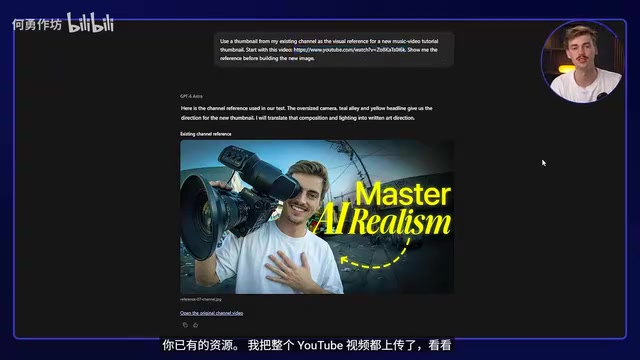
He kept coming back to one key principle: this is an ideation tool used in collaboration with a human thumbnail designer, not a replacement — both parties were using it for ideation. You can draw on someone else's style as a style reference, but you should never directly copy and substitute it. The right use is feeding AI to grow your own creative thinking and produce original work shaped by your own inputs.
AI Video Editing: DaVinci MCP Is the Best Option Right Now
The third direction is using Astra 6 for AI video editing — the creator noted a full tutorial is coming soon. There are currently three paths: having Astra 6 control your computer to operate After Effects and Premiere Pro; or using DaVinci Resolve MCP — which he considers a far better experience than Premiere Pro, with dramatically faster execution.
He ran a clever experiment: having Astra 6 create a match cut effect in DaVinci using the letters of his surname "Kieft." It automatically gathered a hundred different leather texture photos, assembled them at 10 frames per second using a reference clip and music as guides, and produced an editable project file. Crucially, the images were sourced from real search results rather than AI-generated, giving the final product a distinctive visual quality.
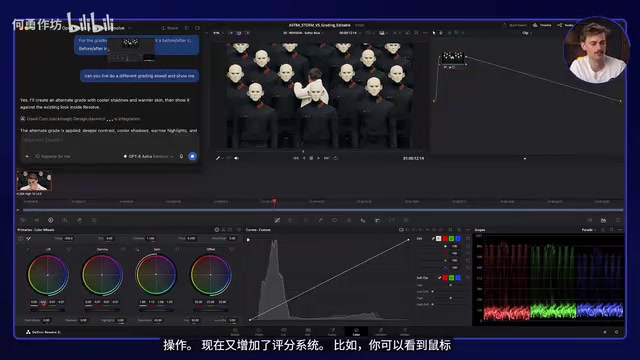
He also demonstrated having Astra 6 do real-time color grading on footage — you can watch the mouse cursor working on screen as Codex generates different versions and shows before/after comparisons. In After Effects, he had the tool animate a typographic "break the box" piece into a frame-breaking animation, preserving editable layers so editors can make adjustments afterward. Compared to CDance 2.5's non-editable video output, layer-based outputs carry significantly more value for professional editors.
One caveat worth noting: DaVinci currently has MCP support and runs much more smoothly, while Adobe Premiere or After Effects tend to make mistakes when executing multiple operations simultaneously — it's better to give it one task at a time. The creator's position is clear: if you're already proficient with these tools, treating Astra 6 as an enhancement makes everything faster. That's its proper role.
Match Cut is a classic film editing technique that creates transitions between two different shots by finding visual similarities in shape, motion, or color — giving the audience a sense of continuity or even poetry as the image changes. A famous example is the cut in 2001: A Space Odyssey from a bone thrown into the air directly to a spacecraft. In the experiment described here, Astra 6 used letter shapes as the matching element, assembling real leather texture photos at a rhythmic pace — essentially automating the traditional workflow of "find visually similar assets → arrange on timeline → export editable project" that normally depends on an editor's aesthetic intuition. DaVinci Resolve's open API and stable project file structure make it considerably easier for external programs to control precisely compared to Premiere Pro, which is the technical reason the creator recommends prioritizing DaVinci MCP.
Cutting Through the Hype: It's Not Capable of Everything
The most valuable part of the video is the creator's pushback against the claim that "Astra 6 is good at everything." He staged a head-to-head test: giving Astra 6 a script, specific assets, and instructions to automatically direct and produce a short film, while simultaneously producing his own version using the same materials by hand.
The result: the AI version did reasonably well at following the script, but fell noticeably short in image quality, shot quality, and visual coherence. The creator openly admitted his version was better — though far from perfect, and it took much longer than Codex. His conclusion was blunt: don't expect this tool to magically solve everything. The person getting the most out of it is still the creative mind behind it.
"If everyone can make the same type of video with Codex, where does the fun and creativity go?" He believes the human element in AI filmmaking will remain indispensable for the foreseeable future — until we can literally "plug into our brains" and have it generate films directly from imagination. And even then, it couldn't create through your lens, your experience, or your perspective.
He stays optimistic: "This is the worst it's ever going to be — it'll only get better from here." One day it may surpass humans in production quality, but the unique creative point of view still belongs to the person.
The "head-to-head" experiment the creator ran carries real methodological value for AI tool evaluation. Most AI video tool marketing materials tend to showcase carefully selected best-case outputs rather than the average results produced in real workflows. "Shot quality and coherence" remain the core bottleneck in AI video generation: text-to-video models (such as Sora, Kling, and CDance) treat each generation as an independent stochastic process — even with identical character descriptions, a character's appearance, scene lighting, and prop details will still drift between shots. This is precisely the context for why the first section of the article focuses on the Blender 3D scene approach — by locking in geometry and camera parameters in three-dimensional space, control over "consistency" is stripped away from the model's randomness and returned to the creator. This thinking represents a mainstream engineering approach in current AI filmmaking: use deterministic tools to anchor structure, and use generative AI to fill in style and detail.
Takeaway
The value of this hands-on review isn't in listing features — it's in honestly drawing the boundary of what AI tools can actually do. Astra 6 has genuine strengths in scene-building consistency, creative ideation amplification, and cross-tool editing efficiency. But it functions more like a capability enhancer that requires a solid professional foundation to wield effectively, rather than a button that replaces the creator. Users who want to explore it should start with GPT Astra 6 and Higgs Field MCP — and take the time to properly learn the basics of Blender and DaVinci first.
Related articles

AI Compute Is the New Oil, But the Market Mechanism Has Yet to Take Shape
Hacker News compares AI compute to the new oil, noting the lack of price discovery, concentrated supply, and no hedging tools. The article analyzes structural issues in compute trading and explores a possible three-tier market of spot, contracts, and derivatives, plus the real impact on AI practitioners' cost management.

Running Full iOS 16.5 Firmware on Android Devices: Technical Demo or Marketing Gimmick?
A Hacker News post claims full iOS 16.5 firmware can run on Android, with 315 upvotes. This analysis argues it is more likely a web UI simulation than a true firmware port, and explores the value and risks of such projects.

Etsy Cracks Down on AI Slop: Addressing Buyer and Seller Anxieties
Etsy introduces stricter rules limiting AI-generated content in listings, addressing buyer confusion over AI products and seller fears of original work being diluted by AI slop.