GPT Image 2.5 Inpainting in ComfyUI: Feels Like Cheating
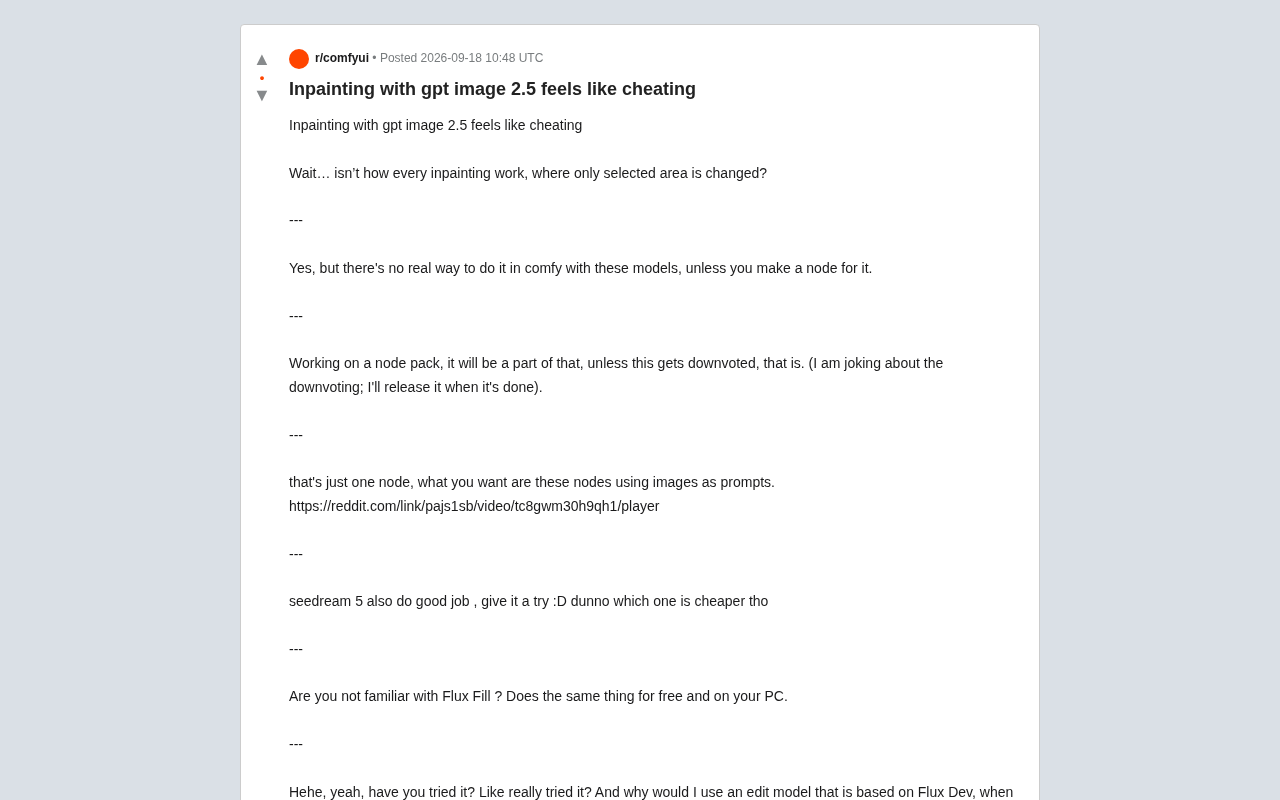
GPT Image 2.5's inpainting quality is called "cheating," highlighting the gap between closed-source and open-source tools.
A Reddit discussion sparked a wide debate in the AI image community about the state of inpainting tools. Users found GPT Image 2.5 far outperformed open-source options like Flux Fill in visual consistency, semantic understanding, and region blending — earning the label "feels like cheating." The discussion also exposed a practical gap: these closed-source models can't be used directly in ComfyUI workflows, though community developers are working on custom node packs to bridge them. For creators, the near-zero marginal cost for existing subscribers and the clear quality advantage are shaping current tool preferences.
In AI image generation communities, a Reddit discussion has been turning heads: one creator bluntly stated that using GPT Image 2.5 for inpainting "feels like cheating." Behind this tongue-in-cheek remark lies a widening gap between the latest generation of editing models and traditional open-source solutions on image modification tasks.
Why Inpainting Has People Amazed
The core logic of inpainting isn't complicated — modify only the user-selected region while leaving everything else untouched. That's exactly what one user in the original thread questioned: "Isn't that just how all inpainting works? It only changes the selected area?"
Technically speaking, yes. But the real difference lies in how well it's done. The reason GPT Image 2.5 gets described as "cheating" is because it performs noticeably better than many existing tools across three dimensions: maintaining visual consistency, understanding contextual semantics, and naturally blending edited regions. The original poster emphasized that this quality gap is exactly why they're willing to pay for a subscription.
Inpainting technology has gone through several key stages of development. Early diffusion-model-based inpainting (such as Stable Diffusion's inpaint mode) relied on filling masked regions with noise and then re-denoising — prone to edge seams, inconsistent lighting, and semantic discontinuities. For example, replacing a chair with a sofa in an interior photo might result in a sofa whose perspective and light direction clearly don't match the surrounding environment. Later specialized training approaches (like Adobe Firefly's generative fill and DALL·E's edit mode) used large-scale supervised data to specifically optimize edge blending and context awareness. The new generation of models that GPT Image 2.5 belongs to goes further by deeply coupling language understanding with image editing — so the model doesn't just "fill pixels," it understands what a region should semantically be within the full image, enabling more natural transitions and more coherent content generation.
The Gap in the ComfyUI Ecosystem
One interesting technical point raised in the discussion: these closed-source models are currently very difficult to use directly inside ComfyUI.
"There's no real way to do this in Comfy unless you write your own node," one participant noted. Another developer then revealed they were working on a node pack that would integrate this kind of functionality. The thinking goes even further — not just a single inpainting node, but a whole suite of nodes using "images as prompts," bringing external model editing capabilities into local workflows.
This reflects a real tension in today's AI image toolchain: closed-source commercial models lead on quality but lack flexibility and composability; the open-source ecosystem is flexible and controllable but falls short on certain advanced editing tasks. Community developers are trying to bridge this gap with custom nodes.
ComfyUI is an open-source Stable Diffusion frontend built on a node graph paradigm, where users can drag and connect different functional nodes to build complete image generation and editing pipelines (workflows). Its core strength is high composability — samplers, ControlNet, LoRA loading, image post-processing, and other components can all be freely chained together, making batch experimentation and automation straightforward. Node packs (custom nodes) are the primary way the community extends ComfyUI's functionality: developers can wrap external API calls, new model inference logic, and more into visual nodes that integrate into existing workflows without modifying core code. It's precisely this extension mechanism that has developers considering wrapping GPT Image and similar closed-source model API capabilities as nodes — combining commercial model editing quality with ComfyUI's workflow flexibility.
Head-to-Head with Open-Source Options
The discussion inevitably brought in the open-source camp's leading contender — Flux Fill.
"Are you not familiar with Flux Fill? It's free, runs on your own machine, and does the same thing," one user pushed back.
But the original poster's response was telling: "Have you actually seriously used it? Why would I use an editing model based on Flux Dev instead of Flux 2 9B?" They were candid that these open-source editing models "aren't as good, at least not as good as these models," and that GPT Image 2.5 is accessible through a Plus subscription they're already paying for — "since I'm already paying, might as well get the most out of it."
This exchange reveals the real trade-offs creators make: free local deployment vs. quality and convenience. For users already subscribed to commercial services, the marginal cost is essentially zero — and the results are better. The scales tip naturally.
Other Alternatives
Seedream 5 was also mentioned in the discussion, with someone noting it "does a good job too, worth trying," though its cost remained unclear. This signals that the market for high-quality image editing models is expanding, giving users more room for side-by-side comparisons.
Flux Fill is an open-source image editing model released by Black Forest Labs (founded by the original core Stable Diffusion team), specifically trained for inpainting and outpainting tasks within their Flux architecture series. Compared to using a base generation model for inpainting, Flux Fill offers improved semantic coherence in masked regions and supports local deployment — attractive for users who prioritize data privacy or want to avoid per-use fees. The "Flux 2 9B" the poster referenced is a newer-generation Flux base model, implying they believe using a stronger base model with standard inpainting workflows might actually outperform Flux Fill, which was fine-tuned on the older Flux Dev — a judgment that reflects an ongoing community debate about "specialized editing models vs. stronger base models with general methods."
How to Connect a Subscription Model to Local Nodes
Toward the end of the discussion, a technical cliffhanger emerged — and it's what many readers are most curious about: "How did you connect your ChatGPT subscription to Comfy nodes? What mechanism does the backend use?"
The original post didn't provide a clear answer, but the question itself points to a noteworthy trend — how to bridge the capabilities of commercial subscription models into open-source workflows. This typically involves API calls, session credential reuse, and other approaches, all of which require developers to carefully consider compliance and stability.
Wrapping Up
This discussion, though brief, reflects several core tensions in the AI image editing space: closed-source quality vs. open-source freedom, subscription costs vs. local deployment, single nodes vs. composable workflows. The "cheating" feeling GPT Image 2.5 delivers is essentially an experiential leap driven by generational model capability improvements. Meanwhile, the community's efforts around node packs represent an ongoing attempt to democratize and composabilize that capability. For everyday creators, the real advice might be: actually try the tools you have at hand seriously, then decide which one is the right answer for you.
Related articles

MosMos: An AI Voice Writing Tool Built for the Entire Meeting Lifecycle
MosMos is an AI voice writing tool built for the full meeting lifecycle — ranked #2 on Product Hunt. It goes beyond dictation with style-aware drafting, a personal glossary, web search, speaker diarization, and structured meeting notes.
Getting Started with Claude Code: Capabilities and Installation Essentials for This AI Coding Assistant
Claude Code is Anthropic's AI coding agent that reads your full codebase, generates accurate code, and auto-debugs. Compare with Cursor, TRAE, Codex, plus key install requirements.

AINA: An AI Career Coach That Uses a Video Avatar to Uncover Your Job Search Blind Spots
AINA topped Product Hunt with its AI career coach that uses a video avatar to help job seekers find blind spots, polish their profile, and practice interviews.