Grimo AI: The Voice Assistant That Handles Tasks, Calendar, and Notes in One Sentence

Grimo AI lets you capture tasks, events, and notes with one sentence using AI-powered voice input on iOS.
Grimo AI is an iOS productivity app built by indie developer Dawid W that turns a single spoken or typed input into automatically categorized tasks, calendar events, and notes — no forms, no app-switching required. Designed for chaotic weeks, it offers conflict visualization, a hands-free voice mode, and a unified chat thread. Free to start and listed at #19 on Product Hunt with 71 upvotes, its success depends on parsing accuracy and integration depth — a prime example of AI-native tools competing on intelligence over features.
Switching between multiple productivity apps — copying to-dos into your calendar, jotting ideas into a notes app — often takes longer than the tasks themselves. Grimo AI tries to solve this with a more direct approach: say one sentence, and the system automatically sorts your tasks, events, and notes into the right place.
The app recently launched on Product Hunt, earning 71 upvotes and 5 comments to land at #19 for the day. It spans three categories — task management, notes, and calendar — built by indie developer Dawid W. It's free to get started and currently iOS-only.
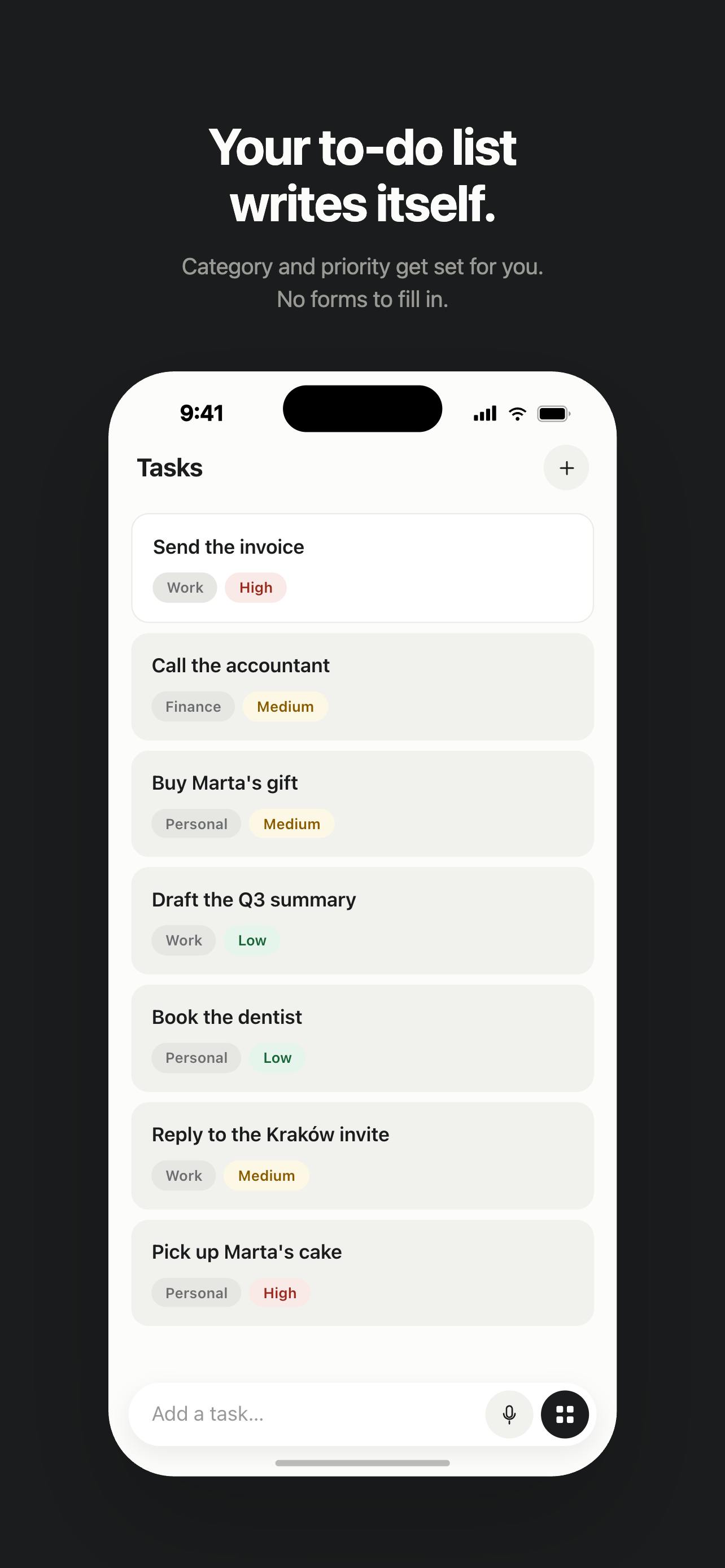
The Core Idea: One Sentence, Automatically Sorted
Grimo AI has a clear focus — turning a single spoken or typed sentence into a structured task, calendar event, or note. In the product's own words, users don't need to fill out forms or jump between apps. Just say what's on your mind, and Grimo files it where it belongs, complete with dates and priority levels.
This is natural language understanding put to practical use. Traditional to-do tools require users to manually decide: "Is this a task or a note?" and then manually set a deadline. Grimo hands that judgment to AI, theoretically lowering the barrier to capturing information. For people who prefer to quickly capture ideas by voice, eliminating even one "classification decision" is itself a productivity win.
Natural Language Understanding (NLU) in productivity tools relies on a large language model's (LLM) ability to recognize intent and extract entities. When a user says "remind me to reply to the client email tomorrow at 3pm," the system needs to do three things at once: identify this as a combined "task + schedule" intent, extract the time entity (tomorrow at 3pm), and infer priority from context. This is far more complex than traditional keyword matching — early rule-based NLP approaches struggled with ambiguous or conversational phrasing. The rise of GPT-series models is what made this kind of "one-sentence parsing" viable in commercial products. The core engineering challenge Grimo faces is how to make accurate, user-expectation-matching classification decisions when expressions are fuzzy — like "maybe take a look at that report this weekend."
Designed for the Messy Week
Grimo AI explicitly positions itself as a tool for handling "messy weeks," with several features built around that scenario.
See Scheduling Conflicts at a Glance
The calendar visually highlights time overlaps, so users can immediately spot conflicts. For people with back-to-back meetings and frequent last-minute changes, this visual overlap indicator is far more practical than scanning events one by one.
Hands-Free Voice Mode
The app offers a hands-free voice mode for when your hands are occupied — driving, cooking, or walking when a thought suddenly strikes. Voice input combined with automatic categorization forms the core usage loop that makes Grimo feel distinct.
A Single Chat Thread
Grimo uses one unified chat thread to capture all input, preventing information from getting scattered across five different apps. This "single entry point" philosophy aligns with how many AI-native tools are designed: give users one interface to interact with, and handle the sorting and organization invisibly in the background.
Product Trade-offs Worth Noting
Grimo AI is currently iOS-only, which means Android and desktop users are out of luck for now. For a productivity tool that relies on cross-device sync, a single platform is a clear limitation — though it's also a typical strategy for indie developers who want to concentrate resources and validate the core experience first.
The free entry point makes the barrier to try it essentially zero, but the product's long-term value hinges on two things: first, how accurately the natural language parsing performs — if the AI frequently misidentifies tasks versus notes, users end up spending more time correcting mistakes; and second, how deeply it integrates with system calendars and other tools. As a product built around "one sentence to sort everything," Grimo's success largely comes down to how well it understands ambiguous input.
A Note on the Productivity Tool Landscape
Grimo AI represents a classic direction for AI-native productivity tools — using large language models to process unstructured input and handle classification, scheduling, and prioritization on behalf of the user. The competitive battleground in this category is shifting from "how many features" to "how smart is the understanding."
When input becomes as natural as speaking, the tool itself should fade into the background. What Grimo is going for is reducing the act of capturing an idea down to its most primitive form — "just say it" — and letting AI handle the rest. Whether it can deliver on that promise will need more real-world, long-term use to validate.
The fundamental difference between AI-native productivity tools and traditional productivity software lies in a shift in interaction paradigm: traditional tools revolve around structured forms and menus, requiring users to adapt to the tool's information architecture; AI-native tools use natural language as the primary interface, offloading the structuring work to the model. This space has seen a surge of competitors in recent years — Notion AI, Mem, Reflect, and others — all united by the goal of reducing "capture friction," meaning the resistance between having a thought and getting it recorded. Grimo's choice to focus on a three-in-one scenario of tasks, calendar, and notes — rather than building a general-purpose AI assistant — is a vertical entry strategy that can help build clear usage habits within a specific user group. But it also means Grimo needs to push the experience in this narrow niche to an exceptional level to differentiate itself from built-in options like Siri and Google Assistant.
Related articles

Complete Guide to Running Your Own Local DeepSeek: Web Access, Knowledge Base & Privacy
Step-by-step guide to deploying a private DeepSeek locally using Ollama, Chatbox, and AnythingLLM — with web access, RAG knowledge base, and full privacy.
AI Agent Development: A 4-Stage Learning Roadmap from Beginner to Enterprise-Level Practice
A complete AI Agent learning roadmap from zero to enterprise-level: covering ReAct, multi-agent collaboration, Prompt tuning, RAG, MCP, and real-world projects.
A New DeepSeek Harness Experiment: Agent Supervising Agent for Self-Evolution
A developer built an "Agent supervising Agent" self-evolution system using DeepSeek Harness, with a ledger mechanism enabling near-unattended overnight software iteration.