GrokBot Lets Carpenters Build an AI Agent Team in 5 Minutes: Invoicing and Email Automation

GrokBot lets blue-collar freelancers build a 9-agent AI team in 5 minutes using natural language.
The article introduces GrokBot and its template library templatesgrokbot.com, showing how blue-collar freelancers like carpenters can build a team of 8 specialized AI agents plus 1 coordinator in 5 minutes. The setup takes just four steps: install GrokBot, add a template creator, connect the MCP server, and batch-install agents with a single natural language command. The core value is replacing technical configuration with templates and natural language, bypassing API integration and scripting barriers to address craftspeople's pain points around invoices and emails. Actual results still depend on template quality, terminology accuracy, and multi-agent collaboration efficiency—reflecting AI agents' expansion from knowledge workers into the blue-collar and freelancer market.
AI Agents That Blue-Collar Workers Can Pick Up Fast
If you're a carpenter, your day isn't just about cutting wood and assembling furniture—you also spend hours reading blueprints, measuring and marking materials, chasing invoices, and replying to emails. This tedious administrative work is eating into your productive hours.
A recent demo on YouTube showcases a new solution: GrokBot and templatesgrokbot.com. The core pitch is refreshingly direct—build your own AI agent team in 5 minutes, with zero programming knowledge required.
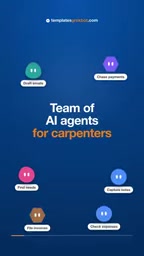
This demo speaks directly to a pain point for blue-collar freelancers: you're a craftsman, not an administrative assistant. But the reality is, without admin support, you have to do everything yourself. GrokBot's approach is to hand off these repetitive tasks to a set of specialized AI agents.
The Setup: From Zero to 9 Agents in Just 4 Steps
According to the video demo, the entire setup process is compressed into a minimalist four-step workflow:
Install the Base Tools
First, install GrokBot, then add a template creator bot. This step essentially gives your AI system a "foundation" on which all specialized agents will run.
Connect the MCP Server
Connect the template creator to the template's GrokBot MCP server. MCP (Model Context Protocol) is a key connectivity protocol in today's AI agent ecosystem, allowing different AI agents to share context and tool capabilities. This step ensures agents can work together rather than operating in silos.
MCP (Model Context Protocol) is an open-source communication protocol proposed by Anthropic in late 2024, designed to establish a unified interface between AI models and external data sources and tools. Before MCP, every AI application that needed to access databases, file systems, or third-party APIs had to write custom integration code with poor reusability. MCP uses a client-server architecture: an AI host (such as a chat assistant or agent platform) acts as the client, sending standardized JSON-RPC messages to request resources, invoke tools, or retrieve prompt templates from MCP servers. For multi-agent systems like GrokBot, the significance of MCP lies in allowing different agents to declare "what I can do" and "what I need" in a consistent way, enabling capability discovery and context passing without manually writing glue code. Think of it as the USB-C port of the AI agent world—as long as everyone follows the same protocol, any tool can plug and play.
Batch-Install Agents with a Natural Language Command
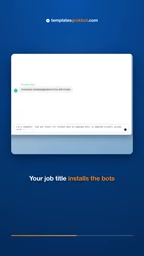
This is the most interesting part of the entire process. You simply type one sentence:
"I'm a carpenter, find and install all relevant bots."
The system automatically identifies your profession and matches and installs all relevant specialized agents for you. For a carpenter, this might include quoting, bill-of-materials generation, invoice management, and more.

The core difference between an "AI agent" and an ordinary chatbot is autonomy: an agent can not only answer questions but also plan steps, invoke tools, observe results, and iterate toward a given goal until the task is complete. In this solution, each specialized agent is assigned clear responsibility boundaries (such as quoting or invoice generation) and equipped with corresponding tool permissions. A multi-agent system further introduces division of labor and collaboration: different agents each handle their own domain, with a coordinator agent decomposing tasks and aggregating results. The advantage of this architecture is that each agent's prompts and tool sets can remain lean, reducing error rates; the challenge lies in inter-agent communication overhead, state synchronization, and error propagation. Common coordination patterns include centralized scheduling (like the coordinator bot in this article), hierarchical management, and decentralized negotiation. Blue-collar scenarios typically suit centralized scheduling better, since task flows are relatively linear and demand high predictability.
Add a Coordinator Agent
Finally, add a coordinator bot so that all specialized agents can work together. This coordinator acts as the team's "project manager," responsible for scheduling and integrating the outputs of each specialized agent.
Once done, you'll have a complete team of 8 specialized agents + 1 coordinator—all in under 5 minutes.
What This Model Means
What GrokBot demonstrates is essentially solving a problem that has long hindered AI tool adoption: the setup barrier.
In the past, to get AI to help with invoices and emails, you might need to research various APIs, configure automation workflows, or even write some scripts. For craftspeople like carpenters, electricians, and plumbers, these technical barriers are enough to make them give up on AI tools entirely.
GrokBot's approach replaces technical configuration with "templates + natural language commands." You don't need to know what MCP is, or understand how agents communicate with each other—you just tell the system who you are and what you do, and the templates handle the rest.
From a product design perspective, the template library at templatesgrokbot.com is the key to this solution. The video mentions "There are templates for any job," meaning templates cover a wide range of professions. The quality and coverage of these templates will directly determine the practical usability of this tool.
The product logic of a templated agent library is in the same lineage as the "industry solutions" of the SaaS era, but the delivery format has changed: previously you purchased pre-configured software features, now you get AI agents with pre-trained role definitions and tool chains. A template is essentially a packaged set of prompts, tool permissions, output format specifications, and workflow orchestration. Its quality depends on three dimensions: domain coverage (does it cover the high-frequency tasks of that trade?), terminology accuracy (can it recognize specialized terms like "mortise-and-tenon" or "tongue-and-groove"?), and output compliance (do invoices conform to local tax formats?). For a template library to remain viable long-term, it also needs version updates and user feedback mechanisms, because industry standards, tax rates, and client communication habits all change over time. For the platform, templates serve as both the entry point to lower user barriers and a key asset for building an ecosystem moat.
Implications for the Blue-Collar AI Tool Market
This demo reflects a broader trend: AI agents are expanding from an exclusive tool for knowledge workers to penetrating the blue-collar and freelancer market.
Invoice management and email handling are common pain points for virtually all freelancers, whether carpenters, designers, or consultants. GrokBot's choice to enter through these universal scenarios while using profession-specific templates to adapt to different trades' particular needs is a logically sound strategy.
However, actual results still depend on several key factors: Can the templates truly understand the professional terminology and workflows of the carpentry industry? Are the invoices and emails generated by agents accurate and reliable enough? Does multi-agent collaboration actually reduce—rather than increase—management burden? The answers to these questions can only be validated through real-world use.
For craftspeople struggling with administrative work, a 5-minute setup for an AI assistant team is indeed a low enough barrier to be worth a try.
One-line Summary
GrokBot lets blue-collar freelancers build a 9-agent AI team in 5 minutes using natural language.
Paragraph Summary
The article introduces a tool called GrokBot and its template library templatesgrokbot.com, demonstrating how blue-collar freelancers such as carpenters can build a team of 8 specialized AI agents and 1 coordinator in 5 minutes. The setup involves just four steps: install GrokBot, add a template creator, connect the MCP server, and batch-install relevant agents with a single natural language command. The core value of this model lies in replacing traditional technical configuration with "templates + natural language," bypassing barriers like API integration and script writing, and directly addressing the pain point of craftspeople being bogged down by invoices, emails, and other administrative work. The article also notes that actual results still depend on template quality, accuracy in understanding industry terminology, and multi-agent collaboration efficiency. This trend reflects AI agents penetrating from knowledge workers into the blue-collar and freelancer market.
Related articles
uGAP: An AI Platform Unifying 100+ African Geospatial Datasets
uGAP is an African geospatial AI platform by a University of Cape Town team, unifying 120+ African datasets with a Python SDK for discovery, processing, and model training, already used in cyclone flood mapping.

Cursor Can Now Control Your Computer: AI Agents Can Drive Desktop Apps for Testing
Cursor adds desktop control: AI agents can drive desktop apps like the iOS Simulator to test their own features. We analyze the impact on dev workflows, possible technical approaches, and reliability concerns.

Vibecoding a Custom Inference Engine: High Hopes, Harsh Reality
A Reddit developer shares the real experience of vibecoding a custom inference engine: running GGUF Q4 models in the browser with WebGL2 and GLSL, only to fall into tokenizer debugging hell. This article analyzes the engineering challenges of browser-side LLM inference and why cloning llama.cpp is the more rational choice.