Gumloop Hands-On Tutorial: A Complete Guide to Building AI Automation Workflows with Zero Code

Gumloop's CEO demos three zero-code AI workflows that automate lead research, SEO content, and competitive analysis.
Gumloop co-founder Max demonstrates how to build powerful AI automation workflows without code, covering three real-world use cases: automated lead research that delivers enriched prospect data in 5 seconds, batch SEO content production from YouTube podcasts in under 20 minutes, and competitive ad analysis with scheduled reports. The tutorial details core features including subflows, custom nodes, Chrome extension integration, and loop mode for batch processing.
Gumloop, which recently closed a $19 million funding round, is quickly becoming one of the most talked-about products in the AI automation space. In this interview, Gumloop co-founder and CEO Max personally demonstrates how to build AI workflows that can replace the work of junior employees—all without writing a single line of code. From lead research and content production to competitive analysis, these automation systems are reshaping how businesses operate.
This article is based on Max's full demonstration, walking through Gumloop's core capabilities and real-world use cases to help you understand what no-code AI automation can actually do—and why every entrepreneur and business leader should take it seriously.
What Is Gumloop: Connecting Data and AI Like Building Blocks
Gumloop's core logic is remarkably intuitive—a workflow is simply a series of interconnected "nodes," with data flowing from one node to the next. It's often compared to no-code automation tools like Zapier, since both share a wide range of integrations: Slack, Airtable, Outlook, Notion, Reddit, Gmail, and other mainstream services can all be connected directly.
But Gumloop's real differentiator lies in deeply integrating data with AI steps. During the demo, Max dragged a Gmail node onto the canvas to read emails, then connected it to an "Ask AI" node. This AI node isn't limited to OpenAI's models—users can freely switch between any model, or even connect to private models deployed on Azure. For enterprises that need data compliance or model controllability, this flexibility means enjoying the convenience of no-code while retaining full control over the AI inference layer.
Beyond basic Q&A, Gumloop offers more granular AI tools: data extraction (with customizable Schemas—for example, extracting amounts and dates from receipts), content classification, summary generation, scoring, and video/image analysis. A Schema here refers to a predefined data structure template that tells the AI "I need you to extract these specific fields from this text, and here's the data type for each field"—transforming unstructured content into structured data that can be written directly into a database or spreadsheet. As Max put it: "When you pair these LLM steps with your own data, you get AI products that would otherwise require an engineer to build."
The host gave high praise to the product design during the interview—it "snaps functionality together like LEGO bricks" while delivering a Figma-like user experience, calling it "the most beautiful automation software I've ever seen."
Use Case 1: Automated Lead Research—From Signup to Outreach in 5 Seconds
The first workflow Max showcased was the "killer feature" that generated all of Gumloop's revenue during their early days at YC (Y Combinator, Silicon Valley's most prestigious startup accelerator, which has incubated companies like Airbnb, Stripe, and Dropbox). It fully replicated his former manual process: someone signs up for the product → immediately research them → determine if they're a high-value lead → send a personalized email.
This workflow is triggered via Webhook—any Gumloop workflow can be called like an API. A Webhook is a real-time server-to-server communication mechanism: when a specific event occurs (such as a user registration), the source system sends an HTTP POST request to a preset URL, pushing event data to the receiver. Unlike traditional polling, Webhooks are event-driven—the receiver doesn't need to repeatedly check for new data, resulting in extremely low latency and minimal resource consumption. The moment a user clicks "Create Account," their email is passed into the workflow and runs in the background.
Inside the workflow, another key Gumloop feature comes into play: subflows. A subflow is an independent workflow that can be reused as a node—similar to a "function" in programming. It encapsulates reusable logic into a standalone module, accepting parameters as input and returning values as output, keeping things clean, scalable, and shareable with teammates. This modular design not only reduces redundant building effort but, more importantly, lowers maintenance costs—when underlying logic needs updating (say, a data enrichment API switches providers), you only need to modify the subflow in one place, and all parent workflows referencing it automatically inherit the change.
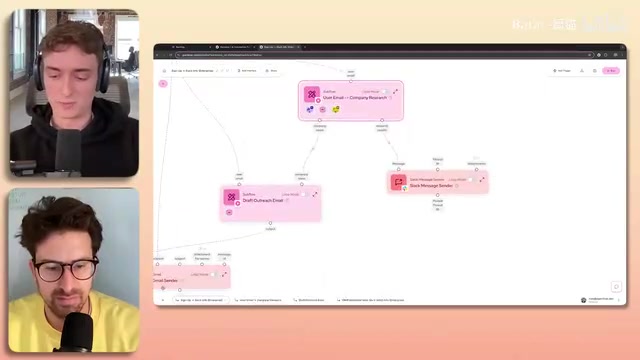
In this case, the subflow handles all the heavy lifting of research: extract the domain from the email → scrape the company website → use Claude 3 Haiku to summarize the business → extract the company name → obtain industry, revenue, country, employee count, and total funding through multiple data enrichment services (in a waterfall pattern). Data enrichment here refers to using third-party data services like Clearbit, ZoomInfo, and Apollo to flesh out a richer company profile based on limited known information (such as an email address or domain). The waterfall pattern calls multiple data sources in priority order—if the first service returns no results, it automatically falls back to the second, then the third, until the needed data is obtained. This fault-tolerant mechanism significantly improves data coverage.
Finally, all the data is formatted and pushed to the company's Slack, and a personalized outreach email draft is generated in Max's Gmail. "About five seconds after someone clicks sign up, we get a notification with their revenue, location, and company summary," Max explained. He would filter through the top 10 high-value leads at the end of each day to send emails, deleting the rest—a hybrid inbound-outbound customer acquisition system, fully formed.
As for whether everyone needs to build workflows themselves, Max offered a realistic answer: at large companies, it's typically a handful of "AI enthusiasts" who build great tools, while everyone else simply uses them. Gumloop already has a template directory and is about to launch a marketplace where users can publish and sell templates. Internally, they live by one mantra: "Understanding the problem should be the only prerequisite for solving it."
Use Case 2: Batch-Producing SEO Content—Building a Content Factory in 20 Minutes
The second workflow is perhaps the most valuable for creators: input a YouTube podcast link, and within seconds, a complete blog post is published on Ghost CMS—complete with a TLDR, detailed bullet points, embedded video, and social links. Ghost is an open-source content management system with a Headless CMS architecture—the content management backend is fully decoupled from the frontend display, and all content can be created, read, updated, and deleted via RESTful APIs, making it naturally suited for automation. Max said this workflow "took less than 20 minutes to build."
The construction logic is deliberate. Rather than dumping the entire transcript into a single AI prompt, Max broke it into multiple small steps—"If you break the task into small chunks, the model behaves better and the output quality is much higher." The specific flow: YouTube node fetches the transcript → o1 model generates an information-dense "digest" (stripping out filler and chitchat) → writes it into a blog post (specifying the author's perspective, requiring a TLDR, avoiding jargon) → formats it into HTML.
Why use o1 for the digest step? o1 is a reasoning model series released by OpenAI in 2024. Its key difference from predecessors like GPT-4 is its built-in Chain-of-Thought reasoning mechanism—before generating a final answer, o1 internally performs multi-step logical deduction, making it particularly adept at tasks requiring deep analysis, information synthesis, and critical thinking. Max explained that processing a 55-minute long podcast requires long-form critical thinking, and o1 excels at this. For the subsequent, relatively simpler formatting steps, using faster and cheaper models is more cost-effective.
More critically, AI step quality cascades downstream—if an earlier step uses a weaker model, it caps the ceiling for all subsequent steps. This cascade effect is often underestimated in multi-step AI pipelines: each step's output becomes the next step's input, and information lost or errors introduced in earlier steps cannot be recovered by later steps, no matter how powerful their models are. This is perfectly aligned with the classic computer science principle of "Garbage In, Garbage Out." Therefore, allocating budget and compute power toward the front end of the pipeline (data extraction and comprehension) is a critical best practice.
Even more powerful is loop mode. By using the single-link workflow as a subflow and connecting it to a Google Sheet, you can process thousands of YouTube links at once. Gumloop automatically handles concurrent execution and rate limiting (controlling the number of API calls per unit of time to avoid triggering third-party services' frequency limits or bans). "You just go grab a coffee, and the content is ready when you come back."
The host astutely pointed out the business value: this kind of content automation delivers "autopilot SEO traffic." Paired with product promotion or a lead magnet—offering valuable free content (such as industry reports, whitepapers, or tool templates) in exchange for potential customers' contact information—it continuously generates free traffic and leads. The automated blog posts keep attracting search engine traffic, and the lead magnets embedded in each article keep converting anonymous visitors into known leads, letting the compounding effect do its work—all with virtually no manual intervention.
Use Case 3: Competitive Ad Analysis and Automated Report Generation
The third workflow, shared over 3,000 times, handles competitive ad analysis—something marketing teams do daily or weekly. Its data source is platforms like Meta Ad Library. Since 2019, Meta has allowed anyone to search and view all active ads running on Facebook, Instagram, Messenger, and other platforms to improve advertising transparency. This public data source has become a goldmine for competitive analysis. Google, TikTok, LinkedIn, and other platforms have since launched similar transparency tools.
The workflow scrapes ads that competitors are running on Facebook, Instagram, and other platforms → uses Gemini to analyze the intent of each video and image ad → consolidates all analyses into a large o1 prompt to generate an overall advertising strategy interpretation → formats it into an HTML email and sends it automatically on schedule (e.g., every Friday at 9 AM) to management. There's a technical reason for choosing Gemini for ad creative analysis: Gemini is a multimodal AI model developed by Google DeepMind. Its core strength is native support for understanding and reasoning across multiple data types—text, images, video, and audio. It can simultaneously analyze a video's visual content, text overlays, and voiceover narration in a single call, transforming unstructured creative assets into structured analytical insights.
To enable colleagues who don't know Gumloop to use complex workflows, Gumloop introduced the Interface feature—a simple web interface can be generated for any workflow via drag-and-drop. Colleagues just fill out a form and click run. "They'll think you're an AI engineer who built a complex web application." Additionally, workflows can be connected to custom products via Webhooks, or even serve as a SaaS backend to charge users.

Regarding costs, Max did the math: one competitive analysis email consumes about 500 Gumloop credits. The current cheapest plan is $97 for 30,000 credits, working out to roughly $1.60 per email. By comparison, hiring a junior ad specialist in San Francisco costs at least $80,000 per year. Going further, users can connect their own API keys, dropping the workflow's credit cost to nearly zero—at that point, users pay the model providers (such as OpenAI, Anthropic, or Google) directly based on actual usage, bypassing Gumloop's credit system and typically achieving lower per-call costs.

Custom Nodes and Chrome Extension: Letting AI Build Its Own Tools
Gumloop is layering AI capabilities onto the product itself. The Custom Node feature allows users to build their own integrations—paste a third-party API's documentation into the node builder, specify inputs and outputs, click generate, and within seconds you have a functional integration node. Max demonstrated the entire process of building a "BuiltWith" integration live. BuiltWith is an online tool and data service that detects the technology stack used by websites—it can identify a site's CMS (e.g., WordPress, Shopify), analytics tools (e.g., Google Analytics), ad platforms, CDN providers, payment gateways, and hundreds of other technology components. This information holds immense commercial value for sales teams. For example, if you sell Shopify plugins, BuiltWith lets you batch-identify all websites using Shopify and emphasize your differentiated advantages in targeted outreach emails.
The Custom Node feature empowers many semi-technical employees to build complex Twitter scrapers or social media analysis tools without writing code. Under the hood, it works by having AI understand the API documentation's endpoints, request parameters, and response formats, then automatically generating the calling code and packaging it as a visual node.
Another noteworthy feature is the Chrome Extension. It allows workflows to be triggered directly from the browser, using the content of the user's current webpage as the workflow's input. Max demonstrated a LinkedIn candidate research workflow: click run on a target person's profile page, the extension scrapes all page content → extracts name, title, company, and other information → summarizes their background → searches for their Twitter and GitHub → writes to a Google Sheet → notifies the team on Slack → uses Apollo (a well-known sales intelligence platform offering email lookup, contact databases, and more) to find their email and draft an outreach email. "Even if an intern finds an interesting candidate, a draft outreach email can automatically appear in the founder's inbox."

Should You Use Gumloop: Decision Criteria and Action Steps
One detail from the interview is particularly thought-provoking: Max revealed that for a long time, Gumloop had only 2 employees and 2 interns, yet gave the outside world the impression of a "big company." This was precisely because they used Gumloop to automate nearly all business processes, focusing their energy on engineering, product, and marketing—the things that truly matter. This echoes the recent trend of "lean teams"—by leveraging AI automation tools, small teams can produce business outcomes far exceeding what their headcount would suggest.
Max offered an extremely practical decision criterion: If you can describe a task like writing sticky notes for an intern—"do these 15 steps in order"—then it's 100% automatable. He believes every business has thousands of such workflows. The deeper implication is this: any task that can be precisely described as a series of deterministic steps (with clear inputs, processing rules, and outputs) is suitable for a workflow engine to take over. Tasks requiring fuzzy judgment, creative thinking, or complex interpersonal interaction should remain in human hands.
The host added another perspective: Gumloop's data-enriched emails are often more personalized and data-rich than manually crafted ones. But that doesn't mean sales should be fully automated—the better approach is to reserve human effort for high-value activities like video calls and in-person meetings, while delegating repetitive work to automation. This philosophy is known in management science as "human-in-the-loop"—letting AI handle high-frequency, low-judgment tasks while humans focus on low-frequency, high-judgment decision points.
As the host summarized: "If you haven't started automating yet, you should start now." Business is fundamentally a game of unfair advantages, and when your competitors are still doing things manually, mastering automation is your greatest unfair advantage. Gumloop offers a free trial, and completing the tutorial earns you 1,000 credits—it's worth trying hands-on for every entrepreneur.
Related articles

Uber Deploys ChatGPT Work Company-Wide: AI in the Workplace Enters the Scaled Implementation Phase
Uber deploys ChatGPT Work to 30,000+ employees, extending it from engineering to all roles. We analyze its expert-engineer pairing, end-to-end automation, and questions of AI control and power concentration—insights for scaling AI in the workplace.

Shift at Midnight Hands-On: When "ID Verification" Becomes Alien Hunting
Shift at Midnight blends ID verification with horror survival in a four-player co-op game. We break down its inspection mechanics and chaotic humor.

Zelensky Recounts the Outbreak of War: I Need Ammunition, Not a Ride
Zelensky recalls the first day of war in a YouTube interview: farewell to family, rejecting Biden's evacuation offer with "I need ammunition, not a ride," and how Bucha shaped his stance on compromise and peace talks.