Handing Your Network to an AI Agent: Deploying Remote MCP Servers on Cloud Run

Deploy a Catalyst Center MCP server to Cloud Run and drive network ops with natural language via CrewAI and Nemotron.
This article walks through a complete workflow for moving a local MCP server to the cloud and wiring it into an AI Agent. The core path: package a Cisco Catalyst Center MCP server into a container using just three files, deploy it to Google Cloud Run as a Streamable HTTP endpoint, create a Skill and Agent in CrewAI that auto-discovers tools via MCP, then use Nemotron and Crew Studio to generate a routing workflow that splits requests into read, troubleshoot, and change operations. A live test successfully listed four network switches using a single natural-language prompt.
Why Move Your MCP Server to the Cloud
Locally running MCP (Model Context Protocol) servers have one inherent limitation: they're stuck on your laptop. Making them accessible to language models from anywhere means wrestling with infrastructure management, firewall rules, and a host of other headaches — difficult to expose, difficult to scale, and even harder to share.
This hands-on tutorial from YouTube offers a lighter-weight path: host your MCP server on Google Cloud Run, wire it into an AI Agent via CrewAI, and ultimately control Cisco Catalyst Center network devices using plain natural language. The workflow chains together cloud deployment, Agent orchestration, and network automation into a single end-to-end pipeline — a solid reference for developers building enterprise-grade AI Agents.
MCP (Model Context Protocol) is an open standard released by Anthropic in late 2024, designed to establish a unified communication interface between AI models and external tools or data sources. Before MCP, every AI Agent framework had to write its own adapter layer for each tool, making maintenance extremely costly. MCP standardizes this relationship: tool providers implement an MCP server once, and any Agent framework that supports the protocol — CrewAI, Claude Desktop, and others — can discover and call the exposed tools directly, achieving true plug-and-play integration. Cisco Catalyst Center (formerly DNA Center) is Cisco's network management and automation platform, offering REST APIs for device discovery, configuration deployment, troubleshooting, and more. Once wrapped as an MCP server, AI Agents can drive network operations using natural language without ever manually calling an API.
Building the Container: Docker and server.py
Containerizing an MCP server comes down to just three files: Dockerfile, server.py, and requirements.txt.
The Dockerfile is straightforward: build from the official lightweight Python 3.13 Slim image, update system packages and install Git, set the working directory to /app, copy the requirements file and install dependencies with pip, then copy server.py, set environment variables, expose port 8080, and configure the container to run server.py on startup.
server.py is equally simple — its sole purpose is to wrap the Catalyst Center MCP server as a streamable HTTP endpoint. This is critical: CrewAI only supports streamable HTTP MCP servers, which is the foundational requirement that makes this whole approach work. The server listens on port 8080 across all network interfaces.
requirements.txt contains a single dependency: the Catalyst Center MCP package pulled directly from a GitHub release.
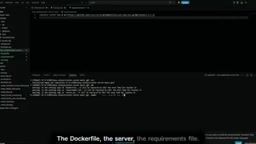
Once these files are ready, run git init and git add to stage everything, then create a public repository (public so Cloud Build can pull the code directly). One easy-to-miss detail: GitHub's default branch name is master, not main — this matters when configuring Cloud Build later.
Streamable HTTP is a transport-layer specification introduced in the MCP protocol in 2025, designed to replace the earlier SSE (Server-Sent Events) approach. It lets clients send calls via standard HTTP POST requests, while the server can return results either in streaming or non-streaming fashion — balancing real-time responsiveness with broad compatibility. This transport is a natural fit for cloud deployment: containers only need to expose a standard HTTP port, with no persistent connections to maintain, and load balancers or reverse proxies can handle traffic transparently. In contrast, the earlier stdio (standard input/output) transport required the client and server processes to run on the same machine — which is exactly why local MCP servers can't be accessed remotely. Since CrewAI currently only supports Streamable HTTP, the wrapping layer in server.py is the technical foundation that makes the entire cloud-based approach viable.
Deploying to Cloud Run: Branches, Memory, and Secrets
In Cloud Run, use Cloud Build to connect it to your repository so that every push automatically builds a new container image.
A few key configuration points to watch:
- Set the branch to master — this is where many people get tripped up;
- Allow public access;
- Allocate 2 GB of memory in the container settings, since the MCP server loads a significant amount of content into variables at startup.
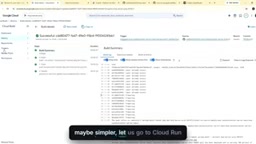
For environment variables, the tutorial uses a running Catalyst Center sandbox — you'll need to fill in the hostname, username, password, and other variables exactly as the official MCP documentation specifies. The password handling approach is worth noting: rather than storing the password as a plaintext environment variable, it's referenced as a secret via Secret Manager, selecting the latest version. This way, sensitive credentials never appear in plain text in your environment variables — a security practice that holds up in production.
Once configured, create the service and watch the build logs in real time as the image is built step by step from the Dockerfile.
Creating a Skill and Agent in CrewAI
While the cloud build is running, the tutorial shifts to the CrewAI side of the setup.
The first step is creating a Skill. Run crewai create skill in your CrewAI directory, name it catalyst center network operations, and the tool generates a skill.md file — this is where the actual instructions live. Paste in the pre-written instruction text and save it. After confirming the current org and directory are correct, publish the Skill.
Once Cloud Run finishes building, copy the generated service URL and head to CrewAI's Tools and Integrations. Add a new connection, name it catalyst MCP server, append /v1/mcp to the URL, select no authentication, and create it. Once connected, CrewAI automatically discovers a large number of tools — this is the plug-and-play capability that MCP provides.
Next, create the Agent: choose a crew agent, fill in the role, goal, and backstory, select the Skill created earlier, enable reasoning and memory, and — critically — select the catalyst MCP server connection under integration apps. The Agent is now ready.
Connecting an LLM and Orchestrating the Workflow in Crew Studio
The final piece is the LLM connection. The tutorial uses the Nemotron model, accessed via OpenRouter with a freshly generated API key (the author even sets a 1-hour expiry on the key). In CrewAI's LLM Connections, add a new connection, choose Custom OpenAI Compatible as the provider, enter the API key, and paste in the base URL copied from the Nemotron model page on OpenRouter. Then fetch models, add the model, and create the connection.
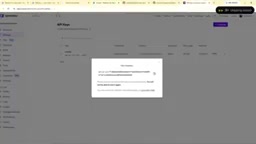
In Crew Studio, paste in the pre-written prompt and the system begins automatically constructing a workflow on the canvas. The generated flow includes a Router that routes user requests to three types of Catalyst Center automation tasks: read only, troubleshoot, and change — then returns the result.
One thing that requires manual adjustment: the default LLM generated is a GPT model. You'll need to switch every node to Nemotron and set the maximum execution time to unlimited to prevent long-running tasks from being cut off mid-execution.
Nemotron is a large language model series developed by NVIDIA based on the Llama architecture. Nemotron Ultra (~253B parameters) performs particularly well on reasoning, code generation, and tool-calling tasks, making it well-suited for Agent scenarios requiring multi-step planning. OpenRouter is an aggregator service that sits in front of APIs from multiple model providers — developers register once and access dozens of models including Nemotron, Claude, and Gemini through a unified OpenAI-compatible interface. Spending limits and key expiration times can be configured on demand, making it ideal for managing API access risk in production environments. The tutorial uses "Custom OpenAI Compatible" as the provider type because most non-OpenAI models now expose interfaces compatible with the OpenAI Chat Completions API format, allowing frameworks like CrewAI to call any compatible model through the same code path.
Live Test: Listing All Network Devices with One Sentence
With everything in place, the author enters a real task: "list all the network devices in catalyst center".
The traces panel gives a clear view of the Agent's complete decision chain: it analyzes the request, correctly identifies this as a read-only operation, then issues an MCP call visible in the metrics and log area, discovers the devices, and returns the result.
The final output is a structured device inventory — four switches, each with its IP address, make and model, and iOS version. The entire flow, from natural language input to precise network data output, validates the viability of the approach.
What This Architecture Is Worth
The real value of this tutorial isn't in any single step — it's in demonstrating a reusable, production-grade architectural pattern: use Docker + Cloud Run to turn any MCP tool into an HTTP service accessible from anywhere, then use CrewAI to orchestrate it into a multi-Agent workflow with routing, reasoning, and memory.
Several technical choices are particularly worth borrowing: using Secret Manager for sensitive credentials, using a Router to handle read/write/troubleshoot operations at separate tiers (critical in real network operations, where change isolation matters enormously), and using OpenRouter to flexibly swap in non-OpenAI models. For teams looking to genuinely connect AI Agents to enterprise infrastructure, this is a high-density, actionable blueprint.
Related articles

Amphibious Transforming Drone: Beyond 100x Power Savings, What Are the Real Needs?
Is the amphibious transforming drone just a gimmick? Starting from the 100x power difference of the M4 Morphobot, explore real application scenarios and thesis topic ideas, analyzing boundary conditions where pure drones and pure ground robots both fail.

Warhound Raises $200 Million: Genetically Engineered "War Dogs" Paired with Anduril Gear
Warhound raises $200M, backed by Ben Lamm and Palmer Luckey, to genetically engineer dogs for military and law enforcement use and equip them with Anduril gear. This article analyzes its technology direction, funding logic, and ethical controversy.

Claude API Comes to Google Cloud: IAM Integration and SDK Access Guide
Anthropic hosts the full Claude API on Google Cloud with IAM-controlled permissions and unified billing. This guide covers the Vertex AI and Anthropic-hosted entry points, IAM role configuration, and SDK access.