Hands-On Review of AI Coding Skill Libraries: How Markdown Files Became a Productivity Superweapon

Markdown-based AI skill files transform how engineers collaborate with coding Agents.
A deep-dive hands-on review of two AI coding skill libraries—Matt Pocock's AI Skills (200K+ GitHub stars) and Lauren (potato)'s P-Stack. Key highlights include the unslopped skill for removing generic AI writing patterns, the grilling skill for structured decision interrogation, and the arena skill for parallel solution generation. The review covers how these Markdown files guide AI Agent behavior, compares both libraries' strengths, and emphasizes building your own personalized skill system rather than blindly copying configurations.
A Programming Paradigm Validated by 200K Stars
When we talk about AI coding tools, we usually think of complex plugins, code templates, or expensive subscription services. But in a recent deep-dive hands-on review, well-known tech creator Theo (t3.gg) turned the spotlight onto a set of seemingly unremarkable Markdown files.
These files come from Matt Pocock, a top creator in the TypeScript community (whom Theo playfully calls "the number one TypeScript YouTuber"). Pocock's AI Skills collection, designed for real-world engineers, has already earned over 200K stars on GitHub, placing it among the top ten most-starred projects on the entire platform.
To appreciate the weight of that number, consider that GitHub's all-time top-ten projects are typically massive community resources built over many years—freeCodeCamp (~400K stars), free-programming-books (~340K stars), and the like. The fact that a project composed entirely of plain Markdown files could break into this tier in a short period signals that demand in AI coding tools has shifted from "writing code" to a deeper methodological question: "how to collaborate with AI."
The most surprising part? These are just a bunch of simple Markdown text files. Theo admitted he was initially skeptical of the skill set and even "ignored" it for a while. But after a week of real-world use, his perspective fundamentally changed.
What Are AI Skills? How Skill Files Work
A "Skill" is essentially a Markdown file with a name and a description. An AI Agent can see the names and descriptions of all installed skills, then determines which skill is useful for the current task and proactively reads the corresponding Markdown content into its context.
This mechanism works because of the context management capabilities of modern AI coding Agents. Tools like Claude Code and Cursor Agent read specific configuration files from the project directory into their context window—the total text range a large language model can process in a single inference pass, currently 128K to 200K tokens for mainstream models. Markdown files serve as the skill carrier because they're both a human-readable plain text format and can be parsed losslessly by models. The name and description fields essentially form a lightweight Retrieval-Augmented Generation (RAG) system—the Agent first evaluates relevance based on the description, then loads the full content on demand, avoiding context pollution from loading all skills at once.
Theo made a sharp observation in the video: the "description" field shouldn't really be called a "description"—it should be called a "trigger." Its purpose isn't to accurately summarize what a skill does, but rather—like a YouTube video thumbnail—to attract the "right Agent" to click and invoke it during the "right task."
He also distinguished between two skill invocation modes:
- User-invoked: Requires manual triggering via
/commandor$command, similar to a plugin - Model-invoked: The model decides whether to activate it based on the description, used to guide the model's behavior
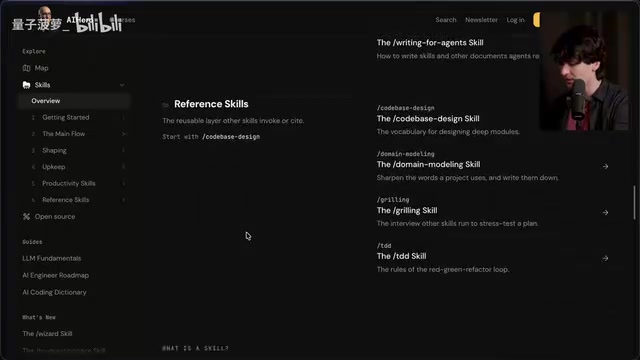
The elegance of this design lies in the fact that for skills like "diagnosing bugs," having the model automatically recognize and invoke them is most efficient; while workflow skills like "grill me" are better suited for manual triggering.
The Most Practical Skill: Unslopped — Removing the AI Aftertaste
Among all the skills, the one that truly hooked Theo came from a different skill library called P-Stack: the unslopped skill. P-Stack was built by Lauren (username: potato, now at Cursor), a former React core team member and major contributor to React Compiler.
React Compiler (originally called React Forget) is an experimental project incubated at Meta over several years, designed to automatically optimize React component re-rendering behavior at compile time, eliminating the need for developers to manually write performance optimization hooks like useMemo and useCallback. Lauren, as one of the project's key contributors, later joined Cursor—the fastest-growing IDE product in the AI coding space during 2023–2024, built on VS Code's open-source codebase with deeply integrated AI Agent capabilities as its core differentiator. Lauren's experience at Cursor gave her deep insight into how AI Agents actually behave, which explains why the P-Stack skill library excels at fine-grained Agent behavior guidance.
The unslopped skill has a straightforward goal: strip the "AI flavor" from generated text and give the writing a human voice. Its core workflow is: scan for AI cliché patterns → rewrite while preserving meaning → match the intended tone → inject "soul" → self-review.
The "flavor" referenced here has a specific term in the tech community—Slop (AI junk text). This term gained wide popularity in 2024 to describe the hollow, redundant, formulaic text that AI generates. Typical hallmarks include: overuse of em dashes, paragraphs opening with "In today's rapidly evolving landscape," vacuous summary sentences, and filler phrases like "It's worth noting that." The root cause is that large language model training data contains abundant examples of these writing patterns, and models tend to generate the statistically most probable expressions. The unslopped skill essentially uses system prompt engineering to override the model's default output tendencies, forcing it to adopt a writing style with higher information density.
It requires the AI to:
- Cut empty flattery (e.g., "pivotal moment," "testament to," "evolving landscape")
- State clearly what happened rather than piling on adjectives
- Have opinions and react to facts instead of neutrally listing pros and cons
- Vary sentence rhythm, alternating between short and long sentences
- Use first person "I" where appropriate
- Reduce overuse of em dashes
An even more critical principle: "Say what it does, not how it feels." For example, instead of saying "the database stays close at hand," say ".toSQL() returns the exact string sent to the database." If a sentence could be copied verbatim into any other project's documentation, it carries zero information for the current project and should be deleted.
Hands-On Results: Night and Day Difference in Readability
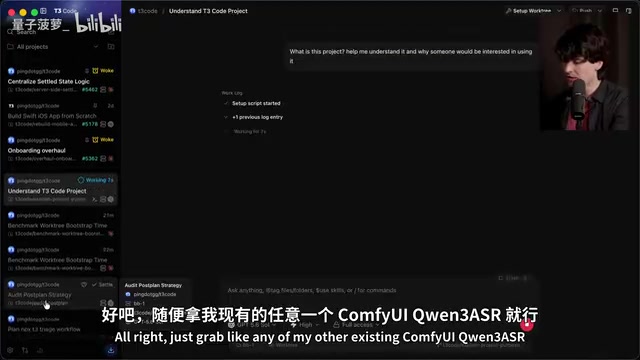
Theo ran a straightforward comparison: using the same model (Claude), he had it explain his open-source project T3 Chat both with and without unslopped installed.
The difference was dramatic. Without unslopped, the model's output was riddled with filler like "The core idea is already clear" and littered with em dashes. With unslopped applied, the response became direct, scannable, and information-dense.
"I'm already having a hard time tolerating unprocessed AI text," Theo said during the stream. "When I read that 'slop,' it actually hurts me." He even said this single skill fundamentally changed his willingness to read Agent responses.
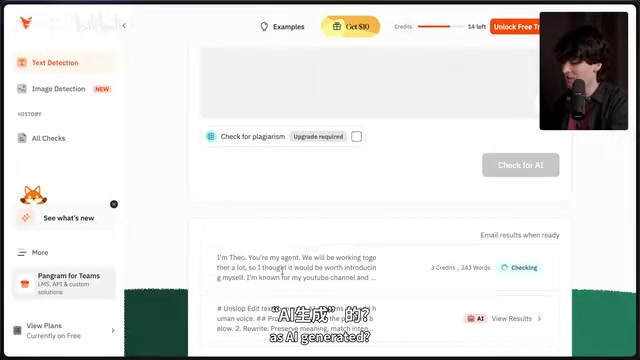
Interestingly, when Theo ran the unslopped skill file itself through an AI detection tool, it was flagged as "AI-generated"—yet it reads exceptionally smoothly, is extremely dense, and is well-written. This reinforces a key insight: when your context history contains excellent writing examples, the model is more inclined to follow excellent patterns. This directly relates to large language models' "in-context learning" capability—models learn output patterns from examples in the current conversation or context, not just from their training parameters. A skill file with exceptionally high writing quality is itself the best few-shot demonstration.
The Grilling Skill: Having AI Ruthlessly Interrogate Your Decisions
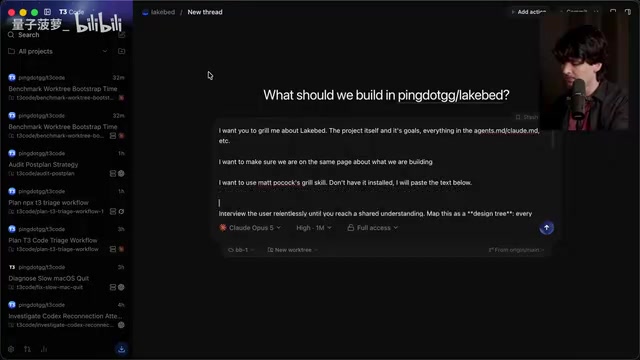
Another skill that made Theo "see the light" was Matt Pocock's grilling skill. Its purpose is to have the AI conduct a relentless "interrogation" around a planned decision or idea until both parties reach consensus on what's being built.
The core mechanism maps decisions into a "design tree" where each decision branches into dependent sub-decisions, then advances round by round through the "frontier"—the decisions whose preconditions have already been resolved. This approach shares intellectual lineage with Architecture Decision Records (ADR) in software engineering and Opportunity Solution Trees in product management. The core idea is that any complex system's design can be decomposed into a series of interdependent decision nodes, where each node's choice constrains or opens downstream options. The "frontier" concept borrows from breadth-first search in graph theory—only processing nodes whose preconditions are settled, ensuring each decision builds on established consensus. This structured interrogation approach is more efficient than freeform discussion because it avoids the common trap of debating implementation details before premises are clear.
When Theo tested it on his own Lakebed project, the AI immediately fired off a series of pointed questions: Who are the users? Who pays? What's the next real milestone? Is the capsule format a specification or just an implementation?
"These are genuinely good questions," Theo admitted. Even better, when he switched to a different model, the model spawned sub-Agents in the background to dig up more data in preparation for follow-up questions.
During the interrogation, Theo frequently disagreed with the AI's recommended answers, and precisely because of that, he clarified his project's real requirements: "Damn, this is actually going to help me. I'm kind of annoyed (because it's so useful)."
Other Notable AI Coding Skills
Theo uncovered several more highlights across both skill libraries:
Matt Pocock Skill Library Picks
- wizard: Guides humans through steps only a human can perform (e.g., accessing dashboards the Agent can't reach, executing sudo commands)
- diagnosing bugs: Automatically identifies and helps locate root causes—Theo said this had already helped him resolve a huge number of debugging issues in just a few days
- writing for agents: Teaches an Agent how to write instructions for other Agents, solving the pain point of "Agents writing terrible prompts for sub-Agents"
- wait, what: When a response is incomprehensible, restates it in plain language
P-Stack Skill Library Picks (by potato)
- arena: Spawns N parallel attempts, reviews all candidates, selects the strongest as the base, grafts advantages from other solutions, and verifies the result—Theo joked that this skill alone has already burned through hundreds of dollars in inference costs. This strategy is a variant of what the AI field calls "best-of-N sampling" or "tournament selection," where the model generates N independent solutions for the same task and the best is selected. Quality improvement is significant, but the tradeoff is linear growth in inference costs. At current mainstream model API pricing (~$3/million input tokens, ~$15/million output tokens), running 5 parallel solutions per task can cost several dollars or more per operation, and costs add up quickly over multiple iterations.
- blast radius: Before shipping a change, identifies what it might break elsewhere
- show me your work: Records every Agent decision step in TSV format (what was done, why, the rationale, the outcome) for post-hoc review
Style Differences Between the Two Libraries and Selection Advice
A recurring bit throughout the video: Theo noticed that Matt Pocock's skill files are packed with em dashes—nine on a single page, "practically one per paragraph." He half-jokingly said he wanted to fork a "de-em-dashed" version of Matt Pocock's skill library.
A more substantive comparison: Theo found P-Stack's writing more readable and its behavior more aligned with his daily workflow, so he philosophically favors potato's approach. But P-Stack's biggest issue is that it's too tightly coupled to Cursor—some skills only work within Cursor.
This limitation reflects the fragmented state of the current AI coding tool ecosystem. Different AI coding environments define their own configuration file formats and Agent behavior interfaces: Cursor uses the .cursor/rules directory for rule files, Claude Code uses the .claude/ directory, and VS Code's Copilot relies on .github/copilot-instructions.md. This fragmentation means a carefully crafted set of skill files often can't be reused across tools. The community has begun calling for standardization, but no unified specification exists yet.
Theo even called for someone to create a universal (non-Cursor-exclusive) version of P-Stack, essentially advocating for platform-agnostic skill file formats.
That said, Theo emphasized this was never an either/or situation: "Both skill libraries contain real gold, and both are worth exploring."
Key Takeaway: Don't Blindly Copy—Build Your Own Skill System
Throughout the video, Theo repeatedly emphasized his most important point: you shouldn't get anything out of blindly copying someone else's configuration.
"If you just copy-paste my codebase and tweak things, you're not a good engineer. But if you use my codebase as a reference point for learning and building your own skills, then you are."
His recommended approach:
- Let your Agent learn about both P-Stack and the Matt Pocock skill library
- Have it review your usage history to identify which skills actually fit your workflow
- Install unslopped first—so you'll actually want to read the AI's responses afterward
- Read the skill's Markdown content before installing it
- Use a dedicated repository (Theo calls it a "fleet") to manage skills across all your machines
Theo revealed that these days he opens his code editor primarily to edit Markdown files and environment variables. "This isn't even a joke anymore." It's precisely this deep engagement with skill configuration that enables him to run more parallel Agent workflows, shipping a large number of PRs in a single weekend with minimal breakage.
Don't be afraid to open your .claude and .agents directories and edit these files—once you start, you'll discover that the cool things you can do are beyond anything you imagined.
Related articles

Bilibili's Hit Dify Tutorial: A Practical Guide to Building 20+ AI Apps from Scratch
A distilled guide to Bilibili's top-rated Dify tutorial: Windows + Docker deployment, MySQL connection, five app types, model integration strategy, and publishing.

Agent Skills Beginner's Guide: From Concepts to Multi-Agent Collaboration in Practice
A comprehensive guide to Agent Skills: core concepts, components, the importance of Description, standardization, beginner learning paths, and multi-agent collaboration.

One Neuron Detects Both Cats and Cars? We Reproduced It and Found a New Explanation
The cat-car neuron reinterpreted: researcher Cammarata argues it distinguishes pointy from round, not cats from cars. We reproduced the experiment and found the new explanation holds on most inputs—but cars are the exception. The interpretability debate continues on language models.