Headroom: Seamlessly Control Your Mac from iPhone with a New Foldable Screen Twist

Headroom is a no-install, no-account, no-intermediary-server Mac remote control tool with innovative adaptation for foldable screens.
Headroom is a Mac screen-sharing client gaining attention on Product Hunt, focusing on lightness and privacy. It leverages macOS's built-in screen-sharing protocol, requiring no software installation on the Mac and no account registration; data does not pass through third-party servers, and all connections are established directly between devices. Its biggest highlight is the adaptation for the iPhone Duo's foldable screen: when half-folded, the top half shows the Mac desktop while the bottom half becomes a virtual keyboard and trackpad, with the layout dynamically adjusting to the folding angle. This design simplifies the usage flow and reduces privacy risks, but also has limitations—cross-network use requires manual port forwarding or NAT traversal configuration, which is not very user-friendly for non-technical users, and the lack of an account system means settings cannot be synced across devices. Overall, Headroom provides a new approach to remote control with its lightweight, privacy-friendly philosophy, especially suitable for tech enthusiasts with foldable devices.
Controlling a Mac remotely from a mobile device isn't a new concept, but Headroom offers a lighter, more privacy-focused solution. This product, which received 70 upvotes on Product Hunt, focuses on a screen-sharing experience that requires "no installation, no account, no intermediary server," and is specially adapted for the iPhone Duo's foldable screen—when the folding angle changes, the interface automatically adjusts, for example, when half-folded, the top half shows the Mac screen while the bottom half becomes a keyboard.
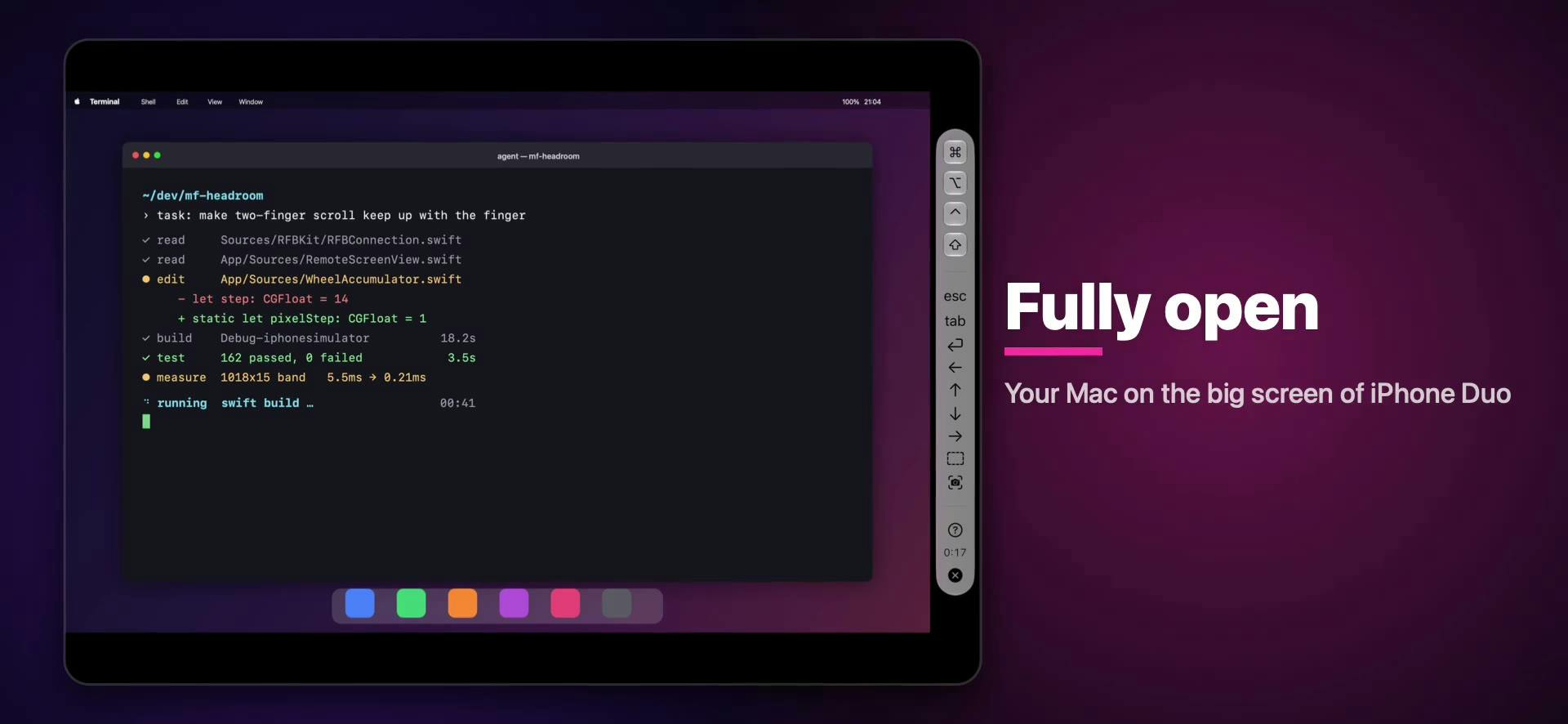
Lightweight Remote Access: Screen Sharing Without Installation
The core of Headroom is a Mac screen-sharing client that leverages macOS's built-in screen-sharing protocol, so users don't need to install any additional software on their Mac. This means you can connect to and control your Mac directly from an iPhone, iPad, or even another Mac, saving the hassle of configuring a server. According to developer Haru, the entire process requires no account creation, data doesn't pass through third-party servers, and all connections are established directly between devices. This design simplifies the usage flow and reduces the risk of privacy leaks.
For users who frequently need to operate their Mac remotely, this undoubtedly provides convenience. For example, you can use your iPhone to urgently handle documents while out, or use your iPad as an extended screen for your Mac. However, note that this feature relies on a local network or proper port forwarding settings, and cross-network use may require some networking knowledge.
macOS's built-in screen-sharing protocol is based on VNC (Virtual Network Computing) technology, specifically using Apple's own variant of the ARD (Apple Remote Desktop) protocol. VNC is a remote framebuffer protocol where the client connects to the server via TCP port 5900, transmitting screen image updates and keyboard/mouse events. macOS's built-in screen-sharing service uses port 5900 by default and supports password authentication or Apple ID authentication. Since this service is already built into the system, users don't need to install additional server-side software; Headroom as a client can directly invoke this protocol to establish a connection. Note that macOS screen sharing is by default only available on the local network or with port forwarding enabled; cross-public-network access requires manual router port mapping configuration or other tunneling tools.
NAT (Network Address Translation) and firewalls are the main obstacles to cross-network remote connections. Most home and office networks use NAT, sharing a single public IP address among multiple devices, so external devices cannot directly connect to internal devices via internal IP addresses. To traverse NAT, you typically need to configure port forwarding (mapping the router's public port to the internal Mac's port 5900), or use protocols like UPnP or STUN to assist in establishing connections. Firewalls may also directly block unauthorized inbound connections. Headroom does not rely on intermediary servers, so it cannot automatically perform NAT traversal; users need some basic networking knowledge to manually set up port forwarding or use VPN solutions. This is also the inherent cost of the "serverless" design.
Foldable Screen Adaptation: The Unique Experience of iPhone Duo
The most striking feature of Headroom is its optimization for the iPhone Duo's foldable screen. When the device is in a half-folded state, the app intelligently splits the screen into two parts: the top half shows the Mac desktop, and the bottom half becomes a virtual keyboard and trackpad. This layout fully utilizes the foldable screen's form factor, making input more intuitive. As the folding angle changes, the interface also dynamically adjusts—for example, it may return to full-screen display when fully unfolded, and switch to compact mode when folded.
This innovation not only demonstrates the potential of foldable devices but also provides new interaction ideas for remote control applications. Although the iPhone Duo is not yet widespread, Headroom's attempt undoubtedly offers a reference for future mobile office scenarios.
The half-folded form of foldable devices is often called "tent mode" or "laptop mode," whose core feature is that the device can stay at multiple angles, splitting the same screen into two functional areas. In remote desktop scenarios, this form is naturally suited to separating display and input: the top half serves as a monitor, and the bottom half as a touch input interface. Unlike traditional split-screen mode, the split boundary of a foldable screen can dynamically change with the hinge angle, so applications need to monitor folding angle sensor data in real time and adjust the layout accordingly. This requires developers to adopt an adaptive layout architecture rather than a fixed split ratio; Headroom's adaptation approach is precisely an exploration of this interaction paradigm.
Balancing Privacy and Convenience
In the remote control software market, many products require users to register accounts or relay data through cloud servers, but Headroom goes the opposite way, emphasizing a "no account, no server" philosophy. This reflects a focus on user privacy: your data is only transmitted between devices and cannot be intercepted by third parties. At the same time, the no-installation feature also reduces the risk of software conflicts on the Mac and maintenance costs.
However, this design also has limitations. For example, it may not be able to traverse complex NAT or firewalls, and setting up connections may be somewhat complicated for non-technical users. Additionally, the lack of an account system means settings cannot be synced across devices; each device must be configured separately.
Conclusion: A New Remote Control Option Worth Watching
With its lightweight and privacy-friendly features, Headroom has opened a new path in the remote control field. Especially for users with foldable devices, it offers a unique interactive experience. Although its features are currently relatively basic and mainly aimed at tech enthusiasts, its design philosophy is commendable. If you need a simple, straightforward Mac remote control tool, keep an eye on Headroom's future development.
One-line Summary
Headroom is a Mac remote control tool that requires no installation, no account, and no intermediary server, with innovative adaptation for foldable screens.
Paragraph Summary
Headroom is a Mac screen-sharing client that gained attention on Product Hunt, focusing on lightness and privacy. It leverages macOS's built-in screen-sharing protocol, requiring no software installation on the Mac and no account registration; data does not pass through third-party servers, and all connections are established directly between devices. Its biggest highlight is the adaptation for the iPhone Duo's foldable screen: when half-folded, the top half shows the Mac desktop while the bottom half becomes a virtual keyboard and trackpad, with the layout dynamically adjusting to the folding angle. This design simplifies the usage flow and reduces privacy risks, but also has limitations—cross-network use requires manual port forwarding or NAT traversal configuration, which is not very user-friendly for non-technical users, and the lack of an account system means settings cannot be synced across devices. Overall, Headroom provides a new approach to remote control with its lightweight, privacy-friendly philosophy, especially suitable for tech enthusiasts with foldable devices.
Related articles
FlyEnv Plugin Review: Visually Running llama.cpp and Managing GGUF Models
FlyEnv launches the official llama.cpp plugin with side-by-side Metal runtime management, public GGUF repository indexing with file type labels, and visual configuration of context, threads, and GPU layers—saving templates and speculative decoding with each model for one-click local LLM inference.
How Can Frontend Developers Advance into AI Agent Development? Deconstructing System-Level Agent Architecture from OpenClaw
Starting from the OpenClaw demo in a Bilibili open class, this article breaks down the three-layer architecture and universal formula of system-level AI agents, and analyzes the path for frontend developers to enter agent development based on TypeScript, including plugin-based design and security/memory layer challenges, with an interview answer framework.

WorkBuddy in Action: How AI Agents Automate Batch File Conversion and Archiving
Bilibili creator Teacher Shanyao tests WorkBuddy vs. Doubao on batch file conversion, showing how AI Agents move from "giving solutions" to "direct execution," with a full workflow and credit cost reference.