Hermes Agent Practical Guide: A Complete Walkthrough for AI Engineering

Hermes Agent bridges large model capabilities with automated engineering workflows for real-world developer use cases.
Hermes Agent is an AI Agent tool built for engineering scenarios, emphasizing executability, integrability, and automation — far beyond a simple chat assistant. This guide covers its full learning path: understanding the overall architecture, setting up the environment, integrating with Feishu, configuring MCP services, and building real projects including an AI news bot, Python library integration, automated tech blog setup, and scheduled code review.
Hermes Agent has emerged as a widely recognized AI engineering tool, steadily becoming a go-to assistant for developers working on automation tasks, code review, news delivery, and more. This article draws from a structured tutorial series to map out a complete learning path — from the basics to real-world deployment — helping first-time users quickly build a solid understanding of the tool.
What Is Hermes Agent
Hermes Agent is an AI Agent tool designed for engineering scenarios. Its core value lies in embedding large model capabilities directly into real development and collaboration workflows. It's not just a conversational assistant — it emphasizes being executable, integrable, and automatable.
Looking at the tutorial's structure, the first step in learning Hermes is laying the groundwork: understanding what it can do and what kinds of problems it's suited for. For users accustomed to general-purpose chat tools, Hermes feels more like an engineering framework — one that can proactively invoke tools, execute commands, and connect to external services.
Understanding Hermes's Overall Architecture
Before diving into hands-on work, getting a clear picture of Hermes's overall architecture is essential. Without a solid grasp of its component modules and how they work together, installation and development will amount to nothing more than copying commands.

At the architecture level, key areas to understand include: the Agent's core execution logic, how it interacts via CLI and desktop interfaces, and its interface capabilities for connecting to external services. Once you understand these relationships, it becomes clear why Hermes can function both as a command-line tool and as a Python library integrated into a project — its design was built from the start to support multiple integration modes.
The fundamental difference between an AI Agent and a standard conversational AI lies in autonomous action. A regular language model simply generates text, whereas an Agent introduces a "perceive–plan–execute" loop: it can call external tools (such as search engines, code interpreters, or API endpoints), adjust its next steps based on execution results, and iterate until the goal is achieved. This architecture is commonly known as the ReAct (Reasoning + Acting) paradigm — alternating between reasoning and action. Hermes is built on this foundation. Its core execution logic includes: receiving a goal instruction, breaking the task into executable steps, invoking tools or sub-processes step by step, aggregating results, and determining whether the task is complete. Understanding this loop helps explain why the "behavior rules" defined in configuration files matter so much — they directly influence how the Agent makes decisions during the planning phase.
Setting Up the Environment and Common Commands
The practical starting point is installation and configuration. The tutorial covers Hermes's installation process, usage of common commands, and how to install the desktop panel.
For beginners, it's recommended to first get comfortable with command-line basics before moving on to the desktop panel. The CLI gives you a more transparent view of what's happening at each step, while the desktop panel provides a friendlier visual experience for day-to-day use. Using both together ensures you maintain control over the underlying logic without sacrificing efficiency.
Additionally, configuration files (referred to in the tutorial as "slim MD / config MD" style files) are central to customizing Hermes's behavior. Through these files, you can define the Agent's behavioral rules and specify which capabilities to enable — this is the dividing line between simply using Hermes and truly using it well.
Real-World Applications in Work Scenarios
Hermes's true value shows up in real deployment scenarios. The tutorial demonstrates several typical use cases spanning collaboration, automation, and development integration.

Feishu Integration: Connecting Hermes to Feishu allows AI capabilities to be invoked directly within group chats or workflows, seamlessly merging intelligent assistance with team collaboration. On top of this, you can build a custom skill system that lets the Agent handle specific tasks.
Configuring MCP Services: Through MCP (Model Context Protocol) service configuration, Hermes can connect to a broader range of external tools and data sources, extending its capability boundaries. This is a critical piece of the current Agent ecosystem and a direct reflection of Hermes's engineering-first positioning.
MCP (Model Context Protocol) is an open standard proposed by Anthropic in late 2024, designed to establish a unified communication interface between large models and external tools or data sources. Previously, every AI application that needed to connect to a database, file system, or third-party API had to build a custom integration layer for each tool — an approach with high maintenance overhead. MCP solves this through a standardized Server/Client architecture: developers only need to implement a compliant MCP Server, and any MCP-compatible Agent (like Hermes) can automatically discover and invoke the tools and resources it provides. This means Hermes's capabilities can expand as the number of MCP Servers in the ecosystem grows, without requiring changes to the Agent's core logic. The community already offers a wide range of open-source MCP Servers covering GitHub, database queries, web scraping, file operations, and more.
Hands-On Projects: From News Bots to Automated Development
The most valuable part of the tutorial is its practical project walkthroughs — these cases best illustrate Hermes's engineering potential.
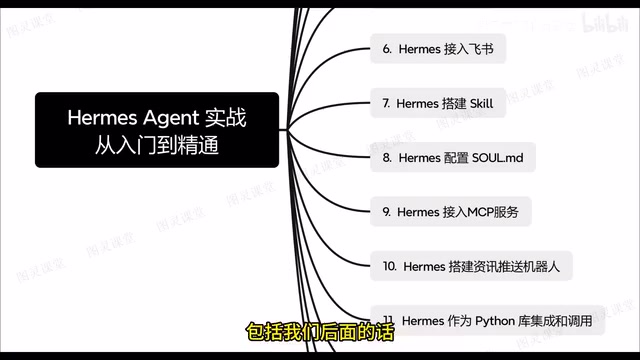
AI News Push Bot: Automatically delivers real-time AI news highlights to a Feishu group or designated channel on a scheduled basis. This is a classic combination of "scheduled task + content scraping + message distribution," showcasing Hermes's ability to handle automated workflows.
Integration as a Python Library: Hermes can be embedded into existing projects as a Python library and called directly. This means developers aren't limited to using it as a standalone tool — Agent capabilities can be woven into their own systems for significantly greater flexibility.
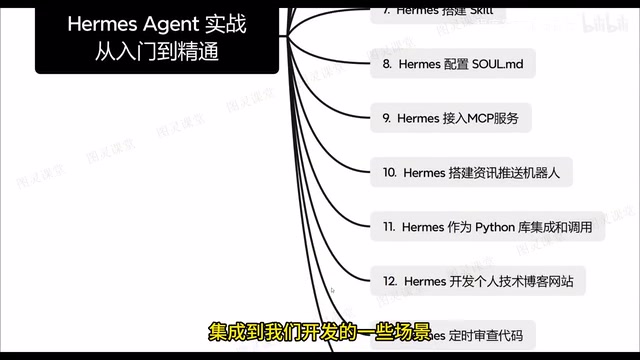
Fully Automated Tech Blog Setup: Using Hermes to automatically develop a personal tech blog — from content to deployment — in a closed loop. This demonstrates the Agent's potential for end-to-end development tasks.
Scheduled Code Review: Having Hermes periodically review project code and provide improvement suggestions. For a team, this is essentially a round-the-clock code quality assistant that continuously surfaces issues throughout the development cycle.
Tips and Learning Recommendations
The tutorial wraps up with practical usage tips. For developers who want to truly master this tool, the recommended learning sequence is: architecture first, then commands, then hands-on practice. Start by understanding the overall design, then get familiar with commands and configuration, and finally reinforce your knowledge through real projects.
A note of caution: this article is based on a single tutorial source. For specific commands, configuration details, and version-specific features, always refer to the official documentation and your actual tool version. Agent tools like Hermes iterate quickly, so it's worth cross-referencing the latest resources as you work.
Overall, Hermes Agent bridges AI capabilities with engineering development workflows. Whether you're tackling automation tasks, team collaboration, or code review, it provides practical, deployable solutions. For developers who want to put large models to work in real productivity contexts, it's well worth investing the time to learn systematically.
Related articles

Amphibious Transforming Drone: Beyond 100x Power Savings, What Are the Real Needs?
Is the amphibious transforming drone just a gimmick? Starting from the 100x power difference of the M4 Morphobot, explore real application scenarios and thesis topic ideas, analyzing boundary conditions where pure drones and pure ground robots both fail.

Warhound Raises $200 Million: Genetically Engineered "War Dogs" Paired with Anduril Gear
Warhound raises $200M, backed by Ben Lamm and Palmer Luckey, to genetically engineer dogs for military and law enforcement use and equip them with Anduril gear. This article analyzes its technology direction, funding logic, and ethical controversy.

Claude API Comes to Google Cloud: IAM Integration and SDK Access Guide
Anthropic hosts the full Claude API on Google Cloud with IAM-controlled permissions and unified billing. This guide covers the Vertex AI and Anthropic-hosted entry points, IAM role configuration, and SDK access.