Home Server Setup Guide: Self-Hosted Services Worth Deploying

A guide to self-hosted services worth deploying on your home server, from media to automation.
This guide explores the world of home server self-hosting, covering essential services like Jellyfin for media, Immich for photos, Nextcloud for file sync, Matrix for encrypted communication, and the *arr suite for download automation. It also provides practical advice for beginners on incremental deployment, the 3-2-1 backup strategy, and leveraging community resources.
Starting from Scratch: A Self-Hosting Enthusiast's Beginning
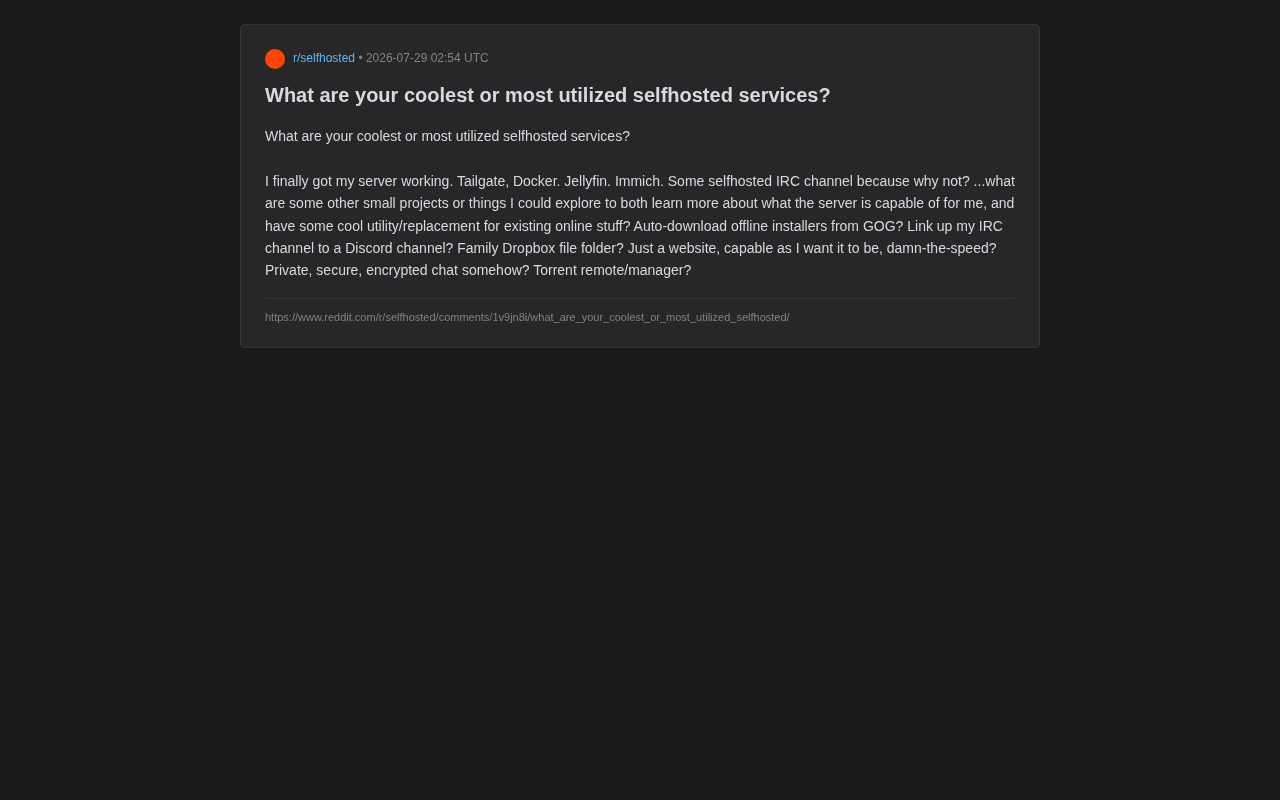
In Reddit's selfhosted community, a user shared their newly set up home server and asked the community: what other practical self-hosted services are worth exploring? This seemingly simple question touches on the increasingly popular topic of "digital sovereignty" — running services on hardware you control to break free from dependence on commercial cloud services.
This user's starting setup is quite representative: using Tailscale (originally written as "Tailgate" in the post, likely a typo) to build a secure virtual network, Docker for containerized deployment, Jellyfin as a media server, Immich for photo management, and even a self-hosted IRC channel — "just because why not."
Tailscale is a zero-configuration virtual private network service built on the WireGuard protocol. WireGuard is known for its lean codebase (around 4,000 lines), high performance, and strong encryption. Tailscale builds on this foundation by adding identity authentication, NAT traversal, and automatic key distribution, allowing users to establish encrypted connections between devices across different network environments without manually configuring firewalls or port forwarding. Even in double NAT environments, its DERP relay servers ensure devices can communicate with each other.
This combination already covers several core self-hosting scenarios: network connectivity, container management, media entertainment, and data backup. For someone just getting started, this is a remarkably solid foundation.
The Core Value of Self-Hosting: Replacement and Control
Why More People Are Choosing to Self-Host
The rise of self-hosting is no accident. As subscription-based commercial software becomes increasingly expensive and data privacy incidents grow more frequent, more and more tech enthusiasts are seriously asking themselves: why should I hand over my photos, files, and viewing history to a third-party company?
The core value of self-hosting manifests in three areas:
- Data control: All data is stored on your own hardware, unaffected by commercial companies' policy changes, price hikes, or service shutdowns.
- Privacy protection: Photo management tools like Immich can fully replace Google Photos without worrying about your photos being used to train AI models or target advertisements.
- Learning value: The process of setting up and maintaining services is itself an excellent learning opportunity, covering networking, Linux, containers, databases, and much more.
Self-Hosting Trends Through the Lens of Tool Selection
The tools mentioned in the original post are almost all mainstream choices in today's self-hosting community. Jellyfin, as an open-source media server, is a fully open-source solution (GPL-2.0 license) forked from the Emby project, serving as a free alternative to Plex. It supports virtually all mainstream video, audio, and image formats, provides hardware transcoding capabilities through VAAPI, NVENC, QSV, and other methods, and can transcode media formats in real-time based on client bandwidth and decoding capabilities. Unlike Plex, Jellyfin charges no fees, requires no third-party account creation to access full functionality, and stores all metadata locally.
Immich has become the star project in the self-hosted photo management space thanks to its user experience that closely mirrors Google Photos. This platform, developed with TypeScript/Dart, features a backend built on the NestJS framework, mobile apps implemented with Flutter for cross-platform support, and integrated machine learning capabilities based on CLIP and facial recognition models, supporting intelligent photo search, person classification, and map browsing. Its architecture separates the API service, machine learning inference, and background task processing into independent containers, using PostgreSQL for metadata storage and Redis for task queue handling. The project has earned over 50,000 stars on GitHub and is one of the fastest-growing self-hosted projects.
These tools share common traits: open-source, active community, and Docker-friendly. Docker, as an OS-level virtualization technology, achieves process isolation through the Linux kernel's cgroups and namespace mechanisms. Each service is encapsulated in an independent container with its own filesystem and network stack, ensuring services don't interfere with each other. Combined with Docker Compose, users can define the configuration, networking, and storage volumes for multiple services in a single YAML file, enabling "one-click deployment" and significantly lowering the technical barrier to self-hosting.
Self-Hosted Service Directions Worth Exploring
In response to the original post's question and drawing from common community recommendations, here are several directions worth exploring, organized by use case.
File Sync and Private Cloud
The user mentioned wanting a "family Dropbox folder" — one of the most common self-hosting needs. Recommended solutions include:
- Nextcloud: The most comprehensive private cloud platform, supporting file sync, calendars, contacts, collaborative documents, and more — essentially a self-hosted Google Workspace.
- Syncthing: A lightweight peer-to-peer file synchronization tool that requires no central server, making it especially suitable for real-time sync across multiple devices.
Encrypted Communication and Message Bridging
The original post mentioned wanting "private, secure, encrypted chat" and connecting an IRC channel to Discord. Relevant options include:
- Matrix/Synapse: A decentralized encrypted communication protocol that allows you to self-host a server with end-to-end encryption support, making it a strong alternative to Discord and Slack. Matrix is an open standard maintained by the Matrix.org Foundation. Its core design philosophy is "federation" — similar to email systems, users on different servers can communicate with each other, and anyone can run their own server node. The protocol natively supports end-to-end encryption (based on the Olm/Megolm double ratchet algorithm, similar to the Signal protocol), message history synchronization, and rich media transmission. Synapse is the reference server implementation (written in Python), while Dendrite is the next-generation Go implementation with lower memory usage, suitable for resource-limited home servers. Matrix has been adopted by multiple government agencies and enterprises as secure communication infrastructure.
- Matterbridge: A message bridging tool that can interconnect messages across IRC, Discord, Matrix, Telegram, and other platforms — perfectly addressing the "IRC to Discord" need.
Download Management and Automation
The user's envisioned needs like "automatically downloading offline installers from GOG" and "remote torrent management" fall under the automated download category:
- qBittorrent + Web UI: A mainstream BT client with a built-in web management interface that supports remote operations.
- *The arr suite (Sonarr, Radarr, Prowlarr, etc.): An automated media resource management toolkit that can automatically search, download, and organize media files, integrating seamlessly with Jellyfin. This toolset (commonly called the Servarr ecosystem) works together to form a complete automation system: Sonarr handles TV shows, Radarr handles movies, Lidarr handles music, and Readarr handles ebooks. Prowlarr provides unified indexer management (resource search sources), automatically searching, selecting, and downloading content based on user-defined quality profiles. Once complete, files are automatically renamed, categorized, and the media server is notified to refresh its library. The entire workflow forms a closed loop: users simply add the content they want through the web interface, and the system automatically handles everything from search to library integration. These tools are all developed in C# and communicate with each other via REST APIs.
Network Management and Ad Blocking
Since you're already using Tailscale, you can further optimize your home network experience:
- Nginx Proxy Manager: Visual management of reverse proxies and SSL certificates, making it easy to expose services externally.
- Pi-hole / AdGuard Home: Network-wide ad and tracker blocking, providing an ad-free browsing experience for all devices in your home.
Practical Tips for Self-Hosting Beginners
Take It Step by Step — Avoid Over-Stacking
The most common pitfall in self-hosting is trying to do too much. Deploying dozens of services at once often leads to maintenance difficulties, resource exhaustion, and even security vulnerabilities. Start with one or two services you'll actually use, and expand gradually once they're running stably. The original poster's Jellyfin + Immich combination is a great example — both are practical services with high usage frequency.
Prioritize Backup and Security
Keeping data in your own hands means you are fully responsible for data security. Be sure to establish a reliable backup strategy (such as the 3-2-1 backup rule: 3 copies, 2 types of media, 1 offsite), and handle externally exposed services with caution.
The 3-2-1 backup rule was originally proposed by photographer Peter Krogh in his book The DAM Book: Digital Asset Management for Photographers, and has since become the gold standard in data protection. Specifically, it means: keep at least 3 copies of your data (1 production copy + 2 backups), store them on at least 2 different media types (e.g., local hard drive + NAS, or SSD + tape), with at least 1 copy stored offsite (at a physically different geographic location to protect against disasters like fire or theft). In self-hosting scenarios, common implementations include: a local RAID array as primary storage, periodic snapshots to external hard drives, and encrypted backups to remote object storage (such as Backblaze B2) using tools like Restic or BorgBackup.
Using a networking solution like Tailscale allows you to access your services remotely without exposing public ports, significantly reducing the risk of attacks.
Leverage Community Resources
Reddit's selfhosted community, the Awesome-Selfhosted project list on GitHub, and each tool's official documentation are all invaluable learning resources. When you run into problems, you can often find ready-made solutions and deployment tutorials in the community.
Final Thoughts
This Reddit user's question reveals the true appeal of self-hosting: it's both a set of practical tools and an open-ended space full of possibilities. Whether you're replacing commercial cloud services, protecting personal privacy, or simply learning and tinkering, a home server delivers a unique sense of accomplishment. For hobbyists just starting out, the most important thing isn't how many services you deploy at once, but finding applications that truly fit your needs and gradually mastering the full capabilities of a home server through hands-on practice.
Related articles

LynnReal-Omni: 32B Unified Video Diffusion Model Goes Open Source with Multi-Task Coverage in Four Steps
LynnReal-Omni is a 32B unified video diffusion model on MiniMax H3, covering text-to-video, pose guidance, style transfer, restoration in 4 steps. Flash version generates 540p video in 377ms on one H100.

Anthropic Co-Founder: AI 'Kill Switch' May Need to Be Mandatory by Law
Anthropic's co-founder tells the BBC that AI 'kill switches' may need to be legally mandated. We analyze the industry logic, technical challenges, and the tension between regulation and innovation.

The AI Data Center Boom Is Colliding With Cities Scarred by Heavy Industry
The AI data center boom is clashing with post-industrial communities. Philadelphia's case reveals structural conflicts between AI growth, energy use, water, and environmental justice.