How Do Cursor, Devin, TRAE, and Copilot Compare on Price? Calculate Your Credits Before You Compare Monthly Fees

All four AI coding tools have shifted to credit-based billing, so compare credits before monthly fees.
The article cross-checks official pricing for 19 individual tiers across Cursor, Devin Desktop, TRAE, and Copilot, noting that monthly fee numbers no longer allow direct comparison—what determines the bill is how credits are calculated, whether third-party models are included, and how overages are billed. It breaks down each vendor: Cursor's $8 Plus only uses Grok with third-party models requiring the $30 Pro tier plus API payment; Copilot Pro offers multiple models at $10 without switching editors; Devin's free version has unlimited completions but opaque credits; TRAE is easiest to calculate but old prices no longer apply. It also offers a same-task three-run testing process, spending caps, monthly reviews, team base-fee dilution analysis, and four common pitfalls.
Title
How Do Cursor, Devin, TRAE, and Copilot Compare on Price? Calculate Your Credits Before You Compare Monthly Fees
Meta Description
A side-by-side comparison of individual and team pricing for Cursor, Devin Desktop, TRAE, and Copilot, breaking down credit rules, whether third-party models are included in the monthly fee, overage billing, and practical methods for measuring consumption before paying, setting spending caps, and choosing the right tool.
Article Content
Pricing for AI coding tools has collectively shifted recently: from charging per request to including a usage credit in the monthly fee and then deducting at each model's per-token rate. According to a side-by-side comparison by a Bilibili creator, laying out the pricing pages of Cursor, Devin Desktop, TRAE, and Copilot and checking them item by item actually makes it harder to tell which is cheaper—because what determines your final bill has never been the monthly fee number, but how credits are calculated, whether third-party models are included in the monthly fee, and how overages are billed.
The Full Pricing Picture: 19 Tiers Squeezed Into One Table
The four vendors' individual plans add up to 19 tiers. Cursor uses the X subscription, with 5 tiers from free to $200; Devin Desktop's free version offers unlimited Tab completions, with paid plans starting at $20; TRAE's monthly fee corresponds one-to-one with dollar credits; Copilot's $10 Pro tier provides 1,500 AI credits, officially stated as worth $15. All figures were verified against the official pricing pages, in USD excluding tax.
Before breaking down each vendor, three intuitions need correcting. Two vendors with the same monthly fee may differ severalfold in how long you can actually use them, because the credit rules are completely different; the value gap between free versions is also large—Copilot offers 2,000 completions per month, while Devin Desktop's Tab completions and inline edits are completely unlimited; TRAE's monthly fee maps one-to-one to dollar credits, making it the easiest of the four to calculate.
Breaking Down Each Vendor: Where the Money Actually Goes
Copilot: Lowest Barrier, Most Models
Copilot's free version offers 2,000 completions per month. The $10 Pro tier gives 1,500 AI credits, officially stated as worth $15, of which $5 is flexible credit that the vendor notes may be adjusted. The $39 Pro+ tier has total credits of 70 and unlocks frontier models; the $100 Max tier has total credits of 200. Team tiers will be calculated separately later.
It has two advantages: its model list covers multiple major vendors, with the pricing page listing several cloud and open-source models; and you don't need to switch editors—VS Code, JetBrains, and Xcode can all connect directly. The cost is that credits are deducted uniformly, with Agent mode, code review, cloud tasks, and the command line all sharing the same credit pool.
Cursor: Most Complex Entitlements, and $8 Is Not the Old Pro
Cursor now has a 5-tier structure under the X subscription. The free version has limited uses; the $8 Plus tier can only use Grok within Cursor—this is the most easily overlooked point; the $30 Pro tier offers 4x the usage of Plus, with third-party models only available from this tier; the $100 Super tier offers 15x usage; the $200 Ultra tier offers 50x usage.
There are three pitfalls here. The $8 Plus is not the old Cursor Pro; to use mainstream third-party models you need to top up separately at API list prices, which doesn't draw on the monthly credit; cloud agents and code hosting are capabilities only available from the Pro tier; and the vendor advises canceling at least 24 hours before renewal, otherwise you'll be charged for an extra month. Judging by the entitlement structure, the X subscription bundles several previously separate memberships, which the vendor says were worth a combined $90 per month.
Devin Desktop: Most Generous Completions, Least Transparent Credits
Devin Desktop is the former WinSurf, and the domain now redirects. The free version offers lightweight Agent credits, with unlimited Tab completions; the $20 Pro tier unlocks all models and also includes free use of its own models and cloud Devin; the team version is an $80 base fee plus $40 per person.
Two opaque points to watch: credits refresh automatically daily and weekly, with overages billed at API prices; and the vendor hasn't published specific credit numbers for each tier, so you can only track consumption yourself. The team version has an $80 base fee, so per-person costs are noticeably higher when the team is small.
TRAE: Easiest to Calculate, but Old Prices No Longer Apply
TRAE's international version now has 4 tiers. The free version can only use Auto mode, with credits granted one-time and not reset monthly; the $20 Pro tier includes $20 of usage and 10 concurrent tasks; the $60 Pro+ tier offers 15 concurrent tasks; the $200 Ultra tier offers 20 concurrent tasks. Annual billing saves about 17%. Paid tiers have unlimited completions.
Two things to note: the original $3 lightweight tier has been discontinued, and many earlier articles still list Pro at $10—that's the old price; this comparison covers the international version, as the domestic version couldn't be opened at the time of checking, and the two pricing systems are not interchangeable.
Three Common Billing Models for AI Coding Tools
To understand the pricing differences among the four vendors, you first need to distinguish three mainstream billing methods. The first is per request: each request to the model deducts one quota unit—simple and intuitive, but a single Agent task may call the model dozens of times in a row, so request counts can't reflect real compute consumption. The second is per token: every input and output token is charged at the model's unit price—closest to real cost, but users find it hard to estimate how much a task will consume. The third is usage included in subscription + pay-as-you-go overage: the monthly fee includes a credit (expressed in dollars, credits, or multiples), deducted within the credit at each model's per-token rate, with overages billed at API list prices or through add-on packs. All four vendors have now collectively shifted to the third model, which is why simply comparing monthly fee numbers no longer works—the same $20 can come with completely different credit units, refresh cycles, and overage rules.
Why Laying Out Four Pricing Pages Still Doesn't Show Which Is Cheaper
Because the billing unit has changed. A single Agent task may call the model dozens of times in a row, and per-request billing simply can't reflect real cost. Credit consumption depends on five variables: which model you use, where unit prices can differ by an order of magnitude; context length, where the larger the codebase, the faster the deductions; cache hit rate; retries and timeouts, where one loop equals running it twice; and task decomposition granularity, where splitting the same requirement into several questions results in completely different consumption.
Here's an example estimate: assume each person has the Agent complete four medium tasks per workday, with each task consuming an average of $0.2 in credits—that's $17.6 over 22 workdays a month. This is an illustrative calculation, not official data. By this number, TRAE Pro's $20 is just enough, while Copilot Pro's $15 is slightly tight.
There's another factor that determines final spending more than the monthly fee number: whether the model you want to use is included in the monthly credit or requires separate payment at API rates. Copilot and Devin include third-party models in their monthly fees with deductions against credits; TRAE uses Auto mode to pick models automatically, also deducting against dollar credits; only Cursor is the exception—third-party models are only available from the Pro tier up, and require separate payment at API list prices.
How Tokens, Context Length, and Cache Hit Rate Affect Your Bill
A token is the smallest unit of text a model processes, roughly corresponding to part of an English word or one Chinese character. The tokens consumed by an Agent task include the system prompt, conversation history, file contents read, tool call return results, and the code the model generates—with input tokens usually far exceeding output. Context length refers to the total number of tokens a model can see at once; the larger the codebase and the longer the conversation, the more context each request carries and the faster credits are deducted. Cache hit rate refers to the proportion of repeated content (such as fixed system prompts or unchanged files) that the provider caches and reuses—the higher the hit rate, the less you're actually billed. In addition, retries and timeouts cause the same task to call the model repeatedly, where one loop equals running it twice; the finer the task decomposition, the more accumulated context and requests. These five variables together determine how fast credits are consumed, and they're the fundamental reason the same task produces wildly different bills across different tools.
Figure Out Your Real Consumption Before Paying
This process works for all four vendors: start with the free version—don't pay right away; pick a medium-complexity task, such as adding an endpoint and writing unit tests for it, and use the same task across all four; run it three times on each, recording whether it succeeded on the first try, whether changes went out of scope, and how many credits were spent.

Only by running the same task across all four tools are the results comparable. Devin doesn't publish credit numbers, so this column can only be back-calculated from the bill—all the more reason to track it yourself. Focus on three things: first-try success rate, which determines whether you need to rerun (and rerunning means double consumption); whether changes went out of scope, since going out of scope means extra review time—a hidden cost; and finally, reconcile credit consumption against the bill.
After paying, your first action should be to set limits: turn off auto top-ups or set a monthly spending cap directly, and set maximum steps and timeouts for Agent tasks to prevent them from getting stuck in loops and calling repeatedly.
After a month, judge whether your tier is right by three signals: if credits often run out early, you don't have enough—upgrade a tier or buy add-ons as needed; using exactly 70–80% is the healthiest range—stay put; if more than half remains for two consecutive months, you have excess credits—downgrade directly or return to the free version.

Why "First-Try Success Rate" Is the Core Hidden-Cost Metric
In Agent scenarios, first-try success rate refers to the proportion of times the model correctly completes a task on the first attempt without manual rework or re-prompting. It's critical because failed reruns not only double credit consumption but also bring extra review time and context bloat. A task with a 60% first-try success rate has an actual cost close to 1.7 times the nominal consumption; if the success rate is only 40%, the cost may more than double. When evaluating, run each tool three times on the same task with the same prompt, record three outcomes—passed on first try, needed one correction, complete failure—and then back-calculate the true per-task cost from credit consumption. Out-of-scope changes (modifying files outside the task scope) also count as hidden cost, because they add code review and rollback work. For tools with opaque credits (like Devin Desktop), this metric can only be back-calculated from the bill, making self-tracking even more essential.
Team Costs: How Base Fees Get Diluted
Individuals only look at monthly fees, but teams also need to consider base fees. Estimating from official list prices: Cursor's team version is the lowest tier of $30 times the number of people; Devin is an $80 base fee plus $40 per person; Copilot Business is $19 per person; TRAE has no published team price, so we'll stack it on top of the individual Pro at $20.
In single-person scenarios, Copilot is lowest, followed by TRAE, then Cursor, with Devin clearly higher due to its base fee; as headcount grows to five or twenty, Copilot's per-person advantage keeps expanding. Looking at per-person cost from another angle: Devin's team version is noticeably more expensive per person than Copilot at three people, and the more people there are, the thinner the base fee is spread, narrowing the gap with Copilot. In other words, the larger the team, the less painful Devin's base fee becomes.
Beyond price, there are three conditions: SSO, centralized billing, and usage analytics are all available on Copilot Business, Cursor's team version, and Devin Teams; enterprise plans go through dedicated channels with no public pricing; and before connecting private code repositories, confirm the data retention terms.
Selection Advice and the Four Most Common Pitfalls
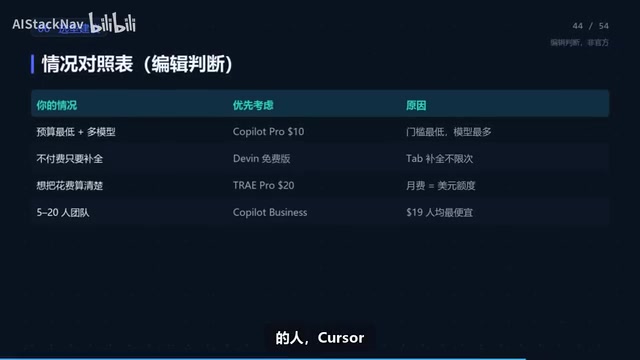
The following selection advice is editorial judgment, not an official conclusion. For individual developers on a low budget who want multiple models, choose Copilot Pro; if you only need completions, choose Devin's free version; if you already subscribe to X Premium, using Cursor is essentially free. Heavy Agent users who want to keep spending clear should use TRAE Pro; those who need cloud-based handling of long tasks should use Devin Pro. For team procurement of five to twenty people, Copilot Business is the first choice.
The first decision is the editor: if the team uses JetBrains or Xcode projects, Copilot is the least hassle since the plugin connects directly; if you already use VS Code, switching costs are low and you can try all four; if you're willing to switch entirely to an AI-native IDE, then consider Cursor, Devin Desktop, and TRAE.
Four high-frequency pitfalls: Cursor's $8 is not the old Pro—it can only use Grok; TRAE Pro is no longer $10, and the $3 tier has been discontinued; Devin's team version has a base fee, making per-person costs very high for small teams; Copilot's flexible credit may be adjusted, so don't treat $15 as a fixed value.
Risks and Security Bottom Lines
Three pricing risks: all four vendors have changed prices in the past six months, so any price is subject to the official site on the day of payment; credits are opaque—Devin publishes no numbers, and Cursor only gives multiples; overages are billed at API prices, so a long task caught in a retry loop could burn a month's credits in a single day.
Three security bottom lines: don't write keys or database passwords into prompts or code—use environment variables; Agents read repository files, web pages, and content returned by MCP, which may contain malicious instructions; don't give it production credentials—payments, deletions, publishing, and permission changes should all require human approval.
A few easily overlooked things: all four vendors auto-renew, and Cursor requires cancellation at least 24 hours in advance; confirm the refund policy before paying annually—don't expect prorated refunds for mid-term cancellations; all four pricing pages are overseas sites, and payment generally requires an international credit card or PayPal, with access from mainland China potentially unstable.
In summary: when comparing prices, calculate credits first, then compare monthly fees. The same $20 can differ completely in whether third-party models are included, how credits refresh, and how overages are billed—these three things determine what you ultimately spend.
One-line Summary
All four AI coding tools have shifted to credit-based billing, so compare credits before comparing monthly fees.
Paragraph Summary
The article cross-checks the official pricing of 19 individual tiers across Cursor, Devin Desktop, TRAE, and Copilot, pointing out that monthly fee numbers can no longer be compared directly—what really determines the bill is how credits are calculated, whether third-party models are included in the monthly fee, and how overages are billed. Breaking down each vendor reveals: Cursor's $8 Plus can only use Grok, with third-party models requiring the $30 Pro tier and separate API payment; Copilot Pro offers multiple models at $10 without switching editors; Devin's free version has unlimited completions but opaque credits; TRAE is easiest to calculate but its old prices no longer apply. The article also provides a testing process of running the same task three times on each tool, methods for setting spending caps and monthly reviews, a team base-fee dilution analysis, and four high-frequency pitfalls.
Related articles

Copilot Retires Three Models: Pro Users Left With Only One Alternative
GitHub Copilot retires Claude Opus 4.8, Claude Opus 5, and GPT-5.6 Tera on Nov 16 across Chat, code completion, and Agent mode. Pro users have only GPT-6 Luna left; Legacy annual plans miss Opus 5.5; admins must enable replacements manually.

Gemini 4 Carbon Arrives: The LLM Race Enters the Era of Million-Token Context and Trillion-Parameter Open Source
Google launches Gemini 4 Carbon and multi-agent tool Swarm; Anthropic debuts million-context Fable 5.2 and Mythos 5.2; OpenAI releases security-focused GPT-6 Cyber; Mistral and Kimi open-source trillion-parameter models — the LLM race accelerates across the board.

What Is DeepSeek Harness? The Entire Engineering Layer Beyond the Model
What is DeepSeek Harness? Starting from the horse-tack metaphor, this article explains that Harness is the engineering system beyond the model—covering prompts, tool calls, memory, sandbox, and orchestration—and analyzes its open-source "everything is a plugin" architecture along with the significance of its four operating modes.