How Does the AI Coding Agent Work? Unraveling the Loop Mechanism Behind Text-Model Code Fixes

Coding agents turn text models into efficient problem solvers through the observe-decide-act loop and built-in judges.
The article reveals how coding agents fix real software using only text models. The core mechanism is the observe-decide-act loop: a wrapper turns model requests into tool calls and feeds results back, forming continuous problem solving. Context windows force strategic exploration, while tests, compilers, and linters act as an objective judge for rapid self-correction. Memory relies on instruction files and session summaries, and permission controls with human review are essential.
A junior engineer spends three hours tracking down a session bug, while an AI coding agent gets it done in 20 minutes without anyone touching the keyboard. But here's the strange part: the model that did the work can't run code or open any files—it only reads and writes text. So how does a text predictor fix real software? The answer lies in two key things: an endless feedback loop, and a design decision most people overlook.
Core Mechanism: The Observe-Decide-Act Loop
A coding agent is essentially a program wrapped around a model. This program sends the user's request to the model along with a list of allowed tools (read files, search the codebase, edit files, run commands). The model replies not with an answer, but with a request, like "search the project for the word session." The wrapper program actually performs the search and pastes the result back into the conversation. The model reads the result, decides the next step, and requests another tool. And so it repeats: observe, decide, act, observe again.
The model is the brain, the wrapper is the hands, and the loop turns a single reply into hours-long continuous problem solving. The loop only ends when the model decides the task is complete and answers in plain text instead of requesting a tool.
Tools sound magical but are actually quite plain: a name, a description, and an input format. When the model wants to edit a file, it outputs structured text specifying the file, the exact old lines, and the new lines. The wrapper checks whether the old lines actually exist, then applies the change. If they don't match (because the model misremembered), the wrapper returns an error and the model corrects itself. Errors aren't hidden—they're fed back as information.
Context Window: Managing the Agent's "Desktop"
Real projects have tens of thousands of files, while a model can only hold a limited amount of text at once—this is the context window. Think of it as a desk: everything the agent currently knows must fit on it. So the agent doesn't read everything; it explores like a human in an unfamiliar codebase: searching function names, opening files, following imports, reading tests to understand expected behavior.
Some agents also build a project index that maps call relationships between functions, letting them jump straight to the relevant corner instead of wandering aimlessly. Choosing what not to read is a big part of the skill.
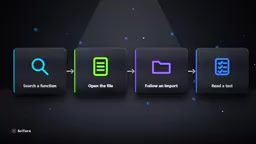
Managing desk space is hard, but the bigger danger is: what if the model writes code that looks great but silently breaks the app? It doesn't just write a patch and pray.
A context window is the maximum number of tokens an LLM can process at once, including the input prompt and output reply. A token is the basic unit of text the model processes, roughly equivalent to 0.75 of an English word, or 0.5 to 1 Chinese character. For example, a 128K token window can hold about 100,000 English words or 60,000 Chinese characters. Window size directly determines how much code and conversation history the agent can "see" at once. When a conversation exceeds the window, it must be truncated or summarized, otherwise the model can't receive new information. Window sizes vary widely across models, from 4K in early days to 200K or even 1M now. Understanding this limit helps explain why agents need to strategically choose which files to read, and why details tend to get lost in long sessions.
The Secret Weapon: The Judge (Tests, Compiler, Linter)
The judge is the test suite, the compiler, and the linter. After every edit, the agent runs them. These tools have no opinions—they just return error messages with line numbers. That output goes straight into the loop, and the model no longer guesses whether it succeeded; it has evidence.
This is a major reason coding agents have advanced far faster than agents in other domains: code comes with a built-in judge—does it compile? Do the tests pass? A legal memo has no equivalent judge, but software does. So the agent can fail, read the failure, and try again, repeating hundreds of times if necessary.

For larger tasks, one loop isn't enough. Many agents first write a plan—a checklist to tick off as they go, keeping them anchored during long work. Some go further and spawn sub-agents: independent loops, each with a clean desk. A sub-agent might spend its entire context window researching how authentication works, then hand back a three-paragraph summary. The main agent never sees the 50 files it read, only the conclusion.
A compiler is a program that translates source code from a high-level language (like Python or Java) into machine code or intermediate code, while checking for syntax and type errors. A linter is a static code analysis tool that checks for style issues, potential bugs, and suspicious patterns without running the code. A test suite is a set of automated test cases that verify whether code behavior meets expectations. Together, these three form an objective feedback system: the compiler ensures the code builds, the linter catches common mistakes, and the tests verify functional correctness. Their error messages typically include file names, line numbers, and specific reasons—structured feedback that's ideal for model parsing and correction. In the agent loop, these tools act as the "judge," turning the vague question "is the code better?" into a clear pass/fail signal that drives iterative improvement.
Memory and Permissions: Easily Overlooked Details
Memory works differently than you'd expect. Between sessions, the model remembers nothing. So agents rely on files: many projects include an instruction file loaded at the start of every run—how to build the project, which test commands to run, what style the team prefers. It's the onboarding doc a new hire receives, re-read every time. When a long session fills the desk, the agent summarizes everything so far, discards the raw history, and continues from the summary. The cost is that details can get lost, which is why very long runs sometimes drift off track.

None of this makes agents foolproof. They may misread the problem and confidently solve a different one; they may cheat tests by hardcoding answers instead of truly fixing the bug; they may pile up changes that technically work but nobody wants to maintain. And because agents act rather than just talk, permissions matter. A well-designed agent asks before running dangerous commands, works within restricted folders, and shows every change as a reviewable diff. The loop is powerful precisely because it can do things—which is also why humans should retain the final say.
Back to that bug in the session code. Behind the fix is a model that only produces text, a wrapper that turns text into actions, a loop that feeds back results, and tests that refuse to lie. No single part is genius; the intelligence lives in the loop: observe, act, check, correct. Every good engineer has always followed the same loop—the difference is that an agent can run it at a speed humans can't match. The open question now is: what do we decide to point it at?
An instruction file is a text file placed in the project root or a specific location, used to give the agent project context and rules. Common examples include CLAUDE.md, .cursorrules, or AGENTS.md. These files typically contain build commands, test commands, code style guides, architecture notes, and team conventions. The agent automatically loads the file at the start of each session to ensure its behavior meets project requirements. Like a new human hire reading onboarding docs, instruction files let the agent quickly integrate into the project without re-explaining things in every conversation. A well-designed instruction file can significantly improve the agent's output quality and reduce irrelevant changes.
One-line Summary
Coding agents turn text models into efficient problem solvers through the observe-decide-act loop and built-in judges.
Paragraph Summary
The article reveals how coding agents fix real software using only text models. The core mechanism is the observe-decide-act loop: a wrapper turns model requests into tool calls (read files, search, edit) and feeds results back to the model, forming continuous problem solving. Context window limits force agents to explore codebases strategically, while the "judge" formed by tests, compilers, and linters provides objective feedback, enabling rapid self-correction. Memory relies on instruction files and session summaries, and permission controls with human review are essential. Agents aren't omnipotent—they may misread problems or cheat tests—but their speed advantage comes from the loop's efficiency. Ultimately, the intelligence lives in the loop, not in a single model.
Related articles

9 AI Subscription Plans Compared: The Real Cost Per 100M Tokens Revealed
Bilibili creator tests 9 AI subscription plans from Volcano, Alibaba, Tencent, Baidu, Zhipu, Xiaomi, MiniMax and more, converting them all to real cost per 100M tokens, breaking down fixed-quota vs. three-tier coefficient billing and how caching, time-of-day discounts, and window limits affect actual quota.

Vibe Coding for Beginners: Expressing Intent Instead of Handwriting Code
What is Vibe Coding? A 137-episode Bilibili course defines it: the core is expressing intent, not writing code. This article analyzes Vibe Coding's productivity logic, target audience, and entry expectations to help beginners decide if it's worth learning.

LangChain Beginner's Guide: An Agent Development Roadmap from LangGraph to Deep Agents
Clarify the encapsulation relationship among LangChain, LangGraph, and Deep Agents, and master the learning path and selection logic for agent development frameworks—suitable for beginners in large model development.