How to Manage AI Crawlers with robots.txt: Block Training, Allow Search

AI crawlers split into training, search, and user-triggered categories that can be allowed or blocked individually; this article provides a mapping table and robots.txt template.
AI crawlers aren't a single behavior but fall into three categories by purpose: training (GPTBot, ClaudeBot, CCBot), search (OAI-SearchBot, Claude-SearchBot, PerplexityBot), and user-triggered (ChatGPT-User, Claude-User), each with an independent User-agent that can be allowed or blocked separately in robots.txt. The article maps out the crawler relationships for vendors like OpenAI, Anthropic, and Google, noting that Google-Extended is only a training token and doesn't affect Google Search indexing. The author recommends most sites block training crawlers and allow search crawlers, and reminds readers that robots.txt controls crawling rather than indexing and provides no privacy protection. The article concludes with a ready-to-use template, verification methods, and five common mistakes.
AI crawlers are no longer a single "scraping" behavior. The same company may dispatch training collectors, search indexers, and user-triggered real-time scrapers all at once, each corresponding to a different User-agent name in robots.txt. This means site owners can make choices far more granular than "allow everything" or "block everything." This article is based on a configuration guide published by developer Amrendra on Dev.to, breaking down the classification logic of AI crawlers, the User-agent mappings across major vendors, and a ready-to-use robots.txt template.
AI Crawlers Fall into Three Categories: Training, Search, and User-Triggered
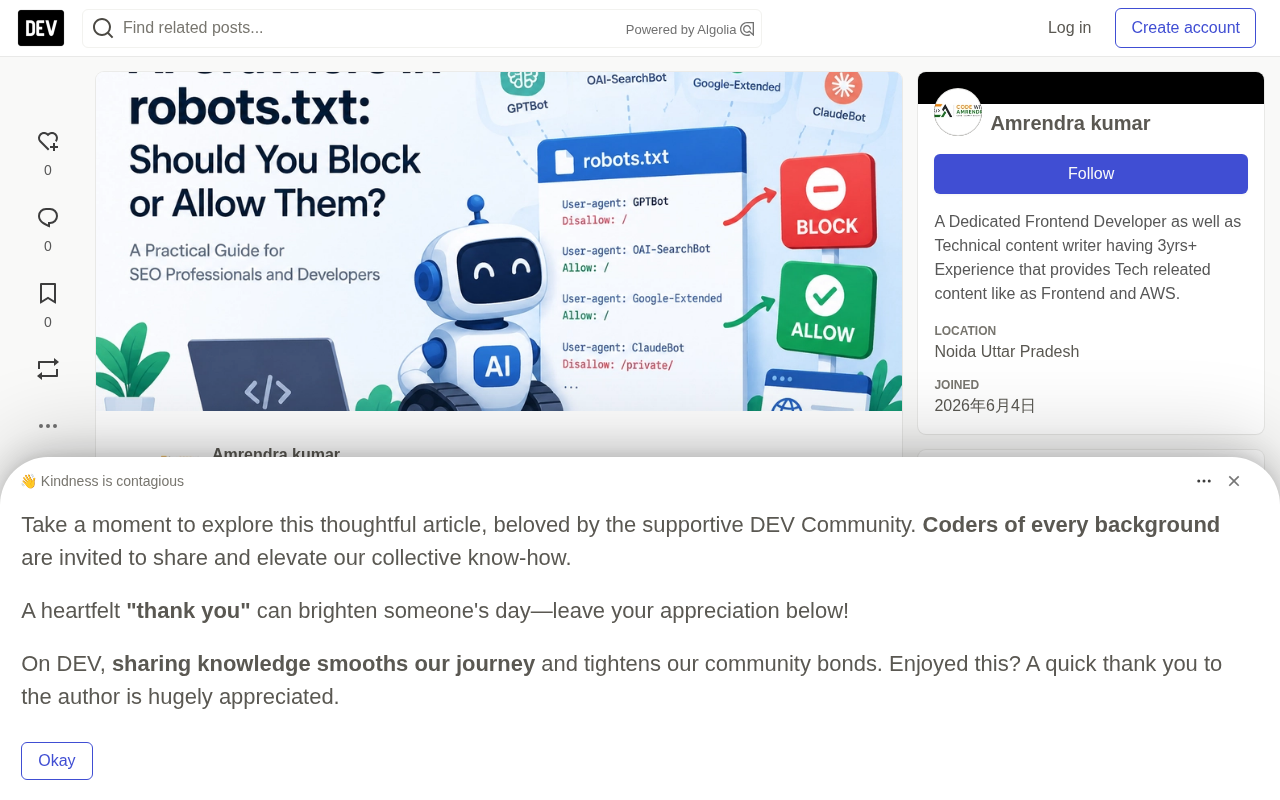
The first step to understanding AI crawlers is to abandon the blanket label "AI crawler." By purpose, they fall into at least three categories:
- Training crawlers: Collect training corpora for LLMs, represented by
GPTBot(OpenAI),ClaudeBot(Anthropic), andCCBot(Common Crawl). - Search crawlers: Provide indexing for AI search products, enabling AI to display and cite your links in answers, represented by
OAI-SearchBot,Claude-SearchBot, andPerplexityBot. - User-triggered scraping: AI only fetches a page when a real user asks about a URL in the chat window. OpenAI's
ChatGPT-Userand Anthropic'sClaude-Userbelong to this category.
The User-agent names for these three categories are independent of each other, so they can be allowed or blocked individually. This is the core premise of the entire article: don't make decisions based on the "AI" category — decide bot by bot.
robots.txt and the User-agent Mechanism
robots.txt is a plain text file placed in the site's root directory (e.g., https://example.com/robots.txt), following the Robots Exclusion Protocol (REP) proposed in 1994. It declares which crawler a rule applies to via the User-agent field, specifies allowed or disallowed paths via Allow and Disallow, and can point to a sitemap via Sitemap.
The key to understanding the entire article is this: User-agent matching is done independently, entry by entry. When a crawler visits a site, it first locates robots.txt, then looks for a rule group that exactly matches its own UA name; only when there's no match does it fall back to the User-agent: * wildcard rule. Therefore, even though GPTBot, OAI-SearchBot, and ChatGPT-User are dispatched by the same company, they can be handled separately.
It's important to emphasize that robots.txt is a voluntarily observed convention with no legal or technical enforcement. Major vendors like Google and OpenAI comply, but malicious crawlers can ignore it entirely. Furthermore, it only controls "whether to crawl," not "whether to index" — a URL blocked from crawling may still appear in search results if linked by other sites (usually showing only the link without a snippet).
Should You Block AI Crawlers?
The author's advice is: only block when there's a clear reason. He lists three common scenarios — not wanting your content used for model training, crawler traffic causing server strain or unbearable bandwidth costs, and content being paid or licensed material.
But blocking comes at a cost. If you want to appear in answers from AI search tools like ChatGPT, you must allow search crawlers. A blanket Disallow: / will shut down your search visibility along with everything else.
There's a concept here that's easily confused: robots.txt controls crawling, not indexing, and it's not privacy protection either. It's essentially a "polite request," and malicious crawlers can completely ignore it. To prevent a page from appearing in search results, you should use noindex (provided the page is crawlable, otherwise Google can't see the tag) or a login wall.
GPTBot and OAI-SearchBot: Can Training and Search Be Separated?
Yes. OpenAI's official documentation explicitly states that each setting is independent: OAI-SearchBot is responsible for making sites appear in ChatGPT search, and sites that opt out will not appear in ChatGPT search answers.
According to OpenAI documentation, the AI crawler mappings for major vendors are as follows:
| Bot | Vendor | Purpose | Blocking It Means |
|---|---|---|---|
GPTBot | OpenAI | Training | Refusing training use |
OAI-SearchBot | OpenAI | Search results | Giving up ChatGPT search exposure |
ChatGPT-User | OpenAI | User-triggered scraping | OpenAI notes robots.txt may not apply to this |
ClaudeBot | Anthropic | Training | Refusing training use |
Claude-SearchBot | Anthropic | Search | Giving up Claude search exposure |
Claude-User | Anthropic | User-triggered scraping | Refusing real-time scraping requested by users |
Google-Extended | Gemini usage | Opting out of Gemini training and grounding |
The most valuable piece of information in this table is the last row: Google-Extended is a robots.txt token, not a standalone crawler. It controls whether content participates in Gemini model training and grounding, and does not affect Google Search indexing or ranking. Blocking it won't make you disappear from Google Search.
Anthropic's split logic is consistent with OpenAI's: ClaudeBot collects content potentially used for training, Claude-SearchBot improves search result quality, and Claude-User only fetches pages when users actively ask. This design lets you opt out of training while retaining search exposure.
The Special Nature of Google-Extended
Google-Extended is a robots.txt product token introduced by Google in September 2023 to control Google's Gemini model training and grounding (i.e., letting the model cite web content to enhance answers). It and Googlebot are two completely independent tokens: Googlebot handles regular crawling and indexing for Google Search, while Google-Extended only affects generative AI uses.
This means blocking Google-Extended will not affect a site's inclusion, ranking, or display in Google Search, nor does it require resubmitting a sitemap. For site owners who want to preserve search traffic while not having their content used for Gemini training, this is an extremely low-cost option.
These tokens provide a granular way to opt out of AI training without sacrificing search visibility, which is the ideal balance for most content sites.
Which AI Crawlers Should Be Allowed?
The author's stance is clear — if you want traffic and citations, allow AI search crawlers. For most blogs and business sites, this is a worthwhile trade-off.
- Recommended to allow:
OAI-SearchBot,Claude-SearchBot,PerplexityBot - Typically blocked:
GPTBot,ClaudeBot,CCBot,Google-Extended(if you oppose training use) - Leave to the platform:
ChatGPT-User,Claude-User(user-triggered)
There's also an often-overlooked technical detail: for AI search to crawl your content favorably, the page itself must be fully readable by bots. The author mentions pages should be fast, server-side rendered, and easy to read — a crawler that can't see the text can't cite it. For sites heavily reliant on client-side JavaScript rendering, this may matter more for AI search visibility than robots.txt itself.
Server-Side Rendering (SSR) and AI Crawlability
AI search crawlers generally do not execute JavaScript, or execute only very limited scripts. What they see is the initial HTML returned by the server. If a site uses client-side rendering (CSR) with frameworks like React or Vue, the page body may appear empty to crawlers, and regardless of whether robots.txt allows them, they cannot cite it.
Server-side rendering (SSR) or static site generation (SSG), by contrast, returns the full HTML in the first response, allowing crawlers to directly read text, headings, and structured data. For most content sites, this is the single most effective step to improve AI search visibility, with priority higher than adjusting robots.txt.
In practice, you can compare using curl or "View Page Source": if the body text isn't in the source code, AI crawlers likely can't see it either. A suboptimal approach is prerendering or serving a degraded page to crawler UAs, but this has higher maintenance costs and risks being flagged as cloaking (showing different content to crawlers), which could incur search penalties.
In Practice: A Ready-to-Use robots.txt Template
Write the following configuration in https://yourdomain.com/robots.txt in your site's root directory to achieve "block training, allow search":
**How to Verify AI Crawler Identity**

UA strings can be forged at will, so the mere appearance of `GPTBot` in logs doesn't confirm identity. Major vendors publish official IP ranges: OpenAI provides JSON-format CIDR lists at `https://openai.com/gptbot.json` and `https://openai.com/searchbot.json`; Google publishes Googlebot ranges at `https://developers.google.com/search/apis/ipranges/googlebot.json`; Anthropic and Perplexity have similar documentation.

The verification process typically involves: extracting the visiting IP from server logs, performing a reverse DNS lookup, confirming domain ownership (e.g., `*.openai.com`, `*.googlebot.com`), then forward-resolving back to that IP for bidirectional matching, and finally comparing against the official CIDR list. Reverse DNS plus forward verification prevents forged PTR records.

A simpler approach is to use Cloudflare's Verified Bots or vendor-provided APIs. The point of verification is: only when you confirm the other party is a genuine GPTBot does log analysis become meaningful; otherwise your optimization strategy may be built on fake traffic.
# Block AI training crawlers
User-agent: GPTBot
Disallow: /

User-agent: ClaudeBot
Disallow: /

User-agent: CCBot
Disallow: /

User-agent: Google-Extended
Disallow: /

# Allow AI search crawlers
User-agent: OAI-SearchBot
Allow: /

User-agent: Claude-SearchBot
Allow: /

User-agent: PerplexityBot
Allow: /

# Everyone else (including Googlebot)
User-agent: *
Allow: /

Sitemap: https://yourdomain.com/sitemap.xml
To block all AI bots, simply replace the search crawlers' Allow: / with Disallow: /. OpenAI states that search-related changes take effect in about 24 hours.
After configuration, you need to verify: first open /robots.txt in a browser to confirm the rules, then check server logs for UA names like GPTBot and OAI-SearchBot, and finally cross-check real crawler identity using vendor-published IP lists (e.g., OpenAI's gptbot.json). If you use Cloudflare or another CDN, also confirm your firewall isn't blocking crawlers you've allowed — bot blocking at the CDN and firewall level often overrides the effect of robots.txt.
Five Common Mistakes
The author's pitfall checklist is worth going through item by item:
- Treating robots.txt as a security mechanism. It's just a polite request; malicious crawlers can ignore it outright.
- Writing
Disallow: /underUser-agent: *. This blocks Googlebot along with everything else. - Accidentally blocking search crawlers, then wondering why AI tools never cite you.
- Using robots.txt instead of
noindex. Blocked pages may still appear in search results if linked by other sites. - Never checking logs. You can't manage what you can't measure.
Frequently Asked Questions
Does robots.txt affect ChatGPT search?
Yes. Allowing or blocking OAI-SearchBot determines whether your site can appear in ChatGPT search answers.
Can I block GPTBot but keep ChatGPT search?
Yes. Just block GPTBot and allow OAI-SearchBot; the two are independent.
Does blocking Google-Extended affect Google rankings? No. Google states it does not affect search inclusion or ranking.
Can robots.txt hide pages from Google?
No. It only controls crawling. To keep a page out of results, use noindex or authentication.
How do I get cited by ChatGPT?
Allow OAI-SearchBot, publish clear and accurate content, and ensure pages load without relying on heavy JavaScript.
Summary
The key to AI crawler management is not a stance of "block AI" or "embrace AI," but recognizing that training, search, and user-triggered are three distinct purposes, and therefore can have three distinct strategies. For most content sites, a reasonable starting point is to block training crawlers, allow search crawlers, and then verify via server logs and vendor IP lists whether the configuration is actually taking effect. Finally, don't forget the fundamental understanding: robots.txt is a crawler directive, not a security boundary.
Related articles

Build an AI Super Employee System at Zero Cost: A Full Breakdown of Automated Agent Workflows
A deep breakdown of the AI super employee system demoed on Bilibili: agent orchestration, digital human voiceovers, map and enterprise lead generation, 24/7 customer service, and legal modules. We analyze the business logic and compliance risks behind zero-cost signup to help entrepreneurs judge the real ROI of this AI digital employee system.

The Essential Difference Between Chatbots and AI Agents: Crossing from Conversation to Execution
What's the difference between a chatbot and an AI agent? Based on the MCP series on the Learn Tech channel, this article uses examples like booking flights and summarizing notes to explain: a chatbot only gives answers, while an agent actually completes tasks through a think-act-observe loop. It breaks down the four core components—model, tools, memory, and goal—as well as MCP's role as a bridge, and discusses agents' applicable boundaries and permission risks.

Free GitHub Repo: 342 Hours of AI Courses, from Math to MCP Servers
A free GitHub repo offers 342 hours of AI courses: 523 lessons across 20 phases, from math fundamentals to agent building and MCP servers. Nearly 100,000 learners have started.