How Top Developers Code Faster with AI: 5 Counterintuitive Tips
Microsoft and Anthropic studies reveal AI boosts output but weakens ability; five prompt techniques turn AI into a sparring partner.
Starting from two studies by Microsoft and Anthropic: developers using AI complete 26% more tasks, but AI-dependent developers score only 50 on knowledge tests while hand-coders score 67, creating a scissors gap between efficiency and ability. The author cites five prompt techniques from a development teaching creator, advocating turning AI from an answer machine into a sparring partner: ask for hints not code; write first then have AI review edge cases; have AI provide a debugging investigation path; let AI act as QA and security auditor; and turn off AI to rebuild features as a self-check. The article concludes with Think, Build, Verify, emphasizing AI as a productivity tool, not a replacement, aiming to become a problem solver not a prompt copyist.
Title
How Top Developers Code Faster with AI: 5 Counterintuitive Tips
Meta Description
A Microsoft study of 5,000 people shows AI boosts developers' task completion by 26%, but in Anthropic's test, AI-dependent developers scored only 50% vs. 67% on knowledge. This article breaks down top developers' 5 AI coding tips: ask for hints, not answers; write first, then review; investigate bugs instead of pasting fixes; let AI attack your implementation; and the AI-off challenge.
Article Content
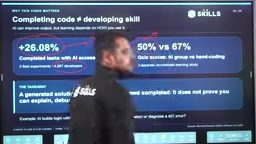
Two studies from Microsoft and Anthropic reveal a contradiction: AI boosts developers' task completion by 26%, yet knowledge test scores drop from 67% to 50%. In other words, while AI accelerates you, it also quietly erodes your problem-solving ability. A creator with years of development teaching experience on YouTube (channel "College Wala") dedicated a video to five specific prompt techniques, with one core idea—turn AI from an "answer machine" into a "sparring partner."
The Truth Behind Two Studies: The Scissors Gap Between Efficiency and Ability
Microsoft researchers surveyed nearly 5,000 developers and found that those using AI tools completed 26% more tasks than non-users. This is the confidence source behind almost all AI coding tool marketing. But a knowledge test from Anthropic revealed the other side: developers who rely on AI to write code scored only 50%, while those who hand-write code scored 67%.
These two numbers together point to a fact most tutorials ignore: AI improves "output speed" while eroding "depth of understanding." The video's presenter admits he has hardly hand-written a complete website's code in nearly 3 years, relying daily on Codex and different agents for different tasks—which is precisely the source of dependency.
"When you throw the problem directly at AI, get the solution, and copy-paste it, what have you learned? Nothing."
Why can these two studies from Microsoft and Anthropic be compared side by side? The key is that they measure two different dimensions. Microsoft's 26% comes from observations or self-reported data of developers' daily workflows, measuring "how many tasks were completed per unit time"—an output efficiency metric. Anthropic's knowledge test is closer to a controlled capability assessment, measuring "the degree to which developers master programming concepts and problem-solving steps without AI assistance." The former is easily influenced by task difficulty and tool proficiency, while the latter more directly reflects cognitive changes. They are not contradictory: a person can absolutely use AI to increase task volume while, over time, skipping reasoning steps and performing worse when separated from the tool. Understanding this distinction helps avoid misreading "efficiency gains" as "ability gains" and explains why the article emphasizes actively designing training-style interactions.
Technique 1: Ask for Hints, Not Ready-Made Answers
The first technique is to change how you ask questions. For example, if you want to solve "find the first non-repeating character in a string," the conventional approach is to ask AI for code directly. The presenter suggests this prompt: Don't give me code; ask me questions about frequency counting and ordering, one hint at a time.
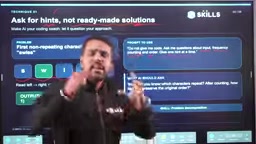
This process forces you to engage in reasoning: AI asks "how do you count character frequencies?" and you have to think of a hash table; AI asks "how do you determine order?" and you have to consider traversal order. After receiving the hints, you assemble the solution yourself. Skill growth happens during the conversation, not at the moment of copy-paste.
The cognitive mechanism involved here is called the "generation effect" in learning science research: when learners generate answers or steps themselves, memory and understanding are significantly better than passively reading ready-made answers. Letting AI give only hints, one at a time, effectively breaks the reasoning chain that AI would otherwise complete in one go into several small steps, forcing the user to fill in the missing links in their own mind. The opposite is "cognitive offloading"—outsourcing thinking tasks to external tools, which saves effort short-term but long-term weakens the automatization of relevant skills. Prompt engineering's role here is not to make AI smarter but to constrain AI's output granularity, making it act as a Socratic questioner rather than an answer provider. This also explains why "one hint at a time" is more effective than "give me several hints": the former maintains continuity of reasoning, while the latter can still become a disguised request for answers.
Technique 2: Write Code First, Then Let AI Review
The second technique overturns most people's usage habits: write the first version yourself, then let AI review rather than rewrite. The video gives an example of an average function—using reduce to sum an array and divide by length. The code runs, but clearly doesn't consider edge cases like empty arrays or non-numeric input.
The corresponding prompt is: review my average function, find edge cases and explain the problems, don't rewrite, let me propose solutions. AI will point out what an empty array returns, whether non-numeric values should be accepted, and how to define a valid input strategy. What you get is a list of problems, not finished code; you propose the improvements.
Technique 3: Use AI to Investigate Bugs, Not Paste Fixes
The third scenario targets debugging. The video shows a React code snippet: inside useEffect, data is fetched and setTasks is called, while tasks is also in the dependency array, creating an infinite loop. The common approach is to let AI fix it directly, but the presenter suggests letting AI help you confirm the problem and teach you to read the code.
The prompt can be written as: this effect is repeatedly sending requests; suggest what I should log first, what to check, and help me confirm the dependency loop before fixing. AI's response is an investigation path rather than a patch. Follow the path once, and next time you encounter a similar problem, you can locate it yourself.
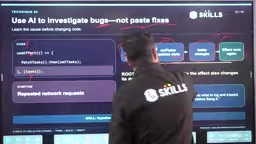
React's useEffect dependency array mechanism is the prerequisite for understanding this case. useEffect receives a callback function and a dependency array; React executes the callback after component rendering and re-executes it when dependencies change. If the callback internally calls setTasks to modify state, and tasks itself appears in the dependency array, then every setTasks triggers a re-render, dependency changes trigger the effect again, forming an infinite loop. Common fix directions include: remove tasks from dependencies and use functional updates, extract the fetch logic into an event handler, or use an empty dependency array with a cleanup function. The article emphasizes letting AI provide an investigation path of "what to log first, what to check," which essentially turns debugging from "guessing patches" to "verifying hypotheses." This aligns with professional debugging methodologies like binary search localization and minimal reproduction, and is a transferable general skill for other frameworks.
Technique 4: Let AI Attack Your Implementation
The fourth technique puts AI in the position of QA and security auditor. The video features a /register endpoint: it takes email and password from request.body, creates a user, and returns the user object with a 201 status code. If you directly ask AI to "improve this implementation," you probably won't think carefully about what's wrong.
A better prompt is: act as a QA and security reviewer, list failure cases and expected results, don't replace my code. AI will ask: should an account be created when email is missing? Does including password in the response leak it? Should the password be hashed? What status code should be returned for duplicate email? According to the presenter's demo, AI will point out that missing email should return 400, duplicate email should return 409, plaintext passwords need hashing, and the response should not include password.
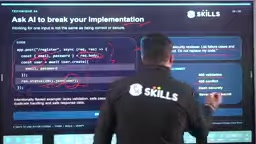
You may not have thought of all these points, but each one pointed out deepens your understanding. The code is still yours, but the security boundaries are clearer.
Technique 5: The AI-Off Challenge—The Toughest Self-Check
The presenter's favorite technique is called the "AI off challenge": turn off AI, rebuild the feature you just completed from scratch, explain every decision, then modify something. If you can still accomplish the same thing without AI, it means the ability has truly grown in you.
This is the hardest to execute because it directly opposes efficiency inertia. But it's also the only way to verify "did you actually learn it?" Developers who can pass this challenge will be fine with or without AI.
Three Abilities That Determine Whether You Can Survive in the AI Era
The video concludes by compressing the methodology into three verbs: Think—define the problem, plan the path, ask AI for hints; Build—write the first version yourself, debug with evidence; Verify—cover edge cases, explain your decisions, and be able to modify without AI. Do all three, and AI is just an accelerator, not a crutch.
The presenter's closing point is worth writing down: AI will always exist, and the sooner you learn to evolve around it, the better—but don't treat it as a replacement tool, treat it as a productivity tool. Train yourself to be a problem solver, not a prompt copyist.
One-line Summary
Microsoft and Anthropic studies reveal that AI boosts output but weakens ability; the article offers five prompt techniques to turn AI into a sparring partner.
Paragraph Summary
Starting from two studies by Microsoft and Anthropic: developers using AI complete 26% more tasks, but AI-dependent developers score only 50 on knowledge tests while hand-coders score 67, creating a scissors gap between efficiency and ability. The author cites five prompt techniques from a development teaching creator, advocating turning AI from an answer machine into a sparring partner: ask AI for hints rather than ready-made code; write the first version yourself before letting AI review edge cases; have AI provide a debugging investigation path rather than direct fixes; let AI play QA and security auditor to attack your implementation; and turn off AI to rebuild features from scratch as a self-check. The article concludes by summarizing the methodology into three abilities: Think, Build, Verify, emphasizing that AI should be a productivity tool, not a replacement tool, with the goal of becoming a problem solver rather than a prompt copyist.
Related articles
How Cursor Indexes Codebases: Engineering Practices with Merkle Trees and Incremental Sync
How Cursor indexes codebases with Merkle trees: file SHA-256 hashes, top-down root comparison, Content Proofs validating results—median repo first query drops from 7.87s to 525ms.

Prompt Master: A Free Claude Skill That Generates Cross-Tool Prompts in One Click
Prompt Master is a free Claude skill available on GitHub (15,000+ stars) that installs in under a minute. Use the /Prompt Master slash command to generate detailed prompts for Midjourney, ChatGPT, Cursor, and video models—cutting back-and-forth clarification and token use.

Multiple Tech Giants' Services Collapse Within a Week: The Fragility Crisis of the AI Era
The Vergecast reviews a week of outages at the FAA, Microsoft, Chase, and iCloud, analyzing software fragility in the AI era, the Y2K-style talent gap, Nvidia's leadership shakeup, Google's product confusion, and Amazon's agentic shopping ambitions.