Prompt Master: A Free Claude Skill That Generates Cross-Tool Prompts in One Click
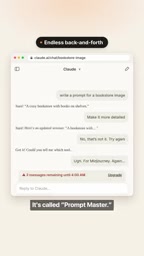
Prompt Master is a free Claude skill that generates cross-tool prompts in one sentence, eliminating repeated clarification.
The article introduces a Claude skill called Prompt Master that solves the pain of going back and forth and wasting tokens when writing prompts. It outsources "prompt writing" to Claude: users simply describe their needs and target tool in natural language, and the skill outputs highly detailed prompts suited to that tool's conventions, covering Midjourney, ChatGPT, Cursor, and even video models. Installation is extremely simple—download the zip from GitHub and upload it in Claude's skills panel in under a minute—and you invoke it with the /Prompt Master slash command. The article sees it as representing the trend of "prompt engineering productization," with value in cross-tool consistency, token efficiency, and lower learning cost, while cautioning that the video is only a hands-on demo lacking quality-evaluation data, and that star count and actual performance are two different things.
Why You Need a "Prompt Generator"
Most people who have used Claude, ChatGPT, or Cursor have been through this loop: you describe your need, the AI gives you a prompt, you decide it's not good enough, you add more explanation, it revises again... A few rounds later, you've burned through a fair number of tokens and a chunk of time. In introducing a Claude skill called Prompt Master, a YouTube channel nailed this pain point directly—"no more going back and forth over a single prompt, re-explaining yourself, and burning tokens for nothing."
Prompt Master's approach isn't about making any particular model smarter; it's about outsourcing the act of "writing prompts" itself to Claude. You just describe what you want in natural language, and it outputs a highly detailed prompt tailored to the target tool you're actually using.
What Is Prompt Master
Prompt Master is a free skill that runs inside Claude. According to the video, it has already racked up over 15,000 stars on GitHub—a number that speaks to a degree of recognition among developers and creators. For a prompt-assistance tool to reach that scale usually means it's solving a high-frequency, real-world annoyance rather than being a toy experiment.
Its core value lies in "cross-tool adaptation." The same sentence—"generate an image for a bookstore"—requires completely different prompt structures when given to Midjourney versus ChatGPT or Cursor: image models care about scene description, style, camera, and lighting, while coding assistants need contextual constraints, input/output definitions, and boundary conditions. Prompt Master claims it can produce prompts that match each tool's conventions based on the target tool you mention, and the video notes it can even handle video models.
From an engineering standpoint, this amounts to consolidating scattered "prompt-writing know-how" into a reusable skill layer: no need to organize your language from scratch each time, and no need to memorize each tool's parameter preferences.
Claude's Skill is a pluggable capability-extension mechanism that Anthropic introduced for Claude. A Skill is essentially a packaged set of instructions, documentation, and optional resource files that Claude loads in specific contexts or when explicitly invoked by the user, thereby gaining a specialized capability—such as generating prompts according to a particular specification or executing a certain fixed workflow. Compared with traditional "system prompts," the advantage of Skills is that they are reusable, distributable, and loaded on demand without occupying the context of everyday conversations. Users can install third-party Skills into their own Claude environment by uploading a zip package, which also explains why Prompt Master can be API-key-free and configuration-free—it runs entirely within Claude's own skill framework.
"Prompt Engineering" refers to designing the structure, wording, and constraints of input text to guide generative models toward outputs that better match expectations. Different models have very different preferences for how prompts are organized: image models are typically sensitive to the subject, style keywords, camera, lighting, and aspect ratio, and often tolerate keyword stacking better; conversational or coding models rely more on explicit role-setting, task decomposition, input/output formats, and boundary conditions. It is precisely this paradigm gap that makes "same intent, different tool" require reorganizing language—and that forms the basis for tools that adapt prompts across tools.
One-Minute Install: Upload the Zip and Go
Prompt Master has a very low barrier to entry. According to the video demo, the process is: visit the GitHub repository, click the green Code button to download the zip archive, then in Claude click the plus icon, go to the skills panel, choose upload a skill, and drag the archive in. The whole installation takes "less than a minute."
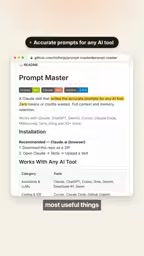
This "zero-config" installation deserves a mention of its own. Many prompt tools require you to fill in API keys, tweak parameters, and edit config files, which is unfriendly to non-technical users; zip upload means it's fully hosted within Claude's skill system, and you don't need to maintain any additional service.

How to Use It: Slash Command + One-Sentence Request
Once installed, using it is a matter of one slash command. The example given in the video is to type /Prompt Master and then directly describe your need—for instance, "write a prompt for creating an image for a bookstore"—and the tool immediately returns a detailed prompt tailored to the current target tool.
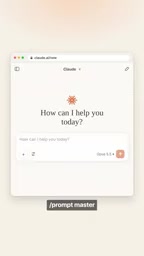
The design logic here is clear: turn "generating prompts" from a one-off conversation into a callable, fixed entry point. You no longer have to explain to Claude "I want a prompt for Midjourney that emphasizes style and composition"—just state the target tool and intent, and the skill handles format and granularity.
What Problem It Really Solves
Seen in a broader context, Prompt Master represents a category of tool that is gaining popularity: not a new generative capability, but "the productization of prompt engineering." The stronger models become, the more prompt quality affects output—yet most people aren't willing to specifically learn each tool's prompt paradigm.
This kind of tool has three value points:
- Cross-tool consistency: the same creative intent can be reused across different models, reducing repeated description.
- Token efficiency: fewer rounds of clarification; the video explicitly makes "no more burning tokens" a selling point.
- Lower learning cost: no need to memorize each tool's conventions and structures—let the skill fill in the gaps.
To be objective, the video does not provide quality evaluations of the generated prompts, comparisons with other solutions, or specific accuracy data. It's more of a hands-on demo and recommendation than a rigorous benchmark. 15,000 stars indicates that many users are willing to try it and stick with it, but "star count" and "works better in your specific scenario" are two different things; actual results still depend on your target tool and the complexity of your needs.
Who Should Try It
If you regularly switch between Claude, ChatGPT, and Cursor, or frequently need to write descriptions for image models like Midjourney, Prompt Master is a tool with an extremely low installation cost that's worth trying first—one minute of setup time in exchange for the possibility of locking down your prompt-organization workflow. If your needs are highly customized or you have strict specifications for prompts, it's still best to treat it as a starting point and fine-tune manually.
Related articles
Cursor Agent Whiteboard Breakdown: Rul…
Cursor Agent Whiteboard Breakdown: Rules, Checkpoints, and Safety Nets
A whiteboard breakdown based on Cursor's official docs and course, covering the Cursor Agent's working loop, three rule types (project rules/user rules/AGENTS.md), checkpoints and steering as two safety nets, plus officially acknowledged loop traps and advice to start with small tasks.
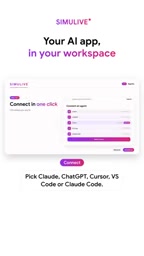
Simulive One-Click Connect Claude/ChatGPT/Cursor to Your Workspace
Simulive now supports one-click connection of Claude, ChatGPT, Cursor and other AI tools to your workspace—no API key copying, with fine-grained permissions, operation confirmation, rate limiting and audit logs, letting users process data with their own AI.
Goodbye Repetitive Prompting: A Practical Guide to Cursor Project Rules
Cursor Project Rules let the AI agent read preset instructions before coding, so you stop repeating prompts. Learn how to create rules, the four activation modes, and team tips to unify coding conventions with .cursor/rules.