In an Era of Rising Hardware Prices, Build a Low-Cost Homelab with a Used Mini PC

Replace an overpriced Raspberry Pi with a $115 used Intel NUC to build a capable Homelab with 4K hardware transcoding.
With Raspberry Pi 4 (8GB) now exceeding $200 and storage/RAM prices surging, tech YouTuber Jeff proposes an alternative: a used Intel Gen 8 NUC bare motherboard (i7-8559U, 16GB RAM) for ~$100, plus a $12 power adapter, totaling around $115. The Coffee Lake CPU's Iris Pro 655 GPU supports Intel Quick Sync hardware transcoding, and when running Jellyfin bare-metal on Ubuntu 24.04, it handles 4–6 concurrent 4K streams with ease — far beyond what Raspberry Pi's ARM chip can manage. The broader lesson: a Homelab doesn't need a full server rack; a low-power mini PC and creative hardware sourcing can deliver media serving, ad blocking, and home automation at minimal cost.
As GPU, RAM, and storage prices surge across the board, building a self-hosted home server (Homelab) can start to feel like a luxury. But tech YouTuber Jeff (Craft Computing channel) proved with a used Intel NUC motherboard that a Homelab doesn't have to be expensive — you just need to think differently about hardware.
Raspberry Pi Is No Longer the Budget Option It Once Was
Since its launch in February 2012, the $35 Raspberry Pi became the go-to entry point for DIY enthusiasts and helped fuel the entire Homelab movement. People ran Pi-Hole, Vaultwarden, Home Assistant, and even Plex or Jellyfin media servers on it — escaping cloud dependency and keeping data in their own hands.
But today's prices tell a different story. According to Jeff, an 8GB Raspberry Pi 4 now costs over $200, and that's before adding a microSD card or case. Hard drive prices have pushed past $30 per TB, after barely approaching $10 per TB just over a year ago. As for RAM, he says he'd rather not talk about it. GPU prices have gone through their fourth price surge since 2018, with no end in sight.
In this environment — whether you're building a workstation, gaming rig, or Homelab — you have to think outside the box and dig for overlooked hardware.
Intel NUC Motherboards: The Underrated Used-Market Value Play
Intel NUC actually predates the Raspberry Pi by a year, and while the two serve different markets, Jeff sees them as fundamentally similar — cheap, compact, low-power, small computers that punch well above their weight. As Raspberry Pi prices climbed, used NUCs and mini PCs quietly became the real bargain.
Last month, Jeff picked up three Gen 8 NUC bare motherboards on eBay for $100 each, including heatsinks and 16GB of RAM. The specs:
- CPU: Intel Core i7-8559U (Coffee Lake), 4 cores / 8 threads, 1.9GHz base clock, boosts up to 4.5GHz
- RAM: Dual-channel DDR4, two SO-DIMM slots, shipped with a single 16GB Kingston HyperX 2400 stick
- Networking: Intel i219 Gigabit Ethernet, onboard AC Wi-Fi and Bluetooth
- Storage: One M.2 NVMe Gen 3x4 slot + one onboard SATA port (requires a $6 power adapter, 2.5-inch drives only)
- Expansion: Four USB 3.1 ports on the sides, plus a hidden USB-C with Thunderbolt 3

The most important hidden gem is the Intel Iris Pro 655 integrated GPU built into this CPU, which supports Intel Quick Sync hardware video encoding. This allows the quad-core chip to significantly outperform its size when running Homelab services like media servers and surveillance recording. Compared to the 7W TDP ARM quad-core in the Raspberry Pi 4/5, the x86 8-thread chip with 4.5GHz boost is in an entirely different league.
With an additional $12 spent on a 65W power adapter, the total cost comes to around $115. The only thing missing is a case — but as Jeff jokes, how many people haven't just zip-tied their Raspberry Pi to a wall at some point?
Intel NUC (Next Unit of Computing) is an ultra-compact bare-bones kit Intel introduced in 2013, with a motherboard measuring just about 4×4 inches (101×101mm). Unlike the Raspberry Pi's ARM SoC architecture, NUC uses a full x86 architecture and can run standard Windows or Linux distributions without worrying about ARM software compatibility. "Gen 8" refers to the 8th-generation Core platform (Coffee Lake, 2018), a mature point in Intel's NUC lineup with plenty of used-market supply. NUCs were widely deployed in enterprise digital signage and thin-client scenarios, and often flood the secondhand market at very low prices after retirement — which is the fundamental reason they offer strong value in today's hardware price environment. Note that Jeff purchased bare motherboards rather than complete NUC kits, skipping the cost of the official case and power supply, but requiring his own cooling and power solutions.
Hands-On: Deploying Jellyfin Media Server on a NUC
Jellyfin is a Netflix-style open-source self-hosted media server. Jeff walked through a complete bare-metal installation and explained why he prefers bare metal over Docker: enabling hardware transcoding is more straightforward, and Jellyfin has its own software repository that upgrades alongside Ubuntu updates, making maintenance easier.
He installed a 512GB NVMe boot drive and chose Ubuntu Desktop 24.04. The core steps are simple:
- Update the system:
sudo apt updateandsudo apt upgrade, then reboot - Add the official Jellyfin repository and security key
- Run
sudo apt updateagain, thensudo apt install jellyfin - Use
sudo systemctl enable jellyfinto enable on boot, andsudo systemctl start jellyfinto start immediately
Once installed, open a browser and navigate to port 8096 on the server's IP address to access the web setup interface, create an account, and specify media storage paths. Jellyfin requires movies, TV shows, music, and other content to be organized in separate subdirectories.
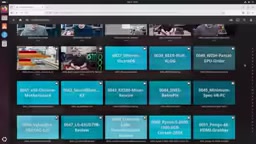
On storage costs, Jeff offers practical advice: 2TB 2.5-inch laptop hard drives on eBay run around $20 to $30, enough to store a substantial library of video content.
Enabling Intel Quick Sync Hardware Transcoding
Hardware transcoding is the key to unlocking this setup's full value. The key steps:
- Run a terminal command to add the current user to the
videogroup, granting Jellyfin permission to use the hardware encoder - Install the monitoring tool:
sudo apt install intel-gpu-tools, then reboot - In Jellyfin: Admin → Dashboard → Playback → Transcoding, set hardware acceleration to Intel Quick Sync (QSV)
- Under hardware encoding options, enable hardware encoding and turn on low-power encoding for H.264 and HEVC
In testing, Jeff played four simultaneous 4K, 20Mbps video streams without the NUC breaking a sweat. Running sudo intel-gpu-top shows real-time GPU utilization, with each Jellyfin encoding session appearing as an FFmpeg process. Overall, this little board can comfortably handle around 10 simultaneous 1080p streams or 4 to 6 concurrent 4K transcode streams — more than enough for multiple TVs or sharing a media library with friends and family.
Intel Quick Sync Video (QSV) is a dedicated video encode/decode engine built into Intel processor integrated graphics, introduced with the 2nd-generation Core (Sandy Bridge, 2011) and improved with each successive generation. Compared to pure software transcoding, QSV offloads video encoding and decoding from the CPU to dedicated hardware (the MFX engine, separate from the execution units), dropping CPU utilization from 80–100% to single digits while dramatically reducing power consumption. Coffee Lake's Iris Pro 655 supports hardware acceleration for H.264, HEVC (H.265), and VP9, with "Low Power Encoding" mode further reducing GPU resource usage for sustained concurrent transcoding workloads. For media servers like Jellyfin, hardware transcoding is especially critical: when a client device doesn't support the source file's codec or the bitrate is too high, the server must re-encode the video in real time to a stream the client can decode. Software transcoding is extremely CPU-intensive, while QSV accomplishes the same work with virtually no perceptible impact — giving a 15–28W NUC motherboard genuine practical value as a media server.
A Homelab Doesn't Have to Be a Full Rack Monster
Jeff uses this build to convey a broader idea: not every Homelab needs a full server rack, 24-core CPUs, hundreds of gigabytes of RAM, and petabytes of storage. Running services at home can be done with a low-power mini PC, some tape, and a few zip ties.

This NUC motherboard is capable of far more than just Jellyfin — it's more than sufficient for Pi-Hole or Technitium for local ad blocking and DNS, Home Assistant or Observium for automation and monitoring, and a wide range of local applications. Old mini PCs, office desktops, and even your retired gaming tower can all become excellent Homelab servers.
Rising hardware prices don't mean you can't afford a Homelab — they just mean you need to be more creative and resourceful when choosing hardware. In this cost-sensitive era, a Gen 8 NUC motherboard sitting on your desk might be more practical than a server rack filling your garage.
Related articles

AI Agent Terminology Too Confusing? One Interactive Concept Map to Untangle 40+ Core Terms
Confused by AI Agent terms like MCP, harness, orchestration, and skills? AI Concept Atlas is an interactive map visualizing 40+ concepts and their relationships, with cited sources.

Meta's Broken Promise: Community Demands to Know Where the Muse Spark Weights Are
Meta promised to open-source Muse Spark model weights over a month ago, but still hasn't delivered. The community questions how this squares with Zuckerberg's "can't delay even a month" stance.

Omarion SEC CLI: How a Self-Healing Autonomous Agent Tackles AutoGPT's Persistent Problems
Omarion SEC CLI is an open-source autonomous CLI agent that solves AutoGPT's error loops, terminal clutter, and session amnesia through execution fingerprinting, intent routing, and persistent memory.