Inbox Zero: The Open-Source Superhuman and a New Choice for AI Email Management

Inbox Zero is an open-source email client challenging Superhuman with keyboard-first design and AI features, free basic version and $20/month AI.
Inbox Zero is an open-source email client gaining attention on Product Hunt, positioned as a free alternative to Superhuman. It supports Gmail and Outlook across Web, Mac, Windows, and iPhone, unifies accounts into one inbox, and emphasizes keyboard shortcuts. The basic version is free and open source, while AI features at $20/month auto-categorize emails and draft replies in your tone, plus team collaboration. The article analyzes its open core + paid add-ons model and differentiated competition, noting AI effectiveness remains to be verified.
Is your inbox always a mess? Do you spend a lot of time every day dealing with emails but feel inefficient? High-end email clients like Superhuman are powerful, but they come at a steep price. Now, an open-source tool called Inbox Zero is gaining attention on Product Hunt. It bills itself as an "open-source Superhuman alternative," aiming to help you achieve inbox zero with AI and a keyboard-first design.
Core Features: Fast, Free, and Cross-Platform
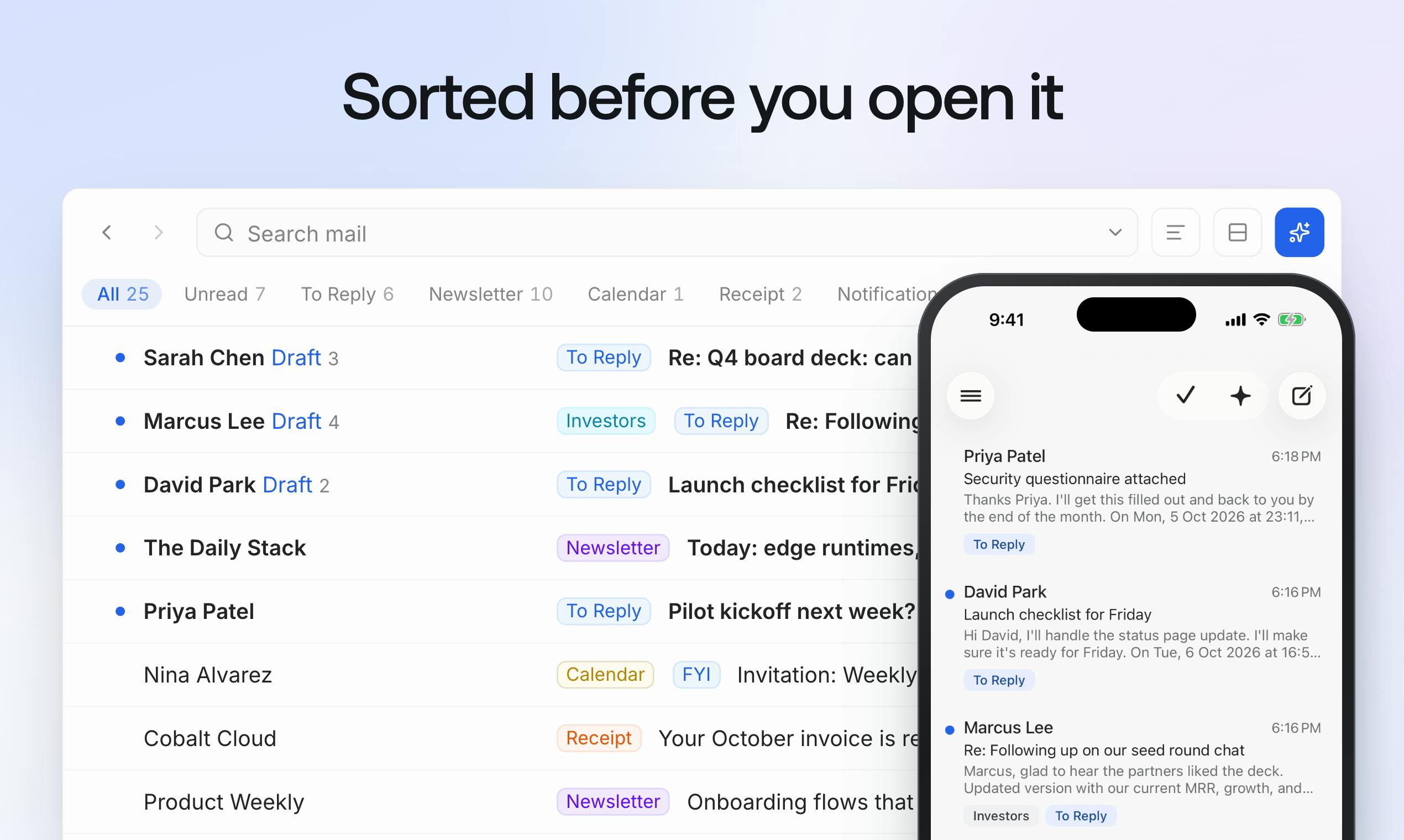
Inbox Zero is an open-source email client for Gmail and Outlook, available on Web, Mac, Windows, and iPhone. It unifies all your accounts into a single inbox. Its main selling points are "speed" and "keyboard-first" — you can complete most actions via shortcuts, reducing mouse clicks and boosting efficiency. The basic version is free, and the code is open source, so users can self-deploy or review it.
For users tired of switching between multiple email apps, this unified inbox design is quite appealing. The keyboard-first interaction continues the philosophy of high-end clients like Superhuman, but presented in an open-source and free form, lowering the barrier to entry.
AI Boost: $20 per Month for Auto-Organization and Draft Replies
Inbox Zero's AI features require an additional payment of $20 per month. According to the official description, AI automatically categorizes and prioritizes each email and drafts a reply in your tone before you even open the message. This means you only need to review and send, greatly reducing repetitive work.
Additionally, AI can pull context from the tools you use to make replies more precise. For team collaboration, you can comment privately alongside emails and receive reminders via Slack, making it easier for teams to handle emails together. These features make Inbox Zero not just a personal productivity tool but also one with team collaboration potential.
The core capabilities of email AI assistants are typically built on large language models (LLMs), such as GPT-4. These models are pretrained on massive text data to learn language patterns and structures, gaining abilities in text classification, summarization, and generation. In email scenarios, AI needs to understand the semantic content of emails, the sender's intent, and the user's historical reply style to achieve accurate classification and tone imitation. In practice, systems often vectorize email bodies, subjects, and metadata, then combine them with the user's past reply samples for fine-tuning or prompt engineering to generate drafts that match personal style. Meanwhile, privacy protection is a key challenge, so open-source tools typically allow users to self-deploy models or choose local inference to avoid exposing sensitive data.
Balancing Open Source and Commercialization
Inbox Zero adopts an open-source model but charges for AI features. This "open core + paid add-ons" model is not uncommon among developer tools. For users who value data privacy or want self-hosting, the open-source version provides a basic guarantee; for users seeking AI efficiency, the $20 per month price is somewhat competitive compared to Superhuman's $30 per month.
However, the actual effectiveness of the AI features remains to be verified by users. The accuracy of auto-classification and draft replies, and the degree to which they mimic personal tone, are key to determining their value. Currently, 146 votes and 8 comments on Product Hunt indicate some early interest, but more feedback is needed on the actual experience.
Open Core is a common business model that refers to open-sourcing the basic functionality of software while offering advanced features, enterprise-level support, or cloud services as paid items. This model can gain code contributions, security reviews, and user feedback through the open-source community, while also generating revenue through value-added services. For email clients, open source means users can audit the code themselves and deploy it to private servers to ensure data isn't collected by third parties; paid AI features cover costs such as model calls and computing power. This model is particularly common in developer tools, such as GitLab and Sentry. The key to success lies in balancing the boundary between the open-source part and the paid part — free users must get enough value, while paid features must be irreplaceably attractive.
Market Positioning and Competition
The email client market is not short of players, from free Gmail to paid Superhuman, Spark, and others — there are many choices. Inbox Zero's differentiation lies in the combination of open source and AI. It targets users who want an efficient email management experience without being locked into closed-source services.
With the proliferation of AI in productivity tools, intelligent email management has become a trend. Whether Inbox Zero can find a balance between the open-source community and the commercial market will depend on the actual performance of its AI features and the vitality of its community ecosystem. For users who value efficiency and privacy, this may be a new option worth trying.
One-line Summary
Inbox Zero is an open-source email client that challenges Superhuman with keyboard-first design and AI features — free basic version, AI at $20 per month.
Paragraph Summary
Inbox Zero is an open-source email client gaining attention on Product Hunt, positioned as a free alternative to Superhuman. It supports Gmail and Outlook, offers cross-platform apps for Web, Mac, Windows, and iPhone, unifies multiple accounts into one inbox, and emphasizes keyboard shortcuts for efficiency. The basic version is free and the code is open source, allowing self-deployment. Its AI features cost $20 per month and can automatically categorize emails and draft replies in the user's tone, plus support team collaboration such as private comments alongside emails and Slack reminders. The article analyzes its open core + paid add-ons business model and notes its differentiated competition with closed-source tools like Superhuman, but AI effectiveness remains to be verified and early interest is limited.
Related articles

Free Unlimited Claude Code Solution: Agnes AI + CC Switch Setup Guide
No paid subscription needed — pair the free AI platform Agnes AI with the open-source tool CC Switch to provide a backend for Claude Code, enabling unlimited free calls to text, image, and video models. This guide covers the full setup, test results, and usage boundaries.

A Complete Zero-Cost Guide to Getting Started with Claude Code for Beginners in China
A beginner's guide to Claude Code for users in China: two installation methods (command line and IDE plugin), full configuration steps for replacing the official API with the free domestic LongCat model, and a hands-on demo of building a small tool with natural language, plus tips.

When the NSA Gets Involved: The AI Supply Chain Crisis Behind Open-Source CVEs and API Key Hijacking
Multiple open-source projects disclosed severe CVEs in one day, PHP flaws alarmed the FBI, and Railway and OpenCode were breached with API keys stolen. This article breaks down the vulnerability window, AI-accelerated exploitation, and the AI supply chain crisis behind the API key black market, with a developer defense checklist.