InfiMaker K1 Desktop CNC Review: AI Makes Metal Machining as Easy as 3D Printing

InfiMaker K1 brings five-axis CNC machining down to 3D-printer-level accessibility with AI text-to-model.
InfiMaker K1 is a desktop five-axis CNC machine aimed at everyday users, weighing over 100kg with an early bird Kickstarter price under $6,000. Its core design philosophy is to "3D printer-ify" CNC: enclosed body, auto tool change, distilled water cooling, and AI software that generates machinable 3D models from images or natural language text. Compared to 3D printing, CNC's biggest edge is material versatility — the K1 supports aluminum, titanium, stainless steel, brass, jade, and more for near production-quality results. Whether its claimed ease of use holds up post-launch remains to be verified.
Tech review channel Unbox Therapy just unboxed a 170-kilogram "desktop factory" — the InfiMaker K1 five-axis CNC machine. It was their first time hands-on with a CNC device, and the whole point of this machine is exactly that: letting someone with zero machining experience turn an idea into a physical metal object.
Reimagining CNC as a "3D Printer"
Traditional CNC machines have an incredibly high barrier to entry. You need to know CAD software, understand tooling parameters, and be familiar with numerical control programming. InfiMaker K1's design philosophy is to "3D printer-ify" this complex workflow as much as possible — shrinking the footprint, fully enclosing the body, integrating everything, and simplifying the interface down to "click play and go."
The reviewer openly admitted having zero CNC experience, but his gut reaction was: "This feels more like taking the concept of CNC and trying to make it into a 3D printer as much as possible." From hardware to software UI, the entire machine is designed to strip away the professional barriers. The K1 uses a five-axis structure (X, Y, Z, B, and C axes), capable of machining complex, highly detailed shapes — like the 3D pineapple carving shown in the video.
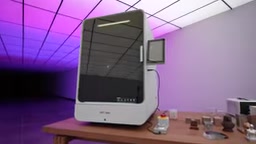
The core difference between a five-axis CNC and a traditional three-axis machine comes down to degrees of freedom. Three-axis machines can only move the tool along three linear directions — X, Y, and Z. For parts with undercuts, curved surfaces, or complex internal cavities, you typically have to manually flip and re-fixture the workpiece multiple times. Five-axis machines add a B-axis (rotation around Y) and a C-axis (rotation around Z), allowing the tool or workpiece to tilt freely in space. This means complex multi-surface geometries can be completed in a single setup. That's why the K1 can machine something like a pineapple with full 360-degree detail — on a three-axis machine, the same result would require multiple manual interventions, which is nearly impossible for a beginner to pull off independently.
Material Capability: Where CNC Truly Surpasses 3D Printing
The real magic of CNC is in its materials. The review repeatedly emphasized this as the area where it "far exceeds 3D printing." The K1's supported materials list is substantial: titanium, aluminum, jewelry wax, epoxy resin, hardwood, brass, stainless steel, acrylic, copper, jade, and more.
This means what you make isn't just a plastic prototype — it's something with the look and feel of a finished product. The video showcased wooden decorative pieces, a brass bowl, an aluminum World Cup trophy shape, hollow cube cutouts, and more — many use cases that 3D printing simply can't touch. For product prototyping, artistic work, or design mockups, you can take a raw block of material and end up with something that looks like a real finished part.
To machine metal, the machine also requires distilled water as a lubricating and cooling medium, piped through to an onboard tank. The machine also supports automatic tool changes: after manually loading the tools initially, it can automatically switch between different tool heads during a job to suit different materials and operations. A display on the front of the machine shows real-time machining status.
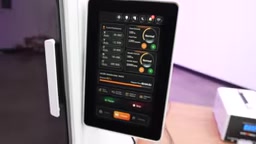
CNC milling and 3D printing are fundamentally opposite processes. 3D printing is "additive manufacturing" — building up a shape by depositing material layer by layer. CNC is "subtractive manufacturing" — starting from a solid block of raw material and cutting away the excess with a rotating tool to reveal the final shape. The advantage of subtractive manufacturing is that it works directly with industrial-grade raw materials, and the finished part's density, strength, and surface finish are nearly indistinguishable from mass-produced components — making it far better suited for functional prototypes and end-use parts. The trade-off is lower material efficiency: the chips and dust that are cut away can't be recycled, and the machining process requires coolant to prevent the tool and workpiece from deforming under heat.
In Practice: Making a Charging Stand for the Magic Mouse
One of the most relatable demos in the review was machining a Magic Mouse charging stand out of an acrylic block — directly addressing Apple's infamous design quirk of requiring you to flip the mouse upside-down to charge it.
Once machined, you can pull it right out and finish it with a bit of sandpaper. The little stand lets the Magic Mouse sit at a natural grip angle while accepting a charging cable from the side, enabling "charge while using" — and improving ergonomics in the process. The reviewer joked that you could practically "spin up a production line" making these kinds of accessories. And that, really, is exactly what CNC machines are built for: rapid prototyping.

Natural Language to 3D Model: The Biggest Highlight
What truly makes this machine "AI-powered" is its modeling workflow. The K1's software can automatically build a machinable 3D model from a 2D image, and it even supports text-to-object — describe what you want in natural language, and the software generates a 3D model and kicks off the machining job.
The reviewer demonstrated starting from a solid, flat block of aluminum and machining out a finished object based entirely on a natural language input. He noted this "goes beyond even what a 3D printer can do," since most 3D printers' interfaces only let you choose from pre-existing models, while the K1 can generate one from a text description. The aluminum "Optimus Prime wearing a hat" shown at the end of the video was made by a team with zero CNC experience, using exactly this workflow.
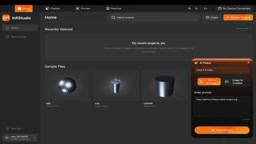
Generating a machinable 3D model from text or images involves two interconnected steps: first, AI converts the natural language or image into a three-dimensional geometric model (typically output as an STL or STEP file); then, CAM (Computer-Aided Manufacturing) software translates that geometry into G-code the machine can execute — a series of precise instructions describing tool paths, feed rates, and cutting depths. In a traditional workflow, the CAM step alone requires considerable expertise: the operator must manually plan toolpaths, select cutting strategies, set safety planes, and configure dozens of other parameters. InfiMaker claims to have automated and internalized both steps — which is the most critical technical claim the K1 makes for lowering barriers, and the aspect most worth scrutinizing closely once production units ship.
Pricing and Positioning: Desktop-Scale, But Still Heavy
The InfiMaker K1 is currently crowdfunding on Kickstarter, with early bird pricing under $6,000. It fits on a desktop, right next to your computer, with no need for a dedicated workshop space.
That said, "desktop-scale" doesn't mean lightweight — the machine weighs over 100 kilograms. The reason is that CNC machining demands extremely high precision, and achieving that precision requires a sufficiently rigid, solid machine body to dampen vibrations. According to InfiMaker, this is essentially the smallest and lightest form factor they could achieve while still delivering satisfactory machining quality.
Simultaneously lowering the barriers in terms of user experience, footprint, and cost is InfiMaker's core product philosophy. For anyone who has long been curious about CNC machining but been put off by its complexity, the K1 offers a relatively accessible on-ramp. Of course, as with any crowdfunded product, whether it can actually deliver on its claimed ease of use and machining quality remains to be seen once production units are in customers' hands.
Related articles

REA: Reverse Engineer Any App with AI, No Coding Required
REA is a viral open-source AI reverse-engineering tool that lets Claude, Codex, and other AI agents analyze any app and generate functional clones—no coding required. This article covers how it works, installation, a hands-on test, and legal risks.

2026 AI Coding Tools Comparison: Claude, ChatGPT, Gemini — Which Is the Best?
A 2026 comparison of five mainstream AI coding tools — Claude Code, ChatGPT Codex, Gemini, DeepSeek, and GitHub Copilot — on real projects, pricing, and code quality, to help you decide where that $20/month should go.

ChatGPT Codex Can Clone Any Software? Testing the Risks and the Truth
YouTube shorts claim ChatGPT Codex or Claude Code can clone Adobe, Excel, and Figma for lifelong free use. We break down the feasibility, legal risks, and DM-funnel tactics—and explain what AI coding tools are truly good for.