REA: Reverse Engineer Any App with AI, No Coding Required

REA integrates reverse-engineering tools via MCP, letting AI agents analyze binaries and generate functional clones.
REA (Reverse Engineer Anything) is an open-source project going viral on GitHub and YouTube. Through MCP, it exposes classic reverse-engineering tools like IDA and Ghidra to AI agents such as Claude, Codex, and Gemini CLI, letting developers drive binary analysis with natural-language instructions. In a hands-on test, the author used REA to analyze the online whiteboard Eraser.io and generated a local clone, "Eraser Studio," with about 95% functional completeness in minutes. The article also covers the official repo address, counterfeit risks, legal boundaries of cloning copyrighted apps, and REA's limits on obfuscated or packed apps.
What Is REA?
REA (Reverse Engineer Anything) is an open-source project that has recently gone viral on GitHub and YouTube. Its core capability is letting AI agents directly analyze any binary application, extract its functional logic, and even generate a runnable clone. Unlike ordinary AI search, REA isn't satisfied with telling you what features an app "has"—it digs into the code layer to reveal how those features are implemented.
According to a YouTube tech channel, REA isn't a brand-new tool; rather, it integrates classic reverse-engineering tools like IDA and Ghidra and exposes their capabilities to AI agents such as Claude, Codex, and Gemini CLI through the MCP (Model Context Protocol) protocol. This means developers no longer need to manually operate complex reverse-engineering tools—they simply describe what they need in natural language, and the AI handles the analysis automatically.
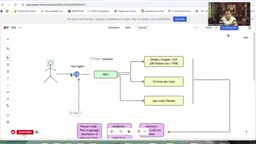
MCP (Model Context Protocol) is a standardized protocol proposed and open-sourced by Anthropic for establishing secure, unified connections between AI agents (such as Claude and Codex) and external tools or data sources. You can think of it as the "USB interface" of the AI world: as long as a tool implements an MCP server, any MCP-compatible AI client can call it directly without writing separate integration code for each AI. In REA's case, reverse-engineering tools like IDA and Ghidra are wrapped as MCP services, and AI agents can trigger their analysis capabilities through natural-language instructions, enabling a "prompt-driven" reverse-engineering workflow. The emergence of MCP greatly lowers the barrier to integrating AI with professional toolchains, and it's also the key reason REA can work across multiple agent platforms such as Claude, Codex, and Gemini CLI.
How Does REA Work?
From Binary to Functional Evidence
REA's workflow can be compared to "debugging a dish." When you taste a dish and want to replicate it, you try repeatedly and adjust the ingredients until you get close to the original flavor. REA does the same with software: it extracts pseudo-code from binary files and, combined with a chain of evidence, tells the AI which features have been confirmed and which remain unclear. The whole process loops in the background until it produces sufficiently reliable conclusions.
On the tech stack side, REA relies on a Node.js environment and is installed via npm. Users invoke the REA skill in Claude Code, Codex CLI, or Cursor, and the AI automatically pulls the repository from GitHub and configures the tools. According to the video demo, installation takes about 2–3 minutes, depending on network conditions.
Pseudo-code is a core intermediate artifact in reverse engineering. Binary files consist of machine instructions that humans can barely read directly; disassemblers (such as IDA and Ghidra) convert them into assembly language, and decompilers further lift the assembly into a high-level representation close to C, namely pseudo-code. Pseudo-code preserves the program's logical structure (conditional branches, loops, function calls, etc.), but variable names and types are often inferred, so readability falls somewhere between source code and assembly. REA uses pseudo-code as the carrier of its "chain of evidence": AI agents read pseudo-code snippets and, combined with clues such as strings, import tables, and UI behavior, determine whether a feature exists and how it's implemented. Understanding the limitations of pseudo-code (such as distortion caused by optimization, or obfuscation countermeasures) helps assess the reliability of REA's conclusions.
Installation and Security Warnings
The video specifically emphasizes that the official repository address is github.com/morluto/re, and that the repository should not contain APK files. A large number of counterfeit repositories and scam versions have already appeared on the market, so users need to carefully verify the URL. The official Discord community already has over 31,000 members providing technical support.
APK files are the installation package format for Android apps—essentially a ZIP archive containing compiled code (DEX bytecode), resource files, and a manifest. In the reverse-engineering community, APKs are often used as an entry point for analyzing mobile app logic. The official REA repository explicitly should not contain APK files for two reasons: first, REA itself is a toolchain rather than an app distribution platform, and mixing APKs into the repository could mean tampering or embedded malicious payloads; second, counterfeiters often attach APKs to trick users into installing them and perpetrate scams. When cloning the repository from GitHub, users should check whether the file list matches the official documentation and avoid executing binaries of unknown origin. This warning also reflects the real supply-chain security risks in the open-source AI tool ecosystem.
Hands-On: Cloning Eraser.io with REA
The video's author did a full demo with REA: having the AI analyze the online whiteboard tool Eraser.io and generate a local clone.
Feature Discovery Phase
The author entered the instruction in Codex: "Inspect eraser using RE," and REA immediately invoked the underlying tools, automatically opening Eraser's editor, insert menu, diagram menu, command palette, and AI panel, checking each feature one by one. The output was divided into two categories: directly visible features (document + canvas workspace, Markdown editor, diagram-as-code, freehand drawing, diagram library) and additional features confirmed in the official documentation.
This step demonstrates REA's "exploration" capability—it doesn't rely on preset scripts but operates the interface like a human tester, recording responses.
Clone Generation and Verification
Next, the author gave a simpler instruction: "Build me a clone of Eraser using RE." A few minutes later, REA generated an app called "Eraser Studio" on local port 4174. The author opened it in Chrome to verify and found that features such as documents, canvas, shape insertion (squares, circles, arrows), text drawing, color changes, and diagram export (PNG, SVG) all worked.
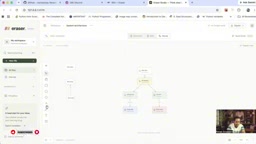
The author commented that the clone's accuracy was about 95%; although details such as background color differed, the core functionality was complete. However, he also noted that a fully 100% clone isn't realistic—REA's output is closer to "functional equivalence" than "pixel-perfect replication."
Legal and Ethical Boundaries
In the video, the author explicitly warns that in regions such as India, cloning a copyrighted app may constitute infringement. He suggests users apply REA to legitimate scenarios, for example:
- Learning the implementation approaches of legacy apps to add similar features to your own projects;
- Adding your own use cases and enhancements on top of a clone rather than copying directly;
- Analyzing competitor features while avoiding copying protected code or designs.

Use Cases and Limitations
REA is best suited to the following scenarios: quickly understanding legacy systems, extracting specific feature logic, and building modern replacements for old apps. But it isn't a panacea—analysis may fail for heavily obfuscated or packed applications, and the generated clones require manual adjustment to reach production quality.
Judging by community momentum, REA's GitHub star growth curve started in July and entered a rapid rise after October, reflecting developers' strong interest in "AI-driven reverse engineering." As agent tools like Claude and Codex become more widespread, skills like REA are expected to become a standard component of AI programming workflows.
Packing and obfuscation are two common techniques that hinder reverse analysis. Packers compress or encrypt the original executable code and decrypt and restore it at runtime through a stub, so static analysis only sees the stub rather than the real logic; obfuscation deliberately reduces the readability of decompiled output by renaming symbols, inserting dead instructions, control-flow flattening, and other means. REA relies on tools like IDA and Ghidra to extract pseudo-code, and when the target app is strongly packed or heavily obfuscated, these tools themselves struggle to produce valid evidence, leaving the AI agent's reasoning without reliable input. Therefore, REA has limited effectiveness on commercially protected applications and usually needs to be combined with manual techniques such as dynamic debugging and unpacking. Understanding this boundary helps set reasonable expectations for REA and avoid treating it as a universal reverse-engineering solution.
Conclusion
REA lowers the barrier to reverse engineering from "expert level" to "prompt level," letting developers without a security background peek into an app's internal logic. Its value lies not in encouraging plagiarism but in accelerating learning and innovation. For teams that want to understand excellent software design or find replacements for legacy systems, REA offers an efficient starting point.
One-line Summary
REA integrates reverse-engineering tools via MCP, letting AI agents analyze binaries and generate functional clones.
Paragraph Summary
REA (Reverse Engineer Anything) is an open-source project that has gone viral on GitHub and YouTube. Through the MCP protocol, it exposes classic reverse-engineering tools like IDA and Ghidra to AI agents such as Claude, Codex, and Gemini CLI, enabling developers to drive binary analysis with natural-language instructions. REA's workflow extracts pseudo-code from binaries and combines it with a chain of evidence, iteratively verifying which features are confirmed. In testing, the author used REA to analyze the online whiteboard Eraser.io and within minutes generated a local clone called "Eraser Studio" with about 95% functional completeness, where core features like canvas, shapes, and export all worked. The article also emphasizes the official repository address, counterfeit risks, and the legal boundaries of cloning copyrighted apps, and notes that REA has limited effectiveness on heavily obfuscated or packed applications and that its output still requires manual adjustment.
Related articles

AI Digital Twin in Action: Using DOT to Automatically Track Bugs and User Feedback
DOTS engineers demonstrate how AI digital twin DOT collects cross-platform user feedback, categorizes issue themes, opens threads to investigate bug root causes, and submits PRs—showcasing a complete AI agent workflow for defect triage with auditable design.

Why Transistors Are No Longer Flat: The Evolution from Planar to Gate-All-Around
Transistor evolution from planar to FinFET to gate-all-around: why gates went from three-sided to four-sided wrapping to suppress short-channel effects and leakage current, extending Moore's Law.

Swarm Intelligence = a Single RL Agent? A Proof of Multi-Armed Bandit Equivalence
A paper proves that collective decision-making through local imitation in swarms is mathematically equivalent to single-agent reinforcement learning: N blind imitators act as N parallel environment samples, with an effective learning rate of 1/N. This article explains the derivation and implications of the Maynard-Cross Learning algorithm.