Inhale Plugin: Take Control of AI Agent Permissions in WordPress

Free plugin Inhale lets WordPress admins visualize and control which plugin actions AI agents can access.
WordPress 6.9 introduced a mechanism allowing plugins to expose callable action interfaces to AI agents — boosting automation but creating a "silent authorization" security blind spot. The free plugin Inhale addresses this by listing all AI-executable actions with safety hints, letting admins enable or disable each one, and showing which plugins are running MCP servers. With a Respira account, it also provides weekly scans against ~40,000 known vulnerabilities with direct fix versions. For site owners integrating AI workflows, Inhale makes the invisible boundaries of AI capability visible and controllable — at no cost.
WordPress Enters the AI Agent Era
WordPress 6.9 brings a noteworthy change: plugins are now able to expose callable action interfaces to AI agents. This means that as you install more plugins on your site, the range of actions an AI agent can perform expands along with them. The question is — what capabilities are these plugins actually exposing when they communicate with AI? Most site owners have no idea.

This is exactly the problem the free plugin Inhale aims to solve. Its core logic is straightforward: your plugins are communicating with AI, but have you ever actually chosen what they're allowed to say or do? In a world where AI agents can directly manipulate content, modify settings, or trigger business workflows, this kind of "silent authorization" poses a real security risk.
An AI agent is an AI system capable of autonomously planning, invoking tools, and executing multi-step tasks — distinct from traditional large language models that only generate text. In the WordPress ecosystem, this means AI can go beyond "answering questions" to directly logging into the dashboard, publishing posts, changing plugin settings, or even triggering e-commerce order flows. WordPress 6.9 introduced a standardized Tool/Action registration mechanism that lets plugin developers declare "this plugin supports AI agent calls to feature XX," granting AI agents the ability to actually operate a site. While this lowers the barrier for AI automation integration, it also means that every plugin supporting this mechanism quietly expands the site's AI-accessible attack surface — and until now, there's been almost no native interface to inform administrators that this is happening.
What Inhale Does
Inhale lists every action that plugins have exposed to AI agents, along with corresponding safety hints. In other words, it surfaces the hidden "AI-executable action list" that was previously buried in the background, allowing site owners to review each item one by one.
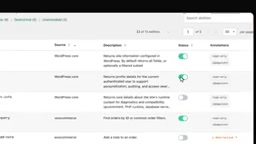
The key feature is choice. Inhale doesn't just display information — it lets you decide which actions AI agents are allowed to use and which should be disabled. This granular permission control puts decision-making back in the hands of the site administrator, rather than letting plugin defaults silently open up all capabilities to AI.
Inhale also lets you see whether an MCP server (Model Context Protocol server) is running on your site and which plugin is loading it. As the protocol layer through which AI agents interact with external tools, having visibility into an MCP server's operational status is critical for security audits — at the very least, you need to know who opened the door.
MCP (Model Context Protocol) is an open protocol proposed and championed by Anthropic in late 2024, designed to standardize how AI models interact with external tools and data sources. Think of it as the "USB port" of the AI world — as long as an application exposes an interface according to MCP specifications, any compatible AI agent can call it without needing custom integration for each AI. In WordPress, if a plugin runs an MCP server, it means it has opened its capabilities in a standardized way to all MCP-compatible AI clients — potentially far beyond what the site owner anticipated. Knowing whether an MCP server exists on your site and which plugin launched it is the first step in assessing your current AI attack surface.
Vulnerability Scanning with a Respira Account
Inhale itself is available for free on wordpress.org. With a Respira account, you also get weekly vulnerability checks against a database of approximately 40,000 known vulnerabilities.

What makes this particularly practical is that when a vulnerability is detected, it also tells you which version fixes it. This saves site owners from manually tracking down patches and delivers a directly actionable upgrade path.
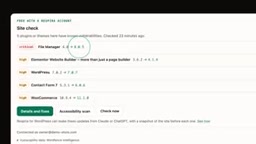
From a security operations perspective, this combination of "identifying the problem and providing the solution" is far more valuable than a bare vulnerability alert. For developers or agencies managing multiple WordPress sites, a systematic and regular scanning mechanism can significantly reduce the risk of anything slipping through the cracks.
Why This Matters
AI agents integrating with WordPress is a double-edged sword. On one hand, they dramatically improve content management efficiency and automation; on the other, every exposed action interface is a potential attack surface. When an AI agent can invoke plugin actions, a misused or manipulated agent could perform operations you never intended.
Traditional WordPress security thinking focuses on plugin vulnerabilities, file permissions, and login protection. AI agents introduce an entirely new risk dimension — the risk of "capability authorization." Inhale's value lies in bringing this new category of risk into the realm of visibility and control.
For site owners exploring AI workflows in WordPress, making it a habit to first understand "what capabilities plugins have exposed to AI" before deciding "what AI is allowed to do" is a basic but essential security practice. With Inhale available for free, there's really no reason not to do it.
Related articles

Free Unlimited Claude Code Solution: Agnes AI + CC Switch Setup Guide
No paid subscription needed — pair the free AI platform Agnes AI with the open-source tool CC Switch to provide a backend for Claude Code, enabling unlimited free calls to text, image, and video models. This guide covers the full setup, test results, and usage boundaries.

A Complete Zero-Cost Guide to Getting Started with Claude Code for Beginners in China
A beginner's guide to Claude Code for users in China: two installation methods (command line and IDE plugin), full configuration steps for replacing the official API with the free domestic LongCat model, and a hands-on demo of building a small tool with natural language, plus tips.

When the NSA Gets Involved: The AI Supply Chain Crisis Behind Open-Source CVEs and API Key Hijacking
Multiple open-source projects disclosed severe CVEs in one day, PHP flaws alarmed the FBI, and Railway and OpenCode were breached with API keys stolen. This article breaks down the vulnerability window, AI-accelerated exploitation, and the AI supply chain crisis behind the API key black market, with a developer defense checklist.