Is Your Local LLM Getting Dumber? The Q4 Quantization Trap Explained (With a 5-Minute Self-Test)
Your local LLM may be underperforming due to silent Q4 quantization defaults, not the model itself.
This article systematically unpacks why local LLMs are often misjudged: quantization compresses model weights to lower bit depths to save VRAM, but different bit levels and algorithm recipes produce drastically different results. 8-bit is nearly lossless; 4-bit is acceptable for short tasks but can cause 23% retrieval loss at long context; below 3-bit, capability collapses. Worse, tools like OLLAMA and LM Studio silently default to Q4KM — meaning users evaluate a file they never chose. KV cache precision, runtime framework, context limits, and missing chat templates all quietly degrade performance without throwing any errors. A practical 5-minute self-test helps distinguish quantization issues from genuine model limitations.
When running a local LLM, have you ever had this experience: a model with a great reputation turns out to feel surprisingly dumb the moment you try it? Before writing it off as "a bad model," hold on — the problem likely isn't the model itself, but the quantization version you never consciously chose, yet were silently given by default.
Quantization is a compression level baked into the local model file. It's the key enabler that lets massive models run on consumer hardware. But there's a fine line between "reasonable compression" and "performing a lobotomy on your model."
What Quantization Actually Does
Take QWEN 3's 27B model as an example — it's made up of 27 billion numbers. Quantization rounds each of those numbers to a coarser grid: 8-bit, 4-bit, 3-bit, 2-bit. From the same model name, you get an entire ladder of variants: Q8, Q6, Q5, Q4, Q3, Q2.
The size differences are staggering: QWEN 3 27B at full precision requires 56GB; Q8 brings it down to 30GB; Q4 leaves you with just 18GB. And those letters after the numbers — KM, KXL, IQ, UD — are the actual "recipe," determining which parts of the model are protected and which are compressed the hardest.
The most critical point: the version you're running was probably chosen by your tool, not you. Pulling a model in OLLAMA without any tag gives you Q4KM by default — an 18GB file wearing a "latest" label. Hugging Face's OLLAMA shortcuts prioritize Q4KM whenever it's available in the repo, and MLX on Mac defaults to a 4-bit conversion. You think you're evaluating a model; you're actually evaluating a file you never actively selected.
The letter suffixes after the numbers aren't decorative — they're shorthand for different quantization algorithms. KM / KS / KL (the K-Quants family) are grouped quantization schemes developed by the llama.cpp community. The core idea is to divide weights into groups, each with its own scaling factor, preserving more precision levels at low bit depths. KM uses a medium group size, KS is more aggressive, and KL is more conservative. IQ (Importance-Quant) goes further by using activation statistics to measure each weight's "importance" to the output, allocating higher precision to important weights and aggressively compressing the rest — seen in names like IQ3_XS and IQ4_NL. AWQ (Activation-aware Weight Quantization) and GPTQ are two mainstream post-training 4-bit quantization frameworks: the former minimizes activation error by searching for optimal per-group scaling factors, while the latter corrects quantization error layer by layer using second-order gradient information. Both can produce files labeled "Q4," but their optimization targets differ — and so do their results. Understanding these suffixes is what lets you actually compare whether two "Q4" files are the same thing at all.
8-bit Is Nearly Lossless; Below 4-bit Gets Dangerous
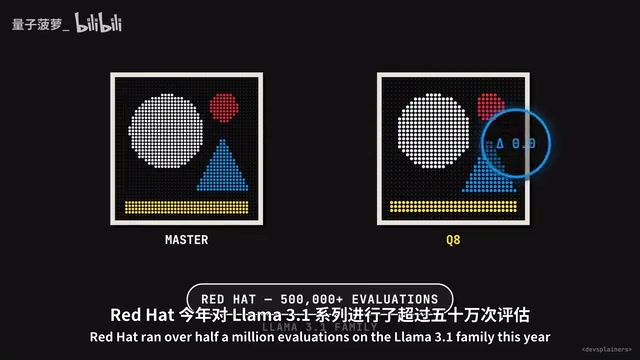
The good news: the cost of 8-bit is too small to measure. Red Hat ran over 500,000 evaluations on the LLaMA 3.1 family this year, and 8-bit float builds matched the original in coding and long-context tests. Even 4-bit LLaMA 3.1 8B only dropped from 67.3 to 67.1 on the HumanEval coding benchmark — negligible.
But once you go below 4-bit, things get dicey. One coding study compressed DeepSeek Coder to 2-bit and lost 67% of passing solutions. The 4-bit version of the same model, by contrast, sacrificed only 2% for a 70% reduction in file size.
As for the extreme 1-bit case: Unsloth once released a 1-bit build of QWEN 3 235B, claiming 77% accuracy retention. Three days later, they posted a disclaimer: actual scores on long tasks were only 8%, and they explicitly warned "don't use it for tool calling." A typical Reddit example: someone asked QWEN what the latest version of Python was, it ran a web search, then turned around and asked the user what the latest Python version was. The community's verdict was sharp — "It got QWEN-otomized (lobotomized)."
Aggregate Scores Hide Two Things: Answer Flips and Context Length
Looking only at average scores can lead to the optimistic conclusion that "Q4 is lossless" — but that hides two uncomfortable truths.
First: answer flips. A Microsoft study tested 4-bit LLaMA 2 on MMLU, and the overall score moved by only one-third of a percentage point — seemingly stable. But 13% of individual questions actually changed answers: half flipped from correct to wrong, half from wrong to correct, canceling each other out to look like "no change."
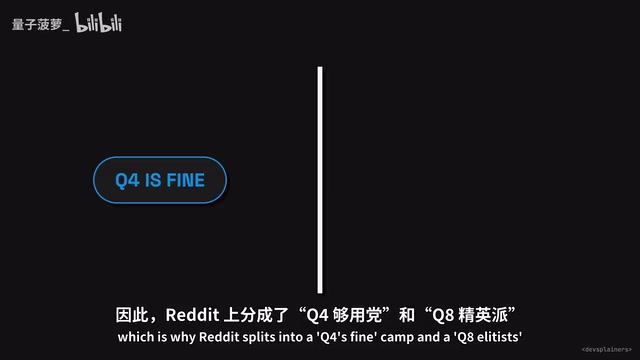
Second: context length. An EMNLP study had 4-bit models run long-document tasks and found average retrieval losses of 23% at 128K tokens. LLaMA 70B under one 4-bit method lost a third of its score, while QWEN at the same scale survived nearly unscathed. A Q4 that looks lossless in short conversations can be a completely different beast at 64K tokens. This is exactly why Reddit is split between the "Q4 is fine" camp and the "Q8 or nothing" camp.
Same Label "Q4," Two Completely Different Models
To make things more complicated, differences in the quantization "recipe" can produce dramatically different results at the same bit depth. In the Red Hat study, GPTQ and AWQ — two 4-bit methods with the same group size — scored 67 and 63 respectively on HumanEval. Same bit count, 4-point gap, coming entirely from which weights each method chose to protect.
One developer did an even more granular measurement: he applied 16 different quantizations to QWEN 3's 30B model, ran 100 agentic tool-calling conversations per variant, and scored each by "how much does this version diverge from the original model's next-token choices?" The result: Bartowski's Q4 and Unsloth's Q4 were nearly identical, while the AWQ and NVFP4 4-bit versions diverged by about a quarter more — and one NVFP4 build actually performed worse than a smaller file.
Bit depth is just a budget. Modern Q4 practice is to keep embedding and output layers at 6 or 8-bit, aggressively compress the "more tolerant" middle layers, then slap an averaged "Q4" label on the whole thing. What ultimately determines the final product is also the runtime doing the inference.
GGUF (GPT-Generated Unified Format) is a local model file format introduced by the llama.cpp project, succeeding GGML. It bundles model weights, the tokenizer vocabulary, chat templates, hyperparameters, and more into a single file for easy distribution and loading. The "GGUF upload dropping the chat template" issue mentioned in this article is real: some uploaders fail to correctly embed the template when converting or repackaging, causing the runtime to fall back to a generic "instruct" prompt format. The chat template defines the delimiters and special tokens for system prompts, user turns, and assistant turns — a wrong template means the model receives input formatted differently from how it was trained, which can severely degrade performance. And since nothing crashes and the output still looks like normal text, the problem is extremely easy to miss. After downloading a GGUF file, you can use llama-gguf-dump (bundled with llama.cpp) or Hugging Face's online GGUF parser to verify whether the correct tokenizer.chat_template field is embedded in the file.
The Culprit Is Often More Than Just Quantization
A post that hit the front page of Hacker News last week ran an elegant experiment: taking full-precision 16-bit QWEN 3 30B and simply swapping the attention kernel and inference framework (vLLM), the model's word choices began diverging midway through a 100K-token prompt — while re-running with the same kernel produced bit-for-bit identical output. In other words, the difference came purely from the mathematical computation path itself.
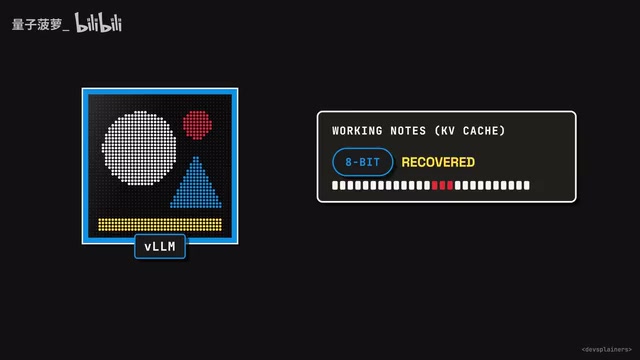
They then kept the weights unchanged and only compressed the KV cache (the model's "working notes" for the conversation): 8-bit cache could recover from tool-calling errors; 4-bit cache could not recover at all. NVIDIA's own 4-bit format, at 88K token context, had half of the tokens mismatching the reference — and even ran the wrong Cisco command on the wrong interface (running show run instead of show arp).
Simon Willison, running Q4 QWEN 3 in LM Studio, found the model always ran out of tokens mid-thought — because LM Studio's default context is only 8,000 tokens, and the model spent all of them thinking. The problem disappeared once he maxed out the context. Another common pitfall: a GGUF upload missing the chat template causes the runtime to silently fall back to a generic template. The model keeps talking, getting progressively dumber, and because nothing throws an error, nobody notices.
KV cache is the memory region where a Transformer caches the key-value vectors for already-processed tokens during inference — think of it as the model's working memory during a conversation. Without quantization, the KV cache is stored in 16-bit float and grows linearly with context length, making it one of the primary sources of VRAM usage in long-context inference. Quantizing it to 8-bit or 4-bit saves significant VRAM at the cost of additional precision loss stacked on top of weight quantization. The experiments described in this article show that KV cache quantization sometimes has a larger impact on long-context tasks than weight quantization itself: a tool-calling error that 4-bit weights could still recover from becomes unrecoverable once the KV cache is also compressed to 4-bit. Inference frameworks (llama.cpp, vLLM, LM Studio, etc.) typically expose a separate KV cache precision parameter — when VRAM allows, keep it at 8-bit or 16-bit, especially for long-context or precise tool-calling scenarios.
5-Minute Self-Test: First, Figure Out What You're Actually Running

Rather than debating "is 27B any good" in forums, try this three-step self-test:
Step 1: Identify What You've Actually Loaded
Use ollama show, check the LM Studio model panel, or look directly at the GGUF filename. If your answer is just "QWEN 27B," you don't actually know what you're running.
Step 2: Fix Your Entire Stack
Set context length higher than the runtime's default, use the sampler settings specified on the model card, and keep the KV cache at 8-bit or higher for coding and agentic tasks.
Step 3: Run a Controlled Test With Real Tasks
Pick two tasks from your actual workflow — one with a clear pass/fail criterion, one requiring precise tool calling. Run them at your current quantization level, then run them again at one tier up from the same uploader (Q4 → Q6 or Q8), keeping everything else identical. If failures disappear, the problem was quantization level. If Q8 still fails, that's a model problem.
Lessons Worth Remembering
With the same VRAM budget, a large model at Q4 usually beats a small model at Q8 — but this rule breaks down around 3-bit. Also, a 1-bit file hard-compressed from a full 16-bit model is a completely different thing from a model trained for 1-bit from the start (like the Bonsai 27B covered previously).
When you publish test results, write down exactly what you ran. For example: "QWEN 3 27B, Unsloth UD Q4KXL, llama.cpp, 64K context, Q8 KV cache, RTX 5090." It's a mouthful, but at least someone else can reproduce it.
Quantization does cause mistaken judgments — but it isn't always the only culprit. Prompts, templates, test harnesses, and runtimes all collectively shape the final text you receive. A model name tells you how it was trained. It never tells you what you're actually running.
Related articles

AI Agent Fundamentals: The Three Core Components — Brain, Memory, and Tools
A beginner's guide to AI Agents: covering the three core components (brain, memory, tools), four stages of LLM deployment, and why Agents matter for real business use cases.

Boycotting Software That Doesn't Support Linux: One Developer's Philosophy of Choice
A Linux-only developer shares his philosophy of boycotting non-Linux software — without sacrificing productivity — and explains how coding agents like Claude Code are closing the gap with commercial tools.
Why Do All AI-Generated Projects Look the Same? The Aesthetic Homogenization Problem in Vibe Coding
Why do vibe coding projects all use purple gradients and dark glassmorphism? We break down the technical roots of AI aesthetic homogenization and how to escape it.