Kimi Code Desktop: The AI Coding Agent That Builds Your Entire App While You Sleep

Kimi Code Desktop is an autonomous AI coding Agent that can build and deploy a full app overnight with a single prompt.
Moonshot AI's Kimi Code Desktop evolves AI coding tools from autocomplete assistants into an autonomous Agent workspace that can own the full development workflow. It offers Goal, Plan, and Swarm modes — the latter spawning parallel sub-Agents for complex tasks. Powered by the K3 model with 2.8 trillion parameters and a 1M-token context window, it can theoretically hold an entire codebase in a single inference. A demo showed the Agent building a complete SaaS landing page with Auth overnight, delivering a live link, git diff, passing tests, and browser preview with no human intervention.
From Terminal Agent to Desktop Workspace
Moonshot AI has taken its terminal-based coding Agent and evolved it into a full single-window workspace called Kimi Code Desktop. This isn't aimed at being yet another code completion tool — it's positioned as an "Agent workbench" capable of completing tasks autonomously.
Unlike autocomplete editors that chime in as you type, Kimi Code Desktop operates on a different premise: you open your project, and it takes over. According to a YouTube demo, the Agent can read code, edit files, run commands, and verify execution results — closing the entire development loop on its own, without requiring you to manually feed it prompts step by step.
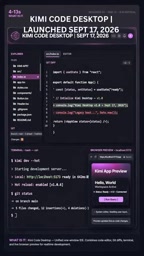
This shift from "assistant" to "autonomous operator" represents a paradigm change underway in AI coding tools. What developers increasingly need isn't smarter autocomplete — it's a collaborator that can genuinely own end-to-end tasks.
Three Modes for Different Scenarios
Kimi Code Desktop offers three operating modes, each designed for a different level of task complexity:
Goal Mode
Built for long-horizon tasks. You describe the end goal, and the Agent plans and executes continuously — ideal for development work that spans multiple steps and takes significant time to complete.
Plan Mode
Designed for targeted code changes. It first presents an edit plan, then carries out the changes, giving developers clearer visibility and control over the scope of modifications.
Swarm Mode
The most ambitious of the three — the Agent spins up multiple parallel sub-Agents that work simultaneously. In practice, it breaks a large task into sub-tasks and runs them concurrently, dramatically compressing the time needed to finish.
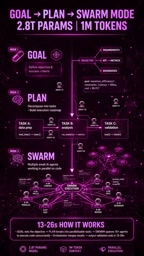
This parallel Agent design reflects one of the most active areas of exploration in the current AI Agent space: a single Agent has a capability ceiling, and multi-Agent collaboration on complex engineering tasks may be the key to breaking through it.
Multi-Agent Systems are one of the core research directions in applied AI engineering today. The basic idea is to decompose a complex task into relatively independent sub-tasks, with an Orchestrator Agent distributing work to multiple Worker Agents running concurrently, and the orchestration layer aggregating results at the end. This approach can overcome the time and capability constraints of a single model in a single inference pass — but it also introduces new challenges: sub-Agents need to share context, avoid conflicting writes (e.g., two Agents modifying the same file simultaneously), and have rollback or retry mechanisms when partial failures occur. K3's one-million-token context window plays a critical role here — parallel collaboration only produces coherent code changes when all sub-Agents have access to sufficiently complete project information.
The K3 Model: 2.8 Trillion Parameters and a Million-Token Context
Underpinning the entire system is Moonshot AI's K3 model, which reportedly features 2.8 trillion parameters and a one-million-token context window.
What does a million-token context actually mean? As the demo presenter put it, the model can "remember your entire codebase." For large projects, context length has long been the Achilles' heel of AI coding tools — a model that can't hold enough code in memory can't make globally consistent changes. A one-million-token capacity means the Agent can maintain a complete understanding of an entire codebase when working across files and modules.
This capability is also the foundational requirement that makes features like Swarm Mode viable: without sufficient context, parallel sub-Agents would struggle to stay consistent with each other.
The context window refers to the maximum amount of text a model can "see" in a single inference pass, measured in tokens. One token is roughly equivalent to 0.75 English words or about 1.5 Chinese characters. A one-million-token context can accommodate approximately 750,000 English words — equivalent to hundreds of source code files loaded simultaneously. By comparison, early GPT-4 had a context window of just 8K tokens, and today's mainstream models typically range from 128K to 200K tokens. For coding tasks, context length determines whether the model can simultaneously "see" inter-module dependencies, change history, and test results — directly affecting the quality of high-complexity tasks like cross-file refactoring and global variable tracking. If the 2.8 trillion parameter count is accurate, it would be roughly 1.5 times the scale of GPT-4 (reportedly around 1.8 trillion parameters), placing it in the range of the largest known sparse MoE (Mixture of Experts) architectures.
Fall Asleep, Wake Up to a Live App
The most eye-catching moment in the demo is a "sleep experiment." The presenter typed in a single instruction — "Build me a SaaS landing page with Auth" — and went to bed.
When he woke up, he was greeted with: a live link, a complete git diff, passing tests, and a browser preview — all without a single prompt loop or manual intervention.

If this demo reflects real-world performance, it illustrates an ideal state for AI coding Agents: developers define the requirements, and the Agent handles implementation, validation, and deployment autonomously. Of course, demos like this tend to be carefully curated — performance on genuinely complex production projects still warrants more real-world validation.
The "no prompt loop" mentioned in the demo is a key distinction between traditional AI coding assistants and autonomous Agents. Traditional tools (like early Copilot) require developers to repeatedly input prompts, review outputs, and re-prompt — a back-and-forth human-in-the-loop cycle. An autonomous Agent, by design, should be able to execute a closed "perceive → plan → act → verify" loop after receiving an initial instruction, self-correcting when errors arise rather than waiting for human intervention. The git diff record and passing automated tests serve as externally verifiable markers of this loop — the former proves the Agent made real structural changes to the codebase, while the latter proves those changes were functionally validated, not just plausible-looking code snippets.
Who Is It For? Is Coding Dead?
Kimi Code Desktop's target audience is clearly defined: developers who want an "Agent workspace" rather than yet another autocomplete editor.

The demo closes with a provocative question: "Is coding dead, or are coders now 10x?"
There's no clean answer, but it surfaces the core tension that AI coding tools have introduced. On one hand, Agents can genuinely automate repetitive, process-heavy development work and multiply individual developer output. On the other hand, these tools raise the bar for requirements definition, architectural judgment, and result validation — the faster an Agent moves, the more important it becomes for humans to steer the direction.
For teams and individuals looking to break out of the traditional coding loop and explore Agent-driven development, Kimi Code Desktop represents a direction worth watching. That said, before committing it to production, a clear-eyed assessment of its stability in complex real-world scenarios remains an essential step.
Related articles

Qwen 4 First Test Leaks: Performance Rivals Opus 5.5, DeepSeek V4 Series Surfaces
Early Qwen 4 test outputs leak, with front-end generation said to rival Opus 5.5; DeepSeek V4 Mini, Flash, and Pro names appear in a code repo; Ant Group's Ling-3.1-flash surfaces too. Here's the latest on model tiering and on-device lightweight models.

OpenCode Makes DeepSeek V4.1 Flash Free, AI Daily Roundup
AI daily roundup: OpenCode makes DeepSeek V4.1 Flash free, StepFun Step5 Preview and Ling 3.1 Flash open-sourced, Grok Voice 3.0 tops speech leaderboard, Matrix Game 4.0 open-sourced, and the EU opens its first AI Act enforcement probe into OpenAI and Anthropic.

DeepSeek V4.1 Flash 1017 Released: Reasoning and Coding Upgrades, Search and Fetch API Now Available
DeepSeek releases V4.1 Flash 1017 with major gains in reasoning, coding, and agentic tasks, plus web search and fetch APIs at 5 yuan per 1,000 requests. Tencent Hunyuan open-sources High Memory 2.0, Perplexity open-sources multimodal decision models, and MOFCOM seeks comments on AI export catalog.