LangChain + LangGraph Full-Stack in Practice: A Production-Ready Guide to Six Core Modules and Agent Deployment

Master LangChain's six modules and LangGraph to build production-ready, debuggable AI Agents.
This guide systematically covers LangChain's six core modules — Models, Prompts, Chains, Memory, RAG, and Agents — and explains how LangGraph extends them with explicit state graphs, persistence, and Human-in-the-Loop support. It includes practical pitfalls, the ReAct mechanism, multi-Agent patterns, and a concise production deployment cheat sheet to help developers ship stable AI applications.
How a Launch Incident Changed Everything
Most developers building their first AI application will hit the same pitfalls: prompt templates scattered across multiple files, context resetting from zero on every conversation, the model "forgetting" what the user asked two messages ago, and a product manager demanding it can query orders and call external tools — all while the codebase turns into spaghetti and the Friday deploy gets rolled back on Monday.
This is fundamentally an AI development reinvention-of-the-wheel problem. What you're missing isn't a more powerful model — it's an engineering toolchain. LangChain was created specifically to solve this. Founded by Harrison Chase in late 2022, its core motivation was to address the fragmentation in large language model application development. Before LangChain, developers had to manually handle API calls, error retries, token counting, prompt concatenation, and a mountain of other repetitive work. LangChain wraps a unified abstraction layer over the interfaces of dozens of model providers — OpenAI, Anthropic, Hugging Face, and more — completely decoupling application logic from the underlying model. It pre-packages all the "parts" you need to work with LLMs so you can just pick and assemble.
Think of LangChain as an "LLM operating system": you focus on business logic, and it handles all the grunt work of talking to the model. This article systematically breaks down LangChain's six core modules and explains how LangGraph fills the gaps for production-grade Agents.
LangChain's Six Core Modules Explained
LangChain is built around six modules: Models manages model access, Prompts manages prompt templates, Chains handles workflow orchestration, Memory manages conversational context, Indexes manages knowledge bases, and Agents enables autonomous decision-making.
Compared to calling model APIs directly, LangChain bundles capabilities like streaming output, prompt reuse, chain composition, memory management, tool invocation, and token monitoring — eliminating the need to rebuild them every time.
Model and Prompt Abstractions
Start by distinguishing three model types: LLM for pure text completion, Chat Model for role-formatted conversational models, and Embeddings for converting text into vectors. LangChain wraps all three under a unified BaseLanguageModel abstraction — switching models requires changing just one line of config. This design follows the software engineering principle of "dependency inversion" — business code depends on abstract interfaces rather than concrete implementations, so switching from GPT-4 to Claude or a locally deployed Llama only requires changing initialization parameters, with no impact on any downstream logic.
At the prompt level, PromptTemplate extracts dynamic parts of a prompt string into variables — similar to template variable placeholders in frontend frameworks. ChatPromptTemplate goes further, supporting multi-role messages like System, Human, and AI, which is far more structured than raw f-strings. Paired with PydanticOutputParser or the newer with_structured_output, you can directly instruct the model to return a specified structure, eliminating the need to write regex parsers by hand.
From LLMChain to LCEL Pipeline Orchestration
Many older tutorials still use LLMChain — that's the LangChain 0.1 style, wrapping components like prompt and llm together by passing parameters. It still works, but the officially recommended approach has shifted to LCEL (LangChain Expression Language).
LCEL uses the pipe operator | to chain components together, similar to the pipe operator in JS or pipelines in RxJS. Synchronous, asynchronous, streaming, batch invocation, and callbacks are all included at no extra cost. The underlying core is the Runnable protocol: any component that implements invoke, stream, and batch can be piped into a pipeline — which is why a Retriever can plug directly into a chain. The Runnable protocol is essentially a duck-typing contract: it doesn't enforce inheritance, only behavioral compatibility with the interface. This makes third-party extensions extremely straightforward.
Memory: Giving Conversations Persistent Context
Without passing history, an LLM will immediately forget. This is an inherent characteristic of large language model architecture — Transformer models are stateless by nature. Each inference is an independent forward pass with no awareness of the previous conversation. All "memory" must be explicitly managed at the engineering layer and injected into the Prompt. The Memory module acts as a context window manager for your Chain.
Different Memory classes use different strategies: full buffering, sliding window, summary compression, token-limited storage, and more — choose based on your use case.
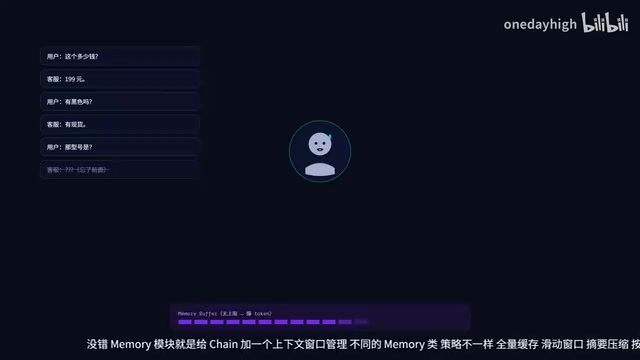
The practical rule of thumb is simple:
- Short conversations → use
ConversationBufferMemoryto retain everything - Long conversations → use
ConversationBufferWindowMemorywithk=5to keep only the last 5 turns - Very long conversations → use
ConversationSummaryMemoryfor summary compression
ConversationSummaryMemory works by using a separate LLM call to compress conversation history into a summary, then injecting that summary as a System Message into subsequent conversations. The trade-off is extra API overhead; the advantage is theoretically unlimited conversation history, making it ideal for customer service and long-running companion chat scenarios.
In production, however, the more common approach is to use LangGraph's built-in persistence capabilities to manage state — we'll cover that in detail below.
RAG: Let the Model Take an Open-Book Exam
RAG (Retrieval-Augmented Generation) was formally introduced in a 2020 paper from Meta AI. The core insight is: instead of cramming all knowledge into model parameters, dynamically retrieve external knowledge at inference time. This architecture dramatically reduces hallucination probability, allows the knowledge base to be updated in real time without retraining the model, and significantly lowers the maintenance cost of enterprise AI applications.
The RAG concept is straightforward: retrieve + generate. When a user asks a question, first pull the most relevant chunks from a vector store and inject them into the Prompt, then let the model answer based on that content — essentially letting the model take an "open-book exam" to avoid fabricating answers.
Several common pitfalls in practice:
- Chunk Size: The default of 4000 is too large and degrades retrieval granularity; too small and you break semantic continuity. A range of 500–1000 with 10–20% overlap is generally recommended.
- Splitter choice: Use
RecursiveCharacterTextSplitterfor general documents, or a Markdown-specific splitter based on document structure. - How Embeddings work: Text is mapped to a high-dimensional vector space (typically 512–3072 dimensions), where semantically similar text is geometrically closer. At retrieval time, the user's question is also vectorized, and cosine similarity or Euclidean distance is used to find the top-K closest document chunks. This is the fundamental difference between "semantic search" and traditional keyword search.
- Vector store selection: Choose from FAISS, Chroma, or Pinecone. The main differences are in performance, persistence, and whether they're cloud-hosted. FAISS is Meta's open-source in-memory library, best for prototyping; Pinecone is a cloud-hosted solution suited for production; Chroma falls in between, supporting local persistence.
LangChain Agent: ReAct Mechanism and Production Rules
The core of LangChain Agents is the ReAct (Reason + Act) paradigm, introduced in the 2022 paper "ReAct: Synergizing Reasoning and Acting in Language Models" from Princeton and Google Brain. The paper found that interleaving reasoning traces (step-by-step thinking similar to Chain-of-Thought) with tool-calling action steps significantly outperformed either reasoning or acting alone on complex tasks — the model reasons about what information it needs, calls a tool to get results, returns to reasoning, and repeats until it can produce an answer. This was the foundational design behind early LangChain Agents.
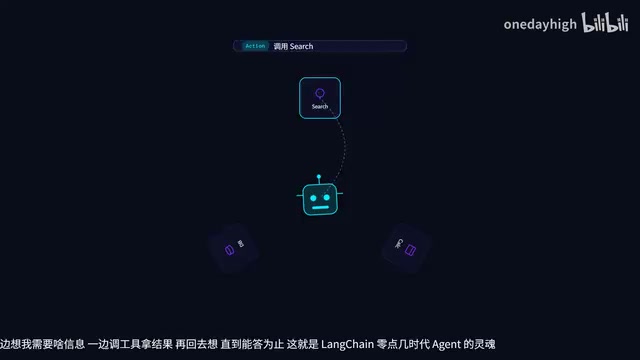
Defining tools is straightforward: use the @tool decorator and write a proper docstring. LangChain automatically generates the JSON schema from type annotations and documentation to send to the model. In other words, docstrings aren't comments — they're instructions for the AI. The model relies on this description to decide when to call a tool and what parameters to pass. The clearer the docstring, the higher the tool-calling accuracy — which is exactly why tool design quality directly impacts overall Agent performance.
Five production rules to follow with legacy Agents:
- Set
max_iterationsto prevent infinite loops - Set timeouts to prevent hangs
- Add
early_stopping_method="generate" - Add input validation to tools to prevent bad parameters from the model
- Integrate LangSmith for full-chain tracing — otherwise debugging will consume your entire night
However, legacy Agents have a fundamental ceiling: they're essentially a black-box loop. You can't see the shape of the loop, can't precisely control each step, don't know which iteration you're on, can't replay on failure, and can't insert human approval mid-execution.
LangGraph: Turning Agent Flow into a Controllable State Graph
LangGraph was built to solve exactly these problems. It draws on the design thinking behind finite state machines (FSM) and workflow engines, implemented on top of the NetworkX graph library as a directed graph structure. The core idea is to replace the Agent's implicit loop with an explicit state graph: nodes are functions, edges define flow, and state is centrally stored. Every step is observable, replayable, and interruptible.
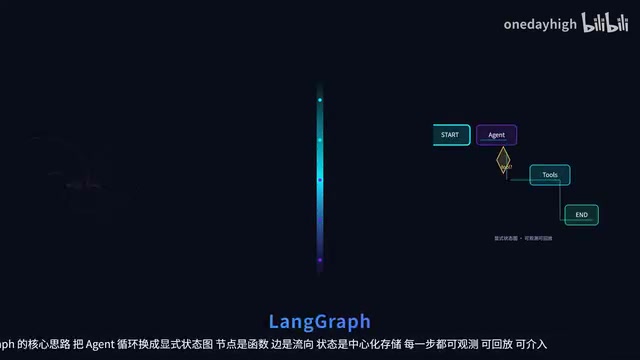
The State, Node, and Edge Trio
State is defined using TypedDict or MessagesState — essentially a shared data center that all nodes read from and write to. Modifying State requires returning new data, following an immutability principle similar to React's setState. This immutability is intentional — it makes state changes trackable and reversible. Complete State snapshots before and after each node execution can be persisted in full, which is the underlying foundation of "time-travel debugging."
Node is just a function: it takes State as input and returns the fields to update. LangGraph uses Reducers to merge changes for you — the default add_messages appends new messages to the list rather than overwriting.
Edge comes in two forms: regular edges via add_edge follow a fixed path; conditional edges via add_conditional_edges determine the next step based on State — this is the core of Agent reasoning. Combined with self-loops, this perfectly supports iterative inference. The routing function for conditional edges takes State as input and returns the name of the next node. LangGraph also includes the built-in tools_condition to check whether a tool call is needed in a single line.
Streaming Output and Frontend Integration
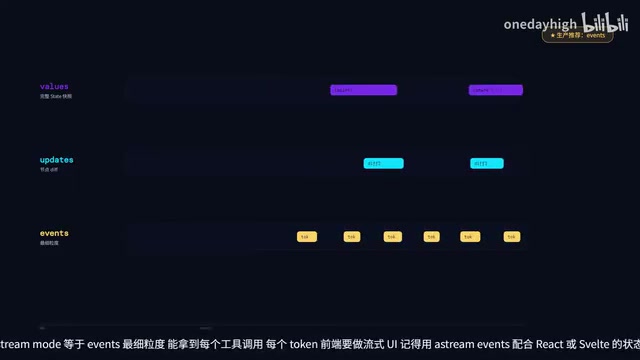
In production, use stream_mode="events" — it's the most granular mode, giving you every tool call and every token. When building streaming UI on the frontend, use astream_events together with React or Svelte state updates. The underlying streaming protocol is typically Server-Sent Events (SSE) or WebSocket. SSE is more common in Agent streaming scenarios due to its unidirectional push model and native HTTP/1.1 compatibility; WebSocket is better suited for bidirectional communication cases where users need to interrupt Agent execution.
Persistence and Human-in-the-Loop (HITL)
LangGraph's true killer features are persistence and Human-in-the-Loop:
- Persistence: Attach
MemorySaverorPostgresSaverat compile time, and the graph automatically checkpoints after every Super Step. This Checkpointer mechanism is analogous to a database's Write-Ahead Log (WAL) — atomically persisting state after each superstep, ensuring full recoverability from network interruptions or model errors. Calling with the samethread_idresumes where you left off — effectively giving you both "session resurrection" and "time travel" for free. In production, preferPostgresSaveroverMemorySaver, as in-memory storage loses all session history on service restart. - Human-in-the-Loop (HITL): Attach
interrupt_beforeto a node, and the graph will pause when it reaches that node. The frontend displays an approval dialog; once the human approves, useCommandwithresumeto push updates back into State and the graph continues execution. This is an essential mechanism for risk control and sensitive tool calls in production. HITL is especially critical in high-stakes domains like finance, healthcare, and law — it transforms AI systems from "fully autonomous execution" into "human-supervised assisted execution," significantly reducing the compliance risk of autonomous Agents.
Multi-Agent Orchestration: Supervisor and Swarm
There are two primary patterns for multi-Agent orchestration: Supervisor is ideal for task-dispatch workflows, with a central node coordinating everything and clear process flow; Swarm is ideal for specialist handoff workflows, where each Agent does its best part then passes the baton. LangGraph natively supports both — pipelines like "research → implement → review" work especially well. Supervisor mode is analogous to an API gateway in microservices architecture, with the central node holding global task state and making routing decisions. Swarm mode is more like an assembly line factory, where work automatically flows to the next station after each workpiece is completed — ideal when each Agent has clearly defined responsibilities.
The key technique is to give each Agent its own State subset, letting it see only the fields it cares about to prevent context pollution. The Send API introduced in LangGraph 0.2 also makes dynamic dispatch much easier.
Production Deployment Cheat Sheet
Here's the key summary.
On the LangChain side: Don't use LLMChain in production; always add partial_variables to Prompts; always set limits on Memory; use LangSmith for full-chain tracing.
On the LangGraph side: Always declare State types explicitly with TypedDict; always add recursion_limit to loop edges; prefer Postgres over in-memory for Checkpointer; always add timeouts to HITL.
Technology selection guide:
- One-shot Q&A, simple RAG, pure prompt engineering → Use LangChain directly
- Need HITL, long workflows, visual debugging, multi-Agent → Use LangGraph
- Just making a single call and getting a result → The OpenAI SDK is enough, skip the framework
One-line summary: LangChain is the toolbox, LangGraph is the blueprint. The recommended path is to get comfortable with the toolbox first — get a minimal RAG running — then use LangGraph to wrap it into a debuggable, persistent production version.
Key Takeaways
Related articles

Coinbase Engineer: How to Determine Whether an AI Agent Can Operate Unattended
Coinbase engineer Evan Kormos shares an engineering method for judging whether an AI agent can run unattended: model processes with DAG/DCG, replace output comparison with statistical evaluation, and hand over control in three phases—supervision, sampling, and exception handling.

WorkBuddy Beginner's Guide: How AI Agents Automate Office Tasks
WorkBuddy tutorial: learn how this desktop AI agent workbench automates files, organizes data, and generates documents, compared with LLMs and Codex, plus a beginner path and cost analysis.

Doubao Work in Practice: Three Modes That Let AI Actually Get Work Done
Doubao Work practical tutorial: from chat mode to Work Mode Lite and Pro, explaining the logic for choosing among three modes with real office task demonstrations. Even complete beginners can learn to use an AI agent to handle local files, organize materials, and generate documents.