LangGraph Step-by-Step Tutorial: From Core Components to Multi-Agent in Practice

LangGraph builds Agents with graphs (nodes + edges), offering low-level control over loops, persistence, and human-in-the-loop.
The article outlines the core structure of a Bilibili LangGraph tutorial. LangGraph is a relatively independent component in the LangChain ecosystem, using graph nodes and edges to organize agent logic with lower-level control than writing Agents directly. Starting from a "weather query" Hello World example, it walks through defining tools, building tool nodes, defining routing functions, assembling graphs, and compiling/running, then breaks down core components: nodes as functions, ToolNode wrapping, normal vs. conditional edges, state as the data backbone, and MemorySaver checkpoints. It concludes by comparing drag-and-drop tools, noting that complex processes are better orchestrated precisely with LangGraph code—the value of multi-Agent practice.
LangGraph is a relatively independent component system within the LangChain ecosystem—its official site even uses a separate domain. Compared to writing Agents directly with LangChain, LangGraph organizes agent logic as a graph, offering lower-level control over loops, branching, persistence, and human-in-the-loop interactions. This tutorial series from a Bilibili creator starts with Hello World and gradually expands to multi-Agent practice. Below is a breakdown of its core structure.
What LangGraph Is and Who It's For
LangGraph positions itself as an efficient development framework for Agents, with the core idea of building agent workflows using graph nodes and edges. The official documentation provides complete docs, example code, tutorials, and an API Reference. For RAG scenarios, there are multiple examples to reference, including advanced patterns like Agentic RAG and Self-RAG.
Its main capabilities center on several areas: loops and branching, persistence (checkpointing), human-in-the-loop (breakpoint execution), streaming handling, and integration with LangChain and LangSmith.
There's an easy pitfall during installation: after installing LangChain 0.3, LangGraph needs to be upgraded separately to a matching version, otherwise it reports a Pydantic v1 warning. The warning itself doesn't affect runtime results, but it's recommended to upgrade to the latest version as well.
Checkpointing is the key design that distinguishes LangGraph from ordinary chained calls. It automatically persists a snapshot after every state change in the graph, recording the current node, message list, variable values, and all other graph state. Snapshots can be stored in memory (MemorySaver), SQLite, Postgres, and other backends. With checkpoints, an interrupted workflow can resume from the last breakpoint instead of rerunning from scratch; it also provides the foundation for "time travel" debugging, rolling back to a historical state, and human-in-the-loop scenarios—pausing the graph for manual review, modifying state, and then continuing.
Pydantic v1 warnings are also a common source of confusion. LangChain 0.3 has migrated to Pydantic v2, while early LangGraph versions still rely on a Pydantic v1 compatibility layer. When mixed, you'll see warnings like Support for class-based config is deprecated. It doesn't affect execution, but to eliminate it entirely, upgrade LangGraph to a version aligned with LangChain 0.3 and unify dependency declarations.
Hello World: Understanding LangGraph's Development Model with One Graph
The tutorial uses a mini "weather query" example to build intuition. The whole flow is a directed graph: a start node points to an Agent node, the Agent calls a tool node, the tool node returns results to the Agent, and the Agent decides no further tool calls are needed and moves to the end node.
At the code level, there are several key steps:
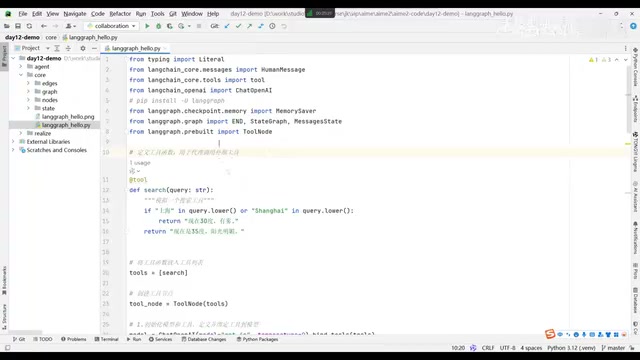
Define the tool. Use a decorator to turn the search function into a LangChain tool. Inside the function, check whether the input contains "Shanghai"; if so, return some simulated weather data. Then put the tool in a list and call bind_tools to bind it to the LLM, letting the LLM match which tool to call.
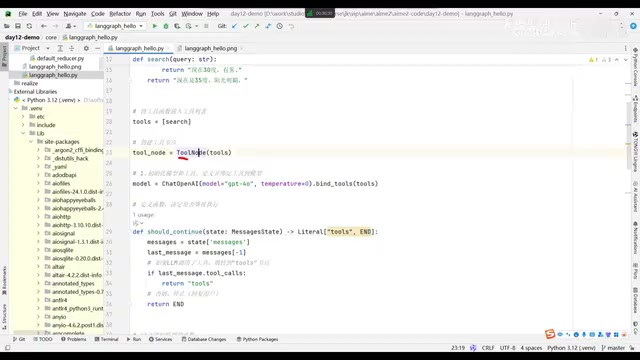
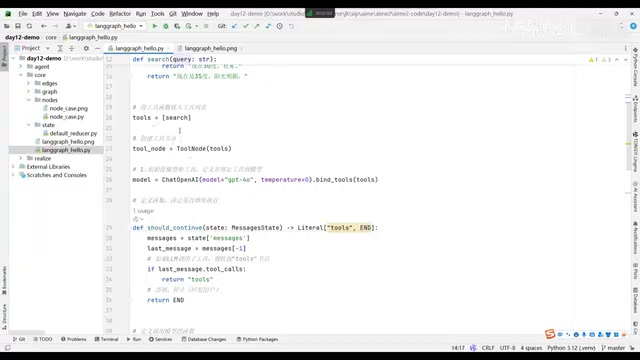
Build the tool node. Besides binding the tool to the LLM, you also need to turn it into a tool node, because everything that executes in LangGraph must be a node. Ordinary nodes are essentially functions, but tool nodes need to be wrapped using a dedicated class provided by LangGraph.
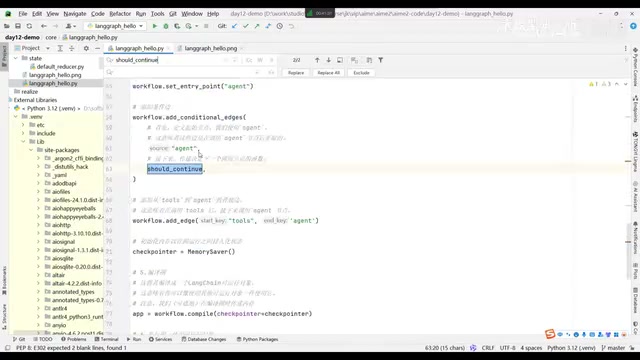
Define the routing function. The routing function retrieves messages from shared memory (MessageState) and determines whether the LLM is requesting a tool call—if so, return the tool node; if not, return the end node.
Assemble the graph. Create a StateGraph and pass in MessageState, then add the agent node and tools node in order, set the entry point to agent, connect agent to the routing function with a conditional edge, and connect tools back to agent with a normal edge.
Compile and run. Add MemorySaver as checkpoint storage, call compile to generate a runnable object, and then invoke it via stream or other methods. Pass in a config consistent with LangChain (including session id / user id) at runtime, and context will take effect under the same id.
Breaking Down Core Components One by One
Nodes Are Just Functions
Nodes in LangGraph aren't complicated to understand—they're just functions or methods that do work. The first parameter when adding a node is the node name, and the second is the function itself. Tool nodes are slightly different: they need to be wrapped with ToolNode, because tools are in list form and there may be multiple, and LangGraph handles tool calls specially, so they can't be used directly as ordinary functions.
Normal Edges and Conditional Edges
Edges come in two types. Normal edges (add_edge) connect two nodes with a fixed direction, e.g., the tool node always returns to the agent node after execution. Conditional edges (add_conditional_edges) require a routing function, and the return value of the function determines which branch to take. The nodes that the routing function can ultimately reach must be declared clearly when adding the conditional edge.
State and Shared Memory
Every node produces state changes after execution, like a save file after clearing a level in a game. This save file is shared across nodes, and both the routing function and the LLM-calling function read messages from it. In other words, state is the data backbone running through the entire graph.
MessageState is the most commonly used state type in LangGraph. It's essentially a TypedDict with a messages field, whose value is a list of messages (List[BaseMessage]). What makes it special is that LangGraph predefines a "merge by appending" reducer for the messages field—each time a node returns new messages, the graph doesn't overwrite the old list but concatenates them. This way, the LLM can see the full conversation history in subsequent calls, and tool calls and tool returns are preserved in order. If custom state includes ordinary fields (like counters or flags), the default behavior is to overwrite rather than accumulate; you can explicitly specify a reducer via Annotated when needed.
Checkpoints and Compilation
MemorySaver plays the role of checkpoints (save points), preserving context across sessions. The final compile step builds the graph into an executable object, conforming to LangChain's Runnable specification, after which it can be called via standard interfaces like stream.
compile does more than just "generate a runnable object." When a checkpointer is passed in, the compiled artifact automatically persists state on each execution; without one, you get a one-off runnable graph. The compilation stage also performs static validation: whether the entry point is set, whether target nodes declared in conditional edges exist, whether the state schema is valid, etc., exposing most structural errors before runtime. The compiled artifact's calling interface follows the LangChain Runnable specification, so methods like invoke, stream, astream_events, and batch are all available directly, making it easy to embed into existing LangChain applications.
From Single Agent to Multi-Agent: When to Use Code Instead of Drag-and-Drop
There are already many visual drag-and-drop tools on the market (such as open-source options like Dify), which can indeed simplify development for simple business processes like CRUD and admin backends. But once processes become complex, drag-and-drop's generality isn't enough, and you need LangGraph to achieve more precise control through code.
The tutorial emphasizes the trend of "Agent workflow customization." After learning LangGraph, looking back at those drag-and-drop tools, you'll find their underlying ideas actually reference this graph-based workflow model. A single Agent can call an LLM, but a true intelligent agent can not only call multiple LLMs but also orchestrate loops, branching, and persistence as needed—this is exactly where LangGraph's value lies in multi-Agent practice.
Common multi-Agent orchestration patterns fall into several categories. The first is the Supervisor pattern: a routing Agent responsible for dispatch chooses which sub-Agent to hand control to based on the task; sub-Agents report back to the supervisor upon completion, which then decides the next step. The second is the Network/Swarm pattern: Agents can hand off directly to each other without a central node constraint. The third is the Hierarchical pattern: a supervisor nested under another supervisor, suitable for larger systems. LangGraph is well-suited to such scenarios precisely because it writes "who hands control to whom" into the graph using explicit nodes and edges. Combined with checkpoints, it can pause, resume, or allow human intervention at any Agent boundary—something pure prompt stacking struggles to achieve reliably.
One-line Summary
LangGraph builds Agents with graphs (nodes + edges), offering low-level control over loops, persistence, and human-in-the-loop.
Paragraph Summary
The article outlines the core structure of a Bilibili LangGraph tutorial. LangGraph is a relatively independent component in the LangChain ecosystem, organizing agent logic with graph nodes and edges, providing lower-level control than writing Agents directly. The article starts with a "weather query" Hello World example, demonstrating the complete flow of defining tools, building tool nodes, defining routing functions, assembling graphs, and compiling/running. It then breaks down core components one by one: nodes are essentially functions, tool nodes need ToolNode wrapping; edges are split into normal and conditional, with conditional edges determined by routing functions; state is the data backbone running through the entire graph; MemorySaver provides checkpoints for cross-session context sharing. Finally, it compares visual drag-and-drop tools, pointing out that complex processes are better orchestrated precisely with LangGraph code—which is also the value of multi-Agent practice.
Related articles

Felix Rieseberg Personal Homepage
Felix Rieseberg's personal homepage sparks attention on Hacker News. This article covers the Slack engineer's technical background, the rise and fall of nativefier, and the value of a developer homepage as a tech calling card.

@ai-sdk/vue 3.0.306 Patch Release Syncs with [email protected] Update
@ai-sdk/vue 3.0.306 released, synced with [email protected]. A routine patch release for the Vercel AI SDK ecosystem with no public API changes; the Vue adapter layer stays version-aligned with the core package.

Gemini 4 Argon API Launches: The Era of Million-Token Output Begins
Google launches Gemini 4 Argon with sparse MoE architecture, up to 1M output tokens, and a 68.90% Vals Index score, available across API, AI Studio, and the Gemini app.