Laravel MCP in Practice: Let AI Agents Operate Your SaaS Directly

Build a production-ready MCP server for your Laravel SaaS with multi-tenant security and AI agent support.
MCP (Model Context Protocol) is becoming a standard interface for SaaS products to support AI agents — letting users operate your app with natural language through tools like Claude Code, no browser required. This article walks through a hands-on Laravel Daily course using a Linear-style task manager to demonstrate how to build an MCP server with Laravel MCP 1.0: tools mirror API controllers, schemas constrain AI inputs and outputs, and a three-layer defense of schema validation, middleware, and policy authorization prevents cross-tenant data leakage. Authentication starts with Laravel Sanctum and later upgrades to Laravel Passport for finer-grained token control.
Why SaaS Products Need an MCP Server
Conversations around MCP (Model Context Protocol) servers are heating up fast in the SaaS world. The course from Laravel Daily draws on a consensus emerging from the startup community: MCP is becoming a must-have for SaaS products. The creator observed a wave of tweets from founders, SaaS practitioners, and business people, all converging on three core ideas — "add MCP to your SaaS," "does UI even matter anymore with MCP," and "MCP has become a deciding factor in whether to adopt a piece of software."
The underlying logic: when users can send natural language commands directly to your SaaS through AI agents like Claude Code or Codex, the traditional Web UI effectively becomes "optional." Instead of opening a browser and clicking around, users simply describe what they need in an AI terminal and get results. For tools like task managers and project trackers (think Linear), this interaction model is a natural fit.
A key milestone here is the official release of Laravel MCP 1.0 — meaning it's now stable, officially supported, and production-ready, removing a major barrier for Laravel developers looking to integrate MCP.
What is Multi-tenancy? Multi-tenancy is a core concept in SaaS architecture where a single application instance serves multiple isolated customer organizations (tenants/workspaces). Common implementations include shared database with shared schema (differentiated by a
tenant_idcolumn), shared database with separate schemas, or fully separate databases. Regardless of approach, data isolation must be strictly enforced at every layer — queries, caching, queues, and the MCP tool calls discussed here. Without tenant isolation in the MCP server, an attacker can simply guess or enumerate other tenants' workspace IDs and read or modify their data through legitimate AI commands. This is far more insidious than traditional API attacks, because the entire call chain is executed automatically by an AI agent, making log tracing significantly harder.
A Real-World Task Management SaaS Demo
The course uses a realistic SaaS as its example: a Linear-style task and project management app with projects, priorities, assignees (with role-based permissions), and workspaces (implying a multi-tenant architecture). These features represent exactly the complexity a real SaaS must navigate when integrating MCP.
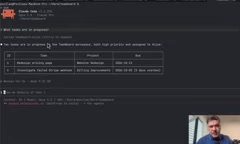
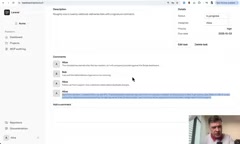
In the demo, the author types a natural language prompt into Claude Code as user Alice: "I'm Alice, I just got back from vacation — catch me up, create a task, assign it to Bob, and leave a comment." In roughly 40 seconds, Claude Code calls the MCP server (named team board), automatically creates the task, assigns it, adds a comment, and returns a "welcome back" summary report.
Checking the dashboard confirms it: open tasks went from 5 to 6, and the new high-priority item is indeed assigned to Bob. The result is both impressive and slightly unsettling — an AI agent actually manipulated real business data in the database, without the user ever opening a browser.
MCP vs. Traditional APIs
On the surface, MCP looks a lot like an API — but it operates under an entirely different set of rules. The key differences center on:
- Security and authentication: who can call what, and when
- Multi-tenant isolation: ensuring users can only access data within their own workspace
- Natural language to database mapping: how a prompt gets parsed into real queries
On the implementation side, the structure of Laravel MCP will feel immediately familiar to Laravel developers. After installing via composer require laravel/mcp and running vendor:publish to get routes/ai.php, the MCP server itself is analogous to an API controller, with each tool corresponding to a method within it.
The author highlights one easily overlooked point: tool descriptions are critical. Claude Code relies entirely on the server and tool description text to automatically decide whether and when to call it. In other words, the description is the trigger — it must be written with precision.
What is MCP? MCP (Model Context Protocol) is an open protocol proposed by Anthropic in late 2024, designed to standardize communication between AI models and external tools or data sources. Unlike traditional REST APIs — which human developers call by manually constructing HTTP requests — MCP tools are invoked autonomously by AI agents based on natural language descriptions, which determine when to call a tool and what parameters to pass. The protocol defines three primitives: Tools (executable actions), Resources (data sources), and Prompts (reusable prompt templates). Tools are the most commonly used. MCP uses JSON-RPC 2.0 as its underlying communication format and supports two transport modes:
stdio(local process) and HTTP with SSE (remote service). The HTTP transport mode is what enables SaaS products to deploy MCP servers in the cloud — secured with Bearer Token authentication and open to any MCP-compatible AI client (such as Claude Code or Cursor) — rather than being limited to local toolchains.
Tool Structure: Schema and Validation
Tools generated with the make:mcp:tool command center on a handle method (similar to a Laravel job or action) that builds queries, handles sorting, and manages pagination. The real constraints on AI input and output come from two key methods: schema and outputSchema.
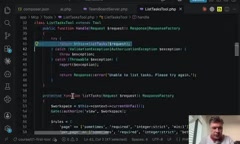
schema defines the parameters parsed from a Claude Code request, along with their descriptions and validation rules. outputSchema defines the structure of the returned data. Notably, inside an MCP tool you can directly reuse familiar Laravel capabilities — request, validate rules, and Gate for authorization checks. This is also what makes the course double as a Laravel refactoring lesson: how to make the same business logic serve both your Web layer and your MCP server, maximizing code reuse.
When the author expands the request details, you can clearly see the full journey: human language parsed into structured parameters, processed, and returned as structured data.
Authentication and Multi-Tenant Security
For authentication, the course starts with Laravel Sanctum (and later switches to Laravel Passport for a more secure and capable solution). On top of the default starter kit, the author builds a dedicated MCP access settings page where each user (like Alice) can generate their own access token.
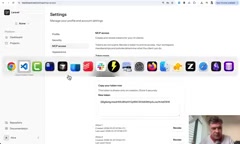
Connecting to Claude Code uses claude mcp add http, with HTTPS enabled via Laravel Herd's secure command, and the Bearer Token retrieved from the settings page. Once connected, you can see the MCP server and its enabled tools directly inside Claude Code.
The security demonstration is the highlight of the whole walkthrough. The author simulates an attack scenario: what if Alice tried to guess another user's workspace ID and actor ID to steal data? The MCP server returns a validation error immediately — workspace id field not supported here. This is the first line of defense at the schema layer.
On top of that sits a second layer: middleware. The resolve mcp workspace middleware in the route retrieves the user's workspace from the URL and places it into Laravel's Context (one of the primary use cases for that feature). The list tasks tool then uses the workspace policy's belongsToWorkspace method to verify whether the authenticated user actually has access to that workspace, backed by an Eloquent query against user memberships.
This combination of schema validation + middleware + policy authorization forms the complete defense stack for protecting the MCP server against unauthorized access while enforcing multi-tenant isolation.
Sanctum vs. Passport for MCP Laravel Sanctum and Laravel Passport differ significantly in OAuth capabilities — a distinction that matters a lot in MCP scenarios. Sanctum is primarily designed for simple token authentication for SPAs and mobile clients; it generates "Personal Access Tokens" without expiration and offers coarse-grained management. Passport, on the other hand, is a full OAuth 2.0 implementation supporting token expiration, token scopes, client credential grants, and other enterprise-grade features. In a multi-tenant MCP context, Passport's scope mechanism lets you restrict a given token to only read-only tools or a specific workspace — enforcing permissions at the token level rather than relying solely on application-layer policy logic. This is the core reason the course upgrades from Sanctum to Passport: to provide a more fine-grained, easily revocable authentication solution for production MCP servers.
Wrapping Up
This content covers the highlights from the first three lessons of a more comprehensive course. The core goal is to help developers build a complete mental model of MCP: it resembles an API but operates differently, with the emphasis on authentication, multi-tenant isolation, and the secure mapping of natural language to data. For Laravel developers considering adding AI agent capabilities to their SaaS products, the stable release of Laravel MCP 1.0 and hands-on examples like this provide a clear, actionable path forward. Deeper topics — such as Laravel Passport authentication and more complex validation — are covered in the full course.
Related articles

Amphibious Transforming Drone: Beyond 100x Power Savings, What Are the Real Needs?
Is the amphibious transforming drone just a gimmick? Starting from the 100x power difference of the M4 Morphobot, explore real application scenarios and thesis topic ideas, analyzing boundary conditions where pure drones and pure ground robots both fail.

Warhound Raises $200 Million: Genetically Engineered "War Dogs" Paired with Anduril Gear
Warhound raises $200M, backed by Ben Lamm and Palmer Luckey, to genetically engineer dogs for military and law enforcement use and equip them with Anduril gear. This article analyzes its technology direction, funding logic, and ethical controversy.

Claude API Comes to Google Cloud: IAM Integration and SDK Access Guide
Anthropic hosts the full Claude API on Google Cloud with IAM-controlled permissions and unified billing. This guide covers the Vertex AI and Anthropic-hosted entry points, IAM role configuration, and SDK access.