Learning SpringBoot from Scratch: The 'Big Picture First' Approach to Efficient Onboarding

A big-picture-first strategy for beginners to efficiently learn SpringBoot without getting stuck on details.
This article distills an efficient learning method for SpringBoot beginners: focus on the big picture first, understand the technological evolution from Java to Spring to SpringBoot, and avoid getting stuck grinding details like OOP. It covers IDEA tool setup with legitimate licensing advice, JDK version selection, and why understanding 'why' a technology exists matters more than memorizing 'how' it works.
Why So Many People Study for Six Months and Still Can't Get Started with SpringBoot
For Java learners starting from scratch, there's a universal dilemma: the gap between writing your first "Hello World" and building an enterprise-grade project feels like an uncrossable chasm. This tutorial highlights a very real phenomenon — many students hit a certain milestone on the learning roadmap (such as object-oriented programming) and simply stall out. They practice endlessly, grind through exercises, yet can never seem to move forward.
The instructor argues that this "grind every detail" approach to learning is precisely the wrong strategy. When studying object-oriented programming, many people mistakenly believe they must complete massive amounts of practice and thoroughly master every concept before moving on, ending up stuck in the same place for months. The core idea the instructor proposes is: Focus on the big picture first, build an overall understanding, then circle back to fill in the details.
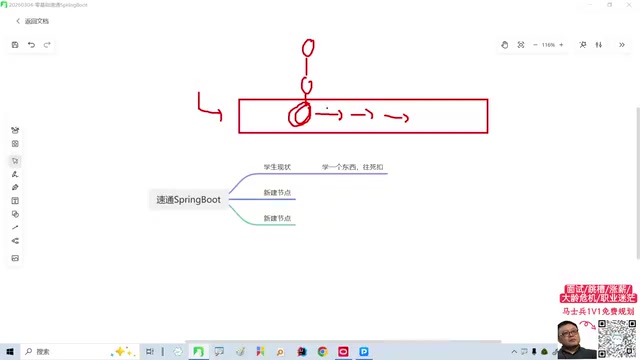
It's worth exploring why object-oriented programming becomes such a stumbling block. Object-Oriented Programming (OOP) is the core paradigm of Java, encompassing four key principles: encapsulation, inheritance, polymorphism, and abstraction. The fundamental reason so many beginners stall here is that OOP isn't a syntax rule — it's a shift in thinking. Moving from procedural programming (writing code as step-by-step instructions) to object-oriented programming (modeling the real world with objects) requires substantial hands-on project experience to truly internalize. Trying to "practice your way" into understanding OOP through exercises is like trying to learn chess by memorizing openings — without the feel of real games, theory never sinks below the surface. This is exactly why the instructor recommends "getting a project running first": only by seeing how classes collaborate and how interfaces decouple in a real project does OOP transform from an abstract concept into concrete intuition.
This approach is genuinely enlightening for beginners. In technical learning, diving into details too early can drain your sense of direction and accomplishment. By contrast, getting a complete project running first and understanding why a technology exists often builds far stronger learning motivation.
Understand the Evolution of Technology, Don't Just Memorize Isolated Facts
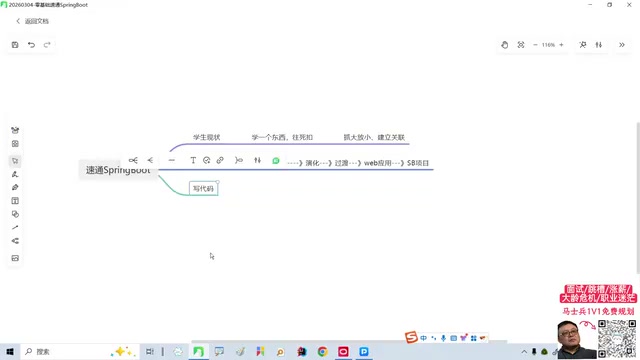
The tutorial follows a very clear teaching arc: start with the simplest possible Java project, evolve and transition it step by step, and ultimately reshape it into an efficient SpringBoot application — the kind used in real enterprise development. The instructor emphasizes that the focus of learning shouldn't be memorizing specific APIs or configurations, but understanding the entire process of technological evolution — Why do we need Spring? Why did SpringBoot emerge on top of Spring?
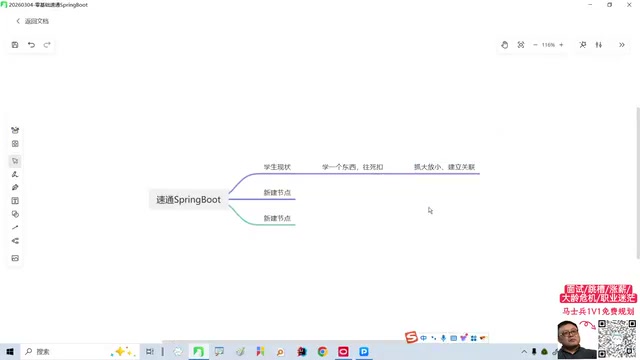
This "evolutionary" teaching method has real value. To understand this evolutionary path, we first need to grasp the core mechanisms of the Spring framework. Spring's two foundational pillars are Inversion of Control (IoC) and Dependency Injection (DI). In traditional Java development, developers manually managed dependencies between objects — if class A needed class B, you'd create a new B object inside class A. This approach led to tightly coupled code; whenever B's constructor changed, every class depending on B had to be modified. Spring's IoC container inverts this process: the container takes responsibility for creating objects and managing their lifecycles. Developers simply declare "what I need," and the container automatically injects the corresponding dependencies. In its early days, Spring used XML files to configure Bean definitions and dependency relationships. A medium-sized project might require maintaining dozens of XML configuration files with thousands of lines of configuration — the infamous "XML Hell."
It was precisely to solve this pain point that SpringBoot was born. Released by the Pivotal team in 2014, SpringBoot's core design philosophy is "Convention over Configuration." This principle originated from the Ruby on Rails framework, and the core idea is: the framework provides sensible defaults for common scenarios, and developers only need to explicitly configure things when the defaults don't meet their needs. SpringBoot achieves this through its Auto-Configuration mechanism — when it detects a dependency on the classpath (such as spring-boot-starter-web), it automatically configures an embedded Tomcat server, DispatcherServlet, JSON serialization, and other components. Developers no longer need to write a single line of XML; a single @SpringBootApplication annotation plus a main method is enough to launch a complete web application. Additionally, SpringBoot introduced the Starter dependency mechanism, packaging commonly used functionality into ready-to-use dependency bundles, dramatically reducing the complexity of dependency management. This "zero-configuration startup" experience is the key reason SpringBoot became the de facto standard for Java enterprise development within just a few years.
In other words, rather than memorizing SpringBoot annotations and startup procedures in isolation, it's far better to understand them within the evolutionary arc of "Java project → Spring → SpringBoot." Knowledge learned this way has logical connections rather than being scattered fragments. The instructor's goal of "quick onboarding in one hour" is essentially about using this storyline to thread scattered knowledge together.
Start with the Right Tools: Ditch Notepad, Embrace IDEA
Before writing any actual code, the tutorial spends some time introducing development tools. The instructor points out that many beginners start by writing code in Notepad, but real programmers use Integrated Development Environments (IDEs), the most popular of which is IntelliJ IDEA.
IntelliJ IDEA, developed by JetBrains, has gradually replaced Eclipse as the IDE of choice for Java developers since its initial release in 2001. Its core competitive advantage lies in deep code comprehension — IDEA doesn't just do simple syntax highlighting; it performs semantic-level indexing and analysis across your entire project. This means it can accurately perform refactoring (automatically updating all call sites when you rename a method), provide smart completion (inferring the methods or variables you most likely need based on context), and offer real-time error detection (flagging logical errors before compilation). For SpringBoot development, the Ultimate edition provides Spring-specific support, including visual navigation of Bean dependency relationships, intelligent hints in configuration files, and direct endpoint testing. According to the JetBrains 2023 Developer Survey, IDEA's market share among Java developers exceeds 70%, making proficiency with IDEA a fundamental skill for Java developers.
The tutorial uses the IDEA Ultimate edition. Readers should note that the Ultimate edition is JetBrains' paid commercial software, and the "cracked version" mentioned in the video carries copyright risks and is not recommended for learning or professional use. For students and individual learners, there are better legitimate options:
- Community Edition: Completely free. While it lacks enterprise features like Spring visualization support, it's more than sufficient for learning Java fundamentals and basic SpringBoot projects from scratch.
- Educational License: Students can apply for a free JetBrains educational license using their school email, gaining legal access to all Ultimate edition features.
Choosing the right tools can dramatically improve learning efficiency — IDEA's smart completion, error hints, and one-click run features let beginners focus on logic itself rather than syntactic minutiae.
First Hands-On Step: Creating a Project and Your First Class
With tools ready, the tutorial moves into hands-on work. The first step is to create the most basic Java SE project via New Project, select an appropriate JDK version, choose IntelliJ's built-in build system, and simply click Create to generate the project skeleton in the current window.
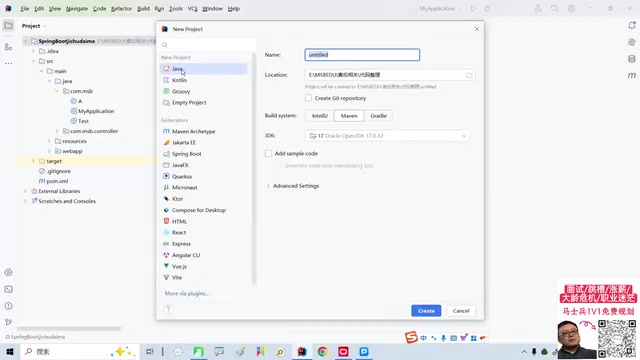
Regarding JDK version selection, this deserves some additional discussion. As of now, the most commonly used Long-Term Support (LTS) versions in the Java ecosystem include JDK 8, JDK 11, JDK 17, and JDK 21. Although JDK 8 was released in 2014, it still holds the highest market share due to the massive number of legacy enterprise projects that depend on it. However, SpringBoot 3.x has raised its minimum JDK requirement to JDK 17, meaning developers who want to learn the latest version of SpringBoot must use JDK 17 or higher. JDK 17 introduced many modern features, such as Sealed Classes, Pattern Matching, and Text Blocks, which make Java code more concise and expressive. For beginners, the recommendation is to start directly with JDK 17 or JDK 21 — this ensures compatibility with the latest SpringBoot 3.x while enjoying the conveniences of modern Java language features.
The first thing to do next is create the most basic "class." The tutorial is very considerate of absolute beginners here, even pausing to ask the question: "What exactly is a class?" — exactly the kind of patience a beginner-friendly tutorial should have.
In Java, a class is the fundamental organizational unit of a program — all code must be written inside a class, which is a notable difference from languages like Python and JavaScript. From a design perspective, a class is an abstract model of real-world things: it defines the shared attributes (fields/member variables) and behaviors (methods) of a category of things. For example, a User class might contain attributes like name and age, along with methods like login() and logout(). A class itself is a blueprint; using the new keyword creates an instance of the class (i.e., an object), where each object has independent attribute values but shares the same behavior definitions. In the SpringBoot world, classes take on more specialized roles: Controller classes handle incoming HTTP requests, Service classes handle business logic, Repository classes handle database operations, and Entity classes map to database table structures. Understanding the nature of classes is the first building block for understanding the entire Java technology stack.
From an instructional design perspective, this starting point is a smart choice. Rather than immediately throwing complex SpringBoot concepts at learners, it begins with the simplest Java class and then follows the evolutionary path mentioned earlier, gradually "growing" this simple project into a SpringBoot application. This progressive approach, with a clear goal pulling learners forward, effectively reduces the frustration beginners often feel.
Practical Tips for Absolute Beginners
Drawing from the tutorial's overall approach, here are several practical tips for newcomers who want to get started with SpringBoot quickly:
- Get it running first, dig deeper later: Don't endlessly polish fundamentals like object-oriented programming or collections. Get a complete project running, gain positive feedback, and then circle back to fill in the details.
- Understanding "why" matters more than memorizing "how": Once you understand what problems Spring and SpringBoot were designed to solve, your learning efficiency will multiply.
- Use legitimate tools: Prioritize IDEA Community Edition or apply for a student license. Avoid the security and legal risks that come with pirated software.
- Maintain storyline awareness: Always remember where you are on the "Java → Spring → SpringBoot" evolutionary path to avoid getting lost in the details.
- Choose the right JDK version: Start directly with JDK 17 or JDK 21 to stay compatible with the latest SpringBoot 3.x while enjoying modern Java language features.
Learning SpringBoot from scratch isn't scary — what's scary is having no method and burning time in the wrong places. The greatest value of this tutorial may not lie in any specific code, but in the learning philosophy it conveys: focus on the big picture, understand the evolution, and let the details fall into place.
Related articles

Uber Deploys ChatGPT Work Company-Wide: AI in the Workplace Enters the Scaled Implementation Phase
Uber deploys ChatGPT Work to 30,000+ employees, extending it from engineering to all roles. We analyze its expert-engineer pairing, end-to-end automation, and questions of AI control and power concentration—insights for scaling AI in the workplace.

Shift at Midnight Hands-On: When "ID Verification" Becomes Alien Hunting
Shift at Midnight blends ID verification with horror survival in a four-player co-op game. We break down its inspection mechanics and chaotic humor.

Zelensky Recounts the Outbreak of War: I Need Ammunition, Not a Ride
Zelensky recalls the first day of war in a YouTube interview: farewell to family, rejecting Biden's evacuation offer with "I need ammunition, not a ride," and how Bucha shaped his stance on compromise and peace talks.