Lenovo IdeaPad Slim 3i: The Thin-and-Light You Can Actually Upgrade

A thin-and-light laptop that bucks the trend with upgradable RAM, SSD, and dongle-free triple-display output.
The Lenovo IdeaPad Slim 3i 15 Gen 11 stands out in a market of sealed thin-and-lights by offering dual SODIMM slots (up to 32GB) and an M.2 PCIe 4.0 SSD slot (up to 1TB), letting users expand capacity over time instead of replacing the whole machine. Powered by the Intel Core 7 350, it handles everyday productivity and light creative work with ease. Its HDMI and USB-C DisplayPort outputs combine with the built-in screen for a dongle-free three-monitor setup. The overall philosophy points to a more sustainable ownership model: start mid-range, upgrade when needed.
Going Against the Grain
At a time when thin-and-light laptops have almost universally moved toward soldered RAM and non-removable storage, the Lenovo IdeaPad Slim 3i 15 Gen 11 does something refreshingly rebellious — it lets you upgrade the hardware yourself. In today's laptop market, that's genuinely rare.
Pop off the bottom cover and you'll find two SODIMM memory slots supporting up to 32GB, plus an M.2 PCIe 4.0 SSD slot supporting up to 1TB. In other words, when Windows, Photoshop, Chrome, and your perpetually open 47 tabs eventually push the machine to its limits, you can upgrade the RAM and storage instead of throwing the whole laptop out and buying a new one.

This upgradability reflects a more sustainable approach to buying tech. For users on a budget who want their machine to last longer, starting with a mid-range configuration and expanding as needed is often a smarter investment than paying for top-spec hardware you may not need right away.
Performance and Expandability
The machine is powered by Intel's new Core 7 350 processor, which delivers more than enough out-of-the-box performance for everyday productivity, web browsing, and light creative work. As your workload grows, both memory and storage can scale with it — no forced hardware replacement required.
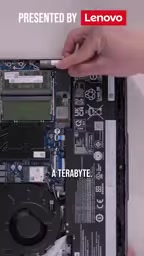
This "grow as you go" philosophy is worth unpacking. Many buyers don't know what they'll need three years from now. Buying top-spec upfront might mean paying for capacity you'll never use, while going entry-level risks running out of headroom too soon. Upgradable design neatly resolves that dilemma — meet your current needs now, then fill the gaps when it actually makes sense.
The Intel Core 7 350 belongs to the Lunar Lake generation of mobile processors, manufactured on TSMC's N3P process node and featuring an integrated Neural Processing Unit (NPU) with approximately 48 TOPS of AI compute — meeting Microsoft's Copilot+ PC certification threshold. Compared to the previous generation, Lunar Lake integrates memory directly within the processor package (so-called "on-package memory"), which means most Lunar Lake laptops don't support memory upgrades at all. The IdeaPad Slim 3i uses a separate SODIMM configuration instead, preserving upgradability — a minority approach among devices on this processor platform, and a key part of what makes this machine's "against the grain" positioning possible.
Triple-Display Output Without a Dock
On the connectivity side, this laptop supports a three-monitor setup without any adapters or docking stations. The setup works like this: connect one display via HDMI, another through the USB-C port's DisplayPort output, and the laptop's own screen becomes the third. Windows treats all three as independent displays.

In practice, you could run Photoshop on your main monitor, keep Chrome tabs spread across the laptop screen, and throw a YouTube video onto a portable display. This kind of multi-screen workflow requires zero additional accessories — a setup that's genuinely friendly for content creators and heavy multitaskers.

Saving the cost of a dock and the cable clutter that comes with it is not something you often see at this price point.
Whether a USB-C port can output video depends on whether it supports DisplayPort Alt Mode — a protocol jointly defined by USB-IF and VESA that allows a USB-C physical port to simultaneously carry data while routing some of its lanes to a DisplayPort signal path. Not every USB-C port has this capability; some only support charging or data transfer. Just because a port has the USB-C logo doesn't mean it can drive a display. When buying, make sure the spec sheet explicitly states "DisplayPort over USB-C" or "DP Alt Mode" to confirm the dongle-free triple-screen setup described here will actually work.
Who Is This For?
Taken together, the IdeaPad Slim 3i's core value proposition isn't peak performance or premium build quality — it's the deliberate prioritization of long-term usability. Removable RAM and storage, a capable processor, and multi-monitor output without a dock all add up to a productivity machine built to last.
If you're tired of laptops that feel obsolete after two years, and you want a machine that can grow with your needs, this upgradable thin-and-light deserves a spot on your shortlist. It's a reminder that in an era of increasingly closed hardware, repairability and upgradability are still genuinely valuable.
Related articles

AI Compute Is the New Oil, But the Market Mechanism Has Yet to Take Shape
Hacker News compares AI compute to the new oil, noting the lack of price discovery, concentrated supply, and no hedging tools. The article analyzes structural issues in compute trading and explores a possible three-tier market of spot, contracts, and derivatives, plus the real impact on AI practitioners' cost management.

Running Full iOS 16.5 Firmware on Android Devices: Technical Demo or Marketing Gimmick?
A Hacker News post claims full iOS 16.5 firmware can run on Android, with 315 upvotes. This analysis argues it is more likely a web UI simulation than a true firmware port, and explores the value and risks of such projects.

Etsy Cracks Down on AI Slop: Addressing Buyer and Seller Anxieties
Etsy introduces stricter rules limiting AI-generated content in listings, addressing buyer confusion over AI products and seller fears of original work being diluted by AI slop.