Linux Zoom Client Found to Actively Read All X11 Clipboard Contents
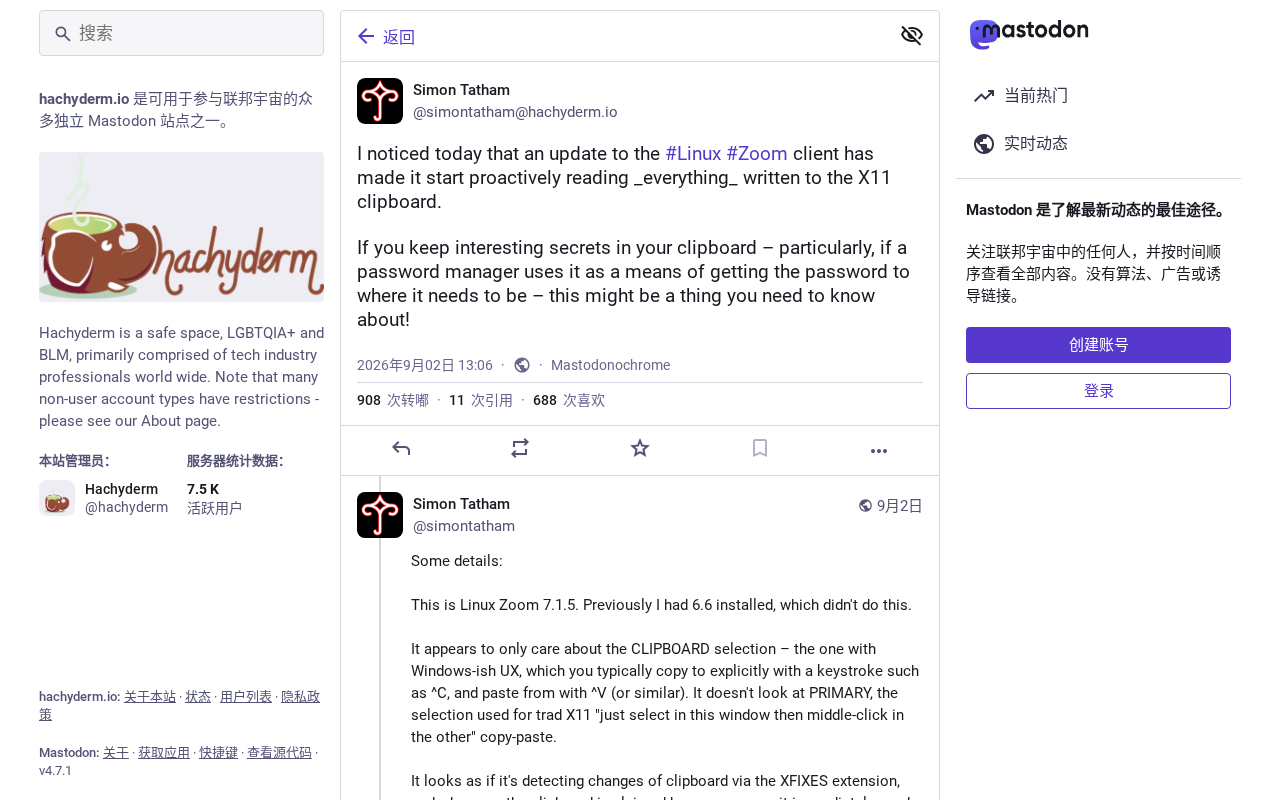
Linux Zoom actively reads all X11 clipboard contents due to X11's lack of client isolation.
PuTTY author Simon Tatham revealed that the Linux Zoom client immediately reads any content written to the X11 clipboard — without waiting for a user-initiated paste. The root cause lies in the X11 protocol itself: any client with access to the same X server can monitor clipboard ownership changes and request contents at any time, with zero permission isolation. This means passwords, private keys, and other sensitive data copied in an X11 session are effectively exposed to all applications in that session. Wayland's compositor-arbitrated model closes this gap architecturally, though risk persists for apps running via XWayland. Users should prioritize native Wayland sessions, avoid routing sensitive data through the clipboard, and fully quit Zoom when not in use.
PuTTY author and renowned programmer Simon Tatham recently disclosed on the social platform Hachyderm a finding that has sparked widespread discussion in the security community: the Linux Zoom client actively reads all content written to the X11 clipboard. The post quickly made it to the top of Hacker News, garnering 180 upvotes and nearly 60 comments, once again bringing the privacy risks of X11's clipboard mechanism into the spotlight.
The Core Issue: How Can Zoom "Peek" at Your Clipboard?
According to Simon Tatham's account, the Linux Zoom client doesn't wait for the user to initiate a paste operation before requesting clipboard data. Instead, the moment any content is copied to the X11 clipboard, Zoom immediately and proactively reads it. This means that regardless of whether you ever intend to paste anything into Zoom, any passwords, private keys, personal information, or text you copy could be captured by the running Zoom process right away.
For users who routinely use the clipboard to temporarily transfer sensitive data — such as copying passwords from a password manager or copying SSH private key fragments — this is a risk that cannot be ignored. The severity of the issue isn't necessarily that "Zoom is definitely abusing this," but rather that it possesses the capability to continuously monitor the clipboard without any user interaction.
Is This a Zoom Problem or an X11 Problem?
It's worth examining more closely, because the root of this behavior involves both application design choices and architectural flaws in the X11 protocol itself. In X11's clipboard model, clipboard data is not managed centrally by the system — it is stored within the application that "owns" the selection. When another program needs to read the clipboard, it requests the data from the owner.
The critical flaw is that X11 has no permission isolation mechanism whatsoever — any client with access to the same X server can request the current clipboard contents at any time, and can also listen for ownership-change events on the clipboard. This opens the door to "active polling" style reads. What Zoom is doing is simply exploiting this open characteristic of X11.
The Historical Baggage of the X11 Clipboard
X11's design dates back to an era with a fundamentally different trust model. The assumption at the time was that all programs running under the same X server were trusted, so there was no need to establish isolation walls between clients. This worked fine in single-user, locally trusted environments — but in the modern desktop landscape, especially one running large amounts of third-party closed-source software (such as video conferencing clients), it exposes obvious privacy risks.
In theory, any X11 client can:
- Read keyboard input (keylogging)
- Capture the contents of other windows
- Monitor and read the clipboard
- Inject synthetic events into other windows
The active reading of clipboard contents is just one specific manifestation of X11's systemic lack of isolation. This is a key reason why the security community has long pushed for migration to Wayland.
How Wayland Addresses This Problem
Wayland, as the modern replacement for X11, introduces a much stricter isolation model by design. Under Wayland, clipboard access typically requires the window to be in focus, or is arbitrated by the compositor — applications cannot freely poll clipboard contents in the background. This architecturally closes the "active clipboard monitoring" vulnerability.
However, the reality is more complex. Many applications still run through the XWayland compatibility layer, which can reintroduce some of X11's security weaknesses. So even if the desktop environment has switched to Wayland, if applications like Zoom still run in X11 mode, the risk may still be present.
What Protective Measures Can Users Take?
Ordinary Linux users are not without recourse when facing this type of issue:
Prefer Wayland sessions: If your distribution and hardware support it, switching to Wayland can significantly reduce the risk of X11 applications snooping on each other.
Isolate sensitive operations: When dealing with highly sensitive information like passwords or keys, avoid routing them through the clipboard in a session where video conferencing software is also running. Using your password manager's auto-fill feature rather than manually copying and pasting reduces the window of exposure in the clipboard.
Quit unnecessary processes: Fully exit Zoom rather than minimizing it when not in use, to prevent it from running in the background and continuously monitoring the clipboard.
Be mindful of clipboard manager permissions: Some clipboard managers also rely on polling mechanisms — pay attention to their behavior when choosing one.
A Deeper Question: Closed-Source Software and the Desktop Trust Boundary
This incident generated so much discussion on Hacker News not only because it involves Zoom — a widely used application — but because it touches on a fundamental question: when running closed-source software in an open X11 environment, users have almost no way of knowing what these applications are actually reading or uploading.
Zoom's active clipboard reading may have a "legitimate" technical explanation — for instance, prefetching data to enable a smoother paste experience. But from the user's perspective, the lack of transparency and the aggressiveness of the default behavior are the real problems. This also serves as a reminder to the entire ecosystem: the security model of desktop operating systems needs to evolve with the times, shifting from "trust all local programs by default" to a modern paradigm of least privilege and on-demand authorization.
For privacy-conscious users, this disclosure is a valuable wake-up call: every piece of text you copy to the clipboard, in an X11 environment lacking isolation, can potentially be read by any other program in the same session.
Related articles

LLM Application Development: A High-Paying Career Guide for Ordinary People
LLM application development offers fresh graduates up to 35K/month, with SP offers reaching 600K. This article explains the core skills, how to break in, and how ordinary people can seize AI opportunities through learning by doing.

Say Goodbye to AI Influencer Faces: A Complete Guide to Creating Visual Assets for AI Comic Dramas from Scratch
Bilibili creator shares a full workflow for zero-basics AI comic drama visual assets: use Doubao Work skills with script-first, visual references, and real-person texture to escape AI influencer faces, then lock character and scene consistency with asset sheet layouts, weapon detail images, scene nine-grids, and cinematic color palettes.

The AI Production Pipeline Behind Great Videos: From Research to Agent Validation
AI video production isn't just a model race. This article breaks down a transferable four-step pipeline: researching professional workflows, organizing a skill checklist, configuring agents, and experimental validation—and explains how general-purpose LLMs like DeepSeek can replace paid tools to run the entire process.