Local AI on Mac mini in Practice: Building a Personal Intelligent System with Ollama + Hermes Agent

Build a local AI system on a Mac mini with Ollama and Hermes Agent—phased rollout beats chasing the biggest model.
Based on a Bilibili creator's hands-on guide, this article explains how to build a local AI system on a Mac mini where Ollama handles inference and Hermes Agent handles tool calling. It first breaks down the MoE architecture and memory ledger of Qwen3.6-35B-A3B, noting that 32GB is workable but tight. It then distinguishes Ollama as the "engine" from Hermes Agent as the "driving system"—complementary, not competing. Three deployable scenarios are given—knowledge-base maintenance, content creation, and batch file processing—along with an execution path: install Ollama, connect Hermes, and test in three stages. On model selection, it stresses that 35B isn't necessarily faster than 27B and suggests stabilizing the workflow with a small model first. Finally it proposes a three-layer local-plus-cloud division of labor and reminds readers about real privacy, cost, and stability issues, arguing that task completion rate and error recovery matter far more than parameter scale.
Handing thousands of PDFs and hundreds of notes over to cloud AI always feels a bit uneasy. But if those materials could be automatically organized, analyzed, archived—and even drive a browser—right on your own Mac mini, that's where the value of a local AI Agent lies.
Based on a hands-on walkthrough from a Bilibili creator, this article explains how to build a local AI system on a Mac mini where Ollama handles inference and Hermes Agent handles tool-calling execution, and offers concrete advice for phased deployment.
1. Understand the Model First: What Exactly Is Qwen3.6-35B-A3B
The "Squad" Logic of Mixture-of-Experts
The name Qwen3.6-35B-A3B can be broken into three parts: Qwen3.6 is the model series, 35B means roughly 35 billion total parameters, and A3B is the key—only about 3 billion parameters actually participate in computation per Token. Behind this is the Mixture-of-Experts (MoE) architecture.
Think of it this way: a company with 350 engineers where, in a traditional model, everyone attends a meeting for every project; MoE sends out just a small squad instead. Total parameters are large and the knowledge base is big, but only a small portion is activated each time—striking a balance between compute cost and model capability.
MoE's "squad" isn't dispatched randomly; a Router/Gating Network scores and decides which experts to activate for each Token. Taking Qwen3.6-35B-A3B as an example, the model's internals are divided into several "expert" sub-networks, and the router selects only a few of them (Top-K) to participate in computation while the rest stay dormant. The benefit is this: the model's total parameters determine how much knowledge it has seen and how complex a function it can express, while the activated parameters only determine the compute and memory-bandwidth cost per inference. The trade-off is that the "static footprint" on VRAM/RAM is still calculated based on total parameters—even if experts aren't activated, their weights must still reside in memory waiting to be called. That's also why running 35B-A3B isn't more memory-efficient than a dense small model at the same activation scale.
Once you grasp this, you'll understand why MoE fits the local scenario of "broad and deep overall, but only doing one thing at a time": you trade memory for breadth of knowledge, and routing for speed.
The Memory Ledger: File Size Isn't Running Memory
A common misconception: since activated parameters are only 3 billion, doesn't that mean you only need the storage space for 3 billion parameters? Not at all. Your computer must store the entire model's weights—roughly 70GB at original precision. After compression via quantization, for example 4-bit quantization, the file size drops to around 23-24GB, which is also the size of the quantized Qwen3.6-35B version you can download on Ollama.
But the model file size still doesn't equal all the memory used at runtime. You also need to account for context cache, the inference framework, the operating system, and whatever browser, video software, etc. you have open at the same time.
Can a 32GB Mac mini run a 35B model? Yes, but it's a fairly tight memory configuration. Once you start heavily using the disk as virtual memory (swap), speed drops noticeably. A 32GB Mac mini is better suited to running quantized versions with a reasonably limited context length. The most reliable way to know how fast it can actually run is still to install it on your own machine and test—the chip, memory bandwidth, inference engine, and quantization format all affect the results.
Quantization is the key technology that lets large models run on consumer devices. Model weights are usually stored at 16-bit floating point (FP16) or higher precision during training; quantization compresses these values into 8-bit, 4-bit, or even lower integer representations, approximating the original values with fewer bits. 4-bit quantization means each weight occupies only half a byte, theoretically compressing a 70GB FP16 model down to around 17-18GB. In practice, because a small number of high-precision parameters and metadata must be retained, the final file is usually 23-24GB.
Quantization inevitably brings precision loss, but how much loss depends on the algorithm (such as GPTQ, AWQ, GGUF's K-quants, etc.) and the model's own redundancy. Empirically, 4-bit quantization has little impact on most everyday tasks (summarization, classification, Q&A), but the drop is more noticeable on tasks requiring fine reasoning, long-chain math, or strict format output. So "able to run" and "runs well" are two different things—quantization level, context length, and inference framework together determine the final experience. It's advisable to first test task quality with a higher-quantization version, then gradually downgrade for speed.
2. Ollama and Hermes Agent: Engine and Driving System
These two tools are often confused, but they do completely different jobs.
Ollama is a model runtime platform: download models, load, infer, return results. It's like an engine.
Hermes Agent is an intelligent work system: it can operate files and execute terminal commands through tool calling, and it has its own memory and workflows. It's like a driving system.
The two aren't competitors but collaborators. Ollama provides inference capability; Hermes Agent arranges actions and uses tools to get work done based on the task.
You may not have noticed, but Hermes has recently gotten stronger too—it can now not only connect to external inference services, but also manage local models itself, automatically installing the llama.cpp inference runtime and optimizing for hardware (for example, leveraging Metal acceleration on Apple M-series chips).
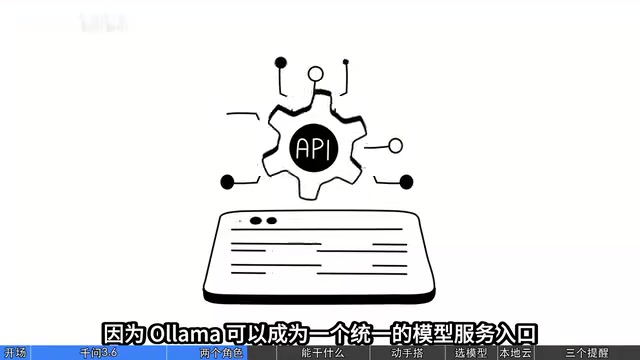
This leads to two paths: one is Ollama downloading and running the model while Hermes connects to Ollama; the other is Hermes managing the model and inference service itself. If you've already installed Ollama and want the same model to serve multiple applications (such as Hermes and other AI clients or knowledge-base software), the first path is more suitable—Ollama can serve as a unified model service entry point, avoiding the need to download the model repeatedly for each application.
Remember one thing: Ollama solves how the model runs, Hermes Agent solves how the model works. Using the same model won't make it smarter just because you go through Hermes—the model's basic capability is determined by the model itself; Hermes's value lies in organizing tools and tasks.
3. Three Genuinely Deployable Automation Scenarios
If all you want is to chat, there's really no need to go to the trouble of installing locally. The value of a local AI Agent lies in automating workflows.
Scenario 1: Personal Knowledge Base Maintenance
Suppose you store thousands of notes in Obsidian. These notes used to be static—you had to search, read, and organize them yourself. Now you can have Hermes Agent connect to your local knowledge base and give it a task: "Check the knowledge base, classify the AI Agent technical materials added in the past month, find notes with duplicate content, and suggest which bidirectional links to create."
Hermes reads the materials and hands them to the Qwen model for analysis, generating organization suggestions. In the first stage, only let it generate proposals—don't let it directly overwrite the original notes. AI makes mistakes too; only after the proposals are verified should you gradually open up permissions.
Scenario 2: A Content Creation Pipeline
Suppose you run a book-interpretation channel and every three days need to find topics, pick books, write voiceover scripts, and come up with titles and copy. This work can be broken down: use web-search tools to gather public information → Hermes organizes it into text → the local Qwen model does topic categorization, extracts viewpoints, and generates a first draft → humans review facts and adjust viewpoints.
A large amount of repetitive text-organization work stays local. But note: a local model doesn't automatically know the latest information just because it's installed on your computer—it still needs search tools to get news and trends; nor does it naturally know how to edit videos or publish content—those require corresponding Hermes tools or external software.
Scenario 3: Batch File Processing
Organizing dozens of files daily, archiving by type, extracting key information—these high-frequency repetitive tasks are exactly where local models shine. Over the long run, it's more economical than repeatedly calling cloud APIs.

4. Hands-On Setup: Three Steps from Ollama to Hermes
Step 1: Install Ollama and Download the Model
After installing the latest Ollama, open the terminal and enter the download command (pull Qwen3.6-35B). Once the download is complete, run it and you can chat with the model in the terminal. For the first test, don't do anything complicated—give it a long article and ask it to summarize three key points, and observe the answer quality and speed. If it's especially slow, open Activity Monitor and check memory pressure.
Step 2: Connect Hermes Agent
In the terminal, go to Hermes's model configuration, choose a custom model interface, and set the API address and model name. Key point: the context length configuration in Hermes must match the actual running Ollama service.
Context length is an easily underestimated pitfall here. It refers to the total number of Tokens the model can "remember" at one time, including your input, content returned by tools, and the model's output. When starting a model, Ollama can specify num_ctx (for example 8192, 32768), and Hermes also has its own context budget configuration. If Hermes sends requests at 32768 but Ollama has actually only loaded 8192, the excess will be silently truncated—manifesting as the model "forgetting" file content you mentioned earlier, or tool-call results being discarded, causing tasks to mysteriously fail.
Conversely, setting the context too large also consumes memory: the KV Cache grows linearly with context, and under long contexts 32GB of memory is quickly filled up. A recommended approach: set the context limit in Hermes to a smaller value consistent with Ollama (such as 16K), break down "needs long memory" requirements into multiple rounds of small tasks, or rely on the Agent's retrieval/memory tools to compensate, rather than simply enlarging the window.
Step 3: Test Execution Capability in Three Stages
Stage one: read a few files and organize a report. Stage two: make classification suggestions for files in a folder. Stage three: execute actual modifications only after confirmation.
Why split it this finely? Because you need to distinguish two things: whether the model can understand the task and whether the agent can execute the task safely and accurately. AI mistakes are inevitable; when operations involve file deletion or software installation, there must be a confirmation mechanism.
5. Model Selection: 35B Isn't Necessarily Faster Than 27B
Bigger isn't always better for a personal computer—you must consider quality, speed, and stability together.
- Small models around 9B: low resource usage, fast response, suitable for quick classification and keyword extraction
- Models around 27B: require more resources, but stronger comprehensive analysis capability, suitable for long-document interpretation and code analysis
- 35B-A3B MoE model: uses fewer activated parameters to gain part of a large model's capability, but still needs considerable memory on a Mac mini
35B isn't necessarily faster than 27B—if it makes the computer frequently use swap memory, the experience may be worse than a smaller model. It's advisable to first get your workflow running stably with a small model, then test 35B, and only consider making it the main model after confirming that memory, speed, and task completion rate are all acceptable.
6. Local or Cloud? A Layered System Is the Answer
There's no need to move all tasks to local.
Local advantages: data control, suitable for high-frequency repetitive tasks, and cheaper over the long run than repeatedly calling APIs.
Cloud advantages: complex reasoning and difficult engineering problems—stronger cloud models are more efficient.
A layered system is more recommended:
- Layer 1: local small models handle quick classification and simple summarization
- Layer 2: local Qwen3.6-35B handles knowledge-base analysis and program assistance
- Layer 3: high-capability cloud models handle difficult problems and review important results
- Hermes Agent serves as the unified operation entry point
7. Three Easily Overlooked Issues
First, so-called complete privacy. When you use a local model to process local files, inference does happen locally. But if Hermes calls search services, cloud models, or third-party plugins, data may still leave your computer. True privacy protection depends on the entire tool-calling workflow.
Second, cost. Storage and maintenance costs also count. If you use it infrequently and only analyze something once in a while, cloud services may actually be more cost-effective.
Third, stability matters far more than parameters. We're easily drawn to parameters and leaderboards while overlooking task completion rate. Just because a model can solve advanced math problems doesn't mean it can execute ten file operations without error. What truly determines an AI Agent's practicality is tool-calling format, error recovery, and context management.
When testing a local model, don't just ask whether it answers intelligently; ask instead: out of ten real tasks given to it, how many can it complete fully? Does execution require frequent human intervention? Can it self-correct when it makes a mistake? These metrics are far closer to real productivity than parameter scale.
Conclusion
Is Ollama + Hermes Agent + Qwen3.6-35B worth deploying on a Mac mini? Worth trying. But what's most worth trying isn't chasing the largest model you can run—it's building a personal AI system you can use for the long term: let Ollama or Hermes handle running the model, let Hermes Agent handle calling tools to complete tasks, let your local folders become the center of your knowledge assets, and let cloud AI handle the complex work that local can't manage for now.
This system won't suddenly become capable of anything just because you installed a certain model, but it can gradually become practical as your tools improve, your processes optimize, and your knowledge base accumulates. In the future, competition in personal AI may not just be about who has the strongest model, but about who can better combine models, tools, data, and real workflows.
Background Supplement
Tool Calling / Function Calling is the core capability that distinguishes an Agent from a chatbot: the model no longer only outputs natural language, but outputs, in an agreed JSON structure, "which tool I want to call and what parameters to pass." After an external program executes it, the result is fed back to the model. This requires the model to undergo specialized post-training so it can stably produce correctly formatted call instructions.
Local small models often stumble at this stage—missing brackets in the format, wrong parameter types, chattering when it should call, calling randomly when it shouldn't—any of these can break the entire workflow. That's why the key metrics for evaluating an Agent's practicality are task completion rate and error recovery capability: the former measures how many out of N real tasks can be run end-to-end; the latter measures whether, after a failed tool call, the Agent can read the error, correct the parameters, and retry instead of getting stuck. These capabilities aren't linearly related to parameter count; a 9B model fine-tuned for tool calling is often more reliable in such scenarios than an untuned 35B. When choosing a model, prioritize its completion-rate curve on your real task set over general leaderboard scores.
Related articles

5 Practical Ways Real Estate Agents Can Use AI to Boost Efficiency (2026 Edition)
How can real estate agents use AI to boost efficiency? Based on a YouTube walkthrough, this breaks down five methods — ChatGPT for listing descriptions, Canva for marketing materials, forms for open house leads, Zapier for automated follow-up, and seller meeting prep — and flags risk boundaries like fair housing laws, photo authenticity, and price verification.

Grok Bot vs ChatGPT Agent: Which AI Agent Is More Powerful?
How does Grok Bot differ from ChatGPT Agent? This comparison examines how they work: Grok Bot has a cloud computer and runs persistently inside tools to execute multi-step tasks automatically; ChatGPT Agent operates web pages in a browser and is more mature at general tasks. Includes selection advice.

Walmart Agent Gateway: AI Shops for You Automatically—Why Is Amazon Going the Opposite Way?
Walmart's Agent Gateway lets ChatGPT, Gemini and other AI assistants access its product catalog to search, compare and add to cart, with spending limits and per-purchase approval. Amazon blocks external AI agents—two retail giants, opposite paths. Currently US-only, India may follow.