Local LLM Selection Guide: Qwen vs DeepSeek — Which Should You Choose?
A practical guide for non-technical users to run private, offline AI on their own PC.
This guide helps non-technical users deploy offline LLMs on personal hardware. It covers two key use cases — no internet access and sensitive data privacy — then recommends Qwen for daily tasks and DeepSeek for complex reasoning. Using the analogy of furniture and room size, it explains parameters and VRAM requirements, highlights Q4 quantization as essential for consumer GPUs, and provides hardware-matched model size recommendations. Tool options include LM Studio, Cherry Studio with Ollama, and Mac's MLX — all requiring zero command-line knowledge.
Why Run a Large Language Model Locally
You're on a high-speed train with no signal, and every AI web app is spinning endlessly. Or you have a confidential contract you simply can't risk uploading to the cloud — these are pain points that heavy AI users know all too well. Local LLMs exist precisely to solve both problems.
Once you deploy a model on your own machine, you can disconnect from the internet entirely, switch to airplane mode, and your AI assistant is still ready to go. The practical benefits are twofold: complete token freedom — no more worrying about API call limits or costs — and 100% data locality, keeping sensitive files on your own drive and ensuring both privacy and compliance.
For personal users, today's consumer-grade hardware is genuinely capable of running large models fully offline. The key is choosing the right model, matching it to your hardware, and using the right tools.
Qwen vs DeepSeek: Everyday Companion vs Deep Reasoning
The internet is full of jargon, so let's cut straight to it: what's the actual difference between Alibaba's Qwen and DeepSeekAd, and how should a non-technical user choose?
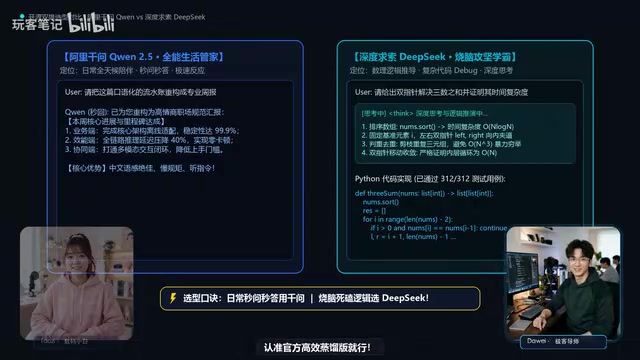
Here's the one-line selection logic: Use Qwen for everyday, always-on tasks where you need instant responses. Call on DeepSeek when you hit a tough problem that demands rigorous logical reasoning.
Qwen is positioned as a general-purpose assistant — fast responses, smooth experience, ideal for high-frequency daily tasks like copywriting, Q&A, and translation. DeepSeek has an edge in complex logic and deep reasoning, making it better suited for tasks that require "slow thinking," like solving math problems or analyzing code logic.
One important point: don't try to run trillion-parameter behemoths on a personal PC — they won't run well and you don't need them. Stick to the official efficient distilled versions. Distilled models retain the core capabilities while dramatically reducing size, making them far more suitable for local deployment.
Understanding 7B, 14B, and Quantization: Models Are Furniture, VRAM Is the Room
What do the 7B and 14B labels after a model name actually mean? Does bigger always mean smarter? And if you have 6GB of VRAM, is it fine to grab a 5.8GB model that just barely fits?
There's a classic misconception here. 7B and 14B refer to the number of model parameters (Billion). Larger numbers generally mean stronger capability, but also higher hardware requirements.
Think of it this way: the model is furniture, and VRAM is the room. It's not just the furniture that needs to fit — conversation history also takes up temporary space. So you can't pack your VRAM to the brim; you must leave at least 1.5 to 2GB of headroom, otherwise long conversations will freeze or crash the system.
The other critical factor is quantization. On a typical consumer PC, always look for INT4 or Q4 quantized versions — they shrink the model size by roughly 70% while barely affecting quality. Quantization is essentially "compression packaging" for models and is a prerequisite for running LLMs on consumer hardware.
Quantization is a technique that compresses model weights from high-precision floating-point numbers (such as 32-bit or 16-bit) down to low-precision integers (such as 4-bit). INT4 and Q4 are the most common 4-bit quantization formats today — the former is commonly associated with quantization frameworks like GPTQ, while the latter is the naming convention used in the GGUF format within the llama.cpp ecosystem. Both work on a similar principle: using fewer bits to approximate the numerical value of each parameter, drastically reducing memory usage and computation. The trade-off is a minimal loss in precision, but in practice this is virtually imperceptible for everyday tasks like Q&A, writing, and coding. The reason consumer-grade GPUs (such as those with 6GB or 8GB of VRAM) can run models that would otherwise require tens of gigabytes is entirely thanks to quantization. When browsing model files, look for identifiers like Q4_K_M, Q4_0, or int4 in the filename — these indicate 4-bit quantized versions and are the top choice for local deployment.
Match Your Hardware: What Size Model Should You Download
Once you understand the fundamentals, the most practical step is simply matching your hardware to the right model size — one that will never freeze up on you.
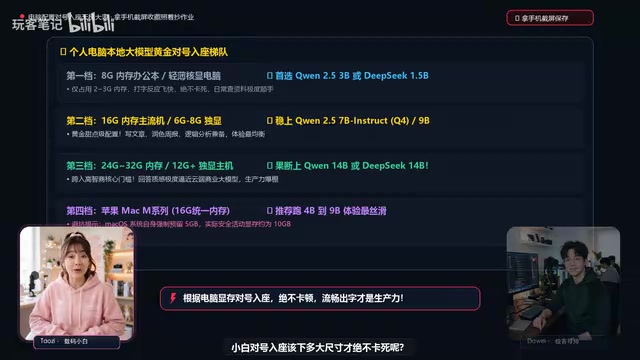
- Integrated graphics / thin-and-light laptops: Choose Qwen 2B or 4B
- 6GB VRAM: You can run a 7B model
- 8GB VRAM: Comfortably run a 9B model
- 12GB+ VRAM: Go straight for 14B and step into high-capability territory
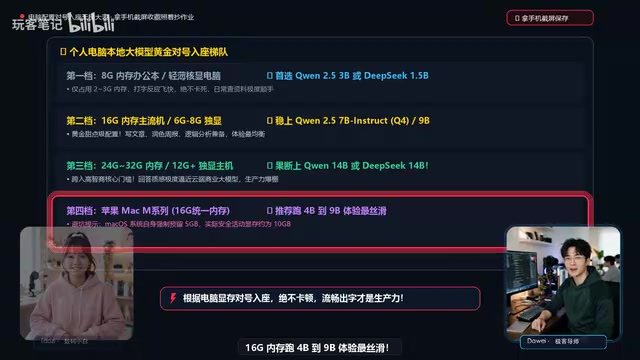
- Apple Mac: Don't forget to account for system overhead — 16GB unified memory runs 4B to 9B models most smoothly
The core principle is this: a small model that runs smoothly on your machine is 100 times more useful than a large model that constantly freezes. Chase real-world performance, not parameter bragging rights.
Zero-Code Deployment: No Command Line Required
If you can't write code, do you still have to wrestle with a black terminal window and a complex Python environment?
Good news: absolutely not. Today's local deployment tools are fully graphical and beginner-friendly:
- Best for complete beginners — LM Studio: The interface looks like an app store. Search for and download models with a single click, and it comes with a built-in VRAM "traffic light" dashboard that tells you whether a given model will actually run on your hardware.
- Prefer a beautiful chat interface: Use Cherry Studio paired with Ollama for a more polished look and greater flexibility.
- Mac users: You also have the dedicated MLX option — up and running in under three minutes, no configuration needed.
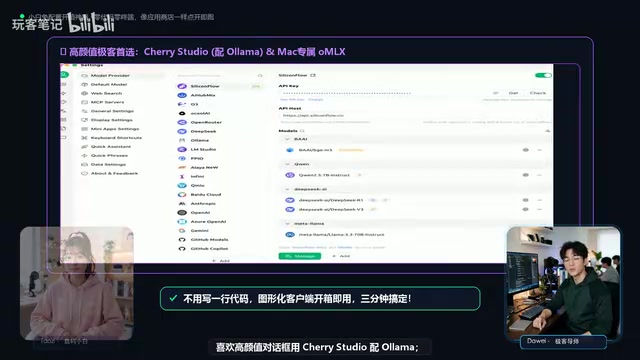
Ollama is currently one of the most popular local LLM runtimes. At its core, it's a background service that runs locally and handles model downloading, loading, and inference scheduling, while exposing an OpenAI API-compatible interface to the outside world. This means any frontend tool that supports a custom API endpoint (such as Cherry Studio or Open WebUI) can connect to it directly, with no extra adaptation needed. MLX is Apple's machine learning framework designed specifically for Apple Silicon (M-series chips). It takes full advantage of the Mac's unified memory architecture — where CPU and GPU share the same memory pool — giving large-memory Macs a significant advantage in local inference. A Mac with 16GB of unified memory has far more memory effectively available for model inference than a PC with a discrete GPU of the same capacity. LM Studio also integrates llama.cpp internally as its inference engine; the graphical interface is simply a more user-friendly wrapper built on top of it.
One Easily Overlooked Detail: Your Storage Drive
Finally, a reminder that often gets missed: always store your model files on a fast SSD (solid-state drive). Never put them on a mechanical hard drive. HDDs are slow to read, meaning your model will take forever to load, seriously degrading the experience.
Put it all together — choose the right model (Qwen for daily use, DeepSeek for reasoning), match it to your VRAM, pick a Q4 quantized version, deploy with a graphical tool, and store everything on an SSD — and any ordinary user can have a fully offline, completely private local AI assistant.
Related articles

Deleted Reddit Post Sparks Debate Over AI Content Moderation
A Reddit post removed with only a 'Removed by Reddit' notice highlights AI content moderation's transparency gaps, misjudgment risks, and appeal challenges for platforms and creators.

DSH + Ollama Local LLM Deployment in Practice: Free Chat with Da Fei Yu
Bilibili creator tests DSH + Ollama local LLM deployment end to end: Ollama install, Xunlei-accelerated downloads, ModelScope GGUF model import, DSH custom API address setup, and a comparison of Qwen 3.5 4B, 8B, Gemma, and other models on 8GB VRAM, with advice on choosing local deployment vs. API calls.

Tested: A $899 Mac Mini vs. a $200/Month AI Subscription
Real-world test of whether an M4 Mac mini can replace a $200 AI subscription: 16GB can't fit large models, and both speed and quality fall short—but privacy, no caps, and near-zero running costs make it an ideal host for an always-on agent. Includes buying advice per configuration and money-saving strategies.