Marv: The AI Cursor Companion That Draws Arrows on Your Screen to Guide You

Marv is an AI cursor companion that draws arrows and annotations on your screen to guide you through any task.
Marv is an AI screen assistant by Cameron McHardy built around a "show, don't just tell" interaction model: hold a hotkey, ask about anything on screen, and Marv responds with voice while overlaying arrows, circles, and annotations on your current interface. This voice-plus-visual-markup approach simulates hands-on human guidance and shines in complex scenarios like code debugging, spreadsheet formulas, and video editing. Powered by multimodal vision models for real-time UI recognition, Marv represents the emerging trend of AI that understands your screen context and intervenes naturally. It launched on Product Hunt with 74 upvotes and ranked 14th on its debut day — promising early traction, with annotation accuracy and privacy data handling still to be validated.
An AI Assistant That Actually Points the Way
Most AI assistants work in a straightforward loop: you ask, they answer — usually with a block of text or a voice response. But when your question is "where exactly do I click right now?", plain text explanations often fall short. You end up scanning the interface back and forth, trying to match the description to what's actually on your screen. Marv, a recent addition to Product Hunt, is built to solve exactly that problem.
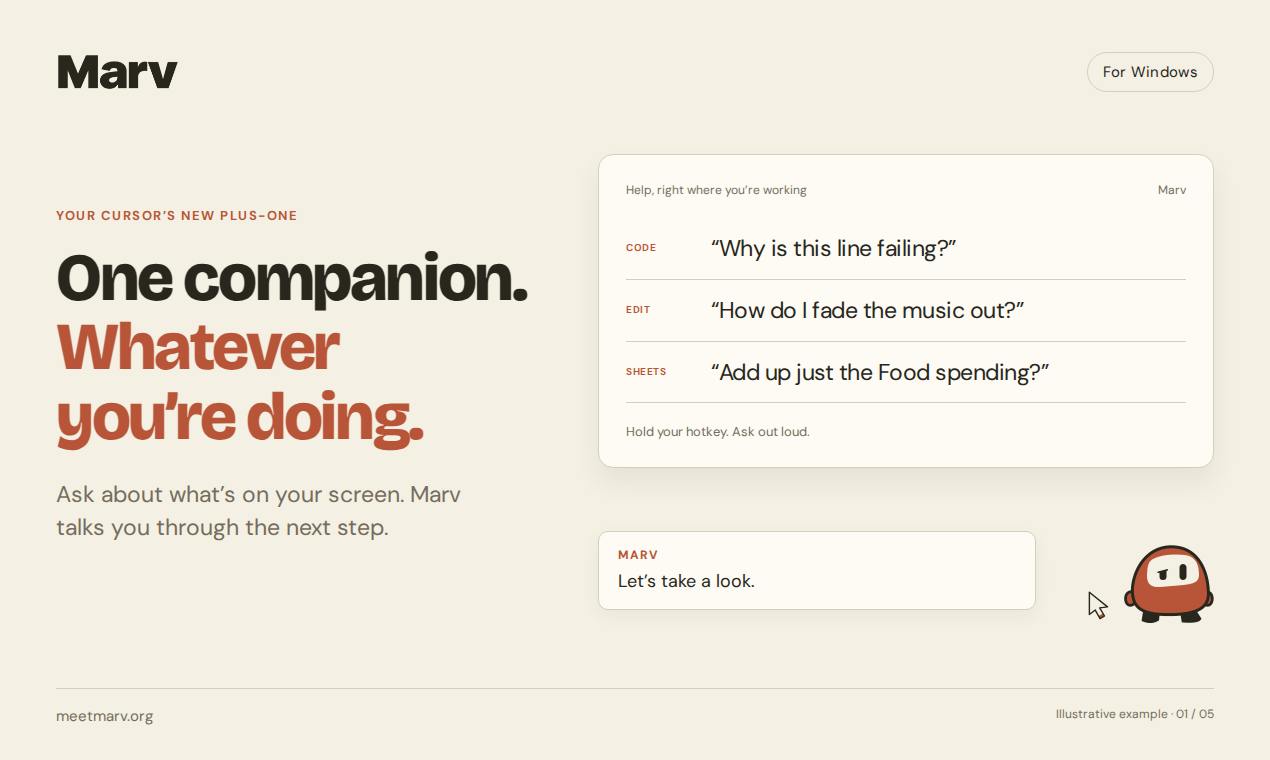
Marv positions itself as "your cursor's new plus-one." The core interaction is simple: hold down a hotkey, ask a question about anything on your screen, and Marv responds with voice — while simultaneously drawing arrows, circling buttons, and writing annotations directly on your display. No switching to another window or app required.
Answers You Can See on the Screen
Marv's real differentiator is how it delivers answers. Traditional screen assistants either pop up a chat window or read out a text description, leaving you to mentally translate "the icon on the right side of the second toolbar" into an actual location on screen. Marv overlays its answers as visual annotations directly on your current interface — what to click and which control to target becomes immediately obvious.
This combination of voice and on-screen markup essentially simulates having someone sit next to you, pointing at the screen and walking you through each step. For users unfamiliar with a piece of software, or anyone facing a complex professional tool, this kind of guided experience is far closer to how humans actually teach each other than pure text ever could be.
Under the hood, this interaction model relies on Screen Understanding — the AI continuously captures your screen, uses a vision model to identify the position and semantics of UI elements (buttons, menus, icons, etc.), and then renders annotation results as a transparent overlay. This is closely tied to recent breakthroughs in multimodal large models (such as GPT-4o and Claude 3) in visual comprehension: these models no longer just process text — they can "read" the UI structure within a screenshot. Early attempts in this space, like the Recall feature in Microsoft's Copilot+ PCs, also used continuous screen capture combined with semantic indexing, but were forced to delay launch due to privacy concerns — a backdrop of scrutiny that Marv will inevitably face as well.
Key Use Cases
According to official materials, Marv is designed around several high-frequency scenarios:
- Code debugging: Developers can ask about errors or logic issues visible on screen without ever leaving their editor.
- Spreadsheet formulas: When faced with complex formula logic, Marv can help you work through the syntax.
- Video editing and other professional tools: These applications often have deep menu hierarchies and dense controls — "finding the right button" is half the battle, and this is precisely where on-screen annotation adds the most value.
What these scenarios share is a common user frustration: knowing what you want to do, but not knowing how to do it within the interface. Marv bridges that gap by combining AI comprehension with real-time screen awareness.
Product Positioning and Market Reception
Marv was built by Cameron McHardy and is listed on Product Hunt under three categories: Productivity, Developer Tools, and Artificial Intelligence. By community metrics, it earned 74 upvotes, 4 comments, and ranked 14th on its launch day — a product with genuine early traction, though not yet a breakout hit.
Zooming out, Marv represents a broader product philosophy that's gaining momentum: letting AI understand your current screen context and intervene in a more natural way. Whether as a general-purpose screen understanding assistant or a smart guide for specific software, this direction is heating up fast. Marv's proposition is packaging "screen understanding" and "visual guidance" into a lightweight, always-ready companion tool you can summon at any moment.
Open Questions Worth Watching
As an early-stage product, Marv still has several things that warrant closer scrutiny. How accurate are the screen annotations? Does it handle different resolutions and multi-monitor setups well? How reliably does it recognize interfaces in specialized professional software? And on the privacy front — an assistant that continuously reads your screen raises real questions about how that data is handled. Official documentation is currently limited on these details, and they'll need to be verified through real-world use.
There are relevant industry precedents to consider here: Microsoft's Recall feature sparked widespread concern among security researchers because it stored screen snapshots in a locally searchable database, creating potential data exposure risks — ultimately forcing a delayed launch with added encryption and access controls. For tools like Marv, the core privacy questions come down to two points: whether screenshots are uploaded to cloud servers for inference (local vs. cloud inference represents a significant difference in privacy exposure), and whether screenshot content is used for model training. Before granting this kind of access, understanding a tool's data flow and retention policy is basic security hygiene.
Overall, Marv introduces a genuinely fresh interaction paradigm. For users who regularly get stuck on "where is that feature, anyway?", an AI companion that draws arrows directly on your screen to show you the way has a real and distinct appeal.
Related articles

2026 AI Coding Tools Comparison: Claude, ChatGPT, Gemini — Which Is the Best?
A 2026 comparison of five mainstream AI coding tools — Claude Code, ChatGPT Codex, Gemini, DeepSeek, and GitHub Copilot — on real projects, pricing, and code quality, to help you decide where that $20/month should go.

ChatGPT Codex Can Clone Any Software? Testing the Risks and the Truth
YouTube shorts claim ChatGPT Codex or Claude Code can clone Adobe, Excel, and Figma for lifelong free use. We break down the feasibility, legal risks, and DM-funnel tactics—and explain what AI coding tools are truly good for.

Kilo Code Is Free to Install but Charges for API: Cost Estimation and Configuration Guide
Kilo Code is free to install, but connected AI models are billed per token. This guide covers VS Code extension and CLI setup and shows how to estimate API costs.