Master WorkBuddy in Ten Lessons: From Chat AI to an Automated Digital Colleague

A ten-lesson Bilibili tutorial breaks down WorkBuddy's complete path from installation to scheduled automation and its key logic.
This article distills the core content of the ten-lesson WorkBuddy tutorial on Bilibili. It first draws the dividing line between traditional large models and AI agents—whether they can autonomously execute and deliver results; then introduces the installation process, the three interface areas, and the applicable scenarios of Craft, Plan, and Ask, emphasizing workspace isolation; next explains the eight-step task description process and its six elements; focuses on Skills, expert teams, and connectors, where layered loading solves context bloat and MCP simplifies N×M integration into N+M; and finally covers mobile access, IM assistants, external API integration, and the five elements and six-question screening method for scheduled Agent tasks, recommending starting with a small, clearly scoped task.
Traditional large models can propose solutions, but you still have to implement them manually; AI agents like WorkBuddy try to take over the "execution" as well. This ten-lesson tutorial series on Bilibili breaks down the entire path from installation to scheduled automation, and this article distills the key logic.
From "Giving Advice" to "Delivering Results": The Dividing Line of Agents
The tutorial opens with an intuitive example that draws a clear line: for a poorly formatted Word document, an ordinary large model will only tell you how to fix it, and every step still has to be done by hand; WorkBuddyAd, within the scope of authorization, can automatically locate the file on your desktop, complete the beautification and layout, unify the formatting, and once standards are set, batch-process dozens or even hundreds of documents.
The criterion for distinguishing traditional AI from agents is simple—whether it can autonomously execute tasks and deliver concrete results, rather than merely output text suggestions. By this standard, WorkBuddy positions itself as a domestic alternative to Codex, but with a lower barrier to entry, requiring no network environment or complex configuration. It also supports parallel multi-agent work: when faced with complex tasks, it automatically breaks down the workflow and mobilizes multiple "digital employees" to divide the work of file parsing, data analysis, content creation, and more.
Installation and Interface: Three Areas, Three Modes
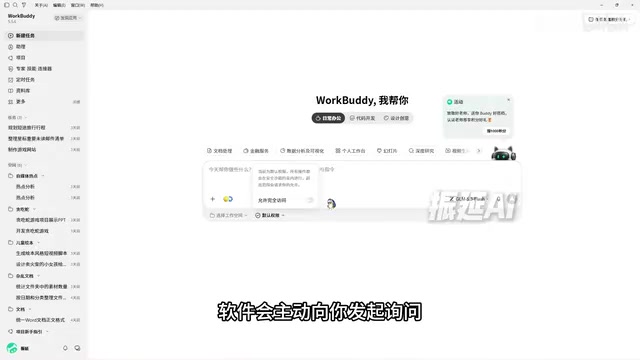
Installation goes through the official website: double-click to install on Windows, drag to the Applications folder on Mac, then log in via WeChat QR code or phone number, and new users receive initial credits. The interface is divided into three parts: the left navigation, the center workspace, and the right result preview area.
What beginners really need to master are the three working modes, with the toggle located above the input box:
- Craft (Do It): Execution mode, capable of directly reading and writing local files, suitable for daily tasks with clear goals and well-defined steps, and the most frequently used.
- Plan (Think It Through): Planning mode, which first generates a complete plan for confirmation before execution, suitable for multi-step tasks with high risk of changes—for example, when building a website project, it will first fill in requirements and outline the steps.
- Ask (Ask a Question): Pure Q&A mode, which only reads and analyzes without modifying any files, suitable for research and statistics needs, and consumes fewer credits.
The accompanying safety habit is "workspace isolation"—assign a separate directory to each project so the AI can only operate within that directory, avoiding context cross-contamination between projects. The tutorial repeatedly emphasizes: don't enable full access permissions right from the start; when encountering high-risk sensitive operations, the software will proactively ask, which provides more security.
Writing a Good Task Description: The Eight-Step Process and Six Elements
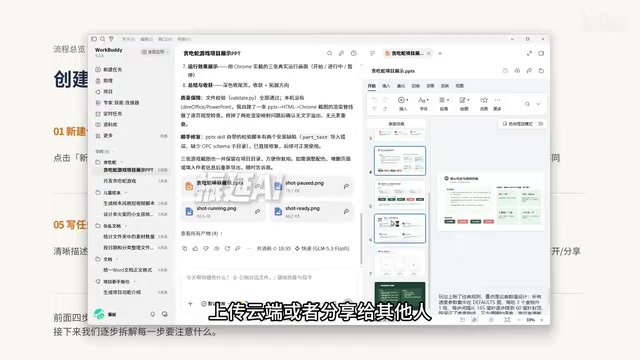
Creating a task can be summarized in eight steps: create a new task, select the working directory, select the mode, select the model, then write the task description, choose enhancement configurations, send and observe, and accept the output. The first four steps are preparation; the last four are execution and acceptance.
The most critical fifth step is the task description. The tutorial provides six elements: goal, input, action, constraints, output, and acceptance. Beginners can start with a simple version and fill in the rest as they become more proficient. Three ready-to-use scenario examples cover common needs: when organizing files, require "generate a list for confirmation before moving, do not delete or overwrite original files"; when generating meeting minutes, "write 'to be confirmed' for anything that cannot be confirmed, do not fill in arbitrarily"; when converting Word to PPT, "preserve the facts and figures of the original text, do not add unverified data."
The Core Trio: Skills, Experts, Connectors
Skills are a set of reusable instruction scripts and reference materials that tell the agent how to perform a certain type of task, which tools to call, and what format to deliver. Its key design is layered loading: at startup, only the names and descriptions of all Skills are loaded; after a task is issued, matching is done by description and then the full content is loaded; during execution, only what is needed is read—solving the problem of "giving the agent more knowledge without blowing up the context." The tutorial mentions that the Skill concept has been published as an open standard, with the standard directory requiring SKILL.md as a mandatory file. The difference from prompt templates can be summarized as: a prompt is a task, a Skill is a method; templates suit one-off needs, Skills suit standardized workflows that can be version-managed and shared across teams.
Experts and Expert Teams are the role layer above capabilities. Skills give AI the ability to do something, while experts are AI roles that understand a certain domain and carry job experience, and an expert team is a team of multiple experts collaborating. Before using an expert team, confirm four things: whether the division of labor among members covers everything, which steps depend on the previous step, when a human needs to make the call, and who ultimately integrates and delivers.

Connectors are essentially carriers of the MCP protocol. The tutorial uses the "N×M integration nightmare" to explain the value of MCP: in the past, connecting 10 AI applications to 10 tools required writing 100 sets of interfaces; with a unified standard, this simplifies to N+M, like USB-C for the AI world. MCP standardizes three core primitives: Tools (execute operations), Resources (read context), and Prompts (predefined templates), and adopts a client-server architecture that supports local operation, so sensitive data need not be uploaded to the cloud.
MCP (Model Context Protocol) is an open protocol proposed and open-sourced by Anthropic at the end of 2024, aiming to establish a unified communication standard between AI applications and external tools and data sources. It adopts a client-server architecture: the AI application acts as the client, and the tool or data provider acts as the server, with both sides exchanging capability descriptions and invocation requests through standardized message formats. The protocol defines three core primitives—Tools for executing operations, Resources for reading contextual data, and Prompts for predefined prompt templates—so that any tool following the protocol can be directly invoked by any AI application that supports it. Because the server can run locally, MCP also keeps sensitive data on the local machine while opening up capabilities, which is the basis for the connector solution in the tutorial balancing extensibility and privacy.
Context Window refers to the upper limit of the total number of tokens a large model can process in a single inference, including all content such as system prompts, conversation history, and tool return results. Once the limit is exceeded, the model either errors out or is forced to truncate earlier information, leading to lost instructions or degraded answer quality. This is exactly why Skills use layered loading: if all skill documents were stuffed into the context at once, the limit would soon be hit; by loading only names and descriptions first and then loading full content on demand, the limited context budget is left for what the current task actually needs. Understanding this constraint means understanding the engineering trade-offs behind the Skill design.
Connecting to Mobile and External Models
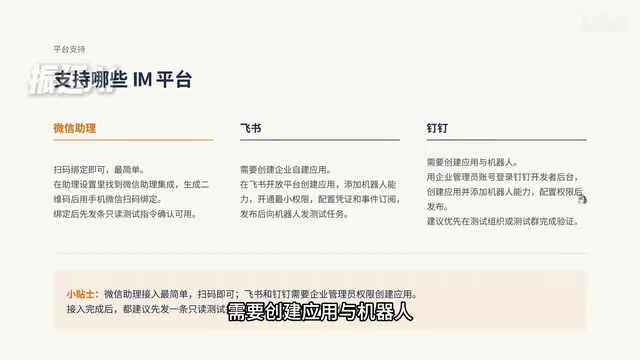
The mini program has two operating modes: local mode connects to the local computer, requires the target computer to be online, and is suitable for accessing local files; cloud mode is not limited by whether the computer is powered on and is suitable for handling lightweight tasks anytime. The IM assistant connects WorkBuddy into the chat windows of WeChat, Feishu, and DingTalk, with the workflow being "send instruction—understand intent—invoke capabilities to execute—return results in the conversation." The WeChat assistant can be bound by scanning a QR code; Feishu and DingTalk require an enterprise administrator to create a custom app on the open platform, add bot capabilities, and configure callbacks.
Users without credits can connect their own API: cloud options like DeepSeekAd only require filling in an API Key and paying per call; local options like Ollama use the default port 11434, keep data off the local machine, can be used offline, and have zero token cost. The choice logic is straightforward—use the cloud for everyday convenience, use local for privacy and cost.
Scheduled Agent Tasks: Let AI Go to Work on Its Own
The final lesson combines scheduled scheduling with agent capabilities. All configurations are stored in the local client, and data does not pass through third-party servers. The tutorial points out that what makes a task run stably is not how powerful the tool is, but whether five things are clearly stated: a clear trigger time, a repeatable input source, sufficiently specific prompts, a fixed and controlled working directory, and acceptance conditions that can determine success or failure.
To judge whether a task is suitable for the first batch of automation, use six questions to filter: Does it repeat (at least once a week)? Is the input stable? Are the steps similar? Is the result verifiable? Is failure recoverable? Are permissions controllable? The recommended starting point in the tutorial is very restrained—not "run my entire company for me," but "collect ten AI industry news items every day at eight o'clock, keep the links, and generate a Markdown briefing saved to a specified directory." The clearer the scope, the easier it is to spot problems and iterate.
The path covered by the ten lessons can be summarized as: understand the tool and complete environment preparation → get hands-on and run the first task → expand capabilities with Skills and expert teams → connect to the world with connectors, mini programs, IM assistants, and external APIs → finally turn repetitive work into scheduled Agent tasks. Starting with a small task is the most pragmatic advice this tutorial offers.
Scheduled Task Scheduling (Cron Scheduling) is a mechanism that automatically triggers program execution at preset times, named after the cron daemon in Unix systems. Its basic elements include the trigger expression (e.g., 8:00 every day, 9:30 every Monday), the execution body (here, the Agent task), and the runtime environment (the local client). Unlike scheduled tasks in cloud SaaS, WorkBuddy's scheduling configuration is stored locally, and when triggered, the local client starts the Agent to execute, so the computer must be powered on and the client running; this also explains why the tutorial emphasizes a fixed and controlled working directory—tasks run unattended, so paths must be certain, otherwise files may be scattered or overwritten. Another key to scheduled tasks is idempotency and recoverability: rerunning after a failure should not produce duplicate outputs, which is why tasks are filtered by "whether success or failure can be determined."
One-line Summary
A ten-lesson Bilibili tutorial breaks down the complete path and key logic of WorkBuddy from installation to scheduled automation.
Paragraph Summary
This article distills the core content of the ten-lesson WorkBuddy tutorial on Bilibili. It first draws the dividing line between traditional large models and AI agents—whether they can autonomously execute and deliver results; then introduces the installation process, the three interface areas, and the applicable scenarios of the three working modes Craft, Plan, and Ask, emphasizing the safety habit of workspace isolation; next explains the eight-step task description process and the six elements of goal, input, action, constraints, output, and acceptance; it focuses on the three core capabilities of Skills, expert teams, and connectors, where layered loading of Skills solves context bloat and MCP simplifies N×M integration into N+M; finally it covers mobile access, IM assistants, and external API connection methods, as well as the five elements and six-question screening method for stable operation of scheduled Agent tasks, recommending starting with a small task with a clear scope.
Related articles

Workbuddy for Absolute Beginners: How a Desktop AI Agent Fits Into Real Workflows
A beginner's guide to the Workbuddy desktop AI agent: installation, claiming credits, file management, and building automated workflows—compared with CodeX for fit and cost, helping professionals shift from AI question-askers to AI managers.

OpenAI's New Agent Stack: Computer Use, Decisions API, and Ultra-Fast Workflows
OpenAI Dev Day unveiled a new agent stack: Computer Use outperforms humans, Decisions API delivers ultra-low-latency classification via Luna, Agents API opens the same Computer Use capabilities, and GPT-6.1 Sol costs only one-seventh of Astra. Core updates, benchmark data, and developer insights.

Liang Wenfeng Open-Sources DeepInfo Inference Framework, Takes On U.S. Ban
DeepSeek open-sources its DeepInfo inference framework after its models, featuring GPU/CPU cross-pipelining, small-model prediction with large-model verification, and full Huawei Ascend and NVIDIA chip support—facing the U.S. federal ban head-on. This article analyzes its significance for AI deployment and open-source strategy.