MCP Is Seriously Underrated: The Hidden Value of How AI Agents Connect to Tools

MCP's lazy loading and workflow encapsulation solve its early Token cost and CLI reliability problems.
MCP (Model Context Protocol) is a standardized protocol connecting AI Agents to external services. Once dismissed for high Token costs, its core flaw was fixed with lazy Schema loading. The article highlights two structural advantages over CLI: reliability — MCP encapsulates backup, migration, and validation into atomic tools the Agent cannot bypass, unlike soft natural-language constraints — and security, where MCP's least-privilege model keeps credentials server-side and invisible to the Agent. The conclusion: use CLI for quick tasks, use MCP for production operations that cannot fail.
What Is MCP, and Why Is It Being Re-evaluated?
MCP (Model Context Protocol) is essentially a "plug" — it connects your AI Agent to external apps like GitHub, Slack, and calendar services. It doesn't sound all that complex, but the debate around it has taken a sharp turn.
Earlier this year, many dismissed MCP as "dead." The argument was straightforward: instead of configuring a bunch of MCP servers, just give the Agent a CLI (command-line interface) — it's simpler and cheaper. That argument wasn't without merit. Every MCP server is essentially handing the Agent a "user manual," and Token costs pile up fast.
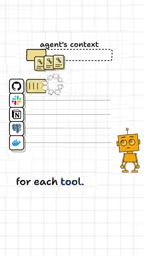
As the image above points out, connecting 5 servers might burn through roughly 50,000 Tokens before the Agent even begins doing any real work. For LLM applications billed by Token usage, that's a significant hidden cost — and it was the core criticism leveled at MCP in its early days.
MCP was proposed and open-sourced by Anthropic in late 2024, designed to provide a standardized protocol for AI Agent interactions with external tools and services. It uses a client-server architecture: the Agent (client) sends requests to an MCP Server through a standard interface, and the Server handles the logic for calling specific services (like the GitHub API, databases, or file systems). The advantage of this layered design is that the Agent doesn't need to understand the specific API details of each external service — it only needs to interact with the unified MCP interface. By contrast, using a CLI directly means the Agent has to manually construct shell commands, handle output formats, and rely on Prompt instructions to regulate behavior. That's the fundamental difference between a protocol-based integration and an ad-hoc script.
The Cost Problem Has Been Solved
Here's the key turning point: that "50k Token" criticism is now outdated.
Agents no longer need to load every tool's full manual all at once. They only need to read the tool name, and only fetch the corresponding "manual" when they actually need to call a specific tool. This "lazy loading" mechanism directly eliminates MCP's biggest cost disadvantage.
A compelling signal: coding agents that previously mocked MCP are now adding it back in. The tool ecosystem votes with its feet — and when early detractors start returning, it signals that the problems MCP solves are real ones.
This "lazy loading" mechanism is technically known as Tool Discovery and Lazy Schema Loading. Early MCP implementations would inject the full JSON Schema for all registered tools — including parameter types, descriptions, and examples — directly into the system prompt at initialization. That's where the tens of thousands of Tokens across just 5 tools came from. In improved implementations, the Agent only receives tool names and brief descriptions at startup (typically just a few dozen Tokens), with full Schemas fetched dynamically only when the Agent decides to call a specific tool. The impact on cost is orders of magnitude — especially when an Agent uses only a small subset of all available tools.
The Fragility of CLI: Constraining Agents with "Promises" Isn't Reliable
Where MCP's real value shows up is in reliability.
Imagine telling an Agent via CLI: "Always back up before you touch the database." That's just a sentence — a single instruction. The problem is that natural language instructions are "soft constraints" — they depend on the Agent remembering to follow through every single time.

It executes perfectly the first 100 times. Then one time it's "in a hurry," skips the backup, and a table's worth of data is permanently lost. That's the risk of entrusting critical workflows to verbal promises: it works countless times, but may fail at the one moment that matters most.
MCP's Real Advantage: Turning Workflows into Unskippable Tools
MCP's solution is to "hard-code" the workflow.
You can bundle backup, migration, and validation into a single tool called migrate: back up, modify, check — all encapsulated as logged steps inside the tool. All the Agent has to do is call it. There's nothing to remember, and nothing to skip.
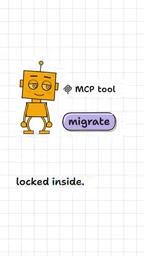
This is the fundamental difference between CLI and MCP: CLI hands the workflow over to the Agent's "memory and discipline," while MCP turns the workflow into deterministic code logic. For operations that cannot go wrong, determinism matters far more than flexibility.
The Security Dimension: Agents Shouldn't See Your Keys
Beyond reliability, security is another advantage of MCP that often gets overlooked.
When using a CLI, the Agent operates inside a terminal environment — meaning it theoretically has access to every key on your machine. Permission boundaries are vague and wide open.

With MCP, the Agent never sees the keys themselves. It only gets access to the specific tool you've explicitly granted it. In other words, MCP naturally provides a least-privilege isolation model — you give it exactly what it needs, nothing more. For security-sensitive production environments, this "can't see the keys" design is enormously valuable.
"Least privilege" is a classic principle in information security: any program or user should only be granted the minimum permissions necessary to complete the task at hand — not one bit more. MCP aligns naturally with this principle at the architecture level. Keys are stored server-side; the Agent only holds the ability to invoke tools, with no access to server environment variables or config files. Even if the Agent is compromised by a prompt injection attack, the resources accessible through the Agent are strictly limited to the authorized tools — dramatically reducing the blast radius. In contrast, when running in CLI mode, the Agent typically operates within the host machine's shell environment, where sensitive files like ~/.aws/credentials and .env are theoretically within its read access.
Conclusion: Not Either/Or — It's About Choosing the Right Tool for the Job
To be clear: none of this means MCP can replace everything.
For fast, one-off tasks, CLI is still the quick and cheap choice. But for operations that "absolutely cannot go wrong" — anything involving databases, credentials, or production changes — you should give the Agent an encapsulated tool, not an unreliable verbal agreement.
The trade-off in one line: For things that can't go wrong, give it the tool, not a pinky promise. That's exactly why MCP is currently underrated — what it buys you isn't convenience. It's determinism and a secure boundary.
Related articles

@ai-sdk/vue 3.0.306 Patch Release Syncs with [email protected] Update
@ai-sdk/vue 3.0.306 released, synced with [email protected]. A routine patch release for the Vercel AI SDK ecosystem with no public API changes; the Vue adapter layer stays version-aligned with the core package.

Gemini 4 Argon API Launches: The Era of Million-Token Output Begins
Google launches Gemini 4 Argon with sparse MoE architecture, up to 1M output tokens, and a 68.90% Vals Index score, available across API, AI Studio, and the Gemini app.

DukaanAI: Turning Product Photos into Inventory Lists with Open-Source AI
DukaanAI is an AI inventory tool for small retailers that turns product photos into inventory entries using the open-source Gemma 3 model, with local inference, editable fields, and CSV export.