MCP Protocol Explained in One Minute: Let Your AI Agent Actually Call Tools

MCP standardizes AI tool integration with Host, Client, and Server, achieving write once, use everywhere.
The article explains the Model Context Protocol (MCP), which tackles the engineering pain of hardcoded, tightly coupled tool integrations in AI apps by letting a tool server be written once and reused by any MCP-compatible client. MCP has three roles: Host (the AI app users interact with), Client (inside the Host, establishing sessions and forwarding calls), and Server (developer-written code exposing tools as typed functions). A real call demo shows the Client connecting, listing tools, and invoking search notes, with results coming from a real notes database rather than model generation—turning "knowing" into "looking it up." The article notes that protocol-layer standardization matters more for AI Agent adoption than single-point model gains, though permission control, error handling, and multi-tool orchestration remain unexplored.
What MCP Is: A Standardized Interface Between AI Applications and Tools
MCP, short for Model Context Protocol, addresses a very real problem in AI application development: how to let AI models actually "use" external tools.
According to the video author's demonstration, without MCP, every tool you connect to an AI application requires hardcoding it once; connect a second tool and you write even more custom code; by the third, the codebase often turns into "a tangled mess no one wants to touch." This is an engineering dilemma that nearly every team building AI Agents runs into—the more tools, the deeper the coupling, and maintenance costs rise exponentially.
MCP's approach is to standardize this: use a single unified "plug" to establish a protocol-level connection between AI applications and external tools. Developers only need to write a tool server once, and any MCP-compatible client can use it directly, with no need to re-adapt for each host application.
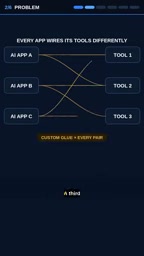
MCP was first proposed and open-sourced by Anthropic in late 2024, and its design philosophy can be compared to LSP (Language Server Protocol) in the language model space—LSP decouples editors from programming language tooling, while MCP decouples AI applications from external tools. It uses JSON-RPC 2.0 for message transport, supports transports such as stdio and HTTP (including SSE streaming), and the protocol itself stays lightweight. Notably, MCP is not a capability exclusive to any particular model but an open, model-agnostic specification; Claude Desktop, various IDE plugins, and third-party Agent frameworks can all serve as a Host. It is precisely because it sits at the "application layer" rather than the "model layer" that cross-vendor, cross-host reuse becomes possible—which is also why it was so quickly adopted by the community.
Three Roles, One Real Call
The video uses one minute to demonstrate MCP's core architecture, which consists of three roles, each with its own responsibilities.
Host: The AI Application the User Interacts With Directly
The Host is the AI application interface the user actually interacts with; it carries the conversation and initiates tool call requests. For the entire system, the Host is the outermost, user-perceivable part.
Client: The Session Establisher and Request Forwarder
The Client lives inside the Host and plays the role of a connector. It is responsible for establishing a session with the tool server and forwarding tool call requests. This role means the Host does not need to directly handle the communication details with each tool server, making the boundaries of responsibility clear.

Server: The Side That Exposes Tools
The Server is code written by developers that exposes tools in a standardized form. Here, a "tool" is defined as a typed function: it has a name, input parameters, and a return result. Typing is an emphasized point in MCP's design; it means tool calls no longer rely on vague natural language conventions but follow an explicit contract.
The capabilities an MCP Server exposes are not limited to "tools"—the specification also defines two other primitive types: resources and prompts. Tools are functions that can be actively called by the model, suitable for operations with side effects such as queries and writes; resources are contextual data that can be read by the Host, such as file contents and database records, and it is usually up to the application side to decide whether to inject them; prompts are prompt templates preset by the server, used to guide specific workflows. In addition, the server uses JSON Schema to describe the parameter structure of each tool, and the Host can use it to validate call legality—this is the concrete mechanism behind the "typed functions" mentioned above. Understanding the differences among these three primitive types is a prerequisite for correctly dividing tool responsibilities and avoiding stuffing read-only data into tool calls.
A Live-Stream-Style Run-Through
The video shows the complete call chain. The Client first connects to the server, then lists the tools available on the server; in the demo, two tools appear: "search notes" and "recent notes." The Client then initiates a call to "search notes," and the answer comes directly from a real notes database rather than content fabricated by the model.

This detail is worth noting: the final returned result comes from a real notes database backup, not from language model generation. In other words, MCP turns the AI's "knowing" into "looking it up," connecting model output with real data sources. The video author sums it up directly—what really makes it work is neither the model nor the tools themselves, but the protocol between them.
The "connect—list tools—call tools" flow demonstrated in the article relies at the protocol level on a standard initialization handshake: when a session is established, the Client and Server first negotiate the protocol version and exchange their supported capabilities; only afterward can the Client request tools/list to obtain the tool list, and then initiate a specific call via tools/call. The returned result usually contains structured content blocks, which the Host hands back to the model for continued reasoning. This fixed "discover—describe—call" chain is exactly the key to MCP's plug-and-play capability for any client: the client does not need to know in advance which tools exist on the server; it can discover them dynamically at runtime.
Write Once, Use Everywhere
MCP's most practical value lies in reusability. According to the video, a Server only needs to be written once, and any MCP client can use your tools. This means that an MCP server built by a team for a notes system, a database, or an internal API can be shared by different AI applications without rewriting the adaptation layer for each host.
For developers, this lowers the marginal cost of tool integration; for the ecosystem, it decouples tool providers from AI application providers—tools can evolve independently, host applications can be freely swapped, and the protocol in between guarantees interoperability.
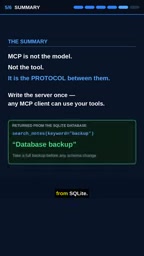
At the end of the video, it mentions that the link to the complete build process is in the description area; interested readers can follow that lead to see how the actual code is set up. As for the amount of information in this short video itself, it is more like a concept overview: it explains MCP's role division and call flow clearly in one minute and conveys the core idea of "one plug connecting to all AI tools."
Why This Protocol Is Worth Watching
From an engineering perspective, MCP responds to an unavoidable part of putting AI Agents into practice: tool integration. No matter how strong the model's capabilities are, if it cannot call external systems reliably, securely, and maintainably, the Agent can only remain at the demo stage. Standardization at the protocol layer often determines the speed of ecosystem expansion more than improvements in single-point model capabilities.
The current video only covers the architecture and basic flow; engineering details such as permission control, error handling, and multi-tool orchestration are not elaborated. But as an entry point for understanding MCP, it explains the three roles and one real tool call clearly enough—for developers troubled by increasingly messy tool integration code, this is already a starting point worth following.
One-line Summary
MCP standardizes AI tool integration with the three roles of Host, Client, and Server, achieving write once, use everywhere.
Paragraph Summary
The article introduces the core concepts and architecture of the Model Context Protocol (MCP). It addresses the engineering dilemma of exploding hardcoded integrations and deepening coupling when AI applications connect to multiple external tools, using a unified protocol so that a tool server only needs to be written once and can be reused by any MCP-compatible client. MCP consists of three roles: the Host is the AI application the user interacts with, the Client sits inside the Host and is responsible for establishing sessions and forwarding calls, and the Server is the side developers write that exposes tools as typed functions. The article demonstrates the complete chain through a real call: the Client connects to the server, lists available tools (such as search notes and recent notes), and then initiates a call; the result comes from a real notes database rather than model generation, reflecting the shift from "knowing" to "looking it up." The article concludes that protocol-layer standardization is more ecologically significant for putting AI Agents into practice than single-point model capabilities, but details such as permission control, error handling, and multi-tool orchestration are not yet covered.
Related articles
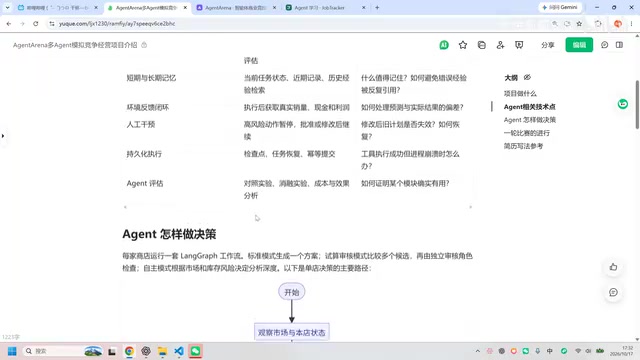
Hands-On Review of an Open-Source Multi-Agent Business Simulation Project
Hands-on review of a Bilibili creator's open-source multi-agent sandbox business project: architecture, memory, HITL, evaluation, and LLM vs rule-engine results.
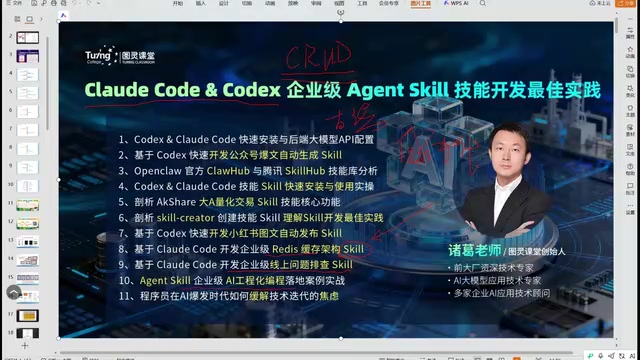
AI Engineering in Practice: The Complete Workflow of Claude Code and Agent Skill Development
A Bilibili hands-on course analyzes AI engineering: using Claude Code, Codex, and WorkBuddy to develop enterprise-grade Agent Skills, covering WeChat article drafts, quantitative analysis, and automated Xiaohongshu posting, while explaining the paradigm shift of Skill-driven development and tool selection.
LangChain for Beginners: A Practical Guide to Structured Output and Agents
Starting from zero with LangChain: clarify the difference between low-code platforms and large model application development, covering structured output, tool calling, Agent practice, and multi-tenant RAG enterprise deployment—ideal for engineers with development experience looking to transition into AI application development.