Microsoft Copilot Gets a Major Upgrade: The Entire Office Suite Now Lives Inside Your AI Assistant

Microsoft rebuilds Copilot as a single work hub unifying chat, AI agents, tool building, and the full Office suite.
Microsoft has redesigned Microsoft 365 Copilot at an architectural level, replacing fragmented AI entry points with a single universal composer. Key changes include: the Home tab as a unified starting point; Autopilot as an always-on personal AI agent with strict Teams channel permissions; a Code feature letting non-technical users build interactive tools via natural language; and Word, Excel, and PowerPoint embedded directly inside Copilot, eliminating the "export = disconnect" problem. Microsoft's differentiation strategy relies not on raw chat capability, but on deep integration with enterprise data, compliance, and the Office ecosystem.
Microsoft has completely redesigned Copilot — and this is far more than a cosmetic refresh. Chat, agents, app building, and the entire Office suite have been unified into a single experience. A creator who received early access visited Microsoft and spoke at length with the product team behind the new version. The core change can be summed up in one sentence: you no longer need to figure out which AI tool to use — just tell Copilot what you want to accomplish, and it will find the best way to handle it.
Home: The One Entry Point You Can Never Get Wrong
The starting point of the new Copilot is the Home tab. Microsoft's product team describes it as a "single universal composer" — whatever you need, you start here, and the system automatically routes you to the right capability.
"Our goal is to introduce this single universal composer that always takes you to the right place. Whatever you need, start from this box, and the right thing will happen."
This means users no longer have to figure out whether they should use chat, co-work, or some other mode. Home brings together the best of Copilot chat and collaboration features while lowering the learning curve — embodying Microsoft's repeatedly stated design philosophy that "you should never be able to use it wrong."
Autopilot: Your Always-On Personal AI Agent
Autopilot is an entirely new concept within Microsoft 365 Copilot. It provides a personal AI agent that works continuously in the background, even when you haven't issued an explicit command. It's "always on and continuously learning," and connects to Work IQ — meaning it understands your enterprise context and work data.

In the demo, Autopilot (named "Fern") proactively offered three routine suggestions: a morning briefing, monitoring important changes, and suggested replies. These weren't generated at random — they were tailored to scenarios where Autopilot can be most effective. Users can also create their own routines and let Autopilot handle recurring tasks automatically.
What's even more noteworthy is the permissions model. Autopilot isn't limited to the Copilot app — it can also be embedded in Microsoft Teams channels. When you @-mention Fern in a channel, its permissions are strictly scoped to that channel's content; when it works outside the channel on your behalf, it operates within your own permission boundaries — "no more, no less." Microsoft has handled all of this permissions and scope management for users. In the demo, Fern could even auto-fill documents based on templates found in a channel, and when asked to "find 30 minutes to meet with a few colleagues," it automatically coordinated schedules and booked the meeting.
Work IQ is the enterprise knowledge graph layer within the Microsoft 365 Copilot ecosystem. It integrates data from a user's emails, calendar, meeting notes, documents, and organizational structure, enabling Autopilot to understand context like "who is collaborating with whom," "which projects are in progress," and "what's the background of this document." The key difference from a general-purpose chat AI is that Work IQ's data is scoped to the enterprise tenant, governed by the Microsoft 365 permissions system, and never leaks across tenants. It's this data layer that enables Autopilot to deliver proactive services like "morning briefings" or "monitoring important changes" — continuously sensing the state of your work rather than simply responding when you ask a question.
Code: Build Interactive Tools Without Writing a Single Line of Code
Code takes Copilot in a completely different direction. Rather than just generating documents or completing tasks, it lets you build your own interactive tools.

The team was quick to emphasize that no technical background is required: "You don't need to be a programmer or know any code — you just need an idea in your head and a little guidance."
In the demo, the presenter simply described "I need a little widget that sits on my screen and helps me track all my customer orders," and through a few rounds of conversation, Code generated a fully interactive desktop widget — with checkboxes, real-time updates, and the ability to write data back to the system.

Another highlight is the sharing experience. CodeTab makes hosting and sharing tools as straightforward as sharing a Word document: just like hosting a file in OneDrive, adding someone's email address, and clicking share. "It just works" — lowering the barrier for everyday users to turn ideas into practical tools.
In terms of positioning, this capability complements Microsoft's existing Power Apps low-code platform. Power Apps targets "citizen developers" with some IT background who need to build department-level applications, while Copilot's Code feature lowers the barrier further — all the way down to end users with zero technical background. From a technical standpoint, Code likely generates something similar to Power Apps or simplified web components in the background, then distributes them through Microsoft 365's permissions and hosting infrastructure. This also explains why the sharing experience feels identical to OneDrive file sharing: the same enterprise-grade hosting and collaboration stack is reused under the hood, rather than building an entirely new standalone platform.
Office Inside Copilot: No More "Export = Disconnect"
The biggest change of all is that Microsoft has brought Office applications directly into Copilot. In the demo, the presenter asked Copilot to help create a slide deck for an offsite meeting. After clicking the generated PowerPoint, they had access to the full PowerPoint experience — right inside the Copilot app.
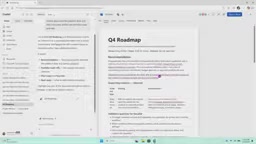
This design addresses a core pain point in AI-assisted work today. The product team described it vividly: "Everyone uses AI to draft a document, then clicks export, and that branch is cut off forever — the file is frozen in time." By embedding the full Office experience inside Copilot, documents stay alive — you can collaborate with AI inside Copilot, and if a colleague opens the same document in the traditional Word app, they can jump in and edit it manually too.
The PowerPoint experience also understands context automatically: the presenter didn't need to tell Copilot which slide he was on — it just knew. The same capability applies to Word roadmap documents, with the ribbon, multi-user collaboration, and context awareness all present, while users remain in a single UX entry point. Microsoft is starting with Word, Excel, and PowerPoint, but the product team made it clear that the vision is to bring the full-fidelity Office suite entirely into the Copilot app.
"Export = disconnect" describes a structural flaw common to most AI writing tools today: AI generates content in its own sandbox, and once the user downloads or exports the file, the AI loses awareness of that document's subsequent state — unable to track edit history, sense collaborators' changes, or provide contextually relevant suggestions as the document evolves. By embedding full Office capabilities into Copilot, Microsoft is essentially keeping the AI in the document's "living state" at all times. Storage, version management, and collaboration permissions remain handled by OneDrive and SharePoint, while Copilot acts as a persistent collaboration layer on top — rather than a one-time content generator. This architectural approach is directionally similar to Google Docs embedding Gemini, but Microsoft's advantage lies in the fact that Office formats are already the de facto standard for enterprise workflows.
Copilot's Reason for Being
With so many AI assistants on the market, product lead Jacob was asked: why does Copilot exist? His answer centered on enterprise use cases — the core reason for a product like this is to help people get things done, which requires it to "deeply understand your enterprise context, your work data, and what it means for an IT department to adopt a single solution."
This reveals Microsoft's differentiation strategy: not competing head-on on general chat capabilities, but leveraging deep integration with enterprise data, permission systems, and IT compliance. The unified Copilot brings chat, agent delegation, tool building, and Office collaboration under one roof — attempting to evolve from "a place to chat with AI" into "a place where work actually gets done."
Of course, this is still a very early preview. How all these features ultimately work together in practice remains to be seen as Microsoft rolls them out. But the direction is clear: rather than asking users to choose among a collection of AI tools, let them simply express their intent — and let Copilot figure out how to make it happen.
Related articles

Apple HomeView Hands-On Review: Is the $300 Smart Home Hub Worth It?
Apple HomeView hands-on: a $300 smart home hub with facial recognition for quick account switching, but no App Store or voice recognition. Is the wall-mounted version worth it? Should you buy the first generation?

Meta Muse Wonder Launch: What It Means for Meta's Return to the Frontier AI Race
Meta releases Muse Wonder and WonderFull, benchmarks reach the frontier, community feedback is polarized. An in-depth look at Meta's return to the frontier AI race, its personal agent strategy, and Zuckerberg's different path.

Apple Home Smart Home Lineup Leaked: LG and Schneider Team Up, UWB Door Lock on Board
Apple Home ecosystem gains new LG and Schneider devices: UWB smart lock with proximity unlock, 2.5K dual-camera doorbell, privacy indoor camera, and AirPods-like seamless pairing.