MiniMax Code CLI Hands-On: Same Model Comparison with Claude Code — How Much Does Toolchain Difference Matter?

Same model, different tools: MiniMax Code CLI outperforms Claude Code's integration thanks to superior toolchain design.
A hands-on comparison test pits MiniMax Code CLI against Claude Code — both running the same MiniMax model — across three real projects: a static page, a Chrome extension, and a full-stack system. Results show M-Code produces more complete first drafts, requires less rework, and handles complex frontend-backend coordination more reliably, proving that toolchain adaptation matters as much as model capability.
MiniMax Code's CLI version has finally opened for beta testing, marking a domestic Chinese AI company's formal entry into the "command-line programming tool" arena, competing head-to-head with mainstream solutions like Claude Code. CLI (Command Line Interface) programming tools have been the most talked-about new paradigm in AI coding since 2024 — unlike IDE-embedded solutions such as Copilot and Cursor that run as VS Code plugins, CLI tools operate directly in the terminal. Developers describe requirements in natural language, and the tool automatically handles the entire workflow including code generation, file operations, and command execution. Claude Code, launched by Anthropic in 2025, is the benchmark product in this space — it can directly read project context, execute shell commands, and modify multiple files, making it the poster child of "agentic coding." MiniMax Code CLI's emergence signals that domestic AI companies are now positioning themselves in this high-barrier track.
After gaining beta access, Bilibili creator Xiao Liu ran a hardcore comparison test across three real projects and reached a clear conclusion: The quality of toolchain adaptation may matter more than the model itself in determining final output.
This article is based on that hands-on test, covering MiniMax Code CLI's core usage and the results from three comparison projects, helping you decide whether this tool deserves a place in your development workflow.
MiniMax Code CLI Installation and Core Commands Explained
MiniMax Code CLI (hereafter referred to as M-Code) has a straightforward installation process. After running the installation command, simply reopen your terminal and type m-code to enter the development interface. Worth noting: m-code is short for MiniMax Code — adding the version parameter lets you verify the version number and confirm successful installation.
Once in the terminal interface, the first thing you should do is run a help command, which lists all available commands and shortcuts. Here are the most frequently used ones:
- init: Initialize a new project, letting the tool familiarize itself with the entire repository structure
- mode: Switch models — currently only supports MiniMax series models, selectable with up/down arrow keys
- new: Start a new session
- go: Goal mode — the tool works continuously toward a specific objective until completion
- provider: Switch model providers
- session: View session history
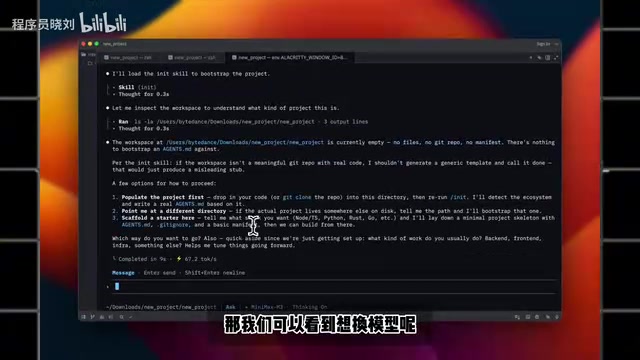
For shortcuts, Shift + Tab quickly toggles between Plan mode and Ask mode, while Ctrl + O (expand) shows the full reasoning process. In AI coding tools, these two modes represent fundamentally different interaction paradigms: Ask mode is Q&A-style interaction where developers pose questions or requirements and the AI provides suggestions or code snippets without directly modifying files; Plan mode is more "agentic" — the AI first formulates an execution plan (e.g., "I will create 3 files, modify the routing config, then run tests"), and after user confirmation, automatically executes all steps. Plan mode is far more complex than Ask mode because it involves multi-step reasoning, error recovery, and state tracking — it's a key indicator of CLI coding tool maturity.
Overall, M-Code's interaction logic doesn't differ much from other terminal coding tools. Developers with experience using Claude Code or similar tools can get started with virtually zero learning curve.
Test Methodology: Controlled Variables, Comparing Only Toolchain Differences
The clever part of this test lies in its controlled variables. The author fed the same prompt to two setups simultaneously:
- MiniMax Code CLI (with built-in MiniMax M3 model)
- Claude Code + manually integrated MiniMax model
In other words, both sides were running the same model — differences came solely from the tools' engineering wrappers, prompt handling, and toolchain design. This doesn't test which model is stronger, but rather whether "the same brain placed in two different bodies" produces different results.
The "toolchain" mentioned here isn't just a simple API call wrapper — it refers to the complete engineering system built around the large model. This includes: system prompt design (how to help the model understand the development context), context window management (how to pass the most critical project information within limited tokens), tool call orchestration (combination strategies for atomic capabilities like file read/write, terminal execution, browser operations), output post-processing (code formatting, conflict detection, auto-fixing), and more. A good toolchain can make the same model perform dramatically differently, which is why first-party tools often outperform third-party adaptations — because every layer of the toolchain can be specifically optimized for the model's characteristics.
This design is precisely what best exposes a tool's true value — because much of what we attribute to "model strength" is actually hidden optimization happening at the toolchain level.
Comparison Results Across Three Real Projects
Project 1: Student Management System Static Page
The first project was a relatively basic student management system static page. Four dimensions were observed: page hierarchy, color scheme, spacing, and responsive design (especially whether the mobile view was genuinely usable).
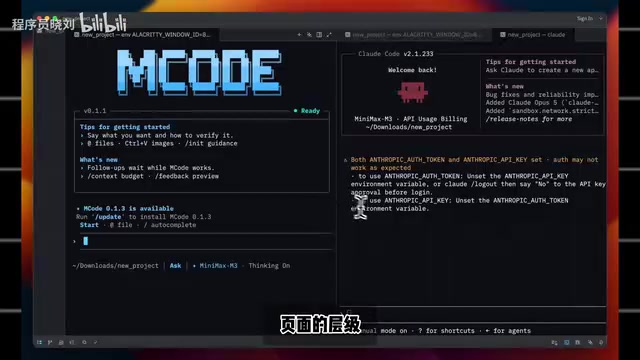
Results showed that the Claude Code + MiniMax model version had complete functionality and no major color issues, but had flaws in responsive layout. M-Code's output had higher completeness, with visual details closer to a directly usable state. Crucially, when switching to mobile view, M-Code's responsive layout displayed correctly — no layout collapse occurred.
Responsive Design requires pages to display properly across different screen sizes, which is a typical "implicit requirement" for AI-generated code. Many large models prioritize desktop visual effects when generating frontend pages while neglecting mobile media queries, flexbox overflow handling, touch interaction adaptation, and other details. "Layout collapse" refers to originally horizontally-arranged elements overlapping or overflowing their containers on narrow screens due to missing proper break rules. M-Code's ability to avoid this problem suggests its toolchain has built-in mobile adaptation checks or prompting strategies in the frontend generation pipeline.
This demonstrates that MiniMax didn't just "plug in a model" — they put real work into the toolchain (harness) layer, with better control over frontend generation details.
Project 2: Webpage Color Extraction Chrome Extension
The second project was a more crash-prone scenario — building a Chrome extension that extracts webpage color schemes and replicates website details.
Chrome extension development involves unique architectural constraints: Manifest V3 requires Service Workers instead of background pages, content scripts have strict isolation mechanisms from page scripts, and cross-origin communication must go through Chrome APIs. A color extraction extension needs to inject content scripts into target pages, traverse DOM nodes to get computed style color values, deduplicate and sort them, then pass results back to the Popup page via messaging. This workflow involves multi-file coordination (manifest.json, content.js, popup.html/js, background.js), making it an excellent scenario for testing AI tools' multi-file collaborative generation capabilities.
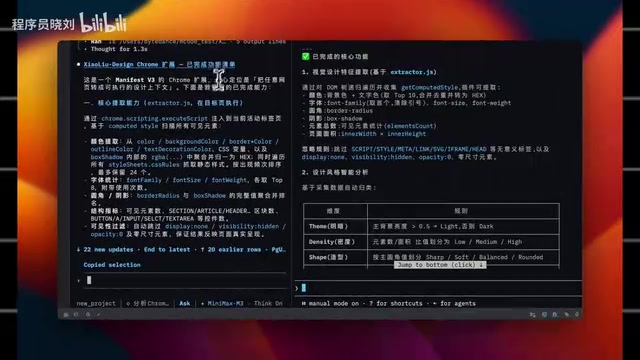
Both sides implemented basic functionality and could extract colors correctly. But differences showed in details: M-Code's version had higher UI and prompt completeness, even proactively generating a simple color swatch card. In comparison, the Claude Code version's UI still had room for improvement. The actual experience was that M-Code "seemed to fill in many details as a natural part of generation," requiring less manual rework.
Project 3: Full-Stack Logistics Management System Stress Test
The third project was the real stress test — a complete full-stack logistics management system with both frontend and backend, involving substantial engineering scope.
The difficulty of full-stack projects isn't in frontend or backend code generation individually, but in whether the "interface contract" between them is consistent. A typical data creation flow involves: frontend form validation → request body construction → API call → backend route parsing → parameter validation → ORM database write → status code return → frontend UI update based on response. Any inconsistency in field naming, data type mismatch, or async handling omission at any step will cause functionality failure.
Query functionality worked normally on both sides. But at the critical data creation operation, a clear divergence appeared: the Claude Code version kept getting stuck in a loading state with errors, and checking the database revealed data was never written to the database. M-Code's identical operation successfully persisted data, and the page immediately refreshed to display it.
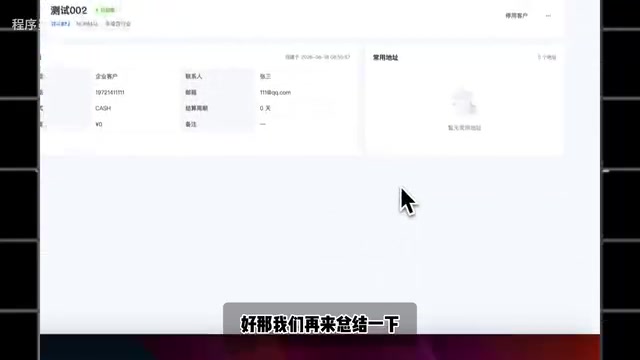
This difference is highly convincing — it's no longer about "how good it looks" but about whether the feature actually works. The Claude Code version's "data not written" issue was likely caused by inconsistent frontend-backend interface definitions or improperly executed database migration scripts — precisely reflecting the toolchain gap in multi-step task orchestration. In full-stack projects where frontend-backend coordination and interface state transitions are extremely complex, M-Code clearly did more thorough orchestration work.
Conclusion: Toolchain Adaptation Determines AI Coding Tool Output Quality
After running three projects, MiniMax Code CLI demonstrated three core advantages:
First, more complete first drafts. For the same static page, M-Code filled in more details around list filtering, entry points, and mobile layouts — especially responsive layouts that were closer to production-ready, eliminating the need for repeated revisions.
Second, less rework needed. Whether for the student management system or the color extraction extension, M-Code handled more details during initial generation, noticeably reducing manual patching effort.
Third, more thorough handling of complex projects. In the full-stack logistics system, M-Code didn't just generate pages — it also tied together interfaces, state transitions, and frontend-backend coordination, producing output that felt more like a "ready-for-acceptance" complete project.
The core insight is: Claude Code + MiniMax model can also complete tasks, but M-Code's toolchain adaptation is smoother. When the model is identical, the decisive factor comes down to engineering packaging — MiniMax clearly understands better how its own model should be "fed" and "used." This confirms an industry trend: CLI coding tool competition is shifting from pure model capability comparisons to a battle over the holistic experience of "model + toolchain." This parallels Apple's ecosystem logic: when hardware (model) and software (toolchain) are deeply integrated by the same company, user experience tends to surpass mix-and-match approaches.
For developers, if you're already using MiniMax models, the first-party M-Code CLI will likely deliver a more hassle-free experience than third-party tools — especially in scenarios with clear requirements where you're aiming for directly deliverable results. Of course, the best way to verify is to run your own small project through it yourself.
Related articles

Apple HomeView Hands-On Review: Is the $300 Smart Home Hub Worth It?
Apple HomeView hands-on: a $300 smart home hub with facial recognition for quick account switching, but no App Store or voice recognition. Is the wall-mounted version worth it? Should you buy the first generation?

Meta Muse Wonder Launch: What It Means for Meta's Return to the Frontier AI Race
Meta releases Muse Wonder and WonderFull, benchmarks reach the frontier, community feedback is polarized. An in-depth look at Meta's return to the frontier AI race, its personal agent strategy, and Zuckerberg's different path.

Apple Home Smart Home Lineup Leaked: LG and Schneider Team Up, UWB Door Lock on Board
Apple Home ecosystem gains new LG and Schneider devices: UWB smart lock with proximity unlock, 2.5K dual-camera doorbell, privacy indoor camera, and AirPods-like seamless pairing.