MiniMax H3 Open-Source Deployment Guide: Generate AI Videos Locally with Low VRAM

MiniMax H3 open-source guide: deploy locally with 16GB VRAM for near-zero-cost AI video generation.
MiniMax H3 is now fully open-source, offering synchronized audio-video generation, text-to-video, image-to-video, and reference-to-video capabilities. This guide details how to deploy it locally using a ComfyUI integration pack requiring as little as 16GB VRAM, reducing AI video generation costs from expensive cloud subscriptions to virtually just electricity costs.
MiniMax H3 Open-Source: A Cost Revolution in AI Video Generation
Recently, the open-source video generation space received a major update—MiniMax H3 is now fully open-source. For creators who have long relied on online platforms charging by the second, this isn't just a model iteration—it's a complete restructuring of cost dynamics.
Before MiniMax H3, the open-source video generation field had already gone through several important iterations. Stable Video Diffusion, released by Stability AI in 2023, pioneered open-source video generation, followed by models like AnimateDiff and CogVideo. However, these early models had noticeable gaps in quality, duration, and consistency compared to closed-source commercial products (such as Runway Gen-3, Pika, Sora, etc.). Since 2024, with the widespread adoption of DiT (Diffusion Transformer) architecture in video generation, open-source model quality has begun catching up rapidly with closed-source products, and MiniMax H3 represents a key milestone in this trend.
Previously, generating a single 15-second high-quality AI video often required repeated "lottery pulls" on cloud platforms, with a single video easily costing dozens or even hundreds of yuan. Currently, mainstream commercial AI video platforms generally adopt credit-based systems—for example, Runway charges by the second, with a 5-second video costing approximately $0.5-1; platforms like Kling charge per generation or offer monthly subscriptions. For creators who need extensive iteration, a satisfactory video might require 10-30 regenerations to achieve the desired result—this is the so-called "lottery pull" cost. Over a month, tool subscription fees can exceed rent.
With MiniMax H3 open-sourced, the marginal cost of local generation approaches zero—aside from electricity, generating 10, 100, or even 1,000 videos incurs no additional fees. Taking the RTX 4090 as an example, with a full-load power consumption of about 450W, generating a single video takes a few minutes with electricity costs of just a few cents.
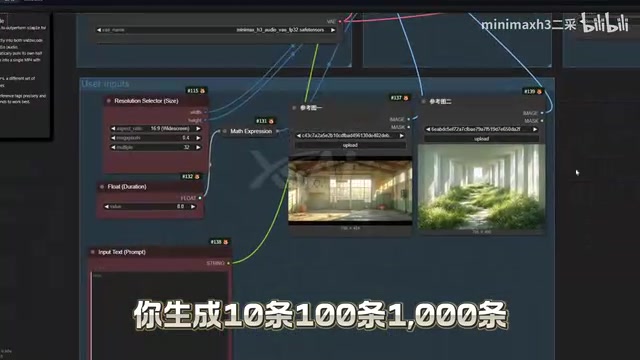
This shift from "per-second billing" to "electricity-based costing" lowers the barrier for high-end AI video generation from enterprise-level budgets to a range affordable for individual creators.
Four Core Advantages of MiniMax H3
As a product in the top tier of comprehensive experience among currently open-source commercially-usable video models, MiniMax H3 excels in several key dimensions.
Synchronized Audio-Video Generation, Eliminating Post-Production Dubbing
In traditional AI video workflows, after generating visuals, creators still need to separately add voiceovers, sound effects, and background music—a massive post-production workload. This typically requires independent tools for TTS (Text-to-Speech), sound effect generation, or music generation, while also facing technical challenges like audio-visual alignment and lip-sync.
MiniMax H3 employs a multimodal joint generation architecture that aligns visual frames with audio waveforms during training, enabling the model to understand the semantic relationships between visual content and sound. For example, when a flowing water scene appears, the model automatically generates matching water sounds; when characters speak, it generates corresponding lip movements and voice. This end-to-end multimodal generation approach directly outputs matching audio and sound effects alongside video frames, with impressive coherence and quality, dramatically reducing post-production time.
Full Coverage of Three Major Scenarios: Text-to-Video, Image-to-Video, and Reference-to-Video
MiniMax H3 provides dedicated models for three mainstream use cases:
- Text-to-Video: Generate complete videos from pure text descriptions, relying entirely on text encoders to map language descriptions to visual space, with higher demands on prompt engineering
- Image-to-Video: Generate dynamic video from a single reference image, using the input image as a first frame or style anchor, extracting visual features through an image encoder for temporal expansion, offering stronger controllability
- Reference-to-Video: Use multiple materials as reference inputs, with the model extracting style, character appearance, motion patterns, and other multi-dimensional information for fusion creation
These three categories cover virtually all creative scenarios—whether concept validation, asset animation, or multi-material remix based on existing assets—each has a corresponding solution.

Balancing Visual Consistency with Dynamic Expressiveness
Visual Consistency is a pain point for many open-source video models and one of the core challenges in video generation. Since video is essentially a frame-by-frame generated sequence, models need to maintain continuity of character appearance, clothing details, and background elements between frames. Early models often suffered from "identity collapse"—where characters' facial features suddenly changed or body proportions became distorted between frames. Technically, solving this typically relies on Temporal Attention mechanisms and Cross-frame Feature Propagation.
In image-to-video tasks, MiniMax H3 uses deeper temporal modeling and identity preservation modules to fully retain the character appearance and artistic style from the original image, avoiding mid-generation "identity collapse." Meanwhile, video dynamics are rich, including complete actions and camera movements, rather than merely slight trembling "slideshow" effects. This ability to maintain identity stability while ensuring dynamic richness is particularly crucial for narrative content creation.
Local Deployment Solution: ComfyUI Integration Pack with One-Click Launch
For many users, the biggest barrier to open-source models is environment configuration—installing dependencies, tuning parameters, spending half a day only to encounter errors. To address this pain point, the community provides a ready-to-use ComfyUI integration pack.
ComfyUI is a node-based workflow AI image/video generation interface tool, released by developer comfyanonymous in early 2023. Unlike traditional WebUI, ComfyUI uses a visual node graph to organize the generation pipeline, allowing users to freely connect steps like model loading, condition input, samplers, and post-processing like building blocks. This design provides exceptional flexibility and extensibility, making it one of the most popular local deployment frontends in the AI creative community.
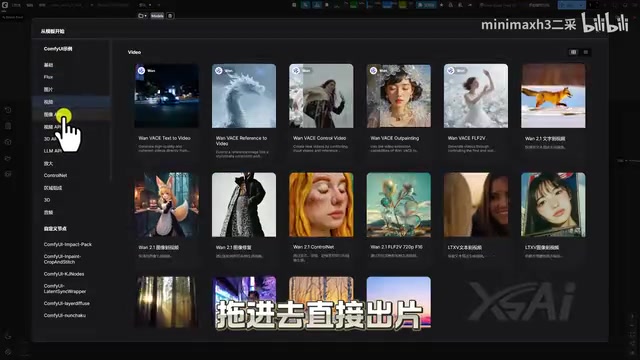
The "integration pack" is a one-stop solution where the community bundles ComfyUI itself, the Python environment, model weights, and custom nodes together—users can start using it immediately after extraction without manually installing any dependencies. Key features of this integration pack include:
- Double-click to launch, zero code, zero configuration—accessible even for non-technical users
- Broad GPU compatibility—supports 30-series (Ampere architecture), 40-series (Ada Lovelace architecture), and 50-series (Blackwell architecture) NVIDIA GPUs, with newer architectures offering significant improvements in AI inference efficiency
- Friendly VRAM requirements—minimum 16GB VRAM to run standard workflows (6GB GPUs can participate in partial processes through model quantization like FP8, INT4, and tiling inference optimizations)
- Built-in acceleration plugins and preset workflows—drag into ComfyUI and start producing immediately
Video generation demands far more VRAM than image generation because the model needs to simultaneously maintain latent space representations of multiple frames in memory. 16GB VRAM (such as RTX 4080, RTX 5080) is the current baseline for running complete video generation models, capable of generating standard resolution (e.g., 720p) short videos; 24GB VRAM (such as RTX 4090, RTX 3090) supports higher resolutions and longer durations.
Even users without deep technical backgrounds can set up a complete AI video production pipeline locally.
Complete Learning Path: From Cloud Experience to Local Optimization
For users with different skill levels, MiniMax H3 can be learned progressively.

The complete learning path covers three levels:
- Cloud-based no-install experience: Lets beginners quickly build intuitive understanding, experiencing the model's actual output without any hardware investment
- Local deployment: Provides a complete environment setup guide, including model download and ComfyUI configuration, freeing users from cloud platform fees
- Parameter tuning: For advanced users, explaining how to precisely control generation results, including adjusting key parameters like sampling steps, CFG (Classifier-Free Guidance) strength, and denoising strategies to improve visual quality and generation efficiency
Three complete workflows cover the three major scenarios: text-to-video, image-to-video, and reference-to-video.
Conclusion: What MiniMax H3 Open-Source Means for Creators
The open-sourcing of MiniMax H3 essentially returns high-end AI video generation capabilities—previously requiring per-second payments—back into the hands of every creator. When generation costs drop from "more expensive than rent" to "just electricity costs," the possibilities for AI video creation are enormously unleashed.
It's worth noting that local deployment still requires a certain hardware foundation: VRAM size affects achievable resolution, and GPU performance determines generation speed. For users pursuing 4K high-definition and long-form video, hardware upgrades and workflow parameter tuning remain ongoing topics to explore. Regardless, MiniMax H3's open-source release makes "everyone can create videos with AI" truly within reach.
Key Takeaways
Related articles

Bilibili's Hit Dify Tutorial: A Practical Guide to Building 20+ AI Apps from Scratch
A distilled guide to Bilibili's top-rated Dify tutorial: Windows + Docker deployment, MySQL connection, five app types, model integration strategy, and publishing.

Agent Skills Beginner's Guide: From Concepts to Multi-Agent Collaboration in Practice
A comprehensive guide to Agent Skills: core concepts, components, the importance of Description, standardization, beginner learning paths, and multi-agent collaboration.

One Neuron Detects Both Cats and Cars? We Reproduced It and Found a New Explanation
The cat-car neuron reinterpreted: researcher Cammarata argues it distinguishes pointy from round, not cats from cars. We reproduced the experiment and found the new explanation holds on most inputs—but cars are the exception. The interpretability debate continues on language models.