Mossy: A Desktop Plant That Wilts to Remind You to Take a Break, Powered by AI

A tiny macOS app uses a wilting plant and AI to gently nudge you into taking breaks.
Mossy is a free, native macOS desktop tool that places a small plant on your screen — one that wilts the longer you sit without a break. Instead of intrusive pop-ups, it offers gentle visual cues and uses AI to generate personalized micro-tasks for each break based on a single sentence you provide. At just 1.4 MB with no account required, it's a privacy-friendly, zero-barrier reminder to take care of yourself.
In an era overflowing with productivity tools, most products are laser-focused on keeping you in the zone and extending your work hours. But a little macOS utility called Mossy takes the opposite approach — it uses a desktop plant that gradually wilts to gently remind you: it's time to get up and take a break.
The product earned 77 upvotes on Product Hunt, landing at #8 on the daily leaderboard. While it hasn't generated a flood of comments, its unique design philosophy is well worth a closer look.
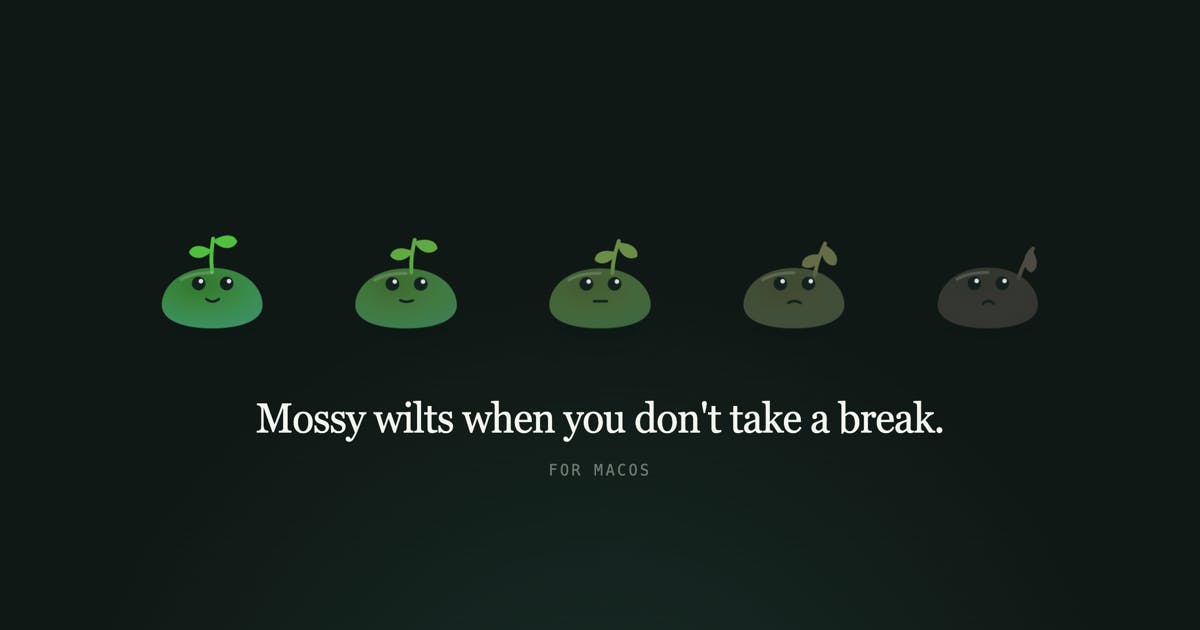
A Desktop Plant That Wilts the Longer You Sit
Mossy's core mechanic is wonderfully intuitive: it's a small plant that lives on your Mac desktop. The longer you sit without taking a break, the more it wilts. This visual feedback mechanism transforms the abstract concept of "health risks from prolonged sitting" into something tangible and emotionally resonant.
Unlike traditional Pomodoro timers or forced screen-lock tools, Mossy embraces a non-intrusive design philosophy. It never blocks your workflow and never dims your screen. As the developers put it: "Ignoring it is a perfectly normal way to use it." This restraint is precisely what makes it so appealing — it doesn't create anxiety; it simply exists quietly, communicating through the plant's condition.
From Commands to Care: Redefining How Reminders Work
Most reminder apps use pop-ups, sounds, or even forced interruptions to "discipline" users — which, over time, tends to breed resentment. Mossy hands the decision-making entirely back to you. Whether the plant wilts, whether you take a break — it's all your choice. This design feels more like companionship than surveillance, making it psychologically easier to accept over the long term.
AI-Powered Personalized Break Activities
The most interesting aspect of Mossy is its clever use of AI. All you need to do is write a single sentence describing what you'd like to do during breaks, for example:
- "Stretch out my sore back"
- "Do 20 push-ups"
- "Teach me a Spanish word"
- "Just get me to stand up for a moment"
From there, the AI generates a specific break task each time — one at a time, complete with a timer. This means every break isn't the same old "drink some water" reminder, but a dynamically generated micro-task tailored to your personal preferences.
A "Lightweight" Paradigm for AI Applications
You might not immediately notice it, but Mossy demonstrates a remarkably restrained approach to AI integration. Instead of cramming AI into complex chat interfaces or multi-function panels, it uses AI to solve one tiny but genuine problem: how to make breaks less boring and more personalized. This "small entry point, deep application" approach may better demonstrate the value of a tool than products that pile on AI features.
The user input is minimalist (a single sentence), while the AI is responsible for expanding it into an ongoing stream of varied break suggestions. This "one sentence generates infinite content" pattern is a textbook example of how generative AI can land effectively in lightweight consumer products.
A Native macOS Experience in Just 1.4 MB
On the technical side, Mossy embodies the same "less is more" philosophy:
- Completely free, no account registration required
- Only 1.4 MB installation size
- Native app, not an Electron wrapper
- Supports macOS 12 and above
In a world where modern apps routinely weigh in at hundreds of megabytes, 1.4 MB is practically negligible. Native development not only means lower resource consumption but also ensures seamless integration with macOS. For a tool that needs to live permanently on your desktop, being lightweight and low-interference is the deciding factor in whether users will keep it around.
Privacy-Friendly by Design with No Account Required
The no-registration, no-account design also makes Mossy exceptionally privacy-friendly. Users don't need to hand over their email or personal information to immediately access all features. This "download and go" low barrier to entry, combined with free pricing, dramatically reduces the cost of trying it out.
The Healthy Work Philosophy Behind Mossy
On the surface, Mossy is a sedentary reminder tool. In reality, it promotes a healthier approach to work. It takes the easily overlooked health issue of prolonged sitting and personifies it through an adorable plant, helping users subtly develop the habit of getting up and moving.
From a product categorization standpoint, it falls under Mac, Health & Fitness, and Productivity simultaneously — which perfectly illustrates its attempt to find the balance between work efficiency and physical well-being.
For developers, designers, and content creators who spend long hours at their desks, Mossy offers a near-zero-cost solution. It doesn't promise to help you get more work done — instead, it reminds you not to forget to take care of yourself. In an era obsessed with maximizing output, a product like this feels especially rare and valuable.
Final Thoughts
Mossy is a macOS desktop utility with a clear design vision and restrained technical implementation. It uses a wilting plant as a visual metaphor, leverages AI to generate personalized break tasks, and gently reminds sedentary users to get up and move — all without interrupting their workflow. Free, no account needed, and just 1.4 MB for a native experience — there's virtually no barrier to trying it.
Among the many productivity tools designed to squeeze every last drop of attention from users, Mossy's counter-intuitive "caring design" may be exactly what makes it stand out.
Related articles

Andrew Ng Teams Up with Anthropic: A Complete Walkthrough of the Claude Code Hands-On Tutorial
Andrew Ng and Anthropic launch a Claude Code short course covering clear context, parallel sessions, MCP servers, and three hands-on projects: a RAG chatbot, Jupyter data analysis, and Figma-to-frontend.

Only Three Agent Recommendations for Beginners: ZeroStack, Claude Code, and DeepSeek Harness
Bilibili creator recommends three beginner Agents: ZeroStack for lightweight devices, Claude Code with a mature ecosystem, and DeepSeek Harness for easy plugin integration. This article outlines use cases and practical tips for each tool.

How Does an AI Agent Control Your Computer? A Full Breakdown of Hermes' Three-Layer Toolchain
Bilibili creator Xiaoyou breaks down Hermes' three-layer toolchain for operating a computer: the built-in Terminal, file modification, and code execution foundation; optional web search, vision analysis, speech synthesis, and browser/desktop control; and an external ecosystem freely extended via CLI and MCP—plus why SSH connects but still can't operate.