How Does an AI Agent Control Your Computer? A Full Breakdown of Hermes' Three-Layer Toolchain

Hermes controls a computer through a three-layer toolchain: foundation, sensory enhancement, and external extension.
Based on Bilibili creator Xiaoyou's breakdown, the article divides Hermes' computer operation capabilities into three layers: the built-in Terminal, file search/modification, and Execute Code form the foundation; the officially optional web search, Vision Analyze, speech STT/TTS, Browser Exec, and Computer Use provide sensory and action capabilities; and the third layer connects external professional software and private systems through CLI leverage and MCP. The article also clarifies the common misconception that SSH only handles command transmission and doesn't automatically carry over the host's tool capabilities, and advocates pragmatism—install tools when real problems arise, and let Hermes search, install, and even write scripts itself to fill in capabilities.
Title
How Does an AI Agent Control Your Computer? A Full Breakdown of Hermes' Three-Layer Toolchain
Meta Description
Bilibili creator Xiaoyou breaks down the three-layer toolchain Hermes uses to operate a computer: the built-in Terminal, file modification, and code execution foundation; optional web search, vision analysis, speech synthesis, and browser/desktop control; and an external ecosystem freely extended via CLI and MCP—while answering the common confusion of "SSH is connected but it still can't operate."
Article Content
How Does an AI Agent Control Your Computer? A Full Breakdown of Hermes' Three-Layer Toolchain
Last time we broke down the underlying logic of AI operating a computer, from black-box commands to high-level screen encapsulation, and then to the MCP unified specification. Once the principles are clear, a more practical question emerges: how exactly does the Hermes we use every day operate our computers, step by step? In her latest video, Bilibili creator Xiaoyou opens up Hermes' toolbox and gives a complete breakdown by capability layer. This layered logic not only explains how the Agent works but also answers common confusions like "why can't it operate another computer even though SSH is already connected?"
Layer 1: The Built-in Foundation
Once Hermes is installed, it comes with a default set of basic tools—this is the foundation that lets it actually operate a computer. Xiaoyou summarizes this layer as three things: running commands, searching and modifying files, and executing code.
Running commands and managing background tasks mainly rely on the Terminal tool. Simple commands execute directly on Enter; for time-consuming tasks like packaging or downloading large files, Hermes throws the task into the background, checks progress when needed, and can stop it midway if it gets stuck—so long tasks don't hog the current interaction.
File operations are handled by a trio of tools working together: Search Files, Read File, and Patch. Search Files quickly locates files among large volumes; Read File reads content; and Patch works like a minor surgery, replacing only the specified two or three lines without regenerating the entire document—fast and stable.
Execute Code is the built-in code runtime environment. When faced with complex calculations that involve many steps, Hermes writes a small Python script on the spot, runs it, and gets the result back directly—saving the hassle of going back and forth in the chat box. With this layer, even without connecting to any online services, Hermes can already look up information, modify files, and manage programs on your computer.
MCP (Model Context Protocol) is an open protocol proposed by Anthropic in late 2024, aiming to define a unified communication specification between large models and external tools and data sources. Before this, every new service integration required separate adaptation; MCP standardizes this: external programs register as "servers," exposing a set of tool instructions with names, descriptions, and parameter structures to the model, and the model invokes them according to the protocol. For Agents, its significance lies in making the toolbox plug-and-play—the third-layer external ecosystem can extend capabilities like game cartridges, precisely thanks to this protocol.
Layer 2: On-Demand Sensory and Enhancement Tools
The code for the second layer is already written officially, but it needs to be configured and enabled based on actual needs. Xiaoyou likens this to giving Hermes eyes, ears, a mouth, and an internet radar. Enabling these capabilities typically involves choosing a service, configuring an API Key, depending on model capabilities, or installing a runtime environment—a single feature may require several of these steps at once.
Web Search and Web Scraping
WebSearch and WebExtract are representatives of this category. Without third-party interfaces, large models can also go online via the terminal or scripts, but they easily run into anti-scraping measures, get web page code stuffed with ads, and have to spend many steps cleaning up content. Search and scraping APIs take over this work: the search interface returns relevant web results, and the scraping interface extracts clean body text and provides summaries.
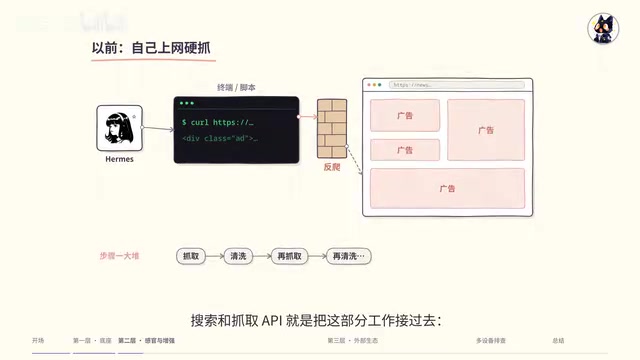
Hermes has built-in round-robin free public channels that work without registering any account, but they're crowded, rate-limited, and prone to timeouts during peak hours. For stability, it's best to register a dedicated Key. Xiaoyou mentions several mainstream options: BraveSearch offers developers a free monthly query quota, fully sufficient for light personal use; Tavoli specializes in AI structured retrieval, suitable for automated research; Firecrawl is Hermes' official early default scraping tool; and DeepSeekAd recently opened Search and Fetch interfaces at very low prices, usable with existing account Keys.
Vision and Video Understanding
The Vision Analyze image tool solves an easily overlooked problem: feeding a high-definition image of thousands of pixels directly to a large model causes the model to automatically compress and blur it internally—small text in corners and complex table lines become invisible, and the model can't zoom into parts of the image itself. Vision Analyze's core capability is region cropping and lossless upscaling—when the model finds a region unclear, it can proactively call the tool to draw a coordinate box on the original image, crop that region at maximum clarity, and re-examine it until every line of small text is confirmed.
Hermes is flexibly designed for configuration: if the main model itself supports multimodality (like GPT, Gemini, and other vision models), just use the main model's eyes directly with no extra configuration; if you normally use a text-only model for chatting and coding, you can separately configure a cheap Auxiliary Vision model that automatically wakes up when images appear, without affecting the main model's lightweight nature. Similarly, Video Analyze can help users analyze video footage after configuring a model that supports video input.
Multimodal models refer to models that can simultaneously process text, image (and even audio, video) inputs, such as the vision versions of GPT and Gemini. They let models "see" images, but visual descriptions are usually limited by input resolution and context—high-resolution images get compressed and details are lost. An Auxiliary Vision model is a cheap small vision model attached separately outside the main model, woken up only when images appear for local recognition, while the main model stays lightweight and focused on text reasoning. Together, they're like giving the Agent a pair of eyes—one primary, one secondary.
Voice Interaction: Listening and Speaking
The listening direction is STT speech recognition, converting sound to text to understand needs and call tools, with local or cloud options available. The speaking direction is TTS speech synthesis, corresponding to the Text-to-Speech tool, converting reply text into sound.
Xiaoyou's top recommendation is the Edge voice that Hermes supports by default: it comes with multiple free voices, synthesizes quickly, is completely free, and synthesis happens in the cloud—no need to run a local speech large model. The only thing to note is to remember to select a Chinese voice. If you have higher audio quality requirements, you can deploy an open-source speech model locally or connect to third-party APIs like Volcano Doubao or MiniMax, the latter of which also supports voice cloning and voice design. If you chat with Hermes in WeChat, Feishu, or Discord, you can also set it to automatically attach a voice message after each text reply—just tap to listen during your commute or when your hands are busy.
Browser Automation and Desktop Control
Browser Exec handles opening web pages, clicking buttons, and filling out forms, while Computer Use can see the screen, move the mouse, and operate software. The browser can connect to either a local browser or a cloud browser; desktop screen control requires installing the corresponding control component on the computer. If these two tools are still unavailable, you can directly ask Hermes to check whether the tools are enabled and whether the runtime environment and permissions are properly configured.
With the second layer fully equipped, Hermes transforms from a basic tool that silently modifies files and runs commands in the background into an all-purpose assistant that can see, hear, speak, and even move the mouse and click the screen for you.
Layer 3: A Freely Connected External Extension Ecosystem
When freshly installed, Hermes has no idea these third-layer tools exist. Using the CLI and MCP discussed last time, Hermes can plug various professional software and private systems into its toolbox like game cartridges.
There are two ways to connect. Lightweight direct leverage means calling the command line of software already installed on the computer—for example, using FFmpeg for editing and transcoding, Git for archiving, or compression tools for packaging—requiring no plugin adaptation. The other is connecting standardized tools through MCP: the Hermes desktop version provides an MCP service management list where you can see at a glance which services are online after connecting, and click in to see which dedicated tool instructions it has added.
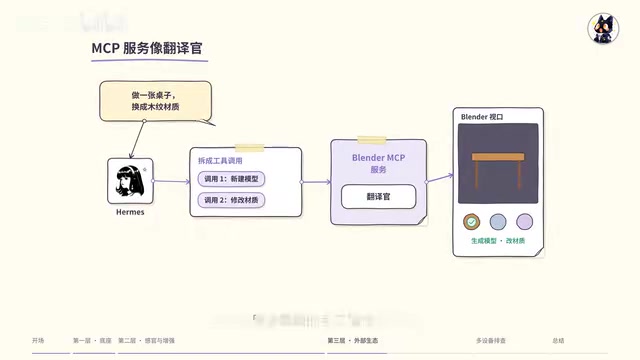
Take Blender as an example: operations that originally required navigating menus, adjusting parameters, and clicking dozens of steps in a complex graphical interface can now be done by simply telling Hermes your needs after connecting Blender MCP. The large model breaks the requirements into specific tool calls and hands them to the background MCP service, and the service program acts like an interpreter, mapping the calls to operations Blender can execute—directly generating models and modifying materials in the viewport.
The open-source community already has aggregation projects like Awesome MCP and Awesome CLI that catalog various services, but Xiaoyou's advice is pragmatism: only install the corresponding tool when you actually encounter a specific problem—never install for installation's sake. When a new need arises, just ask Hermes to search the open-source community for ready-made, mature tools and install them. The tools she herself has installed include: OpenCLI, which wraps mainstream websites into command lines (checking Bilibili data, Zhihu trending, Weibo hot searches, Douban ratings, etc., reusing browser login state and working with Bitwarden for secure password filling), Himalaya for sending and receiving email, OfficeKey for handling Excel reports, plus UE-MCP for operating Unreal Engine, an internal task management MCP, a batch approval MCP, and the smart home platform Home Assistant.
Multi-Device Scenarios: Why Can't It Operate Even Though SSH Is Connected?
Xiaoyou specifically warns about a common misconception. Hermes is installed on one host and sends commands to another computer via SSH—you may encounter a situation where "it's clearly connected and can read files and run commands, but when you ask it to operate a certain piece of software on that computer, it can't."
The key is to clarify what SSH actually solves: it sends commands to another computer for execution, but it does not automatically bring along the tools and operational capabilities already present on the host. If this task could originally be done via CLI—say, having another computer process video with FFmpeg—first have Hermes check whether that computer has FFmpeg installed, whether SSH can find it when running commands, and whether the relevant files are accessible. Just because a tool is installed on the host doesn't mean the other computer has it too; and if it's installed but the invocation path is wrong, it still won't work.
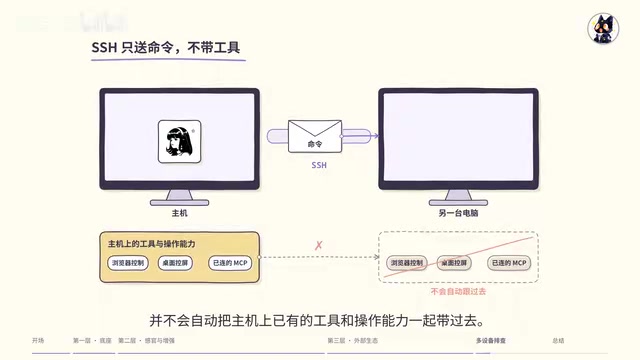
To operate software on another computer through MCP, you need to properly configure the corresponding MCP service and software connection. For example, if Blender is running on another computer, the MCP service must be able to access that Blender, not just connect to software on the host. The same applies to browser and desktop operations: you need to prepare a controllable browser or desktop control component and permissions on the target computer. Especially on Windows, programs launched via SSH may not appear on the desktop you're currently looking at—the desktop control component needs to run in the correct login session.
Next time you encounter "it's connected, so why can't it operate," don't keep staring at SSH and reconnecting—first determine whether this step requires CLI, MCP, browser, or desktop control, where the corresponding tool runs, and which computer it's connected to. Fill in the missing parts, then have it perform a small operation to verify.
SSH (Secure Shell) is an encrypted remote login protocol whose purpose is to securely send commands from a local terminal to a remote host for execution and return the output. It essentially only handles "command transmission and authentication"—it is not responsible for syncing environments, installing software, or transferring tool capabilities. Therefore, if the remote host doesn't have FFmpeg installed, the corresponding program can't be found in the PATH, or the program requires a graphical session to run, then no matter how stable the SSH connection is, it won't help. Understanding this makes it clear that "connected but can't operate" is mostly an environment and runtime location issue, not a connection issue.
Layered Thinking Matters More Than Stacking Tools
Looking at the three layers together: the first layer is the built-in foundation's hard power, with Terminal and precise file modification laying the basic skills; the second layer is the officially natively supported sensory enhancement, where search, vision, voice, Browser Exec, and Computer Use give the Agent audiovisual perception and action capabilities; the third layer is the infinitely growing external ecosystem, continuously expanding capability boundaries through CLI leverage and MCP integration.
In an era where AI tools and new terms emerge endlessly, it's easy to feel anxious about "falling behind again." But once you see through the layered logic, you'll find there's no need to blindly stack tools—only two things really matter: pragmatism, finding solutions when real problems arise; and letting AI do the work, handing tedious configuration, searching, and debugging to Hermes itself. Once you understand where each capability comes from and how to use it, an Agent operating a computer is no longer a black box but a capable assistant you can manage yourself.
One-line Summary
Hermes operates a computer through a three-layer toolchain: foundation, sensory enhancement, and external extension.
Paragraph Summary
Based on Bilibili creator Xiaoyou's breakdown, the article divides Hermes' computer operation capabilities into three layers: the built-in Terminal, file search/modification, and Execute Code form the foundation; the officially optional web search, Vision Analyze, speech STT/TTS, Browser Exec, and Computer Use provide sensory and action capabilities; and the third layer connects external professional software and private systems through CLI leverage and MCP. The article also clarifies the common misconception that SSH only handles command transmission and doesn't automatically carry over the host's tool capabilities, and advocates pragmatism—install tools when real problems arise, and let Hermes search, install, and even write scripts itself to fill in capabilities.
Related articles
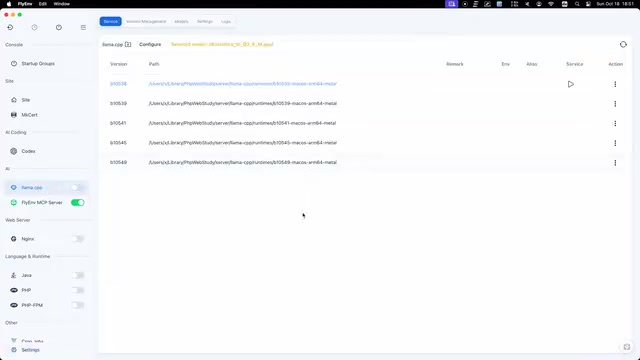
FlyEnv Plugin Review: Visually Running llama.cpp and Managing GGUF Models
FlyEnv launches the official llama.cpp plugin with side-by-side Metal runtime management, public GGUF repository indexing with file type labels, and visual configuration of context, threads, and GPU layers—saving templates and speculative decoding with each model for one-click local LLM inference.
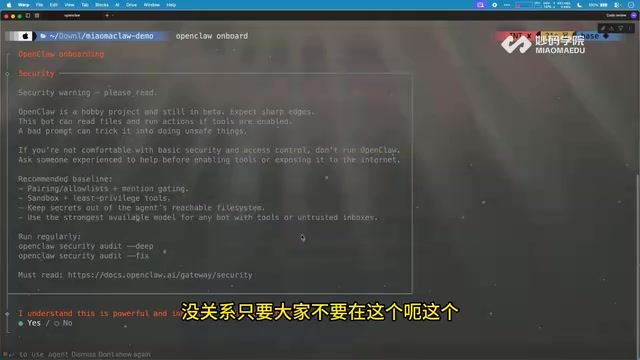
How Can Frontend Developers Advance into AI Agent Development? Deconstructing System-Level Agent Architecture from OpenClaw
Starting from the OpenClaw demo in a Bilibili open class, this article breaks down the three-layer architecture and universal formula of system-level AI agents, and analyzes the path for frontend developers to enter agent development based on TypeScript, including plugin-based design and security/memory layer challenges, with an interview answer framework.
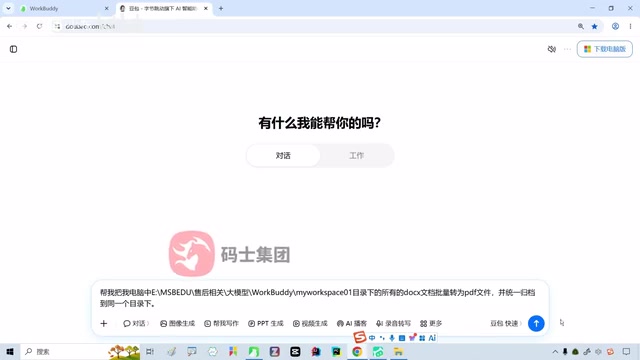
WorkBuddy in Action: How AI Agents Automate Batch File Conversion and Archiving
Bilibili creator Teacher Shanyao tests WorkBuddy vs. Doubao on batch file conversion, showing how AI Agents move from "giving solutions" to "direct execution," with a full workflow and credit cost reference.