Moving RecallOS into the Terminal: A Hands-On Local AI Document Assistant Makeover

Transform Streamlit-based RecallOS into a pure terminal local AI document assistant, replacing the interaction layer while preserving the logic layer.
This article discusses how to transform RecallOS, a local document memory and search assistant built on Streamlit, Ollama, and ChromaDB, from a browser interface into a pure terminal application for use directly in VS Code's integrated terminal without reducing functionality. The core idea is to replace the interaction layer rather than rewrite the logic layer, reusing main.py, model.py, and tools.py as much as possible. For the terminal interface, you can choose Textual (multi-panel TUI) or Rich + prompt_toolkit (lightweight command line). The article also details document chunking and embedding model selection, a ChromaDB retrieval approach using a single collection plus metadata filtering, the Ollama + Gemma 3 RAG pipeline, and local storage and search for chat history, and provides a step-by-step practical order.
Close the browser tab—this is a common urge among developers after using a Streamlit app for a while. RecallOS is a Python-based local AI document memory and search assistant that relies on the trio of Streamlit, Ollama, and ChromaDB. Its feature set is already quite complete: import documents, generate embeddings, semantic retrieval, RAG Q&A, and preserve chat history. But Streamlit's interaction model means you have to open a browser every time you use it, and for people who are used to doing everything in VS Code, that context switch isn't cheap.
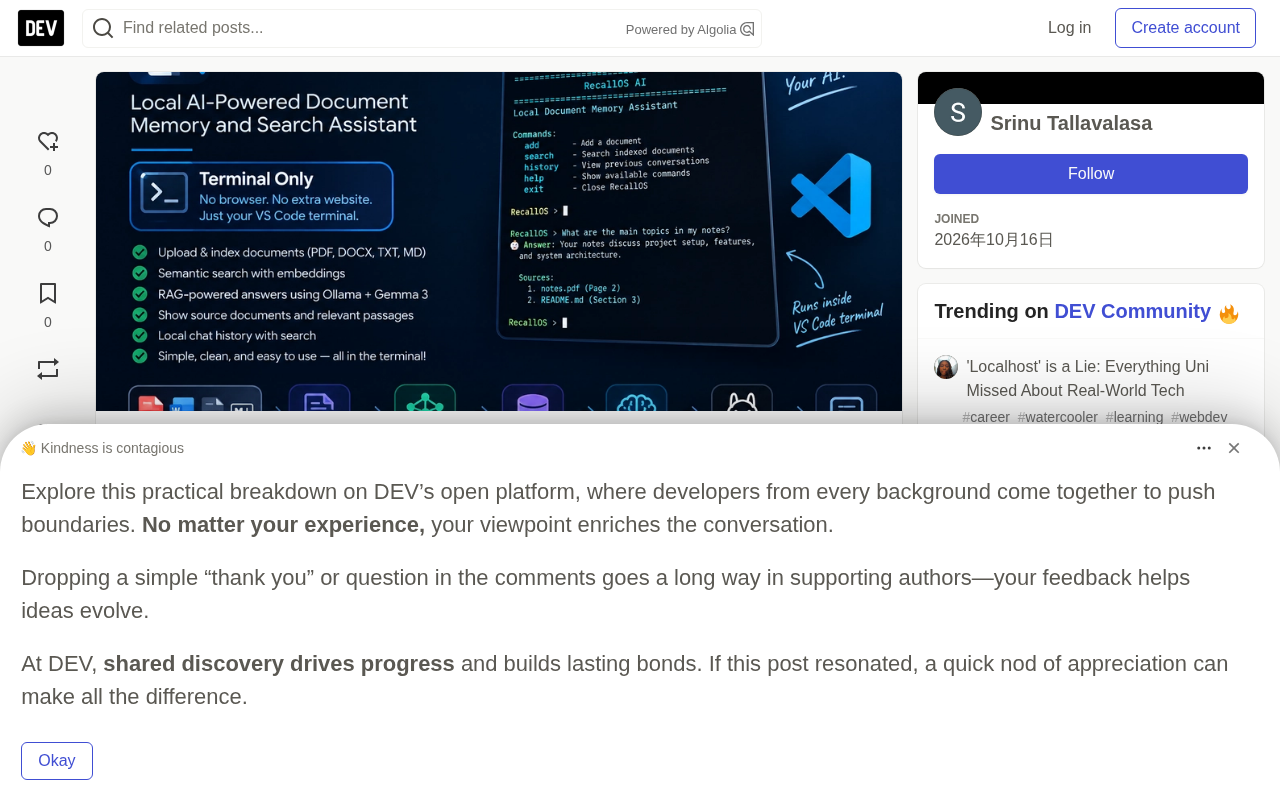
Target Form: A Closed Loop Inside the Terminal
The core requirement for the transformation is clear: turn RecallOS into a pure terminal application that runs directly in VS Code's integrated terminal without opening a browser. Functionality must not shrink—all four document types (PDF, DOCX, TXT, Markdown) must be supported, text extraction must continue to use Sentence Transformers to generate embeddings, ChromaDB handles storage and semantic search, Ollama with Gemma 3 (4B) runs local RAG Q&A, and next to the answer you should see the cited source document and specific passage. Chat history stays local, and historical conversations can be searched.
Here's an easily overlooked constraint: reuse the existing main.py, model.py, and tools.py as much as possible. That means the transformation isn't a rewrite—it's replacing the interaction layer.
Architecture Choice: Textual or Rich + prompt_toolkit
Streamlit is tied to the browser because it is itself a web framework. To achieve equivalent interaction in the terminal, there are two paths.
One is to build a TUI with Textual. Textual provides componentized terminal interfaces with layouts, scrolling, and keyboard event handling, making it suitable for apps that need multi-panel displays—a document list on the left, Q&A in the middle, and cited sources on the right. This kind of layout can be implemented in Textual with Grid or Dock.
The other is the Rich + prompt_toolkit combo. Rich handles rendering Markdown-formatted answers and tabular citation sources, while prompt_toolkit handles input-line history recall and autocompletion. This path is lighter and better suited to focusing on command-line pipelines rather than the interface itself.
If RecallOS's original Streamlit interface had multiple functional areas (import, retrieval, Q&A, history), Textual has a lower migration cost because they can be mapped one-to-one. If you only want to preserve the main Q&A flow, the Rich approach requires less code.
Streamlit's Web Binding Mechanism: To understand why the frontend must be replaced, you need to know Streamlit's execution model. The app.py written by developers isn't an ordinary script—it's a script repeatedly executed by the Streamlit runtime: every time a user clicks a button or enters text, a WebSocket notifies the server to rerun the entire script, and the interface refreshes accordingly. All cross-interaction state must be placed in st.session_state, otherwise it's lost on the next rerun. This "rerun script + server-side rendering" model is naturally tied to the browser, and the terminal has no corresponding WebSocket client or DOM rendering pipeline, so it can't be reused in a TUI. This also explains a key point repeatedly emphasized later in this article: during the transformation, identify the state scattered across st.session_state and decouple domain logic from it.
Document Processing Layer: Key Points for Reusing tools.py
The existing tools.py most likely already contains document loading logic. When transforming, you need to confirm a few things.
First is format coverage. PDF text extraction behaves very differently across libraries. PyMuPDF works well on structured PDFs but has heavier dependencies, while pdfplumber is more stable for table extraction. For DOCX, python-docx is the conventional choice. TXT and Markdown can be read directly, but for Markdown you need to consider whether to preserve heading hierarchy as the basis for chunking.
Second is the chunking strategy. Sentence Transformers generates embeddings with fixed dimensions, but documents must first be split into appropriately sized segments before embedding. If chunks are too large, retrieval precision drops; if too small, context is lost. A common approach is to split along semantic boundaries—Markdown by heading, PDF by paragraph—and then apply a token limit on top.
Third is the choice of embedding model. Sentence Transformers offers a range of models from MiniLM to MPNet, and running locally requires balancing memory and speed.
Sentence Transformers and Embedding Dimensions: Sentence Transformers is a library of sentence-vector models based on Transformers that encodes a piece of text into a fixed-dimensional dense vector, so texts with similar semantics are closer in vector space. Common models such as all-MiniLM-L6-v2 output 384 dimensions, while all-mpnet-base-v2 outputs 768 dimensions. Higher dimensions usually mean stronger expressiveness, but memory usage and retrieval time also rise. The key constraint is: once the embedding model is chosen, it cannot be changed midway, otherwise newly written vectors will have dimensions inconsistent with old vectors, ChromaDB will throw an error directly, and all historical data must be rebuilt. Therefore, before starting the transformation, finalize the model and hard-code the configuration to avoid rework later.
ChromaDB and Retrieval: Implementation Details of Semantic Search
As a vector store, ChromaDB is a reasonable choice for local scenarios because it can persist to disk and doesn't require starting a separate service. A key question during the transformation is how to organize collections—whether to put all documents in one collection or split collections by project or directory.
A single collection is simple to implement, but retrieval latency increases as the document volume grows. Splitting collections by directory is more flexible, but you need to decide which collection to query during Q&A. A compromise is a single collection plus metadata filtering; ChromaDB supports filtering with where conditions at query time.
Retrieval results should be returned along with the source document and specific passage, which can be achieved in ChromaDB by storing the original text snippet and file path in metadata.
Vector Retrieval and the Meaning of top-k: ChromaDB's semantic search is essentially nearest-neighbor retrieval. The query text is first encoded into a vector by the same embedding model, then distances are computed against all vectors in the collection (cosine similarity by default), and the k items with the smallest distances are returned. This k is top-k, the variable in the RAG pipeline that most needs tuning: if k is too small, the recalled context isn't enough to support an answer; if k is too large, irrelevant snippets mixed into the prompt dilute the signal and can also blow out the model's context window. ChromaDB's query interface supports specifying k with n_results and can perform metadata filtering via the where field—this is precisely the technical basis for the "single collection + metadata filtering" approach mentioned in this article, allowing a collection to be searched semantically while also narrowing the scope by file_path or doc_type.
Ollama + Gemma 3 RAG Pipeline
The feasibility of running Gemma 3 (4B) locally depends on hardware; 4B parameters is acceptable on consumer-grade GPUs, while pure CPU inference means accepting some latency.
The RAG pipeline itself isn't complicated: user asks a question → embed the query → ChromaDB retrieves top-k snippets → concatenate the prompt → Ollama generates the answer. The key to the transformation is extracting this pipeline from Streamlit's call stack so that the generation functions in model.py don't depend on any Streamlit session state.
This step is often where problems are most likely to occur, because Streamlit apps often scatter state across st.session_state. During the transformation, identify which state is domain logic (retrieval results, conversation history) and which is UI state (current tab, expanded collapsible panels). Migrate the former, discard the latter.
Chat History: Local Storage and Searchability
Historical conversations should be stored locally and searchable. The simplest solution is SQLite, storing one record per Q&A round with fields including timestamp, question, answer, and cited document snippet ID. Search can use SQLite's FTS5 full-text index, or embeddings for semantic search.
If you want historical search and document retrieval to share the same semantic capability, you can also embed conversations and store them in another ChromaDB collection to enable semantic recall of conversations. This approach is more unified, but be careful to distinguish document collections from conversation collections to avoid polluting each other during retrieval.
Privacy Boundary: Why Localization Is Worth It
The underlying motivation for the entire transformation is privacy. Streamlit itself doesn't upload data, but a browser interface means developers can easily confuse windows in a multi-tab environment, and may accidentally expose local document content during screen sharing. A pure terminal app confines data flow entirely within local processes—Ollama and Sentence Transformers both run local inference, and ChromaDB persists to a local path.
This is also the core value of tools like RecallOS: at a time when AI capabilities are readily available, keeping data local has instead become a differentiator.
Practical Order for the Transformation
It's recommended to proceed in this order. First, freeze the existing feature list and mark each item as belonging to the interaction layer or the logic layer. Then clean up all references to Streamlit in model.py; after this step, the entire model layer should run successfully in a pure Python environment. Next, build a minimal terminal shell with Textual or Rich and connect the document import and Q&A main flow. Finally, add history storage and search, as well as display of citation sources.
Run the original tests or manually verify after each step to avoid quietly degrading retrieval quality while replacing the interaction layer.
Once complete, RecallOS goes from "you have to open a browser to use it" to a local AI document assistant you can enter in the VS Code terminal with python recallos.py—same functionality, clearer privacy boundary.
One-line Summary
Transform Streamlit-based RecallOS into a pure terminal local AI document assistant by replacing the interaction layer while preserving the logic layer.
Paragraph Summary
This article discusses how to transform RecallOS, a local document memory and search assistant built on Streamlit, Ollama, and ChromaDB, from a browser interface into a pure terminal application so it can be used directly in VS Code's integrated terminal without reducing functionality. The core idea is to replace the interaction layer rather than rewrite the logic layer, reusing main.py, model.py, and tools.py as much as possible. For the terminal interface, you can choose Textual (multi-panel TUI) or Rich + prompt_toolkit (lightweight command line). The article also details document chunking and embedding model selection, a ChromaDB retrieval approach using a single collection plus metadata filtering, the Ollama + Gemma 3 RAG pipeline, and local storage and search for chat history, and provides a step-by-step practical order.
Related articles

Free Unlimited Claude Code Solution: Agnes AI + CC Switch Setup Guide
No paid subscription needed — pair the free AI platform Agnes AI with the open-source tool CC Switch to provide a backend for Claude Code, enabling unlimited free calls to text, image, and video models. This guide covers the full setup, test results, and usage boundaries.

A Complete Zero-Cost Guide to Getting Started with Claude Code for Beginners in China
A beginner's guide to Claude Code for users in China: two installation methods (command line and IDE plugin), full configuration steps for replacing the official API with the free domestic LongCat model, and a hands-on demo of building a small tool with natural language, plus tips.

When the NSA Gets Involved: The AI Supply Chain Crisis Behind Open-Source CVEs and API Key Hijacking
Multiple open-source projects disclosed severe CVEs in one day, PHP flaws alarmed the FBI, and Railway and OpenCode were breached with API keys stolen. This article breaks down the vulnerability window, AI-accelerated exploitation, and the AI supply chain crisis behind the API key black market, with a developer defense checklist.