MWE Emperor S2 Review: The Highly Adjustable All-in-One Workstation Chair

MWE Emperor S2 is an all-in-one ergonomic workstation combining a chair, monitor mount, and keyboard tray with zero-gravity recline.
The MWE Emperor S2 is an integrated workstation from a Canadian brand that combines an adjustable chair, monitor mount, and keyboard tray into a single system compatible with both desktops and laptops. Its standout feature is multi-dimensional adjustability: armrests, lumbar support, and headrest adjust manually, while monitor height, tilt, and depth are motorized — allowing the display to follow the user's posture, a rarity among competitors. The backrest reclines from upright to near zero-gravity, suitable for gaming, movies, or napping. The monitor mount holds up to 70 lbs and supports up to six screens with standard VESA compatibility, making it a strong choice for long-session power users.
A Chair That Redefines the Workstation
The Emperor S2 from Canadian company MWE is not an ordinary office chair — it's an all-in-one workstation that integrates a seat, monitor mount, and keyboard tray into a single system. It works with both desktop gaming rigs connected via the floor and laptops, with a small side table surface just right for placing a device. Paired with an LG ultrawide monitor, this setup achieves a near-perfect balance of viewing distance and ergonomics.
The Emperor S2 is not MWE's first product — their earlier models were pricier and more complex. By comparison, the S2 retains a high degree of configurability while being more practical and grounded in the core philosophy that "anyone should be able to find a comfortable position in it."
Adjustability Is Its Biggest Selling Point
This chair offers far more adjustment freedom than a typical gaming chair. The desk tray and backrest support manual adjustment, and there's lumbar support adjustment on the side. The armrests can move up and down as well as pivot. What truly sets it apart is the electrically motorized control over the rear half of the backrest: side buttons let you control the monitor's height, tilt angle, and horizontal depth — that last one is critical, as many competing chairs cannot move the monitor toward the user.
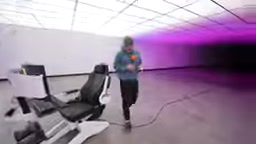
The keyboard tray is more stable than most comparable products the reviewer has tried. With the armrests lowered and the body leaning slightly to the left, the wrists are well supported. The magnetic headrest, borrowed from gaming chair design, effectively protects the neck during extended use. The reviewer candidly admits that as they've gotten older, they can no longer hunch over a gaming laptop for hours the way they once did — and that's precisely the value of an ergonomic chair. Whether gaming or working, it shouldn't come at the cost of your body.
In the field of ergonomics, workstation adjustability is divided into two categories: "passive" and "active." Passive adjustment requires the user to manually turn knobs or levers to lock in a position, while active adjustment uses motors for dynamic switching. The Emperor S2's hybrid approach — manual adjustment for armrests and lumbar support, motorized control for the monitor and backrest — is designed to strike a balance between cost and convenience. The ability to move the monitor toward the user is especially important: traditional monitor arms only allow rotation along a fixed arc, whereas the S2's horizontal depth adjustment lets users maintain the same viewing distance when reclining, preventing posture changes from disrupting visual ergonomics.
From Desk Work to Zero Gravity: The Full Posture Spectrum
The backrest can be manually reclined with a handle, but truly deep recline is handled by the motor. Press a button and the chair can recline all the way into a near-zero-gravity position. The reviewer describes this state as "beyond nap-ready" — body weight sinks in, the memory foam pillow kicks in, and it works just as well for a quick rest or lying back to watch a movie. The only downside is that getting up from an extreme recline is a bit of an awkward experience.
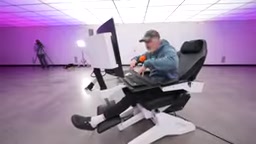
One noteworthy detail: because the chair can recline so dramatically, the tray edge requires a raised lip, otherwise the mouse will slide off and hit you in the face when tilted. Because of this lip, the reviewer recommends using a dedicated keyboard and a properly sized mouse pad. The tray itself is metal, and a Razer mouse pad the reviewer found fit almost perfectly, leading them to suggest that MWE add a product recommendation link on their official website. The tray also integrates a USB hub, providing connection points for keyboards and other peripherals.
The "zero-gravity position" originated from NASA research on astronaut body positioning during orbital flight. Studies found that when the thighs and torso form approximately a 128° angle and the calves are slightly above heart level, spinal compression is minimized while cardiac pumping efficiency improves by about 15% compared to an upright seated posture. This position has since been widely adopted in high-end recliners and medical rehabilitation chairs. The challenge of achieving zero gravity in a workstation context is that once the user reclines, the relative positions of the monitor, keyboard, and mouse all change — which means the entire setup needs to move in coordination to remain usable, not just the backrest.
Monitor Compatibility and Load Capacity
Monitor selection is particularly important for this type of setup. While the front-to-back adjustment range can accommodate most sizes, an overly large screen can feel overwhelming. The reviewer tested a 52-inch LG display — it works, but is better suited to scenarios requiring a wide peripheral field of view, like flight simulators or racing games.
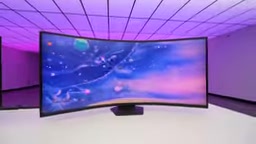
The monitor mount supports up to 70 lbs and has impressive multi-monitor capability: it can hold two 34-inch displays, three 32-inch plus two 27-inch displays, and MWE even claims support for six screens (three 32-inch plus three 27-inch). At that scale, though, it's more of a day-trader setup than a gaming one. VESA compatibility covers 75×75 and 100×100, which encompasses the mainstream gaming and productivity monitor market. The reviewer's setup used a 39-inch, 5K resolution display, and they recommend this size as an ideal choice for single-monitor users.
The VESA (Video Electronics Standards Association) monitor mounting hole standard is named after the spacing between mounting holes: 75×75 and 100×100 refer to holes arranged in 75mm and 100mm square patterns, respectively. The vast majority of consumer monitors use one of these two standards; the larger 200×200 or 200×100 patterns are more common on commercial large-format displays. It's worth noting that a mount rated for "70 lbs (approximately 32 kg)" must also account for torque in real-world use: if the monitor's center of mass is far from the support point, the actual safe load will be lower than the rated value. In multi-monitor setups, it's advisable to check each monitor's weight and its cantilever distance on the mount, rather than simply adding up the weights.
A Side Note: Voice Input Tool WhisperFlow
The video also mentions sponsor WhisperFlow — a tool that lets you speak instead of type. It supports hands-free message replies, sending prompts to AI, or jotting down ideas on the fly. It automatically removes filler words like "um" and "uh" and understands what you actually mean to say.

Its core advantage is speed. In testing, it achieves up to 123 words per minute, while anything above 80 words per minute with 95%+ accuracy is generally considered fast typing. It requires no special setup and works anywhere you can use a keyboard — email, Slack, iMessage, ChatGPT, and more. For users who don't want to hunch over a keyboard for extended periods, this aligns perfectly with the Emperor S2's philosophy of reducing physical strain.
Overall Impressions
The Emperor S2's core competitive advantage lies in its multi-axis configurability: from armrest angles, lumbar support, and headrest, to monitor height, tilt, and depth, to the chair's overall recline — users can find an optimal posture for nearly every activity. Web browsing, office work, gaming, watching movies, and napping each call for something different. It feels less like a chair and more like a work-and-entertainment environment built around your body. For heavy users who prioritize long-session comfort without sacrificing ergonomics, this is a genuinely compelling solution.
Related articles

Cursor AI Programming in Practice: Build a Student Management System from Scratch in 30 Minutes
A Bilibili creator demonstrates Cursor AI programming: generating a student management system in 30 minutes with natural language. Details on Agent mode, Claude selection, prompt techniques, and thresholds.

Top 20 AI Coding Tools Ranking: From Rock-Solid to Lackluster, a Scored Matrix
Bilibili creator releases top 20 AI coding tools ranking, tiered T0–T4 from rock-solid to lackluster, with Claude Code and Codex tied at T0. This article details the scoring dimensions (capability, reliability, robustness, durability, cost, domestic availability) and tool performances to help developers choose the right AI coding assistant.

Vibe Coding Systematic Tutorial: Master AI-Assisted Programming from Zero
A three-month Vibe Coding tutorial from a Bilibili creator covering Codex, ClaudeCode, and Cursor, from core logic to commercial project practice for beginners.