n8n AI Agent Tutorial: Automated Email + PostgreSQL Memory

Using n8n to connect Gemini, PostgreSQL, and SMTP, building a persistent AI Q&A assistant that emails itself.
This article breaks down an n8n-based AI email Q&A workflow: Chat Message triggers questions, the AI Agent node calls Google Gemini and reads/writes PostgreSQL memory, and finally the Send Email node delivers answers to a specified mailbox via SMTP. The creator chose PostgreSQL over built-in memory to persist conversation history across workflow executions and support multi-turn references. Email body extracts AI replies via the {{ $json.output }} expression, and SMTP configuration must use a Google App Password rather than a Gmail login password. Tests cover questions about India's state count, population, and global country count. Answer quality depends on the Gemini model, and you should watch out for data timeliness, database cleanup, and Gmail sending limits.
n8n AI Agent Tutorial: Automated Email + PostgreSQL Memory
n8n's workflow automation capabilities, combined with the AI Agent node and external memory storage, can create an intelligent Q&A assistant that "emails itself." A YouTube creator (channel kayum 698) used Google Gemini as the chat model and PostgreSQL as the memory backend to string together a complete chain from question to inbox delivery. The entire flow consists of four nodes on the n8n canvas: Chat Message triggers the input, the AI Agent calls the model and reads/writes memory, and the Send Email node handles delivery. Below is a breakdown of this workflow's composition logic and configuration essentials.
How Four Nodes Form a Closed Loop
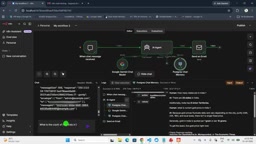
The overall workflow structure isn't complex, but each node's role is clearly defined. The Chat Message node is the entry point, where users input questions—such as "How many states does India have" or "What is India's current population." The AI Agent node sits in the middle as the orchestrator, mounting two key configurations: Chat Model set to Google Gemini, and Memory set to PostgreSQL. PostgreSQL actually runs in a Docker container, independent of n8n itself, which means conversation history won't be lost when the workflow restarts. Finally, the Send Email node receives the json.output field from the AI Agent and sends the answer to a specified mailbox via SMTP.
This "question → reasoning → delivery" pattern suits scenarios where you need to obtain AI answers asynchronously. Rather than staring at a chat window waiting for a reply, sending results to your inbox fits certain work habits better—treating AI as a background assistant where you ask a question, continue with other tasks, and check your email later.
n8n is an open-source workflow automation tool that uses a visual canvas design where "nodes are steps." Users drag nodes for different functions onto the canvas and connect them with lines to define data flow, building automated processes without writing code. n8n's nodes are divided into trigger nodes (such as scheduled, Webhook, chat message) and action nodes (such as HTTP requests, database operations, email sending), with data passing between nodes as JSON objects. Compared to SaaS tools like Zapier, n8n supports self-hosting, can be deployed on local servers or in Docker containers, and is friendlier for data privacy and cost control. The workflow in this article leverages n8n's node orchestration capabilities to splice several originally independent components—large language models, databases, and email services—into an automated chain. Understanding the data flow model of "nodes receive upstream JSON, process it, and output new JSON" is the prerequisite for understanding the configuration of each subsequent node.
PostgreSQL as Memory: Why Not Use Built-in Storage
n8n's AI Agent node itself supports multiple memory options, and the creator's choice of PostgreSQL is no accident. The built-in Window Buffer Memory is only valid within a single execution session—once the workflow ends, the context is cleared. PostgreSQL, as persistent storage, can write conversation turns into database tables and continue reading history the next time the same Agent is triggered.
For scenarios that need to "remember" what was discussed before, this distinction is crucial. If a user first asks "How many states does India have" and then asks "What about its population," the second question loses its referent if memory is cleared. PostgreSQL's presence keeps multi-turn conversations coherent across multiple workflow executions. The creator running the database in a Docker container also shows this solution is friendly to local deployment environments, not dependent on cloud database services.
AI Agent's Memory refers to the mechanism that lets large language models maintain context coherence across multiple conversation turns. Large language models themselves are stateless—each call only processes the current input prompt and doesn't automatically remember previous conversations. To make the model "remember" what was discussed, you need to stuff the historical conversation into the prompt with each request, and the Memory component is responsible for storing and retrieving this history. n8n's AI Agent node supports multiple Memory backends: Window Buffer Memory keeps history in memory, limited to a single execution session; external storage like PostgreSQL or Redis can persist history to disk, achieving persistence across sessions and restarts. Choosing which Memory is essentially a trade-off between "simple but volatile" and "persistent but requires maintenance." Historical conversations are typically truncated by turns or by token count window, to avoid the prompt infinitely expanding and exceeding the model's context length limit or driving up call costs.
How Model Output Becomes an Email
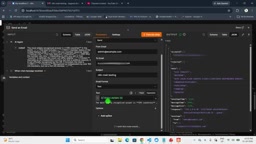
Configuring the Send Email node is the step most likely to get stuck in the entire chain. The creator uses the expression {{ $json.output }} in the Text field of the email body, directly mapping the AI Agent's reply content as the email body. The premise of this expression is that the AI Agent node's output structure actually has an output field—different versions of n8n or different Agent configurations may produce different output paths, requiring adjustment based on actual runtime results.
For SMTP configuration, the creator uses Gmail's default host smtp.gmail.com, with the SSL port kept enabled. Here's an easy pitfall: the password field must be filled with a Google App Password, not the Gmail account login password. Google App Password needs to be generated separately in Google account security settings; regular passwords will be rejected during SMTP authentication. Fields like email subject and sender can be filled in conventionally—the creator sets the subject to an n8n-related identifier in the example for quick filtering in the inbox.
Google App Password is an alternative password scheme Google provides for legacy clients that don't support OAuth 2.0 (such as SMTP, IMAP clients). Since Google tightened its account security policies, regular Gmail login passwords can no longer be used directly for SMTP authentication, returning a "username and password not accepted" error. An App Password is a 16-character string separated by spaces, requiring two-step verification to be enabled in Google account "Security" settings before the generation entry appears, and each device or application should generate an independent password for individual revocation. Another related concept is SMTP (Simple Mail Transfer Protocol), the de facto standard protocol for sending email, with a default plaintext port of 25 and encrypted ports of 465 (SSL) or 587 (STARTTLS). n8n's Send Email node requires filling in SMTP host, port, username, password, and encryption method—any mismatch will cause authentication failure or delivery timeout.
Test Results and Known Limitations
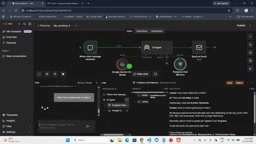
From the three questions the creator demonstrated, the workflow runs stably. The answer to "How many states does India have" is 28 states plus 8 union territories; "India's current population" gives a value between 1.43 and 1.44 billion; "How many countries are there globally" answers 195, with additional explanation of counting differences for disputed regions like Palestine, Taiwan, and Kosovo. The quality of these answers mainly depends on the Gemini model itself—n8n plays a pipeline role here.
Worth noting is that some data mentioned in the creator's demonstration carries timestamps, and actual values given by the model may differ due to training data cutoff times. Additionally, while PostgreSQL memory is persistent, it also means conversation history will continuously accumulate, and long-term operation requires considering cleanup strategies for database tables. The SMTP solution depends on Gmail's sending limits, and high-frequency use may trigger restrictions.
Who This Solution Is For
If you're already using n8n for automation and want to integrate AI capabilities into your existing email notification system, this workflow provides a reusable template. Its value isn't in technical complexity, but in combining several mature components—Gemini, PostgreSQL, SMTP—using n8n's node orchestration capabilities into a stateful, persistent AI assistant. The creator says a complete setup tutorial video will be released later. For readers wanting to replicate this, understanding each node's responsibilities is more important than copying configurations.
One-line Summary
Using n8n to connect Gemini, PostgreSQL, and SMTP, building a persistent AI Q&A assistant that emails itself.
Paragraph Summary
This article breaks down an n8n-based AI email Q&A workflow: Chat Message triggers questions, the AI Agent node calls Google Gemini and reads/writes PostgreSQL memory, and finally the Send Email node delivers answers to a specified mailbox via SMTP. The creator chose PostgreSQL over built-in memory to persist conversation history across workflow executions and support multi-turn references. Email body extracts AI replies via the {{ $json.output }} expression, and SMTP configuration must use a Google App Password rather than a Gmail login password. Tests cover questions about India's state count, population, and global country count. Answer quality depends on the Gemini model, and you should watch out for data timeliness, database cleanup, and Gmail sending limits.
Related articles

Free Unlimited Claude Code Solution: Agnes AI + CC Switch Setup Guide
No paid subscription needed — pair the free AI platform Agnes AI with the open-source tool CC Switch to provide a backend for Claude Code, enabling unlimited free calls to text, image, and video models. This guide covers the full setup, test results, and usage boundaries.

A Complete Zero-Cost Guide to Getting Started with Claude Code for Beginners in China
A beginner's guide to Claude Code for users in China: two installation methods (command line and IDE plugin), full configuration steps for replacing the official API with the free domestic LongCat model, and a hands-on demo of building a small tool with natural language, plus tips.

When the NSA Gets Involved: The AI Supply Chain Crisis Behind Open-Source CVEs and API Key Hijacking
Multiple open-source projects disclosed severe CVEs in one day, PHP flaws alarmed the FBI, and Railway and OpenCode were breached with API keys stolen. This article breaks down the vulnerability window, AI-accelerated exploitation, and the AI supply chain crisis behind the API key black market, with a developer defense checklist.