n8n Workflow Automation in Practice: 8 Ready-to-Use Templates to Stop Copy-Pasting Forever

A $19 n8n automation template pack covering lead management, invoice processing, and multi-platform content distribution.
This article introduces an Automation Pack built on the open-source n8n platform — 8 ready-to-use workflows for a one-time fee of $19. Core use cases include: auto-validating and deduplicating leads then syncing to Google Sheets and Slack; extracting structured fields from uploaded PDF invoices with human review fallback for anomalies; and generating LinkedIn, X, newsletter, and SEO drafts from a single article — without auto-publishing, keeping humans in control. The pack's value lies in packaging common repetitive workflows into ready-made templates, dramatically lowering the barrier to automation for small teams and solo entrepreneurs.
Why Are You Still Processing Leads and Invoices Manually?
If you're still manually copying customer leads, organizing invoice data, or reformatting articles for different platforms every day, these repetitive tasks are quietly eating away at your time. A short demo video from a YouTube creator pointed out a smarter approach: let workflows automatically handle these mechanical tasks.
The core tool introduced here is a visual automation solution built on n8n. n8n is an open-source workflow automation platform that connects different applications through "visual nodes" — a trigger kicks off the entire process, and data then flows step by step through each node without any human intervention.
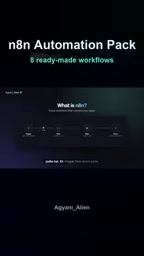
The essence of this approach is breaking down "human brain + manual effort" processes into standardized steps that machines can execute. For small and medium-sized teams and solo entrepreneurs, it means unlocking automation capabilities at a fraction of the cost — the kind that used to be reserved for large enterprises.
How the Automation Flow Works: Following One Lead
The video presents a very typical scenario: when a website receives a new lead, the entire workflow automatically performs the following actions — validating the lead, removing duplicates, saving it to Google Sheets, and finally sending a Slack notification to the team.
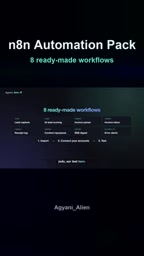
This chain looks simple, but it covers several of the most error-prone steps in lead management: missed data entry, duplicate leads wasting follow-up effort, and internal team miscommunication. Delegating this to a workflow not only saves time but also reduces human error.
Invoice Processing: From PDF to Structured Data
Another high-frequency use case is invoice processing. After uploading a PDF invoice, the system automatically extracts the vendor, date, totals, and line items, then saves them.
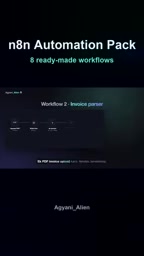
One particularly noteworthy aspect is the "fault-tolerant design": invoices that don't reconcile or contain anomalous data aren't blindly saved to the database — instead, they're routed to a "manual review" queue. This "auto-process + exception fallback to human" mechanism is what distinguishes practical automation from toy demos — it acknowledges that machines make mistakes and leaves a channel for handling those errors.
At the technical level, n8n workflows receive external data via Webhook — when a website form is submitted, it sends an HTTP request to a specific URL, and n8n listens for that request and immediately triggers the flow. Deduplication logic typically works by comparing email addresses or phone numbers against existing records in the data table. The Google Sheets node reads and writes spreadsheets directly via Google OAuth authorization — no CSV export required. The entire process runs in the cloud, so even if you close your laptop, it keeps working as long as the n8n service is online. For users without a development background, understanding this basic "Webhook → processing node → output node" structure will help when modifying or extending templates later on.
Structured extraction from PDF invoices relies on the document understanding capabilities of large language models (LLMs). The process typically converts the PDF to text or images first, then uses an AI node (such as OpenAI GPT-4o or Claude) to extract data according to preset fields. The key difference from traditional OCR is that OCR only recognizes characters, while an LLM understands semantics — for example, mapping "含税合计," "Invoice Total," and "总价" all to the same "total amount" field. However, this also means the node consumes API tokens, so when processing high volumes of invoices, it's worth monitoring API call costs. The condition that triggers manual review for "reconciliation failures" is generally when the sum of line item amounts doesn't match the invoice total, or when required fields (such as date or vendor name) couldn't be successfully extracted.
Content Distribution: One Article into Four Formats
For content creators, the most appealing feature is probably content repurposing. Paste an article, and the workflow automatically generates a LinkedIn post, an X (Twitter) long-form thread, a newsletter draft, and an SEO-optimized version.
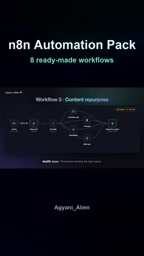
There's an important product design principle worth emphasizing here: all generated content exists only as "drafts," saved for your review — the system never auto-publishes anything. This restrained "human-in-the-loop" approach harnesses AI for productivity while keeping ultimate control in the user's hands, avoiding the brand risks that come with runaway automated content.
"Human-in-the-Loop" (HITL) is an important principle in AI system design — it means retaining a human confirmation or intervention step at critical points in an automated workflow. In content generation scenarios, this design is especially important: AI-generated text may contain factual inaccuracies, tonal mismatches, or platform policy risks. If published automatically, the cost of correction far exceeds the cost of upfront review. Saving drafts to collaborative tools like Google Docs or Notion for human review effectively positions AI as an "efficiency accelerator" rather than a "decision-maker" — which is also the mainstream direction of responsible AI application today.
What's Included in the Automation Pack?
According to the overview, this Automation Pack provides 8 ready-to-use workflows. The usage is straightforward: import a template, connect your own accounts, and run a test. In addition to the lead processing, invoice recognition, and content distribution workflows described above, the pack also includes:
- AI Lead Scoring: Automatically scores incoming leads to help teams prioritize high-value prospects
- Invoice Inbox & Receipt Processing
- RSS Digest: Automatically aggregates subscribed content
- Error Alerts: Notifies you promptly when a workflow encounters a problem
- Accompanying usage guides and sample data
The entire package is priced at a one-time fee of $19. Compared to subscription-based SaaS tools, this "buy once" model is more budget-friendly for cost-conscious users.
Who Is This Kind of Automation Solution For?
Based on the materials, these workflow templates are best suited for three types of users: sales teams that need to process large volumes of leads, small businesses bogged down by invoice and financial paperwork, and creators who need to distribute content across multiple platforms. The value isn't in how powerful any single feature is — it's in packaging common repetitive processes into ready-made templates, lowering the barrier for everyday users to get started with automation.
Of course, as a promotional video, it showcases ideal conditions. In practice, factors like permissions configuration when connecting accounts, the stability of different application APIs, and the review cost for anomalous data all need to be evaluated on your own. But the overall approach is worth adopting: rather than agonizing over whether to automate, just start with your single most painful repetitive task and hand it off to a workflow.
Related articles

GPT-Next Leak, Gemini 4 Argon Imminent: AI News Roundup
GPT-Next leak suggests extreme efficiency; OpenAI's 28-day shipping pledge boosts speed 50%; Gemini 4 Argon nears release; Anthropic subscription value report sparks debate.

GPT-Next Leaked, Gemini 4 Argon Speeds Up, Fable 5.5 May Launch Today
OpenAI's GPT-Next model leaks, expected to be extremely low-cost and possibly part of the 28-day release plan; Gemini 4 Argon internal testing accelerates, NanoBanana 2.1 is live; Semi Analysis tests show Claude Max's equivalent API value is about 5 times that of ChatGPT Pro; Fable 5.5 may launch today.

Gemini 4 Argon Launches Globally: Key Highlights from the AI Daily Brief
Google opens Gemini 4 Argon globally across Pro and Ultra subscriptions and the API, and demonstrates robot control. This article rounds up open-source models, Agent infrastructure, cost transparency, and safety governance updates.