n8n Workflow Builder: Generate Complete Automation Workflows with a Single Sentence

ArgentiRage launches n8n Workflow Builder, generating ready-to-paste n8n workflows in seconds via natural language.
ArgentiRage Academy's n8n Workflow Builder lets users describe automation needs in natural language and generates a complete, ready-to-paste n8n workflow in seconds, along with account connection guidance and field-filling instructions for each node. It doesn't replace n8n but acts as a front-end layer to solve the time-consuming "zero to one" setup. The tool targets automation delivery teams, n8n beginners, and efficiency tool enthusiasts, and is free for ArgentiRage members. The article notes its strength in "generate and use," but generation quality for complex logic like conditional branches, loops, and error handling still needs verification.
n8n Workflow Builder: Generate Complete Automation Workflows with a Single Sentence
Generating n8n workflows with one sentence—this tool is worth a look
If you've used n8n, you've probably been through the process of "dragging nodes, configuring connections one by one, and repeatedly tweaking parameters." For a moderately complex automation flow, spending hours going from idea to something that actually runs is the norm.
Recently I came across a project on YouTube called ArgentiRage Academy that launched an n8n Workflow Builder tool. The idea is straightforward: you describe the automation you want in natural language, and it directly generates a complete workflow you can paste straight into n8n.
The process has a few steps: describe in plain language "what triggers it, what happens, and what the result is," or pick one from the built-in examples; the system reads the request, automatically selects the appropriate steps and app nodes, and validates that the result makes sense. Within seconds, a workflow is drawn out—and it's drawn exactly the way it would actually appear in n8n.
What is n8n? n8n is an open-source workflow automation tool, often compared to Zapier and Make. Its core concepts are "Nodes" and "Workflows": each node represents a specific action, such as receiving a Webhook, reading/writing Google Sheets, sending a Slack message, or calling an HTTP API; nodes are connected with lines, and data flows from upstream nodes to downstream nodes like a stream. n8n supports self-hosting as well as a cloud version, which makes it especially popular with teams that are sensitive about data privacy or want deep customization. Its flexibility comes at a cost—there are many node types, and each node has a large number of configuration options. New users often need to consult the documentation and fill them in one by one, which is exactly the pain point this Builder aims to solve.
It generates not just a flowchart, but also configuration guidance
A common problem with many automation generation tools is that they give you a diagram but no idea how to make it work. ArgentiRage's Builder is more detailed on this front.
According to the video demo, after generating a workflow, it also tells you two things at the same time: which accounts need to be connected, and what to fill in for each node. The official wording is "No guesswork."
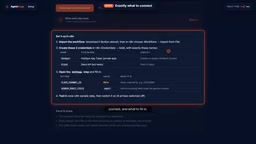
This detail is actually quite important. The barrier to getting started with n8n isn't "not knowing what it can do"—it's "knowing what you want to do but not knowing how to configure each node." For example, with a Slack notification node, you need to know where the Webhook URL goes, how to format the message, and where to get the channel ID. The Builder provides all this information at once, effectively eliminating the need to check documentation and go through trial and error.
Why is node configuration so time-consuming? In n8n, a node usually needs three types of information to work properly: credentials, parameters, and data mapping. Credentials refer to account authorization, such as OAuth connections or API keys; parameters are the node's own settings, such as trigger conditions, target objects, and field options; data mapping is mapping the fields output by upstream nodes to the inputs required by the current node, with expressions written like {{ $json.email }}. If any part is filled in incorrectly, the workflow will throw an error or fail silently at runtime. People familiar with n8n often rely on accumulated experience and templates, while beginners can only repeatedly consult documentation and learn by trial and error. Therefore, the ability to "generate a workflow while also specifying what to fill in for each node and which account to connect" actually addresses a large part of the usage cost.
One-click copy, paste and use
After generation is complete, click the copy button, open your own n8n instance, and press Ctrl+V—the entire workflow appears on the canvas.

From a product logic standpoint, this design is clever—it doesn't try to replace n8n, but exists as a front-end layer for n8n. You still run and manage automation in n8n; the Builder only helps you solve the most time-consuming "zero to one" setup process.
The video summarizes the value in one sentence: "hours of n8n building, done in seconds." For people who need to deliver automation solutions to clients, this efficiency boost is very real. What used to take half a day to build can now be described clearly and turned into a runnable version in minutes, leaving the rest of the time for optimization and testing.
How copy-paste into n8n works n8n workflows are stored at the underlying level as JSON structures, including fields such as the node list, node types, position coordinates, parameters, and connection relationships. The n8n editor supports pasting JSON directly from the clipboard and will automatically restore the nodes and connections on the canvas. Therefore, as long as the JSON structure output by the generation tool conforms to n8n's format specification, users can "paste and use" without manually dragging nodes. This is also why this kind of tool can exist as a front-end layer for n8n—it doesn't need to take over the runtime environment, only produce compliant JSON. Note, however, that credentials (such as API keys and OAuth authorization) are usually not included in the JSON, so users still need to complete account connections themselves after pasting. This is also why the Builder separately provides "account connection guidance."
Who this tool is for
From its product positioning, ArgentiRage Workflow Builder targets several groups:
Automation delivery teams—those who need to quickly produce solution prototypes for clients and shorten the cycle from requirements communication to a demonstrable version.
n8n beginners—those who know what effect they want but aren't familiar with node configuration, and can use the generated workflow to reverse-learn n8n's build logic.
Efficiency tool enthusiasts—those who have a pile of scattered automation ideas but can't be bothered to build each one from scratch, and want to quickly validate feasibility with natural language.
Currently, this tool is free for ArgentiRage members. Considering that n8n itself is open-source and has a highly active community, if this kind of "AI-generated workflow" tool provides a smooth experience, it can indeed hit a real pain point for some users.
A few observations
Natural language workflow generation isn't a new concept, but there aren't many products that are truly easy to use. The difficulty lies in whether the generated workflow can actually run, whether node configuration is accurate, and how well it handles complex logic.
From the video demo, ArgentiRage's Builder has put effort into the "generate and use" part, especially the inclusion of configuration guidance, which is far more practical than simply outputting a JSON file.
Of course, the real experience still depends on its coverage of scenarios of different complexity. Simple flows like "form submission → send email → log to spreadsheet" should be no problem, but if conditional branches, loops, error handling, and other complex logic are involved, the generation quality remains to be verified.
If you're already using n8n, or are considering using it for automation, this tool is worth keeping an eye on.
One-line Summary
ArgentiRage launches n8n Workflow Builder, generating n8n workflows ready to paste and use in seconds with natural language.
Paragraph Summary
ArgentiRage Academy's n8n Workflow Builder lets users describe automation needs in natural language and generates a complete, ready-to-paste n8n workflow in seconds, along with account connection guidance and field-filling instructions for each node. It doesn't try to replace n8n, but serves as a front-end layer to solve the time-consuming "zero to one" setup. The tool mainly targets automation delivery teams, n8n beginners, and efficiency tool enthusiasts, and is free for ArgentiRage members. The article believes it has put effort into "generate and use," but the generation quality for complex logic such as conditional branches, loops, and error handling still needs real-world verification.
Related articles

Free Unlimited Claude Code Solution: Agnes AI + CC Switch Setup Guide
No paid subscription needed — pair the free AI platform Agnes AI with the open-source tool CC Switch to provide a backend for Claude Code, enabling unlimited free calls to text, image, and video models. This guide covers the full setup, test results, and usage boundaries.

A Complete Zero-Cost Guide to Getting Started with Claude Code for Beginners in China
A beginner's guide to Claude Code for users in China: two installation methods (command line and IDE plugin), full configuration steps for replacing the official API with the free domestic LongCat model, and a hands-on demo of building a small tool with natural language, plus tips.

When the NSA Gets Involved: The AI Supply Chain Crisis Behind Open-Source CVEs and API Key Hijacking
Multiple open-source projects disclosed severe CVEs in one day, PHP flaws alarmed the FBI, and Railway and OpenCode were breached with API keys stolen. This article breaks down the vulnerability window, AI-accelerated exploitation, and the AI supply chain crisis behind the API key black market, with a developer defense checklist.