No Coding Skills Needed for AI Automation? A Step-by-Step Guide to Building Your First Workflow

Use the Zapier TypeScript SDK with an AI coding assistant to implement a local cross-app automation workflow between Google Calendar and Slack.
Through a hands-on case study from a Bilibili creator, the article shows that the real difficulty of cross-app automation isn't business logic, but connection-layer engineering like OAuth authentication, token refresh, and multi-API adaptation. The solution is to use Zapier's TypeScript SDK to hand off authentication and API plumbing to the SDK, while developers retain control over business logic in their local TypeScript project. The flow includes: initializing the project and installing the SDK, logging in to connect Calendar and Slack, generating type definitions so the AI assistant calls operations accurately, generating a four-stage function via Cursor, and finally verifying hands-on that the calendar time update and Slack notifications both succeeded. The article emphasizes that AI can accelerate code generation, but code review, edge-case handling, and testing still need to be done by humans.
AI coding assistants can write application logic in minutes, but when one app needs to coordinate with Google Calendar to reschedule a meeting and then notify all attendees via Slack, the real work has only just begun. Two authentication systems, access tokens, refresh tokens, retry mechanisms, permission management, and two completely different APIs — that's where the headaches start.
A Bilibili creator recently shared a hands-on case study: using an AI coding assistant alongside Zapier's TypeScript SDK to build an automation tool locally. Its function is very specific: given a meeting name and a new time, let the code automatically update the calendar and notify attendees. More importantly, the entire process actually runs and the results are verified in both apps.
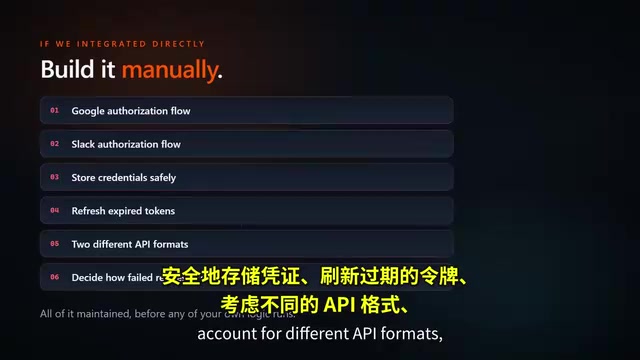
Why Is Cross-App Automation So Hard?
If you integrate Google Calendar and Slack directly, developers have to do a ton of work themselves: set up and maintain two OAuth authentication flows, securely store credentials, refresh expired tokens, adapt to different API formats, and decide how to call them. None of this work has anything to do with the business logic itself, yet it often consumes the most time.
The Zapier SDK approach is this: hand off authentication, token refresh, retries, and app-specific API plumbing to the SDK, while developers retain control over the business logic. Code can access Zapier's entire app ecosystem through a single TypeScript interface.
There's an important distinction here — this is not a Zap, nor is it Zapier's AI agent. The workflow logic runs in the developer's own TypeScript project, executed from the local machine. The Zapier SDK is just the connection layer that lets code talk to the calendar and Slack. The creator specifically emphasized that the CLI is good for exploring available operations, while the TypeScript SDK is the right choice for building reusable tools, backend services, and scheduled tasks.
OAuth 2.0 is the most commonly underestimated engineering burden in cross-app integration. It's essentially an authorization delegation protocol: users don't have to hand their passwords to third-party apps. Instead, an authorization server issues an access token and a refresh token. Access tokens typically last only tens of minutes to a few hours, and once expired, they must be exchanged for new ones using the refresh token; refresh tokens themselves can also be revoked or rotated. For a small script calling a single API, this flow is still manageable by hand. But when a workflow needs to access both Calendar and Slack at the same time, developers have to maintain two independent authorization chains, two sets of token storage and refresh scheduling logic, and also handle cases where the user revokes access mid-way or tokens leak. The value of the Zapier SDK lies precisely in fully encapsulating this layer — the SDK holds an already-authorized connection, and the code side only references a connection identifier, never touching tokens directly.
Building from Scratch: Environment Setup and Authentication Connection
The project starts with a clean Node.js + TypeScript project. Installing the Zapier SDK only takes one npm install command, and configuration is complete with TypeScript and TSX.
After installation, log in to Zapier through the SDK tools and connect your Google Calendar and Slack accounts. During local development, browser-based login authorization lets the SDK use credentials on your machine. If you deploy to a server or CI environment, you'll need to switch to client credentials mode.
A key step is generating type definitions for Google Calendar and Slack. This step's purpose is to let the AI coding assistant know the real app names, operation names, and expected input fields, rather than having it guess the API schema.
Client credentials mode versus local browser login — the difference relates to deployment form. During local development, the SDK can pop up a browser for the developer themselves to complete the OAuth consent flow, and credentials are then cached locally, which suits personal debugging. But servers or CI environments have no interactive browser, and can't have someone click "Agree" in real time, so you need to pre-create a set of client credentials (client ID and secret) on the platform side, and the program exchanges them for tokens as itself. This brings two additional requirements: credentials must be injected via environment variables or a secrets management service, and must never be written into the code repository; meanwhile, the permission scope in this mode is usually narrower, and you should only grant the few operations the workflow truly needs, following the principle of least privilege.
How the AI Coding Assistant Generates Workflow Code
The creator handed the task to the coding assistant in Cursor, with a very specific prompt: create a function called reschedule meeting and notify that uses the Zapier SDK, finds the connected Google Calendar and Slack accounts, searches for a calendar event by its exact title, errors out clearly if not found, updates the event's start and end times, then finds each attendee's Slack account and sends them a direct message.
The prompt also includes several key constraints: titles and timestamps as input parameters, no hardcoding tokens or connection IDs, logging each successful step, and returning a structured summary.

The final generated function contains four stages. First, initialize the Zapier client and retrieve the active calendar and Slack connections — note that OAuth tokens do not appear anywhere in the code file. Second, bind the connections to the Google Calendar and Slack app interfaces, after which all calls are automatically authenticated. Third, search for the calendar event by title, confirm the result exists, then update the event's start and end times. Fourth, iterate over attendees, find the corresponding user in Slack by email, send a direct message containing the new meeting time, and log which notifications succeeded and which were skipped.
This loop nicely illustrates why the logic should run in the SDK: it's an ordinary TypeScript project, free to add conditional logic, validation, and error handling, without trying to cram everything into a visual automation tool.
Type definitions play a role in AI-assisted programming that is often misunderstood. When a large model generates API call code, the biggest risk isn't syntax errors, but inventing non-existent operation names or parameter fields out of thin air — this kind of "hallucination" only surfaces at compile time or runtime. After generating type definitions for Google Calendar and Slack for the SDK, both the editor and the AI assistant can see the real app names, operation names, and their input/output structures, and the model shifts from "guessing from memory" to "completing based on constraints." This is equivalent to adding a compile-time guardrail to code generation: a wrong operation name gets flagged immediately, rather than waiting until runtime to throw a hard-to-locate interface error.
Hands-On Verification: Real Results in Both Apps
The test scenario is this: there's already a meeting called "Zapier SDK Demo Sync" on the calendar, originally scheduled for 2 PM. Run the local function, passing in the same meeting title and a new start time of 4 PM.
The terminal output shows: one matching event found, the calendar record updated, the attendee matched in Slack, and a successful notification result returned. On Google Calendar, the meeting time really did change to 4 PM, and in Slack the attendee received the notification.
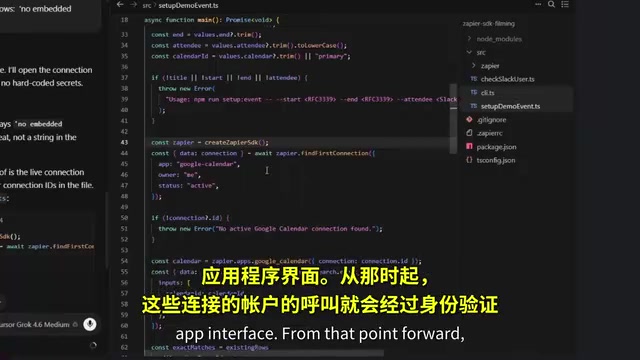
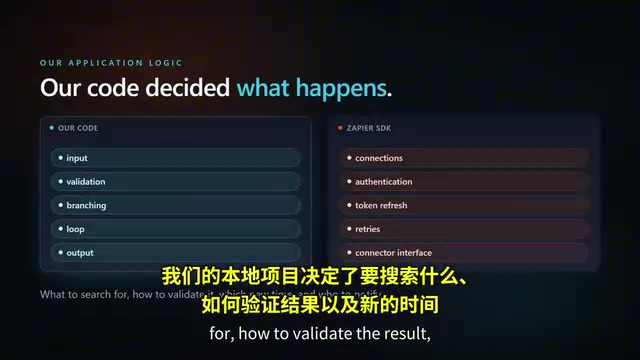
The division of labor worth noting here is: the local project decides what to search for, how to verify results, which new time to use, and who to notify; Zapier provides authentication, connections, and a consistent interface between the two apps. Developers don't need to build a separate redirect route, don't need to store Google or Slack refresh tokens, and don't need to maintain two custom API clients. The SDK also handles token refresh and call retries.
The creator pointed out that AI coding assistants can quickly generate a first version of the code, but reviewing the code, confirming the selected operations, handling empty results, and testing various edge behaviors still need to be done by humans. AI is helping write integration code — it won't replace code review, nor will it magically handle app authentication.
How Far Can This Pattern Scale?
Although the demo case is small, the same pattern can grow with the project. For example, pulling open issues from GitHub and sending a prioritized summary to Slack, reading new leads from a spreadsheet and creating records in a CRM, or inserting AI models between read and write steps to classify, summarize, or route data.
The core conclusion is: AI coding assistants can generate business logic, but reliable access to real user apps is a separate engineering problem. The Zapier SDK gives code a consistent way to authenticate across the app ecosystem, while letting developers keep their own workflows in their own projects.
One-line Summary
Using the Zapier TypeScript SDK with an AI coding assistant to implement a cross-app automation workflow between Google Calendar and Slack in a local TypeScript project.
Paragraph Summary
The article walks through a hands-on case from a Bilibili creator, showing that the real difficulty of cross-app automation isn't business logic, but connection-layer engineering like OAuth authentication, token refresh, and multi-API adaptation. The solution is to use Zapier's TypeScript SDK to hand off authentication and API plumbing to the SDK, while developers retain control over business logic in their own local TypeScript project. The flow includes: initializing the project and installing the SDK, logging in to connect Calendar and Slack, generating type definitions so the AI assistant calls operations accurately, having Cursor generate a four-stage function (initialize client, bind app interfaces, search and update the calendar event, find attendees and send Slack DMs), and finally verifying hands-on that the calendar time update and Slack notifications both succeeded. The article emphasizes that AI can accelerate code generation, but code review, edge-case handling, and testing still need to be done by humans.
Related articles

Uber Deploys ChatGPT Work Company-Wide: AI in the Workplace Enters the Scaled Implementation Phase
Uber deploys ChatGPT Work to 30,000+ employees, extending it from engineering to all roles. We analyze its expert-engineer pairing, end-to-end automation, and questions of AI control and power concentration—insights for scaling AI in the workplace.

Shift at Midnight Hands-On: When "ID Verification" Becomes Alien Hunting
Shift at Midnight blends ID verification with horror survival in a four-player co-op game. We break down its inspection mechanics and chaotic humor.

Zelensky Recounts the Outbreak of War: I Need Ammunition, Not a Ride
Zelensky recalls the first day of war in a YouTube interview: farewell to family, rejecting Biden's evacuation offer with "I need ammunition, not a ride," and how Bucha shaped his stance on compromise and peace talks.